
You are using an out of date browser. It may not display this or other websites correctly.
You should upgrade or use an alternative browser.
You should upgrade or use an alternative browser.
Make volume bar show when changing from keyboard?
- Thread starter hplp20
- Start date

What mouse and keyboard? That sort of thing is usually only available through the software that comes with the mouse or keyboard.
My Computer
- Computer type
- PC/Desktop
- Computer Manufacturer/Model Number
- Me
- OS
- Win 7 Ultimate x64
- CPU
- FX-8350 @ 4.6 GHz so far
- Motherboard
- Asus M5A97 EVO
- Memory
- ADATA XPG V1 Series Black 8GB DDR3 1600
- Graphics Card(s)
- Sapphire R9 270x Dual-X
- Sound Card
- Xonar DGX w/ Corsair Vengence 1300
- Monitor(s) Displays
- Acer S232HL Abid
- Screen Resolution
- 1920x1080
- Hard Drives
- 120 GB OCZ Vertex 3
500 GB Seagate 7200.12
- PSU
- Antec Earthwatts 650W Green
- Case
- Antec Three Hundred
- Cooling
- Cooler Master 212 EVO
- Keyboard
- Logitech G510
- Mouse
- Logitech G500s
- Internet Speed
- 35000/3000

Unless your keyboard or mouse has the software capability to do so, no.
Example of a keyboard with this capability is the Logitech Wave keyboard - Cordless Desktop® Wave (I have one). Some Microsoft Keyboards do this as well. Again, it comes down to the software that accompanies the KB/Mouse.
BTW it would be helpful to your post is you listed the item(s) in question.
Example of a keyboard with this capability is the Logitech Wave keyboard - Cordless Desktop® Wave (I have one). Some Microsoft Keyboards do this as well. Again, it comes down to the software that accompanies the KB/Mouse.
BTW it would be helpful to your post is you listed the item(s) in question.
My Computer
- Computer type
- PC/Desktop
- Computer Manufacturer/Model Number
- Custom built by me.
- OS
- Windows 10 Pro
- CPU
- Intel Core i7-4770K (3.5Ghz)
- Motherboard
- Gigabyte G1 Sniper 5 (F10 Bios)
- Memory
- 32 gig Corsair Dominator Platinum (4x8Gig)
- Graphics Card(s)
- Sapphire Tri-X R9 Fury
- Sound Card
- Soundblaster ZXR
- Monitor(s) Displays
- NEC PA242W 24" LCD Monitor
- Screen Resolution
- 1920 x 1200
- Hard Drives
- Primary - Samsung 850 Pro (512gig), Samsung 840 Pro (256gig), 2TB WD Caviar Black.
- PSU
- EVGA Supernova 1000 G2
- Case
- Cooler Master HAF X
- Cooling
- Corsair H100i with Corsair Air Series SP120 Quiet Fans
- Keyboard
- Logitech Wireless Wave
- Mouse
- Logitech Performance MX
- Internet Speed
- High Speed Cable
- Antivirus
- Norton Security
- Browser
- IE11
- Other Info
- Memory Timings - 1866MHz @ 9-9-9-27-1T @ 1.5 volts
Logitech G700 and Microsoft's basic keyboard. The keyboard has marked volume buttons as it is made to work with windows. It defeats the purpose of changing volume from the keyboard if I have to go to the tray and check the volume levels.
My Computer
- OS
- Windows 7
OK, so did your keyboard come with software for it? Did you install it? If installed, have you checked the settings?
My Computer
- Computer type
- PC/Desktop
- Computer Manufacturer/Model Number
- Custom built by me.
- OS
- Windows 10 Pro
- CPU
- Intel Core i7-4770K (3.5Ghz)
- Motherboard
- Gigabyte G1 Sniper 5 (F10 Bios)
- Memory
- 32 gig Corsair Dominator Platinum (4x8Gig)
- Graphics Card(s)
- Sapphire Tri-X R9 Fury
- Sound Card
- Soundblaster ZXR
- Monitor(s) Displays
- NEC PA242W 24" LCD Monitor
- Screen Resolution
- 1920 x 1200
- Hard Drives
- Primary - Samsung 850 Pro (512gig), Samsung 840 Pro (256gig), 2TB WD Caviar Black.
- PSU
- EVGA Supernova 1000 G2
- Case
- Cooler Master HAF X
- Cooling
- Corsair H100i with Corsair Air Series SP120 Quiet Fans
- Keyboard
- Logitech Wireless Wave
- Mouse
- Logitech Performance MX
- Internet Speed
- High Speed Cable
- Antivirus
- Norton Security
- Browser
- IE11
- Other Info
- Memory Timings - 1866MHz @ 9-9-9-27-1T @ 1.5 volts
No software for the keyboard. No option like that for the mouse. The volume control works just fine. I just don't know how much I've changed it. It would be convenient if the volume bar from the tray pops up from the tray when it is being adjusted from the keyboard/mouse. The way it does on VLC when you scroll. Guess its too much to ask since windows probably doesn't have it built in.
My Computer
- OS
- Windows 7
Guess its too much to ask since windows probably doesn't have it built in.
I'll say it again.... It's the software that comes with the keyboard that provides the feature you're looking for, not Windows.
I also gave you an example with Logitech's Wireles Wave keyboard which does have the option you're looking for through their Setpoint software. So yeah.... with the proper software, this feature is available under Windows... I have it.
My Computer
- Computer type
- PC/Desktop
- Computer Manufacturer/Model Number
- Custom built by me.
- OS
- Windows 10 Pro
- CPU
- Intel Core i7-4770K (3.5Ghz)
- Motherboard
- Gigabyte G1 Sniper 5 (F10 Bios)
- Memory
- 32 gig Corsair Dominator Platinum (4x8Gig)
- Graphics Card(s)
- Sapphire Tri-X R9 Fury
- Sound Card
- Soundblaster ZXR
- Monitor(s) Displays
- NEC PA242W 24" LCD Monitor
- Screen Resolution
- 1920 x 1200
- Hard Drives
- Primary - Samsung 850 Pro (512gig), Samsung 840 Pro (256gig), 2TB WD Caviar Black.
- PSU
- EVGA Supernova 1000 G2
- Case
- Cooler Master HAF X
- Cooling
- Corsair H100i with Corsair Air Series SP120 Quiet Fans
- Keyboard
- Logitech Wireless Wave
- Mouse
- Logitech Performance MX
- Internet Speed
- High Speed Cable
- Antivirus
- Norton Security
- Browser
- IE11
- Other Info
- Memory Timings - 1866MHz @ 9-9-9-27-1T @ 1.5 volts

I have setpoint for my mouse and there seems to be no such option. Just assigning volume up/down to buttons.
I have a Logitech Media keyboard, which has a volume control which does display an OSD for it, but it is not done via Setpoint, it is just built-in.
My Computer
- Computer Manufacturer/Model Number
- DIY
- OS
- W7x64 Pro, SuSe 12.1/** W7 x64 Pro, XP MCE
- CPU
- Phenom II 1090T w/Noctua NH-D14 /**4400+ X2 w/CM Hyper TX 3
- Motherboard
- ASRock 890FX Deluxe 4/**A8N-SLI
- Memory
- 2 x 2GB Patriot PGS34g1600LLKA/**4x1GB Corsair VS
- Graphics Card(s)
- EVGA GTX460 SC/**EVGA 8800GTS
- Sound Card
- Asus Xonar D2X/**Xonar D1
- Monitor(s) Displays
- Acer X233H, Dell E152FPc /**LG M237-WD
- Screen Resolution
- 1920x1080 & 1024x768/**1980x1080
- Hard Drives
- WDC 2TB, 1.5TB, 1TB, 500GB,Seagate 500GB , Maxtor 80GB /**500GB Seagate & WDC 1TB Black
- PSU
- CM RS600 w/ APC BX1000G/**Antec 500 TP w/ APC BX1000
- Case
- HAF922/**Antec 1040IIB
- Cooling
- 3x200mm, 1x140 and 1x120mm/**5x80mm fans
- Keyboard
- Logitech Media USB/**Saitek Eclipse
- Mouse
- Cordless Trackman Wheel/**Ditto
- Internet Speed
- 3.3Mbps
- Other Info
- SB 560 5.1 w/ Sennheiser RS140/**Creative T20 speakers, Dvico FusionHDTV7 Gold RT, Cisco E3000, HP 5510V AIO, Linksys E3000, Belkin F5U237 hub and **F5D8055 adapter
(** = 2nd rig)
I have setpoint for my mouse and there seems to be no such option.
I have a logitech mouse as well, and while your statement is true for the mouse with regards to the setpoint software, It ain't true for the keyboard.... Which you don't have.
And just so you know, the Setpoint software works on both keyboard and mouse....
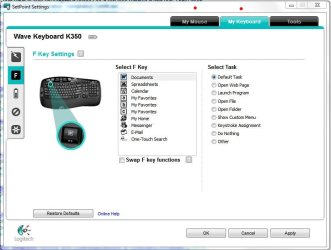
Anyways your question has been answered.... (a few times).
Good luck.
My Computer
- Computer type
- PC/Desktop
- Computer Manufacturer/Model Number
- Custom built by me.
- OS
- Windows 10 Pro
- CPU
- Intel Core i7-4770K (3.5Ghz)
- Motherboard
- Gigabyte G1 Sniper 5 (F10 Bios)
- Memory
- 32 gig Corsair Dominator Platinum (4x8Gig)
- Graphics Card(s)
- Sapphire Tri-X R9 Fury
- Sound Card
- Soundblaster ZXR
- Monitor(s) Displays
- NEC PA242W 24" LCD Monitor
- Screen Resolution
- 1920 x 1200
- Hard Drives
- Primary - Samsung 850 Pro (512gig), Samsung 840 Pro (256gig), 2TB WD Caviar Black.
- PSU
- EVGA Supernova 1000 G2
- Case
- Cooler Master HAF X
- Cooling
- Corsair H100i with Corsair Air Series SP120 Quiet Fans
- Keyboard
- Logitech Wireless Wave
- Mouse
- Logitech Performance MX
- Internet Speed
- High Speed Cable
- Antivirus
- Norton Security
- Browser
- IE11
- Other Info
- Memory Timings - 1866MHz @ 9-9-9-27-1T @ 1.5 volts
I have setpoint for my mouse and there seems to be no such option. Just assigning volume up/down to buttons.
I have a Logitech Media keyboard, which has a volume control which does display an OSD for it, but it is not done via Setpoint, it is just built-in.
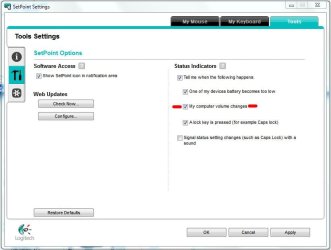
Toggling the "My computer volume changes" box will enable/disable the OSD for the volume.
My Computer
- Computer type
- PC/Desktop
- Computer Manufacturer/Model Number
- Custom built by me.
- OS
- Windows 10 Pro
- CPU
- Intel Core i7-4770K (3.5Ghz)
- Motherboard
- Gigabyte G1 Sniper 5 (F10 Bios)
- Memory
- 32 gig Corsair Dominator Platinum (4x8Gig)
- Graphics Card(s)
- Sapphire Tri-X R9 Fury
- Sound Card
- Soundblaster ZXR
- Monitor(s) Displays
- NEC PA242W 24" LCD Monitor
- Screen Resolution
- 1920 x 1200
- Hard Drives
- Primary - Samsung 850 Pro (512gig), Samsung 840 Pro (256gig), 2TB WD Caviar Black.
- PSU
- EVGA Supernova 1000 G2
- Case
- Cooler Master HAF X
- Cooling
- Corsair H100i with Corsair Air Series SP120 Quiet Fans
- Keyboard
- Logitech Wireless Wave
- Mouse
- Logitech Performance MX
- Internet Speed
- High Speed Cable
- Antivirus
- Norton Security
- Browser
- IE11
- Other Info
- Memory Timings - 1866MHz @ 9-9-9-27-1T @ 1.5 volts
Similar threads
- Replies
- 6
- Views
- 5K
- Replies
- 5
- Views
- 2K

- Replies
- 2
- Views
- 2K
- Replies
- 3
- Views
- 1K