Make Windows 7 bootable after motherboard swap

Make Windows 7 bootable after motherboard swap, or bootable after swapping hard drive to new machine. Software described Paragon P2P Adjust OS.


This procedure describes how to do it. Procedure can be used in case of:
  1. Download "Paragon Adaptive Restore 2010" from Paragon Adaptive Restore 2010 on my DROPBOX.
  2. Burn the ISO to CD/DVD using Windows Disc Image Burner or ImgBurn.
  3. Set CD/DVD as first boot device in BIOS.
Do the following:
  1. Boot the computer from Paragon Windows PE 3.0 based CD/DVD.
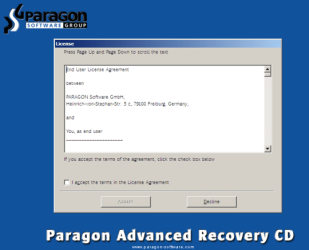
  2. Accept the end user license agreement, otherwise you are not able to use the tool.
    1.png
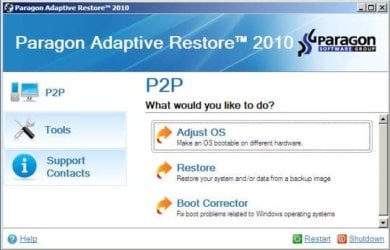
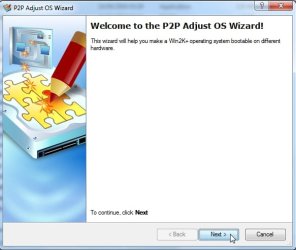
  3. Launch P2P Adjust OS.
    2.jpg
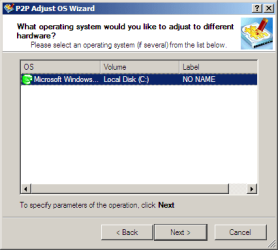
  4. Select the operating system you need to adjust to your new hardware.
    3.png
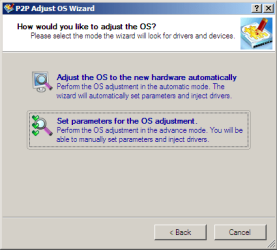
  5. Choose whether you want to add third-party drivers or not, and the way to do it.
    4.png
  6. If you chose "Adjust the OS to the new hardware automatically", the P2P Adjust OS Wizard will automatically accomplish all the necessary actions.
    5.png
  7. The only thing that might need your interaction is to specify additional driver repository.
    6.png
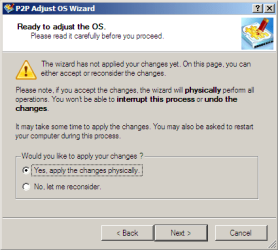
  8. At last, choose "Yes, apply the changes physically" and then restart your computer after operations are done. Do remember, you cannot interrupt the process or undo the changes.
    7.png
Compelete pdf manual: Paragon Adaptive Restore 2010 on my DROPBOX.

Just before the OS adjustment, you can additionally:
extra.JPG


   Warning
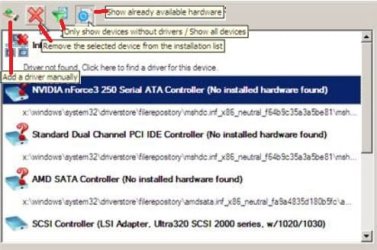
Sometimes the internal hard drive is not recognized in Paragon P2P Adjust OS due to missing SATA or RAID driver. In that case add specific drivers to Windows PE based Paragon Recovery Environment.
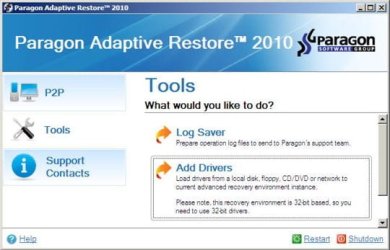
  1. Click to open Add Drivers dialog.
    a.jpg
  2. Browse for an .INF file of the required driver, then click the Open button to initiate the process.
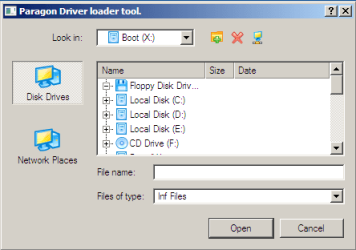
    b.png
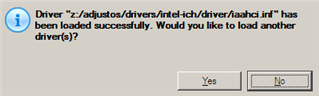
  3. Click Yes to confirm the operation.
    c.png
   Information
You can only add third-party drivers in INF file. If they are zipped, you need to unpack them before processing the steps. The Windows PE environment is 32bit-based, so you need to use 32-bit drivers for injection.
After procedure has finished succesfully and system boots fine, first check if Enable hardware auto-updating via Windows Update (Set to Automatic) is on so it will query Windows Update. After that:

  1. Uninstall Device and Device Driver for devices no longer attached to system. Uninstall associated software as well.
  2. Install all of your device drivers, then Windows Updates.
  3. Refresh your Windows Experience Index (WEI) score.
  4. When done, all you will need to do is to activate Windows 7.
After rebooting from disk, drivers should start swapping out in a cascade you can monitor by clicking on the system tray animation. Wait until all are finished before doing the requested restart. After reboot, go immediately to Check for Updates and install all Important and Optional Updates which may include critical drivers and patches for the OS to run on that hardware.

You must reactivate at the Change Product Key link on System page. If it's not present you can insert Product Key and then Activate using SLMgr Commands

On some systems you see "setup is preparing your computer for first use" on every reboot. Read this to fix that issue: Fix "Setup is Preparing Your Computer for First Use" on Every Reboot


Last edited:
Desktop computers using USB kb/mouse always failed. Hence I moved to laptop which has built-in kb/touchpad.

Installed HP customized USB3 drivers. It fixed the problem. USB ports and USB devices are working.
Solved: HP 15-ay041wm usb controller driver - HP Support Community - 5881549

google search many these issues, mouse keyboard NOT working

Paragon products comparison | Wilders Security Forums
- - - Updated - - -

As far as I know, paragon p2p doesn't do anything to usb.
That is why it is possible your usb3 drivers from hp8300 might be causing some problem on the switch to the G1.
 
Last edited:

My Computers My Computers

  • At a glance

    Windows 7 Pro 64-bitI7-970032 GB
    Computer type
    PC/Desktop
    Computer Manufacturer/Model Number
    HP Elite 800 G5
    OS
    Windows 7 Pro 64-bit
    CPU
    I7-9700
    Memory
    32 GB
  • At a glance

    Windows 7 Pro 64-bit
    Computer type
    Laptop
    System Manufacturer/Model Number
    ASUS UX305C
    OS
    Windows 7 Pro 64-bit
you can try doing it that way.
 

My Computers My Computers

  • At a glance

    7 X64i5 84002x8gb 3200mhz
    Computer type
    PC/Desktop
    OS
    7 X64
    CPU
    i5 8400
    Motherboard
    gigabyte b365m ds3h
    Memory
    2x8gb 3200mhz
    Hard Drives
    various
    PSU
    pure power 11 400w cm
    Case
    Coolermaster
    Cooling
    cryorig m9i
  • At a glance

    7x64g54008gb ddr4 2400
    Computer type
    PC/Desktop
    OS
    7x64
    CPU
    g5400
    Motherboard
    ga b365m ds3h
    Memory
    8gb ddr4 2400
    PSU
    xfx pro 450w
Windows 7 is last user of this tool/Paragon Adaptive Restore 2010.
Windows 10/11 no need of it any more.
 
Last edited:

My Computers My Computers

  • At a glance

    Windows 7 Pro 64-bitI7-970032 GB
    Computer type
    PC/Desktop
    Computer Manufacturer/Model Number
    HP Elite 800 G5
    OS
    Windows 7 Pro 64-bit
    CPU
    I7-9700
    Memory
    32 GB
  • At a glance

    Windows 7 Pro 64-bit
    Computer type
    Laptop
    System Manufacturer/Model Number
    ASUS UX305C
    OS
    Windows 7 Pro 64-bit
I dont know, I never had that isuue.
 

My Computers My Computers

  • At a glance

    7 X64i5 84002x8gb 3200mhz
    Computer type
    PC/Desktop
    OS
    7 X64
    CPU
    i5 8400
    Motherboard
    gigabyte b365m ds3h
    Memory
    2x8gb 3200mhz
    Hard Drives
    various
    PSU
    pure power 11 400w cm
    Case
    Coolermaster
    Cooling
    cryorig m9i
  • At a glance

    7x64g54008gb ddr4 2400
    Computer type
    PC/Desktop
    OS
    7x64
    CPU
    g5400
    Motherboard
    ga b365m ds3h
    Memory
    8gb ddr4 2400
    PSU
    xfx pro 450w
My Dell Optiplex 7010 MT dual-boots Win 7 Pro 64-bit and Win 10 Pro 64-bit. The Win 10 starts up but the Win 7 doesn't. The 7 goes as far as the four glowing MS flags, and stays there.

Do you think this app can help me fix my Win 7 and retain all the apps and files in the 7, but without damaging the Win 10?
-- Can I run the app without being able to start the 7?
-- If I start the 10 and run the app in the 10, will it see the 7 partition and fix only the 7 partition?

Thanks.
 

My Computer My Computer

At a glance

Dual boot - Win 10 Pro 64-bit (good) and Win ...Intel Core i5 3470 @ 3.2GHz16GB RAM DDR3 (Four x 4GB)Intel HD Graphics (on the CPU)
Computer type
PC/Desktop
Computer Manufacturer/Model Number
Dell Optiplex 7010 MT
OS
Dual boot - Win 10 Pro 64-bit (good) and Win 7 Pro 64-bit (won't boot on the NVMe)
CPU
Intel Core i5 3470 @ 3.2GHz
Motherboard
Dell 0GY6Y8 - what would the Intel number be? - Q77 chipset
Memory
16GB RAM DDR3 (Four x 4GB)
Graphics Card(s)
Intel HD Graphics (on the CPU)
Sound Card
Realtek High Definition Audio - and Intel Display Audio
Monitor(s) Displays
Dell E176FP - nothing fancy
Screen Resolution
1280 x 1024 @ 60 Hz
Hard Drives
Now a Samsung 970 EVO Plus SSD NVMe, which works for the Win 10 only

Used to be two 500GB WDC WD5000AAKX (SATA @ 6GB/sec)

- External WD My Book 1110 USB device
PSU
What means PSU? I'm at sea level
Cooling
Ice cubes
Keyboard
Noisy
Mouse
Micky
Internet Speed
Verizon FIOS 500 Mbps (was 1Gbps but I can't type that fast)
Antivirus
Win 10 Windows Defender - Win 7 Avast Free
Browser
Firefox only with lots of security drives my wife crazy
Other Info
Also I still have an old but important XP SP3 machine that can run - Optiplex 755 Desktop w 4GB RAM and Momentus XT hybrid HD-SSD 500 GB hard drive. Used the registry hack to get more updates through "XP Embedded" or "POS" so now the machine rings like a cash register and the CD drawer opens to give change.
you would need to extract it from the iso because it is an old pre sp1 winpe that doesnt support nvme.

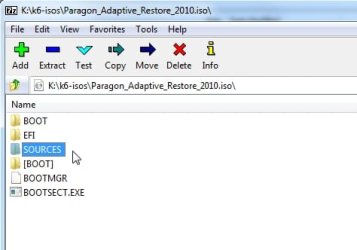
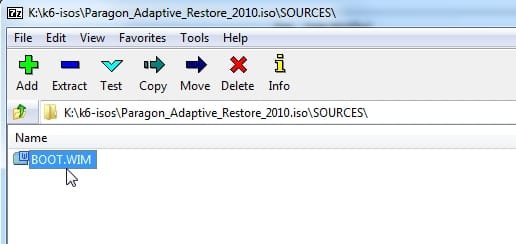
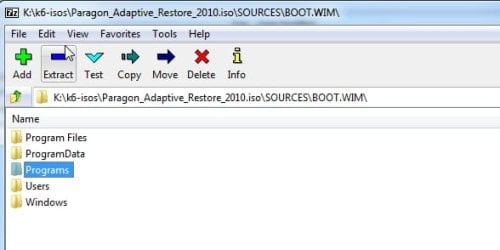
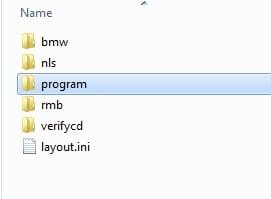
so extract the Programs folder onto your win10 partition from the paragon 2010 iso \sources\boot.wim using 7-zip

click sources

paragonp2p-extract0.jpg


dble click on boot.wim to open it in 7-zip
paragonp2p-extract01.jpg

copy out the Programs folder onto your win10 partition.

paragonp2p-extract1.jpg


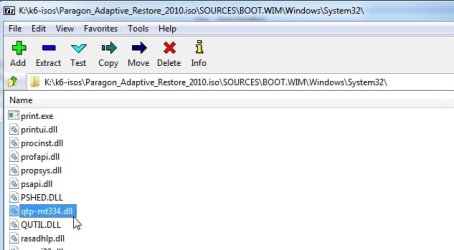
then copy this file from \sources\boot.wim windows\system32
paragonp2p-extract2.jpg


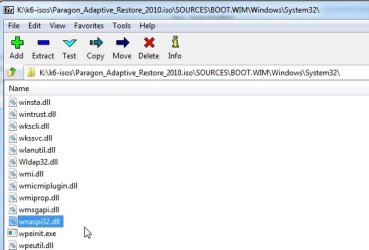
and this file
paragonp2p-extract3.jpg


into the paragon Programs\program folder
paragonp2p-extract4.jpg

put it into an updated win7 bootable wim file that supports 32 bit programs and which includes sp1 and the nvme updates

like this one 17514x64v30.iso


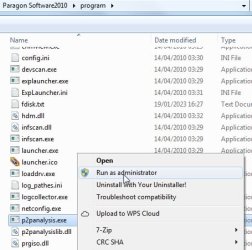
then run p2panalysis.exe

paragonp2p-1.jpg


paragonp2p-2.jpg


paragonp2p-3.jpg

select the win7 installation you want to adjust and click next

paragonp2p-4.jpg
 
Last edited:

My Computers My Computers

  • At a glance

    7 X64i5 84002x8gb 3200mhz
    Computer type
    PC/Desktop
    OS
    7 X64
    CPU
    i5 8400
    Motherboard
    gigabyte b365m ds3h
    Memory
    2x8gb 3200mhz
    Hard Drives
    various
    PSU
    pure power 11 400w cm
    Case
    Coolermaster
    Cooling
    cryorig m9i
  • At a glance

    7x64g54008gb ddr4 2400
    Computer type
    PC/Desktop
    OS
    7x64
    CPU
    g5400
    Motherboard
    ga b365m ds3h
    Memory
    8gb ddr4 2400
    PSU
    xfx pro 450w
SIW2 - very nicely detailed - thanks!

But, right now, it's my dual-booting original HDD that is not starting in Win 7, so I might not insert those NVMe driver files yet. I'd like to fix this original Win 7 before I try again to clone everything to my NVMe.

Just for my peace of mind,
  1. if I run this app in its WinPE environment (or in my Win 10?), will it be smart enough to tell the difference between my Win 7 and 10 partitions and fix only the 7?
  2. As it's a very old app, will it "fix" my Win 7 back to such an old version of 7 that I won't be able to update it to today?

Thanks!
 
Last edited:

My Computer My Computer

At a glance

Dual boot - Win 10 Pro 64-bit (good) and Win ...Intel Core i5 3470 @ 3.2GHz16GB RAM DDR3 (Four x 4GB)Intel HD Graphics (on the CPU)
Computer type
PC/Desktop
Computer Manufacturer/Model Number
Dell Optiplex 7010 MT
OS
Dual boot - Win 10 Pro 64-bit (good) and Win 7 Pro 64-bit (won't boot on the NVMe)
CPU
Intel Core i5 3470 @ 3.2GHz
Motherboard
Dell 0GY6Y8 - what would the Intel number be? - Q77 chipset
Memory
16GB RAM DDR3 (Four x 4GB)
Graphics Card(s)
Intel HD Graphics (on the CPU)
Sound Card
Realtek High Definition Audio - and Intel Display Audio
Monitor(s) Displays
Dell E176FP - nothing fancy
Screen Resolution
1280 x 1024 @ 60 Hz
Hard Drives
Now a Samsung 970 EVO Plus SSD NVMe, which works for the Win 10 only

Used to be two 500GB WDC WD5000AAKX (SATA @ 6GB/sec)

- External WD My Book 1110 USB device
PSU
What means PSU? I'm at sea level
Cooling
Ice cubes
Keyboard
Noisy
Mouse
Micky
Internet Speed
Verizon FIOS 500 Mbps (was 1Gbps but I can't type that fast)
Antivirus
Win 10 Windows Defender - Win 7 Avast Free
Browser
Firefox only with lots of security drives my wife crazy
Other Info
Also I still have an old but important XP SP3 machine that can run - Optiplex 755 Desktop w 4GB RAM and Momentus XT hybrid HD-SSD 500 GB hard drive. Used the registry hack to get more updates through "XP Embedded" or "POS" so now the machine rings like a cash register and the CD drawer opens to give change.
it needs to be run in win7 or win7 pe.

will it be smart enough to tell the difference between my Win 7 and 10 partitions and fix only the 7?

yes, you select from the os it has found.


As it's a very old app, will it "fix" my Win 7 back to such an old version of 7 that I won't be able to update it to today?

no it wont affect that at all. It just makes some changes in the system hive so that windows goes into setting up devices again.
 

My Computers My Computers

  • At a glance

    7 X64i5 84002x8gb 3200mhz
    Computer type
    PC/Desktop
    OS
    7 X64
    CPU
    i5 8400
    Motherboard
    gigabyte b365m ds3h
    Memory
    2x8gb 3200mhz
    Hard Drives
    various
    PSU
    pure power 11 400w cm
    Case
    Coolermaster
    Cooling
    cryorig m9i
  • At a glance

    7x64g54008gb ddr4 2400
    Computer type
    PC/Desktop
    OS
    7x64
    CPU
    g5400
    Motherboard
    ga b365m ds3h
    Memory
    8gb ddr4 2400
    PSU
    xfx pro 450w
It claims to work for Win2k up to win7
 

My Computers My Computers

  • At a glance

    7 X64i5 84002x8gb 3200mhz
    Computer type
    PC/Desktop
    OS
    7 X64
    CPU
    i5 8400
    Motherboard
    gigabyte b365m ds3h
    Memory
    2x8gb 3200mhz
    Hard Drives
    various
    PSU
    pure power 11 400w cm
    Case
    Coolermaster
    Cooling
    cryorig m9i
  • At a glance

    7x64g54008gb ddr4 2400
    Computer type
    PC/Desktop
    OS
    7x64
    CPU
    g5400
    Motherboard
    ga b365m ds3h
    Memory
    8gb ddr4 2400
    PSU
    xfx pro 450w
Back
Top