Make windows slide away when closed

Crimson Knight

New member
Local time
7:07 PM
Messages
1
Anyone know if there is a tweak / app / something available that will change the way windows apps closes in Win 7?

My desire is to have the windows slide off screen rapidly when closed instead of fading out like they do by default.

Not sure if this exists or not. I have tried searching for a previous solution but came up empty handed.

Thanks for reading!

-CK
 

My Computer

OS
Windows 7 Pro
Anyone know if there is a tweak / app / something available that will change the way windows apps closes in Win 7?

My desire is to have the windows slide off screen rapidly when closed instead of fading out like they do by default.

Not sure if this exists or not. I have tried searching for a previous solution but came up empty handed.

Thanks for reading!

-CK
Welcome to the forums, Crimson Knight !!:D

But I am also not aware of such an app :(
 

My Computer

Computer type
PC/Desktop
Computer Manufacturer/Model Number
Self Assembled
OS
Microsoft Windows 10 Pro Insider Preview 64-bit
CPU
Intel(R) Core(TM) i3-4130 CPU @ 3.40GHz
Motherboard
Gigabyte Technology Co., Ltd. B85M-D3H
Memory
Corsair Vengence 4GB x2 (8.00GB Dual-Channel DDR3 @ 798MHz)
Graphics Card(s)
2047MB GeForce GTS 450 (ZOTAC International)
Sound Card
Onboard (Realtek High Definition Audio)
Monitor(s) Displays
LG Flatron E2040T
Screen Resolution
1600x900
Hard Drives
Western Digital 1 TB
Seagate 500 GB
PSU
Corsair VS550
Case
Cooler Master K380
Cooling
Cooler Master Seidon 120V Plus
Keyboard
Logitech MK260r
Mouse
Logitech MK260r
Internet Speed
PMPL Broadband
Antivirus
Windows Defender + MBAM
Browser
Firefox
Other Info
Dell Studio 15" Laptop
This isn't exactly what you asked for, but RK Launcher is a dock that can minimize programs using the OS X genie effect. I've not seen anything else that enhances or changes the windows closing/minimization animation.

It would be nice to have different animation choices for window actions similar to those of Compiz for Linux.
 
Last edited:

My Computer

OS
home: Windows 7 x64 • work: OS X 10.12
CPU
home: 3.0 GHz x4 • work: 2 GHz x2
Memory
home: 8 GB • work: 16 GB
This isn't exactly what you asked for, but RK Launcher is a dock that can minimize programs using the OS X genie effect. I've not seen anything else that enhances or changes the windows closing/minimization animation.

It would be nice to have different animation choices for window actions similar to those of Compiz for Linux.
Compiz is one app that I miss in windows . Another one is cover flow , obviously .
 

My Computer

Computer type
PC/Desktop
Computer Manufacturer/Model Number
Self Assembled
OS
Microsoft Windows 10 Pro Insider Preview 64-bit
CPU
Intel(R) Core(TM) i3-4130 CPU @ 3.40GHz
Motherboard
Gigabyte Technology Co., Ltd. B85M-D3H
Memory
Corsair Vengence 4GB x2 (8.00GB Dual-Channel DDR3 @ 798MHz)
Graphics Card(s)
2047MB GeForce GTS 450 (ZOTAC International)
Sound Card
Onboard (Realtek High Definition Audio)
Monitor(s) Displays
LG Flatron E2040T
Screen Resolution
1600x900
Hard Drives
Western Digital 1 TB
Seagate 500 GB
PSU
Corsair VS550
Case
Cooler Master K380
Cooling
Cooler Master Seidon 120V Plus
Keyboard
Logitech MK260r
Mouse
Logitech MK260r
Internet Speed
PMPL Broadband
Antivirus
Windows Defender + MBAM
Browser
Firefox
Other Info
Dell Studio 15" Laptop
Anyone know if there is a tweak / app / something available that will change the way windows apps closes in Win 7?

My desire is to have the windows slide off screen rapidly when closed instead of fading out like they do by default.

Not sure if this exists or not. I have tried searching for a previous solution but came up empty handed.

Thanks for reading!

-CK

You can disable the animation and just have them disappear instantly, of course!
 

My Computer

OS
Windows 7
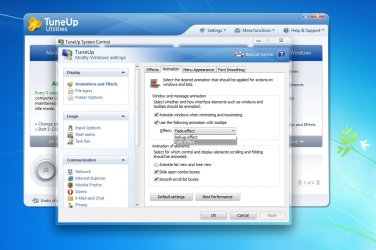
Got one way out . Tuneup utilities :D
 

Attachments

  • Untitled.jpg
    Untitled.jpg
    86.6 KB · Views: 134

My Computer

Computer type
PC/Desktop
Computer Manufacturer/Model Number
Self Assembled
OS
Microsoft Windows 10 Pro Insider Preview 64-bit
CPU
Intel(R) Core(TM) i3-4130 CPU @ 3.40GHz
Motherboard
Gigabyte Technology Co., Ltd. B85M-D3H
Memory
Corsair Vengence 4GB x2 (8.00GB Dual-Channel DDR3 @ 798MHz)
Graphics Card(s)
2047MB GeForce GTS 450 (ZOTAC International)
Sound Card
Onboard (Realtek High Definition Audio)
Monitor(s) Displays
LG Flatron E2040T
Screen Resolution
1600x900
Hard Drives
Western Digital 1 TB
Seagate 500 GB
PSU
Corsair VS550
Case
Cooler Master K380
Cooling
Cooler Master Seidon 120V Plus
Keyboard
Logitech MK260r
Mouse
Logitech MK260r
Internet Speed
PMPL Broadband
Antivirus
Windows Defender + MBAM
Browser
Firefox
Other Info
Dell Studio 15" Laptop
Stardock has an app, WindowsFX which allows you to choose all sorts of diff types of animations (slide, close fm center, fade, zig-zag) for diff functions- but alas, while it worked very well in WinXP, their online installer interface named Impulse told me that it does not work on my version of Windows...

Could be b/c I'm using a x64 bit OS, but people should contact Stardock.com to give input on behalf of 64bit support...

elisedai
 

My Computer

Computer Manufacturer/Model Number
Gateway GT5040 Home Media Center
OS
Win 7 x64 Home Premium
CPU
Pentium D 820 dual core 2.8 Ghz
Memory
3Gb
Stardock has an app, WindowsFX which allows you to choose all sorts of diff types of animations (slide, close fm center, fade, zig-zag) for diff functions- but alas, while it worked very well in WinXP, their online installer interface named Impulse told me that it does not work on my version of Windows...

Could be b/c I'm using a x64 bit OS, but people should contact Stardock.com to give input on behalf of 64bit support...

elisedai
Thanx Man I been trying to remember the name of the app for ever (2 days lol). It sucks to hear it wont run on x64. I'm running Win7 Home pre. If anyone one finds something that works
 
Last edited:

My Computer

Computer Manufacturer/Model Number
Toshiba Satellite L455
OS
Windows 7 Home Premium 64bit
CPU
Celeron(R) Dual-Core CPU T3000 @1.80GHz 1.79 GHz
Memory
4.00 GB (3.8 GB usable)
Back
Top