Make windows transparent on selection

homey457

New member
Local time
9:35 AM
Messages
2
I recently installed Windows 7 Enterprise x64 on my computer and it has a feature I would like to use on my other installs. I can't seem to find the setting for this and was hoping someone could assist.
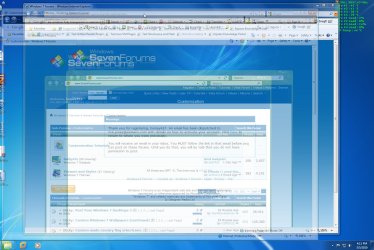
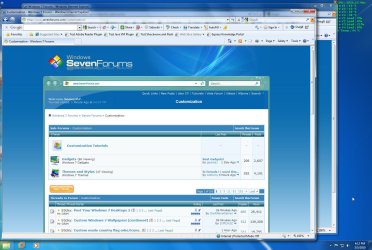
When I select a window it becomes transparent so I can see everything behind it. I've attached 2 images showing when I select the window and the regular view.

Thanks
 

Attachments

  • transparent1.jpg
    transparent1.jpg
    208.1 KB · Views: 154
  • transparent2.jpg
    transparent2.jpg
    187 KB · Views: 75

My Computer

Computer Manufacturer/Model Number
HP Z400
OS
windows 7 enterprise
CPU
Xeon 3540 2.93gHz
Motherboard
HP 0AE4h
Memory
8 Gb
Graphics Card(s)
Nvidia Quadro FX 1800
Sound Card
none
Monitor(s) Displays
HP LP2275w
Hard Drives
2- 250 Gb, 10k
Case
Tower
Cooling
Air
Try my program and see if it can work for you. :p

http://www.sevenforums.com/projects/63796-transparency-project.html

It has a feature in it to make a window transparent when it's active via a hotkey, if that would help you. I also believe, in time, that I could make a script that makes the active window transparent automatically, but I never saw a use for it, as it seems awkward to make every window transparent... :shock:

Oh yea, and welcome.
 

My Computer

Computer type
PC/Desktop
Computer Manufacturer/Model Number
Custom built
OS
Windows 8 Pro 64-bit
CPU
Intel Core i7 950 @4.4GHz
Motherboard
EVGA 131-GT-E767
Memory
12GB DDR3 1333MHz @1400 (9-9-9-24)
Graphics Card(s)
2x AMD Radeon HD 6770
Sound Card
Sound Blaster Audigy
Monitor(s) Displays
Acer S231HL + Acer E19T5W
Screen Resolution
1920x1080 + 1440x900
Hard Drives
128GB Samsung 840 Pro
1TB Seagate Barracuda 7200RPM 64mb
500GB Seagate Barracuda 7200RPM 16mb
PSU
Corsair GS800
Case
Custom-made
Cooling
CM Hyper212+, lots of fans
Keyboard
NMB RT8255C+
Mouse
Func MS-3
Internet Speed
30/1.5
Antivirus
Microsoft Security Essentials/Spybot SD/Malwarebytes
Browser
Google Chrome
Other Info
Onkyo TX-27 receiver & two Realistic Optimus T100s.
Thanks for the response and I will try this and see if I like using it. I thought there must be a windows setting or registry hack or something that enables this feature since I simply installed it ootb and got this behavior.

 

My Computer

Computer Manufacturer/Model Number
HP Z400
OS
windows 7 enterprise
CPU
Xeon 3540 2.93gHz
Motherboard
HP 0AE4h
Memory
8 Gb
Graphics Card(s)
Nvidia Quadro FX 1800
Sound Card
none
Monitor(s) Displays
HP LP2275w
Hard Drives
2- 250 Gb, 10k
Case
Tower
Cooling
Air
There might be, but I'm no registry expert.. If anybody knows, they'll be around these forums somewhere.
 

My Computer

Computer type
PC/Desktop
Computer Manufacturer/Model Number
Custom built
OS
Windows 8 Pro 64-bit
CPU
Intel Core i7 950 @4.4GHz
Motherboard
EVGA 131-GT-E767
Memory
12GB DDR3 1333MHz @1400 (9-9-9-24)
Graphics Card(s)
2x AMD Radeon HD 6770
Sound Card
Sound Blaster Audigy
Monitor(s) Displays
Acer S231HL + Acer E19T5W
Screen Resolution
1920x1080 + 1440x900
Hard Drives
128GB Samsung 840 Pro
1TB Seagate Barracuda 7200RPM 64mb
500GB Seagate Barracuda 7200RPM 16mb
PSU
Corsair GS800
Case
Custom-made
Cooling
CM Hyper212+, lots of fans
Keyboard
NMB RT8255C+
Mouse
Func MS-3
Internet Speed
30/1.5
Antivirus
Microsoft Security Essentials/Spybot SD/Malwarebytes
Browser
Google Chrome
Other Info
Onkyo TX-27 receiver & two Realistic Optimus T100s.
Back
Top