Solved Make Winpower start with Windows boot

macnab

New member
Member
VIP
Local time
1:00 PM
Messages
158
Location
Roodepoort
Re-installed Windows.

I can install, uninstall and reinstall Winpower as many times as I want, but I cannot get it to auto-start with Windows.

Can remember from Tools -> Startup in CCleaner that it was something like ....UPSMS.exe /agent start or something along those lines. I think trayicon was mentioned as well.
 

My Computer

Computer type
PC/Desktop
Computer Manufacturer/Model Number
Built-up
OS
Windows 7 Professional SP1 64-bit
CPU
Intel i3-3220 3.3GHz
Motherboard
Gigabyte
Memory
4GB
Graphics Card(s)
NVIDIA GeForce GTX650 1GB
Sound Card
On-board Realtek
Monitor(s) Displays
LGL1719S
Screen Resolution
1280 x 1024
Hard Drives
Samsung HD321HJ, Samsung HD103SI, Seagate ST2000DL, Seagate ST3100524AS
PSU
450W
Case
AOpen
Cooling
Case fan, CPU fan, PSU fanf.
Keyboard
Microsoft
Mouse
AOpen
Internet Speed
1Mb/s
Antivirus
MSSE
Browser
Firefox
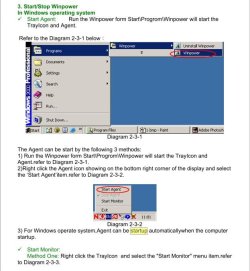
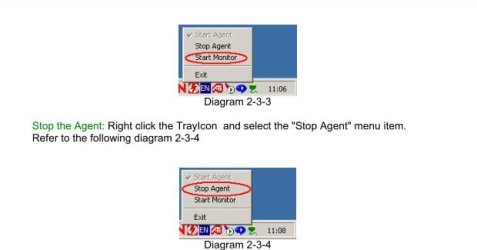
Do you have the tray icon if you start it manually? If so, right click the tray icon and choose Start Monitor. See if that helps. From the user manual (assuming we are talking about WinPower UPS monitor?)

Clipboard01.jpg

Clipboard02.jpg

A Guy
 

My Computer

Computer type
PC/Desktop
OS
Windows 10 Home x64
CPU
INTEL Core i5-750 Quad-Core 3.37GHz
Motherboard
ASUS P7P55D
Memory
HyperX Fury Black Series 8GB (2 x 4GB) 1866Mhz
Graphics Card(s)
EVGA GeForce GTX 750 Superclocked 1GB 128-Bit GDDR5
Monitor(s) Displays
LG 32MA68HY 32" IPS
Screen Resolution
1920 x 1080
Hard Drives
Samsung 840 Evo 120GB, SEAGATE 500GB Barracuda® 7200.12, SATA 3 Gb/s, 7200 RPM, 16MB cache
PSU
ANTEC TruePower New TP-550, 80 PLUS, 550W
Case
ANTEC Three Hundred Illusion
Cooling
COOLER MASTER Hyper 212 Plus, 4 x 120mm 1 x 140mm Noctua's
Internet Speed
85 + Mbps
Antivirus
Avast
Browser
Vivaldi
Currently, when I boot Windows, I run Winpower MANUALLY by clicking on it in the Start Menu. Then, of course, I have the tray icon. It is running, etc.

That is not the problem. The problem is MAKE IT START WHEN I BOOT WINDOWS. The entry UPSMS.exe is in the RUN section in the registry, BUT NOT THE COMMAND LINE ARGUMENTS NEEDED TO MAKE IT RUN. That is the problem, It needs something alonge the lines of
UPSMS.exe /startagent
UPSMS.exe -startagnet
UPSMS.exe /agentstart
UPSMS.exe -agent start trayicon

Something like that. I need the command-line arguments because whenever I install Winpower it doesn't get round to adding them to the entry in the registry.

Someone who uses Winpower needs to look in the Tools -> Startup section od CCleaner and see what the arguments are.

There is no forum for Winpower.
 

My Computer

Computer type
PC/Desktop
Computer Manufacturer/Model Number
Built-up
OS
Windows 7 Professional SP1 64-bit
CPU
Intel i3-3220 3.3GHz
Motherboard
Gigabyte
Memory
4GB
Graphics Card(s)
NVIDIA GeForce GTX650 1GB
Sound Card
On-board Realtek
Monitor(s) Displays
LGL1719S
Screen Resolution
1280 x 1024
Hard Drives
Samsung HD321HJ, Samsung HD103SI, Seagate ST2000DL, Seagate ST3100524AS
PSU
450W
Case
AOpen
Cooling
Case fan, CPU fan, PSU fanf.
Keyboard
Microsoft
Mouse
AOpen
Internet Speed
1Mb/s
Antivirus
MSSE
Browser
Firefox
Did you try the setting? It is to start WinPower with windows according to the manual. A Guy
 

My Computer

Computer type
PC/Desktop
OS
Windows 10 Home x64
CPU
INTEL Core i5-750 Quad-Core 3.37GHz
Motherboard
ASUS P7P55D
Memory
HyperX Fury Black Series 8GB (2 x 4GB) 1866Mhz
Graphics Card(s)
EVGA GeForce GTX 750 Superclocked 1GB 128-Bit GDDR5
Monitor(s) Displays
LG 32MA68HY 32" IPS
Screen Resolution
1920 x 1080
Hard Drives
Samsung 840 Evo 120GB, SEAGATE 500GB Barracuda® 7200.12, SATA 3 Gb/s, 7200 RPM, 16MB cache
PSU
ANTEC TruePower New TP-550, 80 PLUS, 550W
Case
ANTEC Three Hundred Illusion
Cooling
COOLER MASTER Hyper 212 Plus, 4 x 120mm 1 x 140mm Noctua's
Internet Speed
85 + Mbps
Antivirus
Avast
Browser
Vivaldi
No setting.:( Manual says in Windows 7 it will auto-start.
 

My Computer

Computer type
PC/Desktop
Computer Manufacturer/Model Number
Built-up
OS
Windows 7 Professional SP1 64-bit
CPU
Intel i3-3220 3.3GHz
Motherboard
Gigabyte
Memory
4GB
Graphics Card(s)
NVIDIA GeForce GTX650 1GB
Sound Card
On-board Realtek
Monitor(s) Displays
LGL1719S
Screen Resolution
1280 x 1024
Hard Drives
Samsung HD321HJ, Samsung HD103SI, Seagate ST2000DL, Seagate ST3100524AS
PSU
450W
Case
AOpen
Cooling
Case fan, CPU fan, PSU fanf.
Keyboard
Microsoft
Mouse
AOpen
Internet Speed
1Mb/s
Antivirus
MSSE
Browser
Firefox
OK, guess we are miscommunicating. I am posting from the manual what it says to do to have it start with windows. Guess we'll have to wait for someone with the program to reply. A Guy
 

My Computer

Computer type
PC/Desktop
OS
Windows 10 Home x64
CPU
INTEL Core i5-750 Quad-Core 3.37GHz
Motherboard
ASUS P7P55D
Memory
HyperX Fury Black Series 8GB (2 x 4GB) 1866Mhz
Graphics Card(s)
EVGA GeForce GTX 750 Superclocked 1GB 128-Bit GDDR5
Monitor(s) Displays
LG 32MA68HY 32" IPS
Screen Resolution
1920 x 1080
Hard Drives
Samsung 840 Evo 120GB, SEAGATE 500GB Barracuda® 7200.12, SATA 3 Gb/s, 7200 RPM, 16MB cache
PSU
ANTEC TruePower New TP-550, 80 PLUS, 550W
Case
ANTEC Three Hundred Illusion
Cooling
COOLER MASTER Hyper 212 Plus, 4 x 120mm 1 x 140mm Noctua's
Internet Speed
85 + Mbps
Antivirus
Avast
Browser
Vivaldi
I have been trying the latest version. Uninstalled it an installed the old version that I was using. It is the same now, doesn't put in the command-line parameters!!

Pity I can't inspect the registry on the old HDD.:D
 

My Computer

Computer type
PC/Desktop
Computer Manufacturer/Model Number
Built-up
OS
Windows 7 Professional SP1 64-bit
CPU
Intel i3-3220 3.3GHz
Motherboard
Gigabyte
Memory
4GB
Graphics Card(s)
NVIDIA GeForce GTX650 1GB
Sound Card
On-board Realtek
Monitor(s) Displays
LGL1719S
Screen Resolution
1280 x 1024
Hard Drives
Samsung HD321HJ, Samsung HD103SI, Seagate ST2000DL, Seagate ST3100524AS
PSU
450W
Case
AOpen
Cooling
Case fan, CPU fan, PSU fanf.
Keyboard
Microsoft
Mouse
AOpen
Internet Speed
1Mb/s
Antivirus
MSSE
Browser
Firefox
Switched to 64bit and now it works. Without command-line parameters.
 

My Computer

Computer type
PC/Desktop
Computer Manufacturer/Model Number
Built-up
OS
Windows 7 Professional SP1 64-bit
CPU
Intel i3-3220 3.3GHz
Motherboard
Gigabyte
Memory
4GB
Graphics Card(s)
NVIDIA GeForce GTX650 1GB
Sound Card
On-board Realtek
Monitor(s) Displays
LGL1719S
Screen Resolution
1280 x 1024
Hard Drives
Samsung HD321HJ, Samsung HD103SI, Seagate ST2000DL, Seagate ST3100524AS
PSU
450W
Case
AOpen
Cooling
Case fan, CPU fan, PSU fanf.
Keyboard
Microsoft
Mouse
AOpen
Internet Speed
1Mb/s
Antivirus
MSSE
Browser
Firefox
Glad you got it sorted. A Guy
 

My Computer

Computer type
PC/Desktop
OS
Windows 10 Home x64
CPU
INTEL Core i5-750 Quad-Core 3.37GHz
Motherboard
ASUS P7P55D
Memory
HyperX Fury Black Series 8GB (2 x 4GB) 1866Mhz
Graphics Card(s)
EVGA GeForce GTX 750 Superclocked 1GB 128-Bit GDDR5
Monitor(s) Displays
LG 32MA68HY 32" IPS
Screen Resolution
1920 x 1080
Hard Drives
Samsung 840 Evo 120GB, SEAGATE 500GB Barracuda® 7200.12, SATA 3 Gb/s, 7200 RPM, 16MB cache
PSU
ANTEC TruePower New TP-550, 80 PLUS, 550W
Case
ANTEC Three Hundred Illusion
Cooling
COOLER MASTER Hyper 212 Plus, 4 x 120mm 1 x 140mm Noctua's
Internet Speed
85 + Mbps
Antivirus
Avast
Browser
Vivaldi
Back
Top