Making 2nd HD Active

BarrieNoodles

New member
Member
Local time
5:14 PM
Messages
64
Location
Ontario, Canada
I'm installing Win 7 (clean set up) on a second HD (1TB SATA). The first partition is for Windows 7, (100GB). Do I have to set "Status" as "Active & Boot & Systems"since I will be booting Win 7 from the drive? Also do I have to make drive active? I am using Partition Wizard.

Thanks
 

My Computer

Computer Manufacturer/Model Number
Dell Dimension 9200
OS
Windows Vista Ultimate 32 bit & Win 7 Professional 32 bit
CPU
Intel Core 2 E6320 Duo (4MB L2 cache, 1.86Ghz, 1066FSB
Motherboard
Dell
Memory
4GB Kingston Dual Channel DDR2, PC2-5300, 667Mhz
Graphics Card(s)
256MB nVidia GeForce 8600GTS
Sound Card
Integrated Sound Blaster Audigy
Monitor(s) Displays
22 inch Widescreen Digital(Dell) @ 19" Acer LCD
Screen Resolution
Dell 1680 x 1050, Axcer 1280 x1024
Hard Drives
500GB Serial ATA 3Gb/s, 7200rpm w/ DataBurst Cache
1TB Seagate Barracuda 7200.12, 2 x 1TB USB drives for BU
PSU
APC Back UPS ES 750
Case
Standard
Cooling
Standard
Keyboard
MX5500 Logitech
Mouse
Logitech Bluetooth MX5500
Other Info
Dell Studio Laptop, Win 7 Pro 64 bit.
I would use the installer to partition, unless you want to create Logical data partitions after the Win7 Primary partition.

When you start marking partitions it messes with the installer. It will do it for you.

Be sure to unplug other HD's during install since it sounds like you are wisely booting via BIOS Boot Order or Dell's F12 BIOS Boot Menu to keep your HD's fully independent to come and go as you please.

If you instead want to create a WIndows-managed Dual Boot Menu, which interlocks the HD's, then keep the other OS HD plugged in, but I would remove all others.
 
As a note:


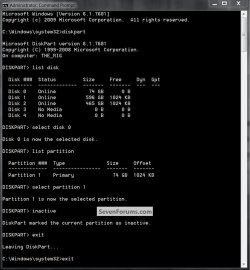
If more than one partition is "Active" it will cause issues, if there is more than one the snip below can be viewed to see how to correct for that; the relevant info can be viewed in disk management.

In the Windows start menu right click computer and click manage, in the left pane of the "Computer Management" window that opens click disk management.

click to enlarge
Inactive2.jpg
 

My Computer

Computer Manufacturer/Model Number
* BFK Customs *
OS
W 7 64-bit Ultimate
CPU
Intel Q9550 Yorkfield
Motherboard
ASUS P5Q Pro
Memory
8GB Dominator 8500C5D
Graphics Card(s)
ATI : XFX 5870
Sound Card
Realtek HD Audio 7-1
Monitor(s) Displays
1x 47" LCD HDMI & 3x 26" LCD HDMI
Screen Resolution
1920x1080P & 1920x1200
Hard Drives
1x 80GB Intel X25-M G2 SSD : 1x 500GB & 1x 640GB WD Caviar Black(s)
PSU
Corsair 620HX
Case
Cooler Master RC-690
Cooling
Tuniq Tower 120, 2x 140mm and 3x 120mm case fans
Keyboard
Microsoft 500
Mouse
Razer Diamondback 3G
Internet Speed
14 Mb/s
Other Info
1x Koutech 3Gb/s SATA HDD Hot Swap Rack
Back
Top