
Solved Making a partition bootable

kev0188

New member
Local time
6:53 PM
Messages
10
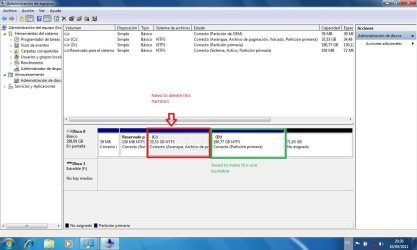
hi, well i have 2 OS on my laptop, one was winXP and 7, I had windows XP on my C: drive, then i installed windows 7 in my D: drive, everything was great i loved windows 7 so i decided to remove windows xp, i put in the windows 7 instalation dvd and booted from it and deleted the C: partition, then i rebooted my Laptop and it told me no boot device found, luckly i was able to re-install windows 7 on my C drive without formating the hole HD, so basicly i now have 2 windows 7 on 1 PC and all my files are on the D: drive, so i need to know how can i make my PC boot up from the D: drive so that i can later delete the C: drive without having the same "no boot device" problem.

and also i left a pic so you can see whats going on


Also i just found out that it seems like i only have 1 OS on my pc, when i had windows xp i would get the dual boot menu now i dont, the new windows 7 starts up automaticlly
 

Attachments
  • partitions.jpg
    partitions.jpg
    91.4 KB · Views: 33

My Computer

OS
Windows 7 ultimate 32bit
Last edited:

My Computer

Computer Manufacturer/Model Number
Toshiba Satellite S875D-S7239 laptop
OS
MS Windows 7 Ultimate SP1 64-bit
CPU
AMD A10-4600M
Motherboard
AMD Pumori (Socket FT1)
Memory
6.00 GB Dual-Channel DDR3 @ 798MHz (11-11-12-28)
Graphics Card(s)
AMD Radeon HD 7660G
Sound Card
High Definition Audio Device
Monitor(s) Displays
Generic PnP Monitor (1600x900@60Hz)
Screen Resolution
1600x900@60Hz
Hard Drives
SSD 119GB Corsair CSSD-V128GB2 ATA Device
Keyboard
Standard PS/2 Keyboard
Mouse
HP Wireless Optical Mobile Mouse Model FHA-3410
Internet Speed
What the local pub, local coffee shop offers.
Other Info
Optical Drive:MATSHITA BD-CMB UJ160B ATA Device


Also have an Asus ha1002xp netbook with Win 7 Ultimate installed.
Deleted because of multitude of errors
 
Last edited:

My Computer

Computer Manufacturer/Model Number
Toshiba Satellite S875D-S7239 laptop
OS
MS Windows 7 Ultimate SP1 64-bit
CPU
AMD A10-4600M
Motherboard
AMD Pumori (Socket FT1)
Memory
6.00 GB Dual-Channel DDR3 @ 798MHz (11-11-12-28)
Graphics Card(s)
AMD Radeon HD 7660G
Sound Card
High Definition Audio Device
Monitor(s) Displays
Generic PnP Monitor (1600x900@60Hz)
Screen Resolution
1600x900@60Hz
Hard Drives
SSD 119GB Corsair CSSD-V128GB2 ATA Device
Keyboard
Standard PS/2 Keyboard
Mouse
HP Wireless Optical Mobile Mouse Model FHA-3410
Internet Speed
What the local pub, local coffee shop offers.
Other Info
Optical Drive:MATSHITA BD-CMB UJ160B ATA Device


Also have an Asus ha1002xp netbook with Win 7 Ultimate installed.
@theog,

I've got to start getting enough sleep. I'm making mistakes.

Let me check again and make sure things are cleaned up.

think I had two different windows open and got confused.

I've deleted everything and tomorrow after sleep, I'll explain the approach which, incidentally, does not require a system reserved partition.
 

My Computer

Computer Manufacturer/Model Number
Toshiba Satellite S875D-S7239 laptop
OS
MS Windows 7 Ultimate SP1 64-bit
CPU
AMD A10-4600M
Motherboard
AMD Pumori (Socket FT1)
Memory
6.00 GB Dual-Channel DDR3 @ 798MHz (11-11-12-28)
Graphics Card(s)
AMD Radeon HD 7660G
Sound Card
High Definition Audio Device
Monitor(s) Displays
Generic PnP Monitor (1600x900@60Hz)
Screen Resolution
1600x900@60Hz
Hard Drives
SSD 119GB Corsair CSSD-V128GB2 ATA Device
Keyboard
Standard PS/2 Keyboard
Mouse
HP Wireless Optical Mobile Mouse Model FHA-3410
Internet Speed
What the local pub, local coffee shop offers.
Other Info
Optical Drive:MATSHITA BD-CMB UJ160B ATA Device


Also have an Asus ha1002xp netbook with Win 7 Ultimate installed.
Deleting reserved partition & C:, would make the PC unbootable.

A startup Repair is need also.
 

My Computer

OS
ME/XP/Vista/Win7
@theog,
Very true. I noticed that and that was one of the changes I had put in before I decided to eradicate all and go at tomorrow after sleep.
Thanks. Let us hope that the thread starter didn't get messed up by my mistakes.
 

My Computer

Computer Manufacturer/Model Number
Toshiba Satellite S875D-S7239 laptop
OS
MS Windows 7 Ultimate SP1 64-bit
CPU
AMD A10-4600M
Motherboard
AMD Pumori (Socket FT1)
Memory
6.00 GB Dual-Channel DDR3 @ 798MHz (11-11-12-28)
Graphics Card(s)
AMD Radeon HD 7660G
Sound Card
High Definition Audio Device
Monitor(s) Displays
Generic PnP Monitor (1600x900@60Hz)
Screen Resolution
1600x900@60Hz
Hard Drives
SSD 119GB Corsair CSSD-V128GB2 ATA Device
Keyboard
Standard PS/2 Keyboard
Mouse
HP Wireless Optical Mobile Mouse Model FHA-3410
Internet Speed
What the local pub, local coffee shop offers.
Other Info
Optical Drive:MATSHITA BD-CMB UJ160B ATA Device


Also have an Asus ha1002xp netbook with Win 7 Ultimate installed.
okay so i see i did make quite a mess, but i want to know if this is an option,
can i just pass all my files from my D: partition to the C: partition and then delete D: and the reserved space? so that then i will only have 1 partition and not a big mess
 

My Computer

OS
Windows 7 ultimate 32bit
im on that, but it would be great if i didnt have to do so many things, but i guess i am going to have to do them
 

My Computer

OS
Windows 7 ultimate 32bit
Yes you can drag your files from D to C and then delete C, which is what I would do especially if you originally installed Win7 on D from XP so that is locked to the letter D and won't see itself as C when booted into it as Win7 normally does when the installer is booted.

You may need to Take Ownership of your User folders on D to copy them to C. Take Ownership Shortcut

The fastest way to copy is to go to each D>User sub-folder (Docs, Pics, Videos, etc), from Organize tab>Select All, then drag the whole group to the corresponding User folder under C drive - but don't release left click until Explorer bar expands and confirms which folder is being copied into.

Wait awhile to make sure you have everything copied over then you can delete D in Disk management, Extend C into its space or create a new Data partition there.
 
yes theog, im starting right now to do the hole process you recomended me, hope it works
 

My Computer

OS
Windows 7 ultimate 32bit
Did you see my post above which answered your question if you could pass your files through from D to C and how it is easily done?

Is there a reason not to do this the simple way and assure Win7 remains C?
 
@gregocker i saw the other post but i have lots of programs and my PC has 2 partitions the one i wanted to recover was 200GB and was almost full and the working one was only 80GB so i would have to be re-sizing partitions alot so it was easier just to do what theog recomended.

@Theog thank you so much for your help i did what you told me to and i was able to recover my other windows 7, thank you for helping out so much, but i do have one more question, if i delete the partition C: will i have the same error again?
 

My Computer

OS
Windows 7 ultimate 32bit
thanks everyone for their time and help, i finaly got my laptop working fine no problems and i didnt loose anything :)
 

My Computer

OS
Windows 7 ultimate 32bit
Back
Top