Making folder names look neater

smeghead

New member
Local time
12:06 PM
Messages
19
Hi,

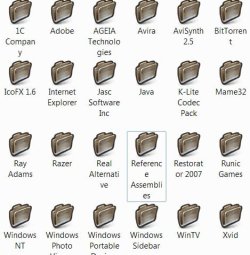
Is there any way to make the text for my folder names look a bit neater? At the moment it's all centred and words which don't fit on the line are moved down to the next line, such as the folder named "Reference Assemblies".

How can I make it either like XP, or just a bit neater? Can I make it just display two lines and then the "..." bit, or are there other ways?

Thanks :)
 

Attachments

  • Image.jpg
    Image.jpg
    34.9 KB · Views: 11

My Computer My Computer

At a glance

Windows 7 64-bit
OS
Windows 7 64-bit
Screen Resolution
Big!!
Internet Speed
Fast!!
Try This:

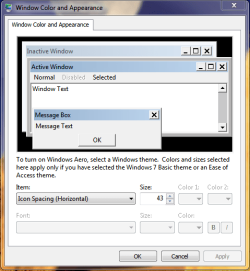
Click on the start orb. Than Enter " Metrics " into the search field
Click on " Change Windows Colors and Metrics "

Under " Item: " Select " Icon Spacing (Horizontal) " and change the
size of the desktop Icon display area.

Repeat this with " Icon Spacing (Vertical)

This will adjust the area which your icons take and thus
adjust the way the text is arranged.

You can also adjust the icon label itself by highlighting the text and
editing it.

Hope this helps
Richard
 

Attachments

  • Capture.PNG
    Capture.PNG
    16.8 KB · Views: 4

My Computer My Computer

At a glance

windows 7 RTMIntel core 2 6400 @2.13GHz2 Gig.NVIDIA GeForce 7300 GT
Computer Manufacturer/Model Number
Dell DXP061
OS
windows 7 RTM
CPU
Intel core 2 6400 @2.13GHz
Motherboard
Dell ??
Memory
2 Gig.
Graphics Card(s)
NVIDIA GeForce 7300 GT
Sound Card
High Definition Audio Device - Microsoft
Monitor(s) Displays
Dell LCD
Screen Resolution
1280 x 1024 75 hertz
Hard Drives
WDC WD2500JS-75NCB3 ATA Device

WDC WD5000AAKS-65YGA0 ATA Device
Keyboard
Logitech Cordless
Mouse
Logitech Cordless
Internet Speed
760k
Unfortunately, adjusting Icon spacing only affects the icons on the desktop, not the ones in explorer. Pity, though...
 

My Computer My Computer

At a glance

Windows 7 64-bit
OS
Windows 7 64-bit
Screen Resolution
Big!!
Internet Speed
Fast!!
For starters I would use the default folder icons. They are wider - up to 17 character spaces on my system.
 

My Computer My Computer

At a glance

Vista, Windows7, Mint Mate, Zorin, Windows 8from 1.6GHz Duo to i7
Computer Manufacturer/Model Number
HP, Dell, Gateway, Toshiba - 4 laptops and 2 desktops
OS
Vista, Windows7, Mint Mate, Zorin, Windows 8
CPU
from 1.6GHz Duo to i7
Monitor(s) Displays
2x HP w2207
Hard Drives
5x HDD, 7x SSD, 12x Externals
Keyboard
with trackball - no mices
Mouse
Trackball mice
Internet Speed
DSL 6000
For starters I would use the default folder icons. They are wider - up to 17 character spaces on my system.

It still does it if I used the default icons, and I prefer my icons to those. Changing the font size makes a difference, but then if "Reference Assemblies" was a couple of characters longer it would revert back. It's more of a formatting thing than a size thing.
 

My Computer My Computer

At a glance

Windows 7 64-bit
OS
Windows 7 64-bit
Screen Resolution
Big!!
Internet Speed
Fast!!
Back
Top