Making Fonts Large

dworsky

New member
Local time
6:07 PM
Messages
4
In Win XP, it was easy to select "large fonts" or "extra large fonts" by right clicking the desktop,then properties, and appearance (I think). You could also change DPI settings which also had an effect on font size. I found a nice combination of using "large fonts" and a higher dpi setting.

In Win7, all you seemingly can do is change the dpi setting (100%, 125% or 150%, or custom). That frankly is not enough control for me. :(

Is the old box that allowed you to ALSO select "normal" "large fonts" and "extra large fonts" buried somewhere? (and how do you access it?)

(I did see that they buried the old "display properties" box where you could pick specific sizes of the font used on the active titlebar, etc... but that is not what I am looking for now.)

thanks in advance,
Edgar
 

My Computer

OS
Win7 Home Premium - 64-bit
In Win XP, it was easy to select "large fonts" or "extra large fonts" by right clicking the desktop,then properties, and appearance (I think). You could also change DPI settings which also had an effect on font size. I found a nice combination of using "large fonts" and a higher dpi setting.

In Win7, all you seemingly can do is change the dpi setting (100%, 125% or 150%, or custom). That frankly is not enough control for me. :(

Is the old box that allowed you to ALSO select "normal" "large fonts" and "extra large fonts" buried somewhere? (and how do you access it?)

(I did see that they buried the old "display properties" box where you could pick specific sizes of the font used on the active titlebar, etc... but that is not what I am looking for now.)

thanks in advance,
Edgar
Hello dworsky, and welcome to Windows Seven Forums!

I am not certain this will help you, but in "Control Panel", "Display" you have several options to "personalize" your screen:

picture.php


This is my normal desktop:

picture.php


and this is a possible extreme contrast on the same monitor:

picture.php


Please let us know how we might be of help?

Cheers!
Robert
 

My Computer

OS
...
Robert,

Thanks for your thoughts and the screen captures.

For me it really is the combination of increasing the DPI *and* using large fonts instead of "normal" that worked best for me in WinXP...and I want to do the same in Win7.

Firefox 3 does NOT play nice when you increase the DPI, for example. I had to uninstall it both in XP and 7, because you get exaggerated size graphics (and when you fix one site, going to another has the same problem). Firefox 2 is fine with increased DPI, but 3 is not.

So...I am still looking for an answer if "large fonts" and "extra large fonts" still exists as a choice OUTSIDE of making DPI changes.

Edgar
 

My Computer

OS
Win7 Home Premium - 64-bit

My Computer

Computer Manufacturer/Model Number
Personal Built (frankenstein) - WEI Here -> http://www.sevenforums.com/451826-post2094.html
OS
dual: windows 7 Ultimate x64 7600 and XP SP3
CPU
AMD PHENOM II 720 2800MHz
Motherboard
ASUS M4A78 sb700
Memory
2 X 2 OCZ REAPER 1066MHz
Graphics Card(s)
MSI 4850 1GB OC
Sound Card
REALTEK HD ONBOARD
Monitor(s) Displays
LCD SAMSUNG 21" T220
Screen Resolution
1680 x 1050 - 60Hz
Hard Drives
1.5 TB SEAGATE SATA II 7200 RPM
PSU
THERMALTAKE 430W PFC ACTIVE W0069
Case
SOLID FULL ATX
Cooling
COOLER MASTER TX-3 HEAT PIPES
Keyboard
logitech cordless keyboard
Mouse
microsoft wireless
Internet Speed
4Mb
Other Info
sound system: logitech x540 5.1
Zboard Fang gaming keyboard
PS2 joystick
Philips VOIP fone
Robert,

Thanks for your thoughts and the screen captures.

For me it really is the combination of increasing the DPI *and* using large fonts instead of "normal" that worked best for me in WinXP...and I want to do the same in Win7.

Firefox 3 does NOT play nice when you increase the DPI, for example. I had to uninstall it both in XP and 7, because you get exaggerated size graphics (and when you fix one site, going to another has the same problem). Firefox 2 is fine with increased DPI, but 3 is not.

So...I am still looking for an answer if "large fonts" and "extra large fonts" still exists as a choice OUTSIDE of making DPI changes.

Edgar
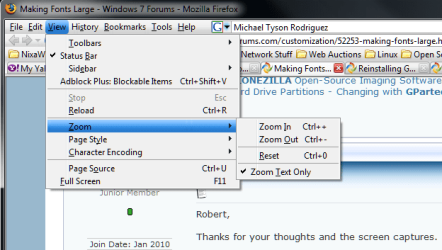
Of course your welcome, I hope some of it was helpful. For me, as my eyesight fails as I age, I can not tolerate the minuscule font size some of these web sites use. I regularly use the "Zoom" to enlarge the "Text Only" so I can read with comfort:

ff_zoom_01.png

Cheers!
Robert
 

My Computer

OS
...
Robert...

Occasionally I use the zoom feature too, but find you begin to lose crispness of the fonts when you do that.

Edgar
 

My Computer

OS
Win7 Home Premium - 64-bit

T...

Yes, I discovered that feature, hidden as it is too. But it is NOT the overall font changing feature that I was looking for, that always existed in XP.

Can anyone definitively say that the old XP choice under Desktop appearance properties of Normal, Large Fonts, and Extra Large Fonts no longer exists in 7?

Edgar
 

My Computer

OS
Win7 Home Premium - 64-bit
I need a way to only make FONTS bigger and not changing the screen DPI setting, just like XP font setting : Extra and Extra Large

ONLY WIN 7 FONTS BIGGER NOT WHOLE SCREEN , any way ?
 

My Computer

OS
7
I too am having exactly the same problem. And if I use the dpi setting in Win 7 32 it also creates problems with a lot of the software apps that I'm using. Yet in XP Pro I did not have a problem at all. I could increase the size without it affecting web browsers or apps adversely.

Anyone have any thoughts?
 

My Computer

Computer Manufacturer/Model Number
Custom Built
OS
Windows 7 Professional 64 bit
CPU
Intel Core i7 Processor i7-3770 3.4GHz 8MB QUAD CORE
Motherboard
Asus P8Z77-V LE LGA1155/ Intel Z77/ DDR3/ Quad CrossFireX/ S
Memory
16GB (4 x 4GB) 240-Pin DDR3 1333MHz (PC3 10600) Quad Channel
Graphics Card(s)
nVidia GeForce GTX570 2560MB DDR5 2DVI/HDMI PCI-Express VC
Sound Card
REALTEK 10/100/1000 GB Network Card & external sound card
Monitor(s) Displays
Viewsonic 27 inch
Hard Drives
CORSAIR 180GB Solid State Drive SATA III (READ/WRITE 550MB/515MB) * OS *
Western Digital BLACK 500GB 7200 RPM 32MB CACHE SATA 6.0Gb/s
Multiple external mechanical drives.
Mouse
Logitech wireless
Other Info
Dell Inspiron 1750, Windows 7 64bit Pro
Robert,

Thanks for your thoughts and the screen captures.

For me it really is the combination of increasing the DPI *and* using large fonts instead of "normal" that worked best for me in WinXP...and I want to do the same in Win7.

Firefox 3 does NOT play nice when you increase the DPI, for example. I had to uninstall it both in XP and 7, because you get exaggerated size graphics (and when you fix one site, going to another has the same problem). Firefox 2 is fine with increased DPI, but 3 is not.

So...I am still looking for an answer if "large fonts" and "extra large fonts" still exists as a choice OUTSIDE of making DPI changes.

Edgar
Edgar, I increased the DPI setting slightly - not enough to cause problems with page rendering in Firefox. Then I increased the font size in Firefox itself using Tools > Options. For the most part it is now satisfactory. You can always use Ctrl - mouse wheel to change the font size temporarily.
 

My Computer

Computer Manufacturer/Model Number
Home built
OS
Windows 7 Ultimate 32 bit
CPU
Intel(R) Pentium(R) 4 CPU 3.00GHz
Motherboard
ASUS P4P800-VM Motherboard Chipset: Intel 865G + ICH5
Memory
2.50 GB RAM
Graphics Card(s)
NVIDIA GeForce 7600 GS
Sound Card
SoundMax Integrated Digital Audio (Chip)
Monitor(s) Displays
ViewSonic VX 1962 wm
Screen Resolution
1680 X 1050
Hard Drives
Seagate Barracuda 7200.10 80 GB
ST380215A ATA Device 18.6 GB
Western Digital "My Book" external hard drive 750 GB
Cooling
Fan based
Keyboard
Microsoft Comfort Curve Keyboard 2000 v10 USB
Mouse
Logitec optic USB
Internet Speed
3.01 Mb/s download 0.64 Mb/s upload
Back
Top