Hello, this is my first post in Win7 Forums. First of all, let me congratulate and thank you for the great community you have here. I installed Win7 some days ago and everything I needed to know about it I found it here. I'm loving this OS 
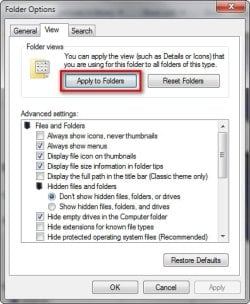
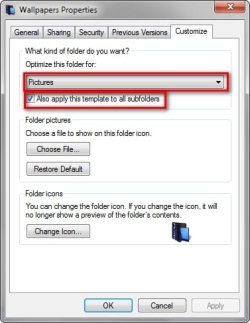
After searching around in the tutorials, I haven't found how to do this. You see, I want to force Windows to use medium icons as its default choice. When I create a folder, Windows sets the view to Details, which I find terribly small and annoying. I've tried both going to a folder with medium icons and "applying to all folders" through folder options and manually setting each folder to "documents" and applying to all those that share its template... but I still get folders set to Details.
Is there a way to make Windows ALWAYS use medium icons? I'd rather customize the few folders I want in a different style manually, rather than having to set the thousands of folders I want to use medium icons.
Thanks in advance.
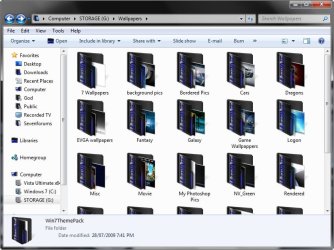
Edit: Now I realise I'm not able to add favourites to, well, my Favourites folder. I want to add a quick link to the desktop and my download folder just like here. I've tried right clicking the favourites icon and adding current location to Favourites to no avail. Any help would be greatly appreciated.
After searching around in the tutorials, I haven't found how to do this. You see, I want to force Windows to use medium icons as its default choice. When I create a folder, Windows sets the view to Details, which I find terribly small and annoying. I've tried both going to a folder with medium icons and "applying to all folders" through folder options and manually setting each folder to "documents" and applying to all those that share its template... but I still get folders set to Details.
Is there a way to make Windows ALWAYS use medium icons? I'd rather customize the few folders I want in a different style manually, rather than having to set the thousands of folders I want to use medium icons.
Thanks in advance.
Edit: Now I realise I'm not able to add favourites to, well, my Favourites folder. I want to add a quick link to the desktop and my download folder just like here. I've tried right clicking the favourites icon and adding current location to Favourites to no avail. Any help would be greatly appreciated.
Last edited:
My Computer
- Computer Manufacturer/Model Number
- Compaq Presario
- OS
- Windows 7 Home Premium x64
- CPU
- Intel Core 2 Duo E7400 2.8GHz
- Motherboard
- Asus P5KPL-AM SE
- Memory
- Kingston 4GB RAM 800Mhz
- Graphics Card(s)
- ASUS 9800GT 1GB DDR3
- Monitor(s) Displays
- HP vs17