Solved Making running applications in the taskbar icons

Zagadka

New member
Local time
12:05 AM
Messages
80
Location
Los Angeles
Hey, I'm trying to save a bit of real estate... I have 3 apps that I always run pinned to the taskbar. That works well and good.

However, one of them, I'd rather remain just the icon (as it displays when the program is not running; ie, getting rid of the text)... is there a way to do this?

Cheers
 

My Computer My Computer

Computer Manufacturer/Model Number
Custom (Sora)
OS
Win 7, Win 8, Ubuntu (64 bit)
CPU
AMD Phenom 2 3.2 GHz Quad Core (AM3)
Motherboard
Asus M4N82 Deluxe (nF 980 SLI)
Memory
8 gb matched Corsair DDR2
Graphics Card(s)
GeForce GTX 580
Sound Card
RealTek (onboard)
Monitor(s) Displays
2x Dell LCDs
Screen Resolution
1680 x 1050
Hard Drives
1x 1.8 tb SATA
1x 1.0 tb SATA (backup)
PSU
950 Watt ThermalTake Toughpower
Case
Aluminum
Cooling
3x 120mm fans, 2x 80 mm fans, 1x horizontal 80 mm fan pair
Keyboard
MS DMP 1031
Mouse
Logitech MX Revolution
Internet Speed
3 mb/s cable
On a somewhat related note... is there a way to make the apps running in the taskbar "flat" instead of having the borders/3d shading?


EDIT

This is essentially what I'm aiming for... (though I'd like the mIRC button to display as the icon, not with the text)

http://zagadka.net/example.png
 
Last edited:

My Computer My Computer

Computer Manufacturer/Model Number
Custom (Sora)
OS
Win 7, Win 8, Ubuntu (64 bit)
CPU
AMD Phenom 2 3.2 GHz Quad Core (AM3)
Motherboard
Asus M4N82 Deluxe (nF 980 SLI)
Memory
8 gb matched Corsair DDR2
Graphics Card(s)
GeForce GTX 580
Sound Card
RealTek (onboard)
Monitor(s) Displays
2x Dell LCDs
Screen Resolution
1680 x 1050
Hard Drives
1x 1.8 tb SATA
1x 1.0 tb SATA (backup)
PSU
950 Watt ThermalTake Toughpower
Case
Aluminum
Cooling
3x 120mm fans, 2x 80 mm fans, 1x horizontal 80 mm fan pair
Keyboard
MS DMP 1031
Mouse
Logitech MX Revolution
Internet Speed
3 mb/s cable
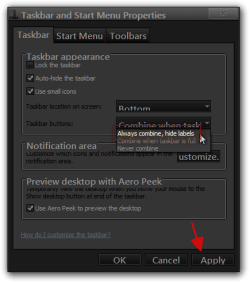
To remove the text have you tried going to the Taskbar Properties and changing it to Always combined high labels?
Taskbar and Start Menu Properties.png

As for making the buttons flat like in your example image if you are using the default aero theme I can change that for you, using Windows Style Builder and post it here in a zip folder. I can also remove the text from there to by using a blank font that I can provide to you to download and install on your computer also.
If you are using a custom theme you will need to ask the theme maker. It's not cool to change someone else work.
&
This will be a custom theme and you will need to do 1 of these 2 ways of Enabling custom themes for it to work.
http://www.sevenforums.com/tutorials/34579-enabling-custom-themes-windows-7-a.html
Or
http://www.sevenforums.com/tutorials/28377-theme-how-apply-custom-themes.html?filter

All I need from you would be a name to call this custom theme let me know if this is something you would like done.
Jerry
 

My Computer My Computer

Computer type
Laptop
Computer Manufacturer/Model Number
Sager NP9170
OS
Win 7 Pro x64 / Win 10 Pro
CPU
Intel(R) Core(TM) i7-3630QM CPU @ 2.40GHz
Motherboard
CLEVO P170EM
Memory
12 GB
Graphics Card(s)
(1) Intel(R) HD Graphics 4000 (2) NVIDIA GeForce GTX 675M
Sound Card
(1) Realtek High Definition Audio (2) Intel(R) Display Aud
Monitor(s) Displays
17.3
Screen Resolution
1920x1080
Hard Drives
(1) Samsung 860 EVO 500GB(OS) (1) Samsung 860 EVO 500GB(Data)
Keyboard
Backlite
Antivirus
MSE, Malwarebytes Pro
Browser
Firefox
Other Info
DESKTOP: Custom-built.
OS: Win 10 Pro x64.
CASE: Rosewill R5.
CPU: Intel I5 4670K CPU @ 3.40GHz.
CPU COOLER: Cool Master Hyper 212 EVO.
MOTHERBOARD: Asus Z87-A.
MEMORY: Kingston HyperX 2x4 GB.
GPU: Nvidia Geforce 650 TI.
PSU: Corsair TX750.
DRIVES: (1) Samsung 840 120 GB SSD (2) Western Digital blue 500 GB 7200 RPM.
That sounds awesome, thank you for the advice.

I am using a default Aero theme. Anything you can whip up would be greatly appreciated. Not particular about a name, but this PC is named Sora, so...

Regarding the names... I kinda wish it would be possible to keep some apps with names and "collapse" others to icons, can't seem to have it both ways though.
 

My Computer My Computer

Computer Manufacturer/Model Number
Custom (Sora)
OS
Win 7, Win 8, Ubuntu (64 bit)
CPU
AMD Phenom 2 3.2 GHz Quad Core (AM3)
Motherboard
Asus M4N82 Deluxe (nF 980 SLI)
Memory
8 gb matched Corsair DDR2
Graphics Card(s)
GeForce GTX 580
Sound Card
RealTek (onboard)
Monitor(s) Displays
2x Dell LCDs
Screen Resolution
1680 x 1050
Hard Drives
1x 1.8 tb SATA
1x 1.0 tb SATA (backup)
PSU
950 Watt ThermalTake Toughpower
Case
Aluminum
Cooling
3x 120mm fans, 2x 80 mm fans, 1x horizontal 80 mm fan pair
Keyboard
MS DMP 1031
Mouse
Logitech MX Revolution
Internet Speed
3 mb/s cable
Give me a couple of hours and I should have something for you.
Jerry
 

My Computer My Computer

Computer type
Laptop
Computer Manufacturer/Model Number
Sager NP9170
OS
Win 7 Pro x64 / Win 10 Pro
CPU
Intel(R) Core(TM) i7-3630QM CPU @ 2.40GHz
Motherboard
CLEVO P170EM
Memory
12 GB
Graphics Card(s)
(1) Intel(R) HD Graphics 4000 (2) NVIDIA GeForce GTX 675M
Sound Card
(1) Realtek High Definition Audio (2) Intel(R) Display Aud
Monitor(s) Displays
17.3
Screen Resolution
1920x1080
Hard Drives
(1) Samsung 860 EVO 500GB(OS) (1) Samsung 860 EVO 500GB(Data)
Keyboard
Backlite
Antivirus
MSE, Malwarebytes Pro
Browser
Firefox
Other Info
DESKTOP: Custom-built.
OS: Win 10 Pro x64.
CASE: Rosewill R5.
CPU: Intel I5 4670K CPU @ 3.40GHz.
CPU COOLER: Cool Master Hyper 212 EVO.
MOTHERBOARD: Asus Z87-A.
MEMORY: Kingston HyperX 2x4 GB.
GPU: Nvidia Geforce 650 TI.
PSU: Corsair TX750.
DRIVES: (1) Samsung 840 120 GB SSD (2) Western Digital blue 500 GB 7200 RPM.
No rush, thanks

Just had a thought, on the name and function, since it is treating the application tabs like panels instead of being raised, it is kinda a Metro-ish taskbar...
 

My Computer My Computer

Computer Manufacturer/Model Number
Custom (Sora)
OS
Win 7, Win 8, Ubuntu (64 bit)
CPU
AMD Phenom 2 3.2 GHz Quad Core (AM3)
Motherboard
Asus M4N82 Deluxe (nF 980 SLI)
Memory
8 gb matched Corsair DDR2
Graphics Card(s)
GeForce GTX 580
Sound Card
RealTek (onboard)
Monitor(s) Displays
2x Dell LCDs
Screen Resolution
1680 x 1050
Hard Drives
1x 1.8 tb SATA
1x 1.0 tb SATA (backup)
PSU
950 Watt ThermalTake Toughpower
Case
Aluminum
Cooling
3x 120mm fans, 2x 80 mm fans, 1x horizontal 80 mm fan pair
Keyboard
MS DMP 1031
Mouse
Logitech MX Revolution
Internet Speed
3 mb/s cable
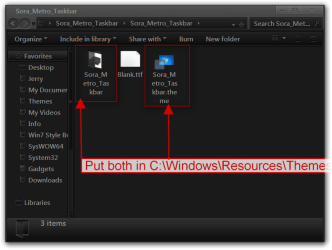
Give this a try, download the zip folder at the bottom of this post extracted to your desktop and both put 1 Sora_Metro_Taskbar folder and 1 Sora_Metro_Taskbar.theme file in C:\Windows\Resources\Themes
1.png

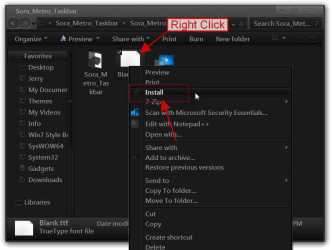
Right-click on the blank font and click on install a little window will open up showing it being installed and will go away.
2.png

It will show up in Personalization under Installed Themes as Sora_Metro_Taskbar
Personalization.png

The width of the buttons cannot be changed unless you use the Always combined high labels in the taskbar property window.
If it's not quite right let me know.
Jerry
 
Last edited:

My Computer My Computer

Computer type
Laptop
Computer Manufacturer/Model Number
Sager NP9170
OS
Win 7 Pro x64 / Win 10 Pro
CPU
Intel(R) Core(TM) i7-3630QM CPU @ 2.40GHz
Motherboard
CLEVO P170EM
Memory
12 GB
Graphics Card(s)
(1) Intel(R) HD Graphics 4000 (2) NVIDIA GeForce GTX 675M
Sound Card
(1) Realtek High Definition Audio (2) Intel(R) Display Aud
Monitor(s) Displays
17.3
Screen Resolution
1920x1080
Hard Drives
(1) Samsung 860 EVO 500GB(OS) (1) Samsung 860 EVO 500GB(Data)
Keyboard
Backlite
Antivirus
MSE, Malwarebytes Pro
Browser
Firefox
Other Info
DESKTOP: Custom-built.
OS: Win 10 Pro x64.
CASE: Rosewill R5.
CPU: Intel I5 4670K CPU @ 3.40GHz.
CPU COOLER: Cool Master Hyper 212 EVO.
MOTHERBOARD: Asus Z87-A.
MEMORY: Kingston HyperX 2x4 GB.
GPU: Nvidia Geforce 650 TI.
PSU: Corsair TX750.
DRIVES: (1) Samsung 840 120 GB SSD (2) Western Digital blue 500 GB 7200 RPM.
Very nice, but I'm having issues with the font... can it be switched back to normal as a compromise?
 

My Computer My Computer

Computer Manufacturer/Model Number
Custom (Sora)
OS
Win 7, Win 8, Ubuntu (64 bit)
CPU
AMD Phenom 2 3.2 GHz Quad Core (AM3)
Motherboard
Asus M4N82 Deluxe (nF 980 SLI)
Memory
8 gb matched Corsair DDR2
Graphics Card(s)
GeForce GTX 580
Sound Card
RealTek (onboard)
Monitor(s) Displays
2x Dell LCDs
Screen Resolution
1680 x 1050
Hard Drives
1x 1.8 tb SATA
1x 1.0 tb SATA (backup)
PSU
950 Watt ThermalTake Toughpower
Case
Aluminum
Cooling
3x 120mm fans, 2x 80 mm fans, 1x horizontal 80 mm fan pair
Keyboard
MS DMP 1031
Mouse
Logitech MX Revolution
Internet Speed
3 mb/s cable
Here you go, switch to the default aero theme then log off/ log on remove both of the old 1 Sora_Metro_Taskbar folder and 1 Sora_Metro_Taskbar.theme file and replace with the new ones.
Give it a try.
Let me know if it's OK
Jerry
 

Attachments

My Computer My Computer

Computer type
Laptop
Computer Manufacturer/Model Number
Sager NP9170
OS
Win 7 Pro x64 / Win 10 Pro
CPU
Intel(R) Core(TM) i7-3630QM CPU @ 2.40GHz
Motherboard
CLEVO P170EM
Memory
12 GB
Graphics Card(s)
(1) Intel(R) HD Graphics 4000 (2) NVIDIA GeForce GTX 675M
Sound Card
(1) Realtek High Definition Audio (2) Intel(R) Display Aud
Monitor(s) Displays
17.3
Screen Resolution
1920x1080
Hard Drives
(1) Samsung 860 EVO 500GB(OS) (1) Samsung 860 EVO 500GB(Data)
Keyboard
Backlite
Antivirus
MSE, Malwarebytes Pro
Browser
Firefox
Other Info
DESKTOP: Custom-built.
OS: Win 10 Pro x64.
CASE: Rosewill R5.
CPU: Intel I5 4670K CPU @ 3.40GHz.
CPU COOLER: Cool Master Hyper 212 EVO.
MOTHERBOARD: Asus Z87-A.
MEMORY: Kingston HyperX 2x4 GB.
GPU: Nvidia Geforce 650 TI.
PSU: Corsair TX750.
DRIVES: (1) Samsung 840 120 GB SSD (2) Western Digital blue 500 GB 7200 RPM.
That is just about perfect, thank you very much!
 

My Computer My Computer

Computer Manufacturer/Model Number
Custom (Sora)
OS
Win 7, Win 8, Ubuntu (64 bit)
CPU
AMD Phenom 2 3.2 GHz Quad Core (AM3)
Motherboard
Asus M4N82 Deluxe (nF 980 SLI)
Memory
8 gb matched Corsair DDR2
Graphics Card(s)
GeForce GTX 580
Sound Card
RealTek (onboard)
Monitor(s) Displays
2x Dell LCDs
Screen Resolution
1680 x 1050
Hard Drives
1x 1.8 tb SATA
1x 1.0 tb SATA (backup)
PSU
950 Watt ThermalTake Toughpower
Case
Aluminum
Cooling
3x 120mm fans, 2x 80 mm fans, 1x horizontal 80 mm fan pair
Keyboard
MS DMP 1031
Mouse
Logitech MX Revolution
Internet Speed
3 mb/s cable
You're Welcome
 

My Computer My Computer

Computer type
Laptop
Computer Manufacturer/Model Number
Sager NP9170
OS
Win 7 Pro x64 / Win 10 Pro
CPU
Intel(R) Core(TM) i7-3630QM CPU @ 2.40GHz
Motherboard
CLEVO P170EM
Memory
12 GB
Graphics Card(s)
(1) Intel(R) HD Graphics 4000 (2) NVIDIA GeForce GTX 675M
Sound Card
(1) Realtek High Definition Audio (2) Intel(R) Display Aud
Monitor(s) Displays
17.3
Screen Resolution
1920x1080
Hard Drives
(1) Samsung 860 EVO 500GB(OS) (1) Samsung 860 EVO 500GB(Data)
Keyboard
Backlite
Antivirus
MSE, Malwarebytes Pro
Browser
Firefox
Other Info
DESKTOP: Custom-built.
OS: Win 10 Pro x64.
CASE: Rosewill R5.
CPU: Intel I5 4670K CPU @ 3.40GHz.
CPU COOLER: Cool Master Hyper 212 EVO.
MOTHERBOARD: Asus Z87-A.
MEMORY: Kingston HyperX 2x4 GB.
GPU: Nvidia Geforce 650 TI.
PSU: Corsair TX750.
DRIVES: (1) Samsung 840 120 GB SSD (2) Western Digital blue 500 GB 7200 RPM.
Back
Top