malawarebytes antimalware will not start up

angusmdmclean

New member
Local time
10:55 PM
Messages
37
I have found the program Malawarebytes Antimalware to be most useful and I bought the full version. This morning I gave a technician access to my computer and he reviewed my files and offered me a service for $190, which I declined. He looked at my Malawarebytes antimalware set up and remarked it should not be on SP3, since I am with Windows Seven. To my knowledge he did not change the settings.

Now I found that after restarting my computer the program will not start up; it is on SP3.

So I uninstalled the program and installed the free version. It will not start up. I wonder if anyone has advice for me. Is it possible that a box is not checked that should be,
 

My Computer

Computer type
PC/Desktop
Computer Manufacturer/Model Number
HP
OS
Windows 7 64 bit
CPU
intel core i5
Motherboard
pegatron abs
Memory
DDR3 6144 MGBYTES
Graphics Card(s)
HP w2408 on AMD Radeon HD 7570
Hard Drives
SEAGATE
Antivirus
NORTON
Browser
EXPLORER 64 BIY
When you first installed the full version did it make a restore point? If so you could try running the RP then installing MBAM Pro again. It might be a good idea anyway, It just seems a bit too snarky that the Remote Control Guy just happened to mention something and it broke right after he left.
 

My Computer

Computer Manufacturer/Model Number
HP Media Center
OS
Windows 7 32 bit
CPU
AMD 5200+ dual core
Memory
2 GB
Graphics Card(s)
NVidia GeForce 6150SE 128 MB
Monitor(s) Displays
CRT
Screen Resolution
1280x1024
Hard Drives
500 GB Sata internal :

SIIG USB 3.0 docking stations w/WD Caviar Black 6 Gb/s drives
Keyboard
PS/2
Mouse
PS/2 Wheel Mouse
Other Info
SIIG USB 3.0 PCIexpress card.
I have found the program Malawarebytes Antimalware to be most useful and I bought the full version. This morning I gave a technician access to my computer and he reviewed my files and offered me a service for $190, which I declined. He looked at my Malawarebytes antimalware set up and remarked it should not be on SP3, since I am with Windows Seven. To my knowledge he did not change the settings.

Now I found that after restarting my computer the program will not start up; it is on SP3.

So I uninstalled the program and installed the free version. It will not start up. I wonder if anyone has advice for me. Is it possible that a box is not checked that should be,

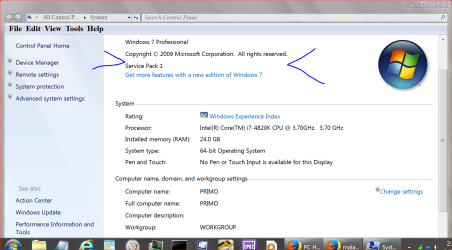
By SP3, do you mean Win7 is on SP3? Windows 7 only has up to SP1. Or do you mean MBAM is on SP3? I never heard of service packs for Malwarebytes.
 

My Computer

Computer type
PC/Desktop
Computer Manufacturer/Model Number
Dell Vostro 400/Dell XPS 8700(Slightly Customized for me by Dell)/Toshiba Satellite T135
OS
Windows 7 Professional 32-bit/Windows 8 64-bit/Win7 Pro64-bit
CPU
Intel Core 2 Quad Q6600/Intel Core i7 4790/Intel Pentium
Memory
2GB/16GB/4GB
Graphics Card(s)
Intel G33/G31 Express(Vostro)/NVIDIA GeForce GTX 745(XPS)
Monitor(s) Displays
HP 2009m(Vostro)/ViewSonic VX2250wm-LED(XPS)
Screen Resolution
1600x900(Vostro)/1920x1080(XPS)
Hard Drives
Seagate ST3160815AS(Vostro)/Western Digital Blue(Satellite)
External:
Western Digital My Passport 0748
Samsung HM121HC
Keyboard
Dell L100)(Vostro)/Dell KB2133p(XPS)
Mouse
Dell M-UAV-DEL8(XPS)
Internet Speed
100 Mbit/s(Only when IPTV is plugged out)
Antivirus
Avast, Malwarebytes PRO
Browser
Internet Explorer 11
Other Info
Note: Names with slashes between two different parts mean that the left is my old desktop and the right is my old laptop and the middle is my new desktop.(Unless specified)
Ping is horrible for servers overseas in US and Europe.
New laptop:LG Gram(Not available in US) Processor:Intel Core i3 4th Gen Ultra Low Power RAM:4GB Hard Drive:SK Hynix OEM MSATA or M.2 Graphics:Intel HD
It is Windows XP SP3; that is what it is set to
 

My Computer

Computer type
PC/Desktop
Computer Manufacturer/Model Number
HP
OS
Windows 7 64 bit
CPU
intel core i5
Motherboard
pegatron abs
Memory
DDR3 6144 MGBYTES
Graphics Card(s)
HP w2408 on AMD Radeon HD 7570
Hard Drives
SEAGATE
Antivirus
NORTON
Browser
EXPLORER 64 BIY
I did not make a restore point; it is odd that the program is not working after the remote tech remarked on it, but I cannot think and did not see any change he made.
 

My Computer

Computer type
PC/Desktop
Computer Manufacturer/Model Number
HP
OS
Windows 7 64 bit
CPU
intel core i5
Motherboard
pegatron abs
Memory
DDR3 6144 MGBYTES
Graphics Card(s)
HP w2408 on AMD Radeon HD 7570
Hard Drives
SEAGATE
Antivirus
NORTON
Browser
EXPLORER 64 BIY

My Computer

Computer type
PC/Desktop
Computer Manufacturer/Model Number
Home made Desktop
OS
Windows 10 Pro. 64/ version 1709 Windows 7 Pro/64
CPU
Intel i7-6800K @ 4.3
Motherboard
ASUS X-99 Deluxe II
Memory
Corsair Platinum 16 gig @2400
Graphics Card(s)
EVGA GTX 1070 OC
Monitor(s) Displays
Asus 27" LED LCD/VE278Q
Screen Resolution
1920-1080 or 1280-720 HDMI
Hard Drives
INTEL SSD 730-240 Gb Sata 3.0/
PSU
EVGA Platium 1200W
Case
Phanteks Luxe Tempered Glass 8 fans/ one radiator
Cooling
XSPC/ Water Cooled CPU
Keyboard
Das 4 Professional
Mouse
Logitech M705/MX Anywhere 2-S
Internet Speed
100 mbits
Antivirus
Microsoft Security Essentials/ Malwarebytes Premium 3.0/ SAS
Browser
I.E. 11 default/Firefox/ ISP Time Warner Cable/Spectrum
Other Info
LG BluRay Burner/
Sound system-KLipsch-THX/
Icy Dock ssd Hot Swap bays.
I did not make a restore point; it is odd that the program is not working after the remote tech remarked on it, but I cannot think and did not see any change he made.

Could it be MBAM is running in Compatibility Mode set as XP SP3?

Right click the MBAM shortcut and click compatibility mode tab. If it is using compatibility mode just turn that off.
 

My Computer

Computer Manufacturer/Model Number
HP Media Center
OS
Windows 7 32 bit
CPU
AMD 5200+ dual core
Memory
2 GB
Graphics Card(s)
NVidia GeForce 6150SE 128 MB
Monitor(s) Displays
CRT
Screen Resolution
1280x1024
Hard Drives
500 GB Sata internal :

SIIG USB 3.0 docking stations w/WD Caviar Black 6 Gb/s drives
Keyboard
PS/2
Mouse
PS/2 Wheel Mouse
Other Info
SIIG USB 3.0 PCIexpress card.
I tried check boxing compatibility mode on and off (without rebooting) it still does not work,
 

My Computer

Computer type
PC/Desktop
Computer Manufacturer/Model Number
HP
OS
Windows 7 64 bit
CPU
intel core i5
Motherboard
pegatron abs
Memory
DDR3 6144 MGBYTES
Graphics Card(s)
HP w2408 on AMD Radeon HD 7570
Hard Drives
SEAGATE
Antivirus
NORTON
Browser
EXPLORER 64 BIY

My Computer

Computer type
PC/Desktop
Computer Manufacturer/Model Number
HP
OS
Windows 7 64 bit
CPU
intel core i5
Motherboard
pegatron abs
Memory
DDR3 6144 MGBYTES
Graphics Card(s)
HP w2408 on AMD Radeon HD 7570
Hard Drives
SEAGATE
Antivirus
NORTON
Browser
EXPLORER 64 BIY
I would run the MBAM clean utility and then reinstall MBAM.
Instructions for this and the download link for the mbam-clean.exe utility are here:
MBAM Clean Removal Process
 

My Computer

Computer type
PC/Desktop
Computer Manufacturer/Model Number
home built
OS
Multi-Boot W7_Pro_x64 W8.1_Pro_x64 W10_Pro_x64 +Linux_VMs +Chromium_VM
CPU
AMD Athlon II x4 620
Motherboard
Gigabyte GA-MA785G-UD3H
Memory
6GB GSkill DDR2 800
Graphics Card(s)
AMD 4670 GPU + AMD 4200 IGP
Sound Card
on board Realtek ALC889A
Monitor(s) Displays
RCA 40" LCD TV, Insignia 32" LCD TV, HP 15" LCD monitor
Screen Resolution
1680 x 1050
Hard Drives
OCZ Vertex 3 120GB,
Samsung F3 1TB (3),
Several others - WD, Seagate, Hitachi, ...
PSU
Corsair 500 W
Case
Rosewill mid tower
Cooling
CM 90mm rifle
Keyboard
Gyration wireless, Logitech wireless, Dell USB wired
Mouse
Gyration wireless, Logitech wireless, V7 USB wired
Internet Speed
Spectrum - 100Mbps D / 10Mbps U
Antivirus
Avast, MBAM3, EMET, WinPatrol
Browser
Pale Moon, Firefox, IE
Other Info
2 multi-boot PC's
Mainly HTPC/Office/Gen purpose (no gaming).
Trendnet USB KVM.
LG DVD burner/Blue Ray Player.
Tray system for removable SATA backup drives.

Not currently OCd, under-volted.
I use Hybrid sleep, rarely re-boot or shutdown.

Hauppauge HD-PVR, Avermedia PCIe TV Tuner, Hauppauge PCI TV Tuner.
I just tried checking the Windows 7 box, but it still does not run in compatibility mode. I will try the suggestion above about the clean utility...................thank you

Angus
 

My Computer

Computer type
PC/Desktop
Computer Manufacturer/Model Number
HP
OS
Windows 7 64 bit
CPU
intel core i5
Motherboard
pegatron abs
Memory
DDR3 6144 MGBYTES
Graphics Card(s)
HP w2408 on AMD Radeon HD 7570
Hard Drives
SEAGATE
Antivirus
NORTON
Browser
EXPLORER 64 BIY
I am not sure how to remove he program now since originally I had the paid version installed. When it ceased to work I uninstalled it at the control panel and then reinstalled the free version.

Suggestions?

Angus
 

My Computer

Computer type
PC/Desktop
Computer Manufacturer/Model Number
HP
OS
Windows 7 64 bit
CPU
intel core i5
Motherboard
pegatron abs
Memory
DDR3 6144 MGBYTES
Graphics Card(s)
HP w2408 on AMD Radeon HD 7570
Hard Drives
SEAGATE
Antivirus
NORTON
Browser
EXPLORER 64 BIY

My Computer

Computer type
PC/Desktop
Computer Manufacturer/Model Number
Home made Desktop
OS
Windows 10 Pro. 64/ version 1709 Windows 7 Pro/64
CPU
Intel i7-6800K @ 4.3
Motherboard
ASUS X-99 Deluxe II
Memory
Corsair Platinum 16 gig @2400
Graphics Card(s)
EVGA GTX 1070 OC
Monitor(s) Displays
Asus 27" LED LCD/VE278Q
Screen Resolution
1920-1080 or 1280-720 HDMI
Hard Drives
INTEL SSD 730-240 Gb Sata 3.0/
PSU
EVGA Platium 1200W
Case
Phanteks Luxe Tempered Glass 8 fans/ one radiator
Cooling
XSPC/ Water Cooled CPU
Keyboard
Das 4 Professional
Mouse
Logitech M705/MX Anywhere 2-S
Internet Speed
100 mbits
Antivirus
Microsoft Security Essentials/ Malwarebytes Premium 3.0/ SAS
Browser
I.E. 11 default/Firefox/ ISP Time Warner Cable/Spectrum
Other Info
LG BluRay Burner/
Sound system-KLipsch-THX/
Icy Dock ssd Hot Swap bays.
The mbam-clean.exe utility works for both the free and paid versions.

Basically what they are telling you in the instructions is to make sure you have your ID and KEY (if you have the Paid version) before you run the utility.
 

My Computer

Computer type
PC/Desktop
Computer Manufacturer/Model Number
home built
OS
Multi-Boot W7_Pro_x64 W8.1_Pro_x64 W10_Pro_x64 +Linux_VMs +Chromium_VM
CPU
AMD Athlon II x4 620
Motherboard
Gigabyte GA-MA785G-UD3H
Memory
6GB GSkill DDR2 800
Graphics Card(s)
AMD 4670 GPU + AMD 4200 IGP
Sound Card
on board Realtek ALC889A
Monitor(s) Displays
RCA 40" LCD TV, Insignia 32" LCD TV, HP 15" LCD monitor
Screen Resolution
1680 x 1050
Hard Drives
OCZ Vertex 3 120GB,
Samsung F3 1TB (3),
Several others - WD, Seagate, Hitachi, ...
PSU
Corsair 500 W
Case
Rosewill mid tower
Cooling
CM 90mm rifle
Keyboard
Gyration wireless, Logitech wireless, Dell USB wired
Mouse
Gyration wireless, Logitech wireless, V7 USB wired
Internet Speed
Spectrum - 100Mbps D / 10Mbps U
Antivirus
Avast, MBAM3, EMET, WinPatrol
Browser
Pale Moon, Firefox, IE
Other Info
2 multi-boot PC's
Mainly HTPC/Office/Gen purpose (no gaming).
Trendnet USB KVM.
LG DVD burner/Blue Ray Player.
Tray system for removable SATA backup drives.

Not currently OCd, under-volted.
I use Hybrid sleep, rarely re-boot or shutdown.

Hauppauge HD-PVR, Avermedia PCIe TV Tuner, Hauppauge PCI TV Tuner.
I just tried checking the Windows 7 box, but it still does not run in compatibility mode. I will try the suggestion above about the clean utility...................thank you

Angus

The idea is to turn off compatibility mode. MBAM should not need it.
 

My Computer

Computer Manufacturer/Model Number
HP Media Center
OS
Windows 7 32 bit
CPU
AMD 5200+ dual core
Memory
2 GB
Graphics Card(s)
NVidia GeForce 6150SE 128 MB
Monitor(s) Displays
CRT
Screen Resolution
1280x1024
Hard Drives
500 GB Sata internal :

SIIG USB 3.0 docking stations w/WD Caviar Black 6 Gb/s drives
Keyboard
PS/2
Mouse
PS/2 Wheel Mouse
Other Info
SIIG USB 3.0 PCIexpress card.
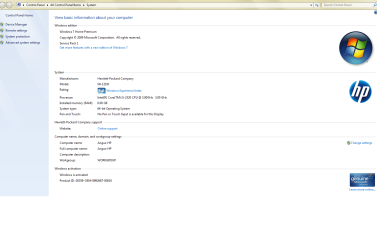
winows seven information

as requested here is the windows seven screenshot.
 

Attachments

  • windows seven information.png
    windows seven information.png
    51.2 KB · Views: 4

My Computer

Computer type
PC/Desktop
Computer Manufacturer/Model Number
HP
OS
Windows 7 64 bit
CPU
intel core i5
Motherboard
pegatron abs
Memory
DDR3 6144 MGBYTES
Graphics Card(s)
HP w2408 on AMD Radeon HD 7570
Hard Drives
SEAGATE
Antivirus
NORTON
Browser
EXPLORER 64 BIY
Thank you for the picture.
I just wanted to be sure you had the operating system you should have after the tech was there.

MilesAhead is correct you do not want to run Malwarebytes in compatible mode.
Their is absolutely no need for that. I do wonder how compatible mode got selected.
 

My Computer

Computer type
PC/Desktop
Computer Manufacturer/Model Number
Home made Desktop
OS
Windows 10 Pro. 64/ version 1709 Windows 7 Pro/64
CPU
Intel i7-6800K @ 4.3
Motherboard
ASUS X-99 Deluxe II
Memory
Corsair Platinum 16 gig @2400
Graphics Card(s)
EVGA GTX 1070 OC
Monitor(s) Displays
Asus 27" LED LCD/VE278Q
Screen Resolution
1920-1080 or 1280-720 HDMI
Hard Drives
INTEL SSD 730-240 Gb Sata 3.0/
PSU
EVGA Platium 1200W
Case
Phanteks Luxe Tempered Glass 8 fans/ one radiator
Cooling
XSPC/ Water Cooled CPU
Keyboard
Das 4 Professional
Mouse
Logitech M705/MX Anywhere 2-S
Internet Speed
100 mbits
Antivirus
Microsoft Security Essentials/ Malwarebytes Premium 3.0/ SAS
Browser
I.E. 11 default/Firefox/ ISP Time Warner Cable/Spectrum
Other Info
LG BluRay Burner/
Sound system-KLipsch-THX/
Icy Dock ssd Hot Swap bays.
This morning I gave a technician access to my computer and he reviewed my files and offered me a service for $190,

Hi,
Where did you find this tech ?
Post a link to their site,
Cheers.
 

My Computer

Computer type
PC/Desktop
Computer Manufacturer/Model Number
Custom assembled by me :}
OS
Win-7-Pro64bit 7-H-Prem-64bit
CPU
i7-5930K 2nd i9-9940x both water blocked VRM's too
Motherboard
ASUS SABERTOOTH X99 2nd ASUS x299 Apex
Memory
Trident-z 3200C14 2nd Trident-z 3600C16
Graphics Card(s)
EVGA 1080ti ftw3 2nd Titan Xp both water blocked
Sound Card
Built-in Realtek
Monitor(s) Displays
1-AOC G2460PG 24"G-Sync 144Hz/ 2nd 1-ASUS VG248QE 24" 144Hz
Screen Resolution
1920 x 1080 144Hz
Hard Drives
2-Samsung M.2 Evo & Evo Plus
2-Samsung 850 EVO 500GB SSD's/ 3-2.5 W.D. Black 1tb-&3-1tb/3-3.5 WD Black 1tb hdd's
PSU
EVGA SuperNOVA 1000-P2 2nd 1200-P2
Case
2-Corsair Obsidian Series 450D Black ATX Mid Tower
Cooling
Custom water loops
Keyboard
Logitech G710+/ 2nd Logitech G910
Mouse
2-RedDragon M901 Perdition 16400 dpi Gaming mouse = wired
Internet Speed
Comcast Ping 19ms 89.31mbps download speed 6.12mbps upload
Antivirus
Malwarebytes Pro/ Superantispyware Pro
Browser
FireFox & Pale moon
Other Info
2nd ASUS X299 Apex/Intel i9-9940x with Custom water loop/7H-Prem-x64/Corsair 450D case/Ram Trident-z 3600C16 4x8gb / Samsung970Evo plus 500gb SSD/Dual ssd EZ swap evo/PSU EVGA SuperNova 1200w-P2 80+Platinum/GPU Titan Xp /8-ML-140 on push-pull on 2-280GTX rads

My Computer

Computer type
PC/Desktop
Computer Manufacturer/Model Number
Home Built Desktop By DataTech
OS
Windows 7 Ultimate X64 SP1
CPU
Intel i5-2550K, Differing ~4.4-4.8GHz No built in GPU
Motherboard
ASUS P8Z68-V PRO/GEN3
Memory
16GB G.Skill Sniper 1866MHz @ 2133MHz 2x8GB
Graphics Card(s)
ASUS GTX650TIB-DC2OC-2GD5, (650TI Boost)
Sound Card
Onboard Realtek 5-1
Monitor(s) Displays
Samsung P2570HD
Screen Resolution
1920x1080
Hard Drives
Samsung 840 Pro 256GB SSD for OS, 500GB Seagate Constellation (Enterprise drive) for Data
PSU
Corsair HX650W
Case
Inwin Dragon Rider
Cooling
Hyper 212 EVO w/two Noctua fans, push-pull, @1300 RPM
Keyboard
E-Z Eyes, bright yellow keys with large characters
Mouse
steelseries SENSEI Laser Pro Gaming
Internet Speed
48-51Mbs Mbs down, 11 Mbs up Xfinity Cable
Antivirus
Norton Internet Security 2013
Browser
IE 10, Opera, Pale Moon if needed
Other Info
4 case fans, LG BluRay-RE, ASUS DVD-RW, Mr. Fusion power supply, 1.21 gigawatts.
I was looking for Netgear to get advice regarding setting up their product: basically it is so hot in my home office upstairs that I have to relocate my desktop downstairs. So I bought the Netgear product, which comprises two modules. One is connected to the Linskys router upstairs and it plugs into the wall socket upstairs. The second is a module that plugs into the socket downstairs and you can use it connected or wirelessly to my desktop. It is a more reliable way of using the home network. By that I mean you do not lose the signal and, if I did I could connect hard-wired, to the wall module downstairs. That is what I am up to. Do you follow? I wanted to ask Netgear a question and called a number that appeared to be Netgear. So I got a big sales pitch about their sevice......................so maybe he did alter the setting.

Following post #10 I am now up and running with the program and it is set up properly as advised above (no compatibility setting)
 

My Computer

Computer type
PC/Desktop
Computer Manufacturer/Model Number
HP
OS
Windows 7 64 bit
CPU
intel core i5
Motherboard
pegatron abs
Memory
DDR3 6144 MGBYTES
Graphics Card(s)
HP w2408 on AMD Radeon HD 7570
Hard Drives
SEAGATE
Antivirus
NORTON
Browser
EXPLORER 64 BIY
Back
Top