Malicious Software Removal Tool 5.45 released

Brink

Administrator
Staff member
Local time
6:40 AM
Messages
74,808
Location
Oklahoma
In September 2016, we started adding to Microsoft Malicious Software Removal Tool (MSRT) a malware suite of browser modifiers and other Trojans installed by software bundlers. We documented how the malware in this group install other malware or applications silently, without your consent. This behavior ticks boxes in the evaluation criteria that Microsoft Malware Protection Center (MMPC) uses for identifying unwanted software. Installing software without your permission, interaction, or consent is considered unwanted behavior because that can take away the choice you should have in determining what applications to install on your computer.

By October 2016, MSRT detected and removed most of the malware families in this suite:

  • Sasquor, which changes browser search and homepage settings to circumvent the browser’s supported methods and bypass your consent, and can install other malware like Xadupi and Suweezy
  • SupTab, which also changes browser search and homepage settings, and installs services and scheduled tasks that regularly install additional malware
  • Suweezy, which attempts to modify settings for various antivirus software, including Windows Defender, creating a significant danger to your computer’s overall security
  • Xadupi, which registers a service that regularly installs other apps, including Ghokswa and SupTab, and is ostensibly an update service for an app that has some user-facing functionality: CornerSunshine displays weather information on the taskbar, WinZipper can open and extract archive files, and QKSee can be used to view image files
  • Ghokswa, which installs a customized version of Chrome or Firefox browsers, modifying the home page and search engine front-end or stopping processes and replacing shortcuts and associations for the legitimate browser with ones pointing to its own version
This month, we’re adding Chuckenit, the last remaining malware in this group, to MSRT, helping make sure the whole suite is detected and removed from your computer and doesn’t interfere with your computing experience.

Chuckenit is an application called “Uncheckit”, whose main purpose is to uncheck checkboxes in installation dialogue boxes, effectively messing with choices without your knowledge during installation.

Chuckenit is installed together with Suptab and Ghokswa when Xadupi downloads and installs updates. Xadupi, meanwhile is installed by Sasquor, although it may also be installed directly by software bundlers.

chuckenit-infection_chart1.jpg


Figure 1. Chuckenit is installed silently by Xadupi, which is installed by Sasquor.

chuckenit-infection_chart2.jpg


Figure 2. Xadupi may also be installed directly by software bundlers, such as ICLoader.

Similar to the other malware in this suite, as part of its installation, Chuckenit adds several Scheduled Tasks and registers a couple of services to automatically download updates, which may come with other applications or malware.

Since May 2016, Windows Defender has encountered this threat in over 418,000 computers, of which 12% are in Brazil, 7% are in India, and 7% are in Russia.

Chuckenit-country.png


Figure 3. Geographic distribution of Chuckenit encounters

Prevention, detection, and recovery

Chuckenit is part of an infection chain that involves malware and software bundlers silently installing other applications. You need security solutions that detect and remove all components of this type of infection.

Ensure you get the latest protection from Microsoft. Keep your Windows operating system and antivirus up-to-date and, if you haven’t already, upgrade to Windows 10.

Ensure your antimalware protection, such as Windows Defender and Microsoft Malicious Software Removal Tool, is up-to-date. In Windows Defender, you can check your exclusion settings to see whether the malware added some entries in an attempt to exclude folders from being scanned. To check and remove excluded items in Windows Defender: Navigate to Settings > Update & security > Windows Defender > Add an exclusion. Go through the lists under Files and File locations, select the excluded item that you want to remove, and click Remove. Click OK to confirm.

Use cloud protection to get protection against the latest malware threats. It’s turned on by default for Microsoft Security Essentials and Windows Defender for Windows 10. Go to Settings > Update & security > Windows Defender and make sure that your Cloud-based Protection settings is turned On.

Use the Settings app to reset to Microsoft recommended defaults that may have been changed by the malware in this suite. Launch the Settings app. Navigate to the Default apps page. From Home go to System > Default apps, then click Reset.

For enterprises, use Device Guard, which can lock down devices and provide kernel-level virtualization-based security, allowing only trusted applications to run.

Use Windows Defender Advanced Threat Protection to get alerts about suspicious activities, including the download of malware, so you can detect, investigate, and respond to attacks in enterprise networks. Evaluate Windows Defender Advanced Threat Protection for free.

James Patrick Dee

MMPC


Source: https://blogs.technet.microsoft.com...ompletes-msrt-solution-for-one-malware-suite/


See also:
 

My Computer

Computer type
PC/Desktop
Computer Manufacturer/Model Number
Self built custom
OS
64-bit Windows 11 Pro for Workstations
CPU
Intel i7-8700K OC'd to 5 GHz
Motherboard
ASUS ROG Maximus XI Formula Z390
Memory
64 GB (4x16GB) G.SKILL TridentZ RGB DDR4 3600 MHz
Graphics Card(s)
ASUS ROG-STRIX-GTX1080TI-O11G-GAMING
Sound Card
Integrated
Monitor(s) Displays
2 x Samsung Odyssey G7 27"
Screen Resolution
2560x1440
Hard Drives
1TB Samsung 990 PRO M.2,
4TB Samsung 990 PRO PRO M.2,
TerraMaster F8 SSD Plus NAS
PSU
Seasonic Prime Titanium 850W
Case
Thermaltake Core P3
Cooling
Corsair Hydro H115i
Keyboard
Logitech wireless K800
Mouse
Logitech MX Master 4
Internet Speed
2 Gb/s Download and 100 Mb/s Upload
Antivirus
Malwarebyte Anti-Malware Premium
Browser
Google Chrome
Other Info
Logitech Z625 speaker system,
Logitech BRIO 4K Pro webcam,
HP Color LaserJet Pro MFP M477fdn,
APC SMART-UPS RT 1000 XL - SURT1000XLI,
Galaxy S23 Plus phone
Hi Shawn, I just installed this but it gives no part number.

Capture.PNG
 

My Computer

Computer Manufacturer/Model Number
Look in my Signature.
OS
Win7 H.Prem. 32bit+SP1

My Computer

Computer type
PC/Desktop
Computer Manufacturer/Model Number
Self built custom
OS
64-bit Windows 11 Pro for Workstations
CPU
Intel i7-8700K OC'd to 5 GHz
Motherboard
ASUS ROG Maximus XI Formula Z390
Memory
64 GB (4x16GB) G.SKILL TridentZ RGB DDR4 3600 MHz
Graphics Card(s)
ASUS ROG-STRIX-GTX1080TI-O11G-GAMING
Sound Card
Integrated
Monitor(s) Displays
2 x Samsung Odyssey G7 27"
Screen Resolution
2560x1440
Hard Drives
1TB Samsung 990 PRO M.2,
4TB Samsung 990 PRO PRO M.2,
TerraMaster F8 SSD Plus NAS
PSU
Seasonic Prime Titanium 850W
Case
Thermaltake Core P3
Cooling
Corsair Hydro H115i
Keyboard
Logitech wireless K800
Mouse
Logitech MX Master 4
Internet Speed
2 Gb/s Download and 100 Mb/s Upload
Antivirus
Malwarebyte Anti-Malware Premium
Browser
Google Chrome
Other Info
Logitech Z625 speaker system,
Logitech BRIO 4K Pro webcam,
HP Color LaserJet Pro MFP M477fdn,
APC SMART-UPS RT 1000 XL - SURT1000XLI,
Galaxy S23 Plus phone
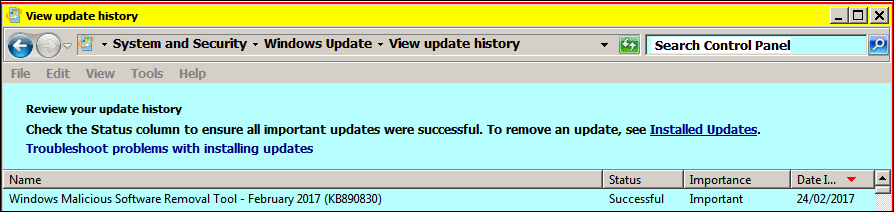
Hi Shawn, your instruction yielded only the version as Feb. 2017
 

My Computer

Computer Manufacturer/Model Number
Look in my Signature.
OS
Win7 H.Prem. 32bit+SP1
That would be for this version though. :)
 

My Computer

Computer type
PC/Desktop
Computer Manufacturer/Model Number
Self built custom
OS
64-bit Windows 11 Pro for Workstations
CPU
Intel i7-8700K OC'd to 5 GHz
Motherboard
ASUS ROG Maximus XI Formula Z390
Memory
64 GB (4x16GB) G.SKILL TridentZ RGB DDR4 3600 MHz
Graphics Card(s)
ASUS ROG-STRIX-GTX1080TI-O11G-GAMING
Sound Card
Integrated
Monitor(s) Displays
2 x Samsung Odyssey G7 27"
Screen Resolution
2560x1440
Hard Drives
1TB Samsung 990 PRO M.2,
4TB Samsung 990 PRO PRO M.2,
TerraMaster F8 SSD Plus NAS
PSU
Seasonic Prime Titanium 850W
Case
Thermaltake Core P3
Cooling
Corsair Hydro H115i
Keyboard
Logitech wireless K800
Mouse
Logitech MX Master 4
Internet Speed
2 Gb/s Download and 100 Mb/s Upload
Antivirus
Malwarebyte Anti-Malware Premium
Browser
Google Chrome
Other Info
Logitech Z625 speaker system,
Logitech BRIO 4K Pro webcam,
HP Color LaserJet Pro MFP M477fdn,
APC SMART-UPS RT 1000 XL - SURT1000XLI,
Galaxy S23 Plus phone
My simple thoughts.

Microsoft MRT is offered every month through Windows 7 Updates. It is a updated version every month.
I personally download it and use it every month.

Once the update is downloaded all one has to do is go to Start orb and type (MRT) and you will find it.
Tick on it and select it. Follow the on screen instruction. I always do Full Scans.
You will get a report at the end of the scan.

One can use (MRT) as many times as one cares to.
Every month a updated version will be offered through Windows 7 Updates and you can just download it and use it until the next offering. You don't have to remove the older version. (MRT) takes care of that when the new (MRT) is installed.
(MRT) is a user (On Demand program). It does not monitor your systems as a active Anti Virus program does.

Using (MRT) has never caused my systems a problem.
(MRT) is free from Microsoft, easy to install, easy to use. Just another layer of security to be added to the war chest against the bad guys.

Jack
 

My Computer

Computer type
PC/Desktop
Computer Manufacturer/Model Number
Home made Desktop
OS
Windows 10 Pro. 64/ version 1709 Windows 7 Pro/64
CPU
Intel i7-6800K @ 4.3
Motherboard
ASUS X-99 Deluxe II
Memory
Corsair Platinum 16 gig @2400
Graphics Card(s)
EVGA GTX 1070 OC
Monitor(s) Displays
Asus 27" LED LCD/VE278Q
Screen Resolution
1920-1080 or 1280-720 HDMI
Hard Drives
INTEL SSD 730-240 Gb Sata 3.0/
PSU
EVGA Platium 1200W
Case
Phanteks Luxe Tempered Glass 8 fans/ one radiator
Cooling
XSPC/ Water Cooled CPU
Keyboard
Das 4 Professional
Mouse
Logitech M705/MX Anywhere 2-S
Internet Speed
100 mbits
Antivirus
Microsoft Security Essentials/ Malwarebytes Premium 3.0/ SAS
Browser
I.E. 11 default/Firefox/ ISP Time Warner Cable/Spectrum
Other Info
LG BluRay Burner/
Sound system-KLipsch-THX/
Icy Dock ssd Hot Swap bays.
:thumbsup:
 

My Computer

Computer type
PC/Desktop
Computer Manufacturer/Model Number
Self built custom
OS
64-bit Windows 11 Pro for Workstations
CPU
Intel i7-8700K OC'd to 5 GHz
Motherboard
ASUS ROG Maximus XI Formula Z390
Memory
64 GB (4x16GB) G.SKILL TridentZ RGB DDR4 3600 MHz
Graphics Card(s)
ASUS ROG-STRIX-GTX1080TI-O11G-GAMING
Sound Card
Integrated
Monitor(s) Displays
2 x Samsung Odyssey G7 27"
Screen Resolution
2560x1440
Hard Drives
1TB Samsung 990 PRO M.2,
4TB Samsung 990 PRO PRO M.2,
TerraMaster F8 SSD Plus NAS
PSU
Seasonic Prime Titanium 850W
Case
Thermaltake Core P3
Cooling
Corsair Hydro H115i
Keyboard
Logitech wireless K800
Mouse
Logitech MX Master 4
Internet Speed
2 Gb/s Download and 100 Mb/s Upload
Antivirus
Malwarebyte Anti-Malware Premium
Browser
Google Chrome
Other Info
Logitech Z625 speaker system,
Logitech BRIO 4K Pro webcam,
HP Color LaserJet Pro MFP M477fdn,
APC SMART-UPS RT 1000 XL - SURT1000XLI,
Galaxy S23 Plus phone
When you say part number do you mean the build number?

That can be found in your log file after MSRT is run through either Windows Update or manually as mentioned. C:\Windows\Debug\mrt.log
 

Attachments

  • MRT Log.png
    MRT Log.png
    6.4 KB · Views: 58

My Computer

Computer type
PC/Desktop
OS
Windows 7 Home 64-bit
Hi,
Yep never used it and I doubt I ever will :)
 

My Computer

Computer type
PC/Desktop
Computer Manufacturer/Model Number
Custom assembled by me :}
OS
Win-7-Pro64bit 7-H-Prem-64bit
CPU
i7-5930K 2nd i9-9940x both water blocked VRM's too
Motherboard
ASUS SABERTOOTH X99 2nd ASUS x299 Apex
Memory
Trident-z 3200C14 2nd Trident-z 3600C16
Graphics Card(s)
EVGA 1080ti ftw3 2nd Titan Xp both water blocked
Sound Card
Built-in Realtek
Monitor(s) Displays
1-AOC G2460PG 24"G-Sync 144Hz/ 2nd 1-ASUS VG248QE 24" 144Hz
Screen Resolution
1920 x 1080 144Hz
Hard Drives
2-Samsung M.2 Evo & Evo Plus
2-Samsung 850 EVO 500GB SSD's/ 3-2.5 W.D. Black 1tb-&3-1tb/3-3.5 WD Black 1tb hdd's
PSU
EVGA SuperNOVA 1000-P2 2nd 1200-P2
Case
2-Corsair Obsidian Series 450D Black ATX Mid Tower
Cooling
Custom water loops
Keyboard
Logitech G710+/ 2nd Logitech G910
Mouse
2-RedDragon M901 Perdition 16400 dpi Gaming mouse = wired
Internet Speed
Comcast Ping 19ms 89.31mbps download speed 6.12mbps upload
Antivirus
Malwarebytes Pro/ Superantispyware Pro
Browser
FireFox & Pale moon
Other Info
2nd ASUS X299 Apex/Intel i9-9940x with Custom water loop/7H-Prem-x64/Corsair 450D case/Ram Trident-z 3600C16 4x8gb / Samsung970Evo plus 500gb SSD/Dual ssd EZ swap evo/PSU EVGA SuperNova 1200w-P2 80+Platinum/GPU Titan Xp /8-ML-140 on push-pull on 2-280GTX rads
My simple thoughts.

Microsoft MRT is offered every month through Windows 7 Updates. It is a updated version every month.
I personally download it and use it every month.

Once the update is downloaded all one has to do is go to Start orb and type (MRT) and you will find it.
Tick on it and select it. Follow the on screen instruction. I always do Full Scans.
You will get a report at the end of the scan.

One can use (MRT) as many times as one cares to.
Every month a updated version will be offered through Windows 7 Updates and you can just download it and use it until the next offering. You don't have to remove the older version. (MRT) takes care of that when the new (MRT) is installed.
(MRT) is a user (On Demand program). It does not monitor your systems as a active Anti Virus program does.

Using (MRT) has never caused my systems a problem.
(MRT) is free from Microsoft, easy to install, easy to use. Just another layer of security to be added to the war chest against the bad guys.

Jack

When you say "MRT" do you mean "MSRT"?

I believe your manual method of scanning is only required for the full scan, and that a quick scan is automatically run in the background when you download/install the update with a message only appearing if it finds something - is that correct?
 

My Computer

Computer type
PC/Desktop
Computer Manufacturer/Model Number
Custom build by PC Specialist
OS
Windows 7 Home Premium 64
CPU
AMD Phenom II X4 955
Motherboard
Asus M4A78T-E
Memory
8GB Corsair XMS3 DDR3
Graphics Card(s)
Gigabyte Geforce GTX 960 2GB
Sound Card
SB Audigy
Monitor(s) Displays
BenQ 24"
Screen Resolution
1920 x 1080
Hard Drives
500GB Serial ATA
PSU
1010W Quiet Quad Rail
Case
Antec 900
Cooling
Fenrir
Keyboard
Corsair
Mouse
Logitech
Internet Speed
20mbps
Antivirus
MSE plus MBAM 2.x Free
Browser
Chrome
Other Info
Second desktop different spec but similar level.
When you say "MRT" do you mean "MSRT"?

I believe your manual method of scanning is only required for the full scan, and that a quick scan is automatically run in the background when you download/install the update with a message only appearing if it finds something - is that correct?

As far as I know MRT is downloaded with windows updates and runs automatically once per month with no user intervention. You can stop it from being offered and downloaded with a registry tweak.

Tweak: Not recommended as allowing MRT to download and run automatically increases security.

Code:
Windows Registry Editor Version 5.00

[HKEY_LOCAL_MACHINE\SOFTWARE\Policies\Microsoft\MRT]
"DontOfferThroughWUAU"=dword:00000001

http://www.microsoft.com/en-us/download/malicious-software-removal-tool-details.aspx

To have the newest versions automatically delivered and installed as soon as they are released, set the Automatic Updates feature to Automatic. The version of this tool delivered by Windows Update runs on your computer once a month, in the background. If an infection is found, the tool will display a status report the next time you start your computer. If you would like to run this tool more than once a month, run the version that is available from this Web page or use the version on the Malicious Software Removal Tool Web site.

msert.exe is Microsoft Safety Scanner. Run on demand with no automatic updates. If you need a new version you have to download it. Not sure what msrt is.

https://www.microsoft.com/security/scanner/
 
Last edited:

My Computer

Computer type
Laptop
Computer Manufacturer/Model Number
ASUS
OS
Microsoft Windows 7 Home Premium 64-bit 7601 Multiprocessor Free Service Pack 1
CPU
AMD C-60 APU with Radeon(tm) HD Graphics
Motherboard
ASUSTeK COMPUTER INC. X501U
Memory
4.00 GB
Graphics Card(s)
AMD Radeon HD 6290 Graphics
Sound Card
(1) AMD High Definition Audio Device (2) Realtek High Defi
Screen Resolution
1366 x 768 x 32 bits (4294967296 colors) @ 60 Hz
Hard Drives
Hitachi HTS545050A7E380 SATA Disk Device
Antivirus
Comodo CIS & FW, SecureAplus App Whitelisting, Threatfire
Browser
Cyberfox 64bit, Opera 64bit, Airfox
Other Info
Spy-The-Spy, HitmanPro.Alert, Norton Connect Safe, MJRegWatcher, BitDefender TrafficLight, Voodoo Shield, Zemana AntiMalware
As far as I know MRT is downloaded with windows updates and runs automatically once per month with no user intervention. You can stop it from being offered and downloaded with a registry tweak.

http://www.microsoft.com/en-us/download/malicious-software-removal-tool-details.aspx


msert.exe is Microsoft Safety Scanner. Run on demand with no automatic updates. If you need a new version you have to download it. Not sure what msrt is.

https://www.microsoft.com/security/scanner/

"MSRT" is what this topic is about - the Malicious Software Removal Tool. It would seem that some also know it as the "MRT" which I assume is supposed to stand for the Malware Removal Tool but that's what I was seeking to clarify as I hadn't seen it referred to as that before.
 

My Computer

Computer type
PC/Desktop
Computer Manufacturer/Model Number
Custom build by PC Specialist
OS
Windows 7 Home Premium 64
CPU
AMD Phenom II X4 955
Motherboard
Asus M4A78T-E
Memory
8GB Corsair XMS3 DDR3
Graphics Card(s)
Gigabyte Geforce GTX 960 2GB
Sound Card
SB Audigy
Monitor(s) Displays
BenQ 24"
Screen Resolution
1920 x 1080
Hard Drives
500GB Serial ATA
PSU
1010W Quiet Quad Rail
Case
Antec 900
Cooling
Fenrir
Keyboard
Corsair
Mouse
Logitech
Internet Speed
20mbps
Antivirus
MSE plus MBAM 2.x Free
Browser
Chrome
Other Info
Second desktop different spec but similar level.
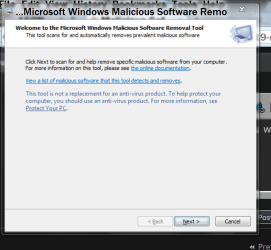
If one type (MRT) in the Start Orb Search you will get this when you tick on it.

CaptureMRT.PNG

Just tick on the (Next) and your on your way. No tricks needed. No command prompts needed. No registry tweaks or any other magic needed. Just tick Next and choose Full Scan.
Microsoft has made it a simple task to download, install and use.

Hopefully that will answer the word game problem.

Jack
 

My Computer

Computer type
PC/Desktop
Computer Manufacturer/Model Number
Home made Desktop
OS
Windows 10 Pro. 64/ version 1709 Windows 7 Pro/64
CPU
Intel i7-6800K @ 4.3
Motherboard
ASUS X-99 Deluxe II
Memory
Corsair Platinum 16 gig @2400
Graphics Card(s)
EVGA GTX 1070 OC
Monitor(s) Displays
Asus 27" LED LCD/VE278Q
Screen Resolution
1920-1080 or 1280-720 HDMI
Hard Drives
INTEL SSD 730-240 Gb Sata 3.0/
PSU
EVGA Platium 1200W
Case
Phanteks Luxe Tempered Glass 8 fans/ one radiator
Cooling
XSPC/ Water Cooled CPU
Keyboard
Das 4 Professional
Mouse
Logitech M705/MX Anywhere 2-S
Internet Speed
100 mbits
Antivirus
Microsoft Security Essentials/ Malwarebytes Premium 3.0/ SAS
Browser
I.E. 11 default/Firefox/ ISP Time Warner Cable/Spectrum
Other Info
LG BluRay Burner/
Sound system-KLipsch-THX/
Icy Dock ssd Hot Swap bays.
Back
Top