Malware.Trace detected

ROBO731

New member
Member
VIP
Local time
10:26 AM
Messages
223
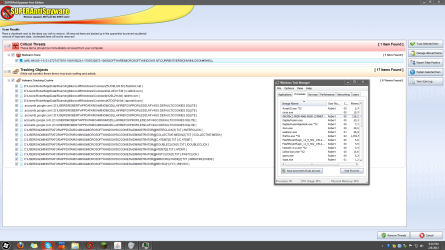
SuperAntiSpyware detected a threat called Malware.Trace in the registry. The locations is:

HKEY_USERS\S-1-5-21-2727477870-1681592241-1705532872-1000\SOFTWARE\MICROSOFT\WINDOWS NT\CURRENTVERSION\WINLOGON\SHELL

Several google results were saying that it's something that appears to be a legitimate antivirus. The antivirus software that I have installed now are SuperAntiSpyware, Avast, and MalwareBytes. All the free versions. Another thing to note is that when I launch Minecraft.exe Avast blocks a threat from quantserve. This just started happening in the past few days. I must have gotten this virus in this past week since I do antivirus scans and backups every week. Also, I see some strange process running. Here's a picture of the results. You can see the process on the right. I haven't removed the threat yet, in case there's some kind of specific way I should get rid of this. please help me out.

Capture.PNG
 

My Computer

OS
Windows 7 Home Premium x64
CPU
Intel i7-2600K
Motherboard
ASUS Sabertooth Z77
Memory
G.SKILL Ripjaws (16 GB Total)
Graphics Card(s)
EVGA GeForce GTX 560 Ti
Monitor(s) Displays
ASUS
Screen Resolution
1920x1080 (2 Monitors)
Hard Drives
Hitachi GST Deskstar 2 TB (HDD)
Samsung 840 Pro 256 GB (SSD)
PSU
SeaSonic X Series X650 Gold
Case
Antec DF 85
Keyboard
Microsoft SideWinder X4
Mouse
MadCatz M.M.O. 7 & Logitech G35
Internet Speed
50 down
Antivirus
Avast Free, SuperAntiSpyware Free, Malwarebytes Free
Browser
Mozilla Firefox

My Computer

Computer type
PC/Desktop
Computer Manufacturer/Model Number
Golden Mk. I.4
OS
Windows 10 Pro x64 ; Xubuntu x64
CPU
Intel i7 860 @ 2.80 GHz O/C'ed to 4.0GHz
Motherboard
Gigabyte P55A-UD3R Rev.1. Award BIOS F13
Memory
16GB Corsair Vengance DDR3 @ 661 MHz Dual Channel (9-9-9-24)
Graphics Card(s)
EVGA NVidia GTX 560 1024MB
Sound Card
Realtek Integrated
Monitor(s) Displays
Dual Samsung SyncMaster 2494HS
Screen Resolution
1920*1080 and 1920*1080
Hard Drives
1*Samsung 840 EVO 120GB SSD;
1*OCZ Vertex 2 60GB SSD;
2*Samsung F3 SpinPoint 1TB in RAID0;
1*Samsung F1 SpinPoint 1TB;
2*Western Digital 1TB External USB 3.0
1*Western Digital 500GB External USB 3.0
1*Seagate 500GB External USB 2.0
PSU
Thermaltake ToughPower QFan 750W
Case
Thermaltake Element S VK60001W2Z
Cooling
Corsair H60 Water Cooling, 2*230mm and 2*80mm case fans
Keyboard
Logitech G110
Mouse
Logitech MX518
So I should remove this with windows offline defender, not superantispyware? Also, I see a folder on my second drive, my hard drive called msdownload.tmp I'm not sure what it is, but it's a hidden folder with no files in it. Can you tell me what this virus is exactly?
 

My Computer

OS
Windows 7 Home Premium x64
CPU
Intel i7-2600K
Motherboard
ASUS Sabertooth Z77
Memory
G.SKILL Ripjaws (16 GB Total)
Graphics Card(s)
EVGA GeForce GTX 560 Ti
Monitor(s) Displays
ASUS
Screen Resolution
1920x1080 (2 Monitors)
Hard Drives
Hitachi GST Deskstar 2 TB (HDD)
Samsung 840 Pro 256 GB (SSD)
PSU
SeaSonic X Series X650 Gold
Case
Antec DF 85
Keyboard
Microsoft SideWinder X4
Mouse
MadCatz M.M.O. 7 & Logitech G35
Internet Speed
50 down
Antivirus
Avast Free, SuperAntiSpyware Free, Malwarebytes Free
Browser
Mozilla Firefox
I would use Windows Defender Offline, since it scans from outside the Windows boot environment.

Leave msdownload.tmp alone - it looks like a temporary folder for Windows downloads. Don't attempt to manually remove anything unless you know what you are doing.
 

My Computer

Computer type
PC/Desktop
Computer Manufacturer/Model Number
Golden Mk. I.4
OS
Windows 10 Pro x64 ; Xubuntu x64
CPU
Intel i7 860 @ 2.80 GHz O/C'ed to 4.0GHz
Motherboard
Gigabyte P55A-UD3R Rev.1. Award BIOS F13
Memory
16GB Corsair Vengance DDR3 @ 661 MHz Dual Channel (9-9-9-24)
Graphics Card(s)
EVGA NVidia GTX 560 1024MB
Sound Card
Realtek Integrated
Monitor(s) Displays
Dual Samsung SyncMaster 2494HS
Screen Resolution
1920*1080 and 1920*1080
Hard Drives
1*Samsung 840 EVO 120GB SSD;
1*OCZ Vertex 2 60GB SSD;
2*Samsung F3 SpinPoint 1TB in RAID0;
1*Samsung F1 SpinPoint 1TB;
2*Western Digital 1TB External USB 3.0
1*Western Digital 500GB External USB 3.0
1*Seagate 500GB External USB 2.0
PSU
Thermaltake ToughPower QFan 750W
Case
Thermaltake Element S VK60001W2Z
Cooling
Corsair H60 Water Cooling, 2*230mm and 2*80mm case fans
Keyboard
Logitech G110
Mouse
Logitech MX518
Ok, So should I just remove it? Why link windows defender?
 

My Computer

OS
Windows 7 Home Premium x64
CPU
Intel i7-2600K
Motherboard
ASUS Sabertooth Z77
Memory
G.SKILL Ripjaws (16 GB Total)
Graphics Card(s)
EVGA GeForce GTX 560 Ti
Monitor(s) Displays
ASUS
Screen Resolution
1920x1080 (2 Monitors)
Hard Drives
Hitachi GST Deskstar 2 TB (HDD)
Samsung 840 Pro 256 GB (SSD)
PSU
SeaSonic X Series X650 Gold
Case
Antec DF 85
Keyboard
Microsoft SideWinder X4
Mouse
MadCatz M.M.O. 7 & Logitech G35
Internet Speed
50 down
Antivirus
Avast Free, SuperAntiSpyware Free, Malwarebytes Free
Browser
Mozilla Firefox

My Computer

Computer type
PC/Desktop
Computer Manufacturer/Model Number
Home made Desktop
OS
Windows 10 Pro. 64/ version 1709 Windows 7 Pro/64
CPU
Intel i7-6800K @ 4.3
Motherboard
ASUS X-99 Deluxe II
Memory
Corsair Platinum 16 gig @2400
Graphics Card(s)
EVGA GTX 1070 OC
Monitor(s) Displays
Asus 27" LED LCD/VE278Q
Screen Resolution
1920-1080 or 1280-720 HDMI
Hard Drives
INTEL SSD 730-240 Gb Sata 3.0/
PSU
EVGA Platium 1200W
Case
Phanteks Luxe Tempered Glass 8 fans/ one radiator
Cooling
XSPC/ Water Cooled CPU
Keyboard
Das 4 Professional
Mouse
Logitech M705/MX Anywhere 2-S
Internet Speed
100 mbits
Antivirus
Microsoft Security Essentials/ Malwarebytes Premium 3.0/ SAS
Browser
I.E. 11 default/Firefox/ ISP Time Warner Cable/Spectrum
Other Info
LG BluRay Burner/
Sound system-KLipsch-THX/
Icy Dock ssd Hot Swap bays.
ROBO731,

Let's take a look at your system and see where Malware.Trace (aka: TraceSweeper) is found...

Please download OTL, by Old Timer:
http://oldtimer.geekstogo.com/OTL.exe

Save to the Desktop.
  • Double-click on OTL.exe to run it.
  • Under Output, select: Minimal Output
  • Under Extra Registry section, select: Use SafeList
  • Click: Scan All Users
  • Click: Run Scan at the top left.

When done, two Notepad files open with reports:
  • OTL.txt <-- Opens on Desktop
  • Extra.txt <-- Minimized, and seen on the Taskbar (Save on your Desktop for now)
Please post the contents of OTL.txt and Extra.txt in your reply.
 

My Computer

Computer type
PC/Desktop
Computer Manufacturer/Model Number
An ol' eMachines
OS
Windows 7 Home Premium
Internet Speed
Fine for me...I'm retired!
I'm running the scan now. I appreciate the help. I'll post the logs as soon as it's done.
 

My Computer

OS
Windows 7 Home Premium x64
CPU
Intel i7-2600K
Motherboard
ASUS Sabertooth Z77
Memory
G.SKILL Ripjaws (16 GB Total)
Graphics Card(s)
EVGA GeForce GTX 560 Ti
Monitor(s) Displays
ASUS
Screen Resolution
1920x1080 (2 Monitors)
Hard Drives
Hitachi GST Deskstar 2 TB (HDD)
Samsung 840 Pro 256 GB (SSD)
PSU
SeaSonic X Series X650 Gold
Case
Antec DF 85
Keyboard
Microsoft SideWinder X4
Mouse
MadCatz M.M.O. 7 & Logitech G35
Internet Speed
50 down
Antivirus
Avast Free, SuperAntiSpyware Free, Malwarebytes Free
Browser
Mozilla Firefox

My Computer

OS
Windows 7 Home Premium x64
CPU
Intel i7-2600K
Motherboard
ASUS Sabertooth Z77
Memory
G.SKILL Ripjaws (16 GB Total)
Graphics Card(s)
EVGA GeForce GTX 560 Ti
Monitor(s) Displays
ASUS
Screen Resolution
1920x1080 (2 Monitors)
Hard Drives
Hitachi GST Deskstar 2 TB (HDD)
Samsung 840 Pro 256 GB (SSD)
PSU
SeaSonic X Series X650 Gold
Case
Antec DF 85
Keyboard
Microsoft SideWinder X4
Mouse
MadCatz M.M.O. 7 & Logitech G35
Internet Speed
50 down
Antivirus
Avast Free, SuperAntiSpyware Free, Malwarebytes Free
Browser
Mozilla Firefox
Please download RogueKiller:
Tlcharger RogueKiller (Site Officiel)

When you get to the website, go to where it says:
(Download link) Lien de téléchargement:

Select the version that applies to your system: x64

Click the dark-blue button that applies to download.

Save to the Desktop

Close all windows and browsers
Right-click RogueKiller and select 'Run as Administrator'

Press: SCAN

A report opens on the Desktop: RKreport.txt

Please provide the RKreport.txt (Mode: Scan) in your reply.

(Pleas,e do not delete anything!)
 

My Computer

Computer type
PC/Desktop
Computer Manufacturer/Model Number
An ol' eMachines
OS
Windows 7 Home Premium
Internet Speed
Fine for me...I'm retired!
Okay, here's RKreport.txt:

RogueKiller V8.5.0 _x64_ [Feb 9 2013] by Tigzy
mail : tigzyRK<at>gmail<dot>com
Feedback : RogueKiller - Geeks to Go Forums
Website : Download RogueKiller (Official website)
Blog : tigzy-RK

Operating System : Windows 7 (6.1.7601 Service Pack 1) 64 bits version
Started in : Normal mode
User : Robert [Admin rights]
Mode : Scan -- Date : 02/09/2013 09:20:45
| ARK || FAK || MBR |

¤¤¤ Bad processes : 2 ¤¤¤
[DLL] explorer.exe -- C:\Windows\explorer.exe : D:\Users\Robert\AppData\Roaming\DisplayFusion\AppHookx64_70547190-4ae9-43b8-953a-f8a0c797ac7d.dll -> UNLOADED
[DLL] explorer.exe -- C:\Windows\explorer.exe : D:\Users\Robert\AppData\Roaming\cubby\cubbyext64.dll -> UNLOADED

¤¤¤ Registry Entries : 3 ¤¤¤
[HJ SMENU] HKCU\[...]\Advanced : Start_TrackProgs (0) -> FOUND
[HJ DESK] HKLM\[...]\NewStartPanel : {59031a47-3f72-44a7-89c5-5595fe6b30ee} (1) -> FOUND
[HJ DESK] HKLM\[...]\NewStartPanel : {20D04FE0-3AEA-1069-A2D8-08002B30309D} (1) -> FOUND

¤¤¤ Particular Files / Folders: ¤¤¤

¤¤¤ Driver : [NOT LOADED] ¤¤¤

¤¤¤ HOSTS File: ¤¤¤
--> C:\Windows\system32\drivers\etc\hosts


¤¤¤ MBR Check: ¤¤¤

+++++ PhysicalDrive0: Hitachi HDS723020BLA642 +++++
--- User ---
[MBR] 4f296a3c0463f45a9444b47540b40911
[BSP] ab24fe509dac9c607954340e69f49db4 : Windows 7/8 MBR Code
Partition table:
0 - [XXXXXX] NTFS (0x07) [VISIBLE] Offset (sectors): 2048 | Size: 1907727 Mo
User = LL1 ... OK!
User = LL2 ... OK!

+++++ PhysicalDrive1: Samsung SSD 840 PRO Series ATA Device +++++
--- User ---
[MBR] bfc15a8d640833ded61a0621cdcda871
[BSP] 8ae3e0079353ece8d06f561fcdaf89b6 : Windows 7/8 MBR Code
Partition table:
0 - [ACTIVE] NTFS (0x07) [VISIBLE] Offset (sectors): 2048 | Size: 244196 Mo
User = LL1 ... OK!
User = LL2 ... OK!

Finished : << RKreport[1]_S_02092013_02d0920.txt >>
RKreport[1]_S_02092013_02d0920.txt


I didn't delete anything that it identified, but I removed the virus yesterday with superantispyware since golden had never responded. I apologize if that was a mistake and makes this more difficult.
 

My Computer

OS
Windows 7 Home Premium x64
CPU
Intel i7-2600K
Motherboard
ASUS Sabertooth Z77
Memory
G.SKILL Ripjaws (16 GB Total)
Graphics Card(s)
EVGA GeForce GTX 560 Ti
Monitor(s) Displays
ASUS
Screen Resolution
1920x1080 (2 Monitors)
Hard Drives
Hitachi GST Deskstar 2 TB (HDD)
Samsung 840 Pro 256 GB (SSD)
PSU
SeaSonic X Series X650 Gold
Case
Antec DF 85
Keyboard
Microsoft SideWinder X4
Mouse
MadCatz M.M.O. 7 & Logitech G35
Internet Speed
50 down
Antivirus
Avast Free, SuperAntiSpyware Free, Malwarebytes Free
Browser
Mozilla Firefox
Once again, right-click RogueKiller, and select: Run as Administrator
Wait until Prescan finishes

Click on: Scan
Wait until the Status box shows: Scan Finished
Then, press: Delete

Wait until the Status box shows: Deleting Finished

Please provide the new RKreport[1].txt (on your Desktop) in your reply.
 

My Computer

Computer type
PC/Desktop
Computer Manufacturer/Model Number
An ol' eMachines
OS
Windows 7 Home Premium
Internet Speed
Fine for me...I'm retired!
I have three new reports. I'll post them all.

RKreport[1].txt:

RogueKiller V8.5.0 _x64_ [Feb 9 2013] by Tigzy
mail : tigzyRK<at>gmail<dot>com
Feedback : RogueKiller - Geeks to Go Forums
Website : Download RogueKiller (Official website)
Blog : tigzy-RK

Operating System : Windows 7 (6.1.7601 Service Pack 1) 64 bits version
Started in : Normal mode
User : Robert [Admin rights]
Mode : Scan -- Date : 02/09/2013 09:20:45
| ARK || FAK || MBR |

¤¤¤ Bad processes : 2 ¤¤¤
[DLL] explorer.exe -- C:\Windows\explorer.exe : D:\Users\Robert\AppData\Roaming\DisplayFusion\AppHookx64_70547190-4ae9-43b8-953a-f8a0c797ac7d.dll -> UNLOADED
[DLL] explorer.exe -- C:\Windows\explorer.exe : D:\Users\Robert\AppData\Roaming\cubby\cubbyext64.dll -> UNLOADED

¤¤¤ Registry Entries : 3 ¤¤¤
[HJ SMENU] HKCU\[...]\Advanced : Start_TrackProgs (0) -> FOUND
[HJ DESK] HKLM\[...]\NewStartPanel : {59031a47-3f72-44a7-89c5-5595fe6b30ee} (1) -> FOUND
[HJ DESK] HKLM\[...]\NewStartPanel : {20D04FE0-3AEA-1069-A2D8-08002B30309D} (1) -> FOUND

¤¤¤ Particular Files / Folders: ¤¤¤

¤¤¤ Driver : [NOT LOADED] ¤¤¤

¤¤¤ HOSTS File: ¤¤¤
--> C:\Windows\system32\drivers\etc\hosts


¤¤¤ MBR Check: ¤¤¤

+++++ PhysicalDrive0: Hitachi HDS723020BLA642 +++++
--- User ---
[MBR] 4f296a3c0463f45a9444b47540b40911
[BSP] ab24fe509dac9c607954340e69f49db4 : Windows 7/8 MBR Code
Partition table:
0 - [XXXXXX] NTFS (0x07) [VISIBLE] Offset (sectors): 2048 | Size: 1907727 Mo
User = LL1 ... OK!
User = LL2 ... OK!

+++++ PhysicalDrive1: Samsung SSD 840 PRO Series ATA Device +++++
--- User ---
[MBR] bfc15a8d640833ded61a0621cdcda871
[BSP] 8ae3e0079353ece8d06f561fcdaf89b6 : Windows 7/8 MBR Code
Partition table:
0 - [ACTIVE] NTFS (0x07) [VISIBLE] Offset (sectors): 2048 | Size: 244196 Mo
User = LL1 ... OK!
User = LL2 ... OK!

Finished : << RKreport[1]_S_02092013_02d0920.txt >>
RKreport[1]_S_02092013_02d0920.txt


RKreport[2].txt:

RogueKiller V8.5.0 _x64_ [Feb 9 2013] by Tigzy
mail : tigzyRK<at>gmail<dot>com
Feedback : RogueKiller - Geeks to Go Forums
Website : Download RogueKiller (Official website)
Blog : tigzy-RK

Operating System : Windows 7 (6.1.7601 Service Pack 1) 64 bits version
Started in : Normal mode
User : Robert [Admin rights]
Mode : Scan -- Date : 02/09/2013 17:39:46
| ARK || FAK || MBR |

¤¤¤ Bad processes : 2 ¤¤¤
[DLL] explorer.exe -- C:\Windows\explorer.exe : D:\Users\Robert\AppData\Roaming\DisplayFusion\AppHookx64_70547190-4ae9-43b8-953a-f8a0c797ac7d.dll -> UNLOADED
[DLL] explorer.exe -- C:\Windows\explorer.exe : D:\Users\Robert\AppData\Roaming\cubby\cubbyext64.dll -> UNLOADED

¤¤¤ Registry Entries : 3 ¤¤¤
[HJ SMENU] HKCU\[...]\Advanced : Start_TrackProgs (0) -> FOUND
[HJ DESK] HKLM\[...]\NewStartPanel : {59031a47-3f72-44a7-89c5-5595fe6b30ee} (1) -> FOUND
[HJ DESK] HKLM\[...]\NewStartPanel : {20D04FE0-3AEA-1069-A2D8-08002B30309D} (1) -> FOUND

¤¤¤ Particular Files / Folders: ¤¤¤

¤¤¤ Driver : [NOT LOADED] ¤¤¤

¤¤¤ HOSTS File: ¤¤¤
--> C:\Windows\system32\drivers\etc\hosts


¤¤¤ MBR Check: ¤¤¤

+++++ PhysicalDrive0: Hitachi HDS723020BLA642 +++++
--- User ---
[MBR] 4f296a3c0463f45a9444b47540b40911
[BSP] ab24fe509dac9c607954340e69f49db4 : Windows 7/8 MBR Code
Partition table:
0 - [XXXXXX] NTFS (0x07) [VISIBLE] Offset (sectors): 2048 | Size: 1907727 Mo
User = LL1 ... OK!
User = LL2 ... OK!

+++++ PhysicalDrive1: Samsung SSD 840 PRO Series ATA Device +++++
--- User ---
[MBR] bfc15a8d640833ded61a0621cdcda871
[BSP] 8ae3e0079353ece8d06f561fcdaf89b6 : Windows 7/8 MBR Code
Partition table:
0 - [ACTIVE] NTFS (0x07) [VISIBLE] Offset (sectors): 2048 | Size: 244196 Mo
User = LL1 ... OK!
User = LL2 ... OK!

Finished : << RKreport[2]_S_02092013_02d1739.txt >>
RKreport[1]_S_02092013_02d0920.txt ; RKreport[2]_S_02092013_02d1739.txt


RKreport[3].txt:

RogueKiller V8.5.0 _x64_ [Feb 9 2013] by Tigzy
mail : tigzyRK<at>gmail<dot>com
Feedback : RogueKiller - Geeks to Go Forums
Website : Download RogueKiller (Official website)
Blog : tigzy-RK

Operating System : Windows 7 (6.1.7601 Service Pack 1) 64 bits version
Started in : Normal mode
User : Robert [Admin rights]
Mode : Remove -- Date : 02/09/2013 17:40:22
| ARK || FAK || MBR |

¤¤¤ Bad processes : 2 ¤¤¤
[DLL] explorer.exe -- C:\Windows\explorer.exe : D:\Users\Robert\AppData\Roaming\DisplayFusion\AppHookx64_70547190-4ae9-43b8-953a-f8a0c797ac7d.dll -> UNLOADED
[DLL] explorer.exe -- C:\Windows\explorer.exe : D:\Users\Robert\AppData\Roaming\cubby\cubbyext64.dll -> UNLOADED

¤¤¤ Registry Entries : 3 ¤¤¤
[HJ SMENU] HKCU\[...]\Advanced : Start_TrackProgs (0) -> REPLACED (1)
[HJ DESK] HKLM\[...]\NewStartPanel : {59031a47-3f72-44a7-89c5-5595fe6b30ee} (1) -> REPLACED (0)
[HJ DESK] HKLM\[...]\NewStartPanel : {20D04FE0-3AEA-1069-A2D8-08002B30309D} (1) -> REPLACED (0)

¤¤¤ Particular Files / Folders: ¤¤¤

¤¤¤ Driver : [NOT LOADED] ¤¤¤

¤¤¤ HOSTS File: ¤¤¤
--> C:\Windows\system32\drivers\etc\hosts


¤¤¤ MBR Check: ¤¤¤

+++++ PhysicalDrive0: Hitachi HDS723020BLA642 +++++
--- User ---
[MBR] 4f296a3c0463f45a9444b47540b40911
[BSP] ab24fe509dac9c607954340e69f49db4 : Windows 7/8 MBR Code
Partition table:
0 - [XXXXXX] NTFS (0x07) [VISIBLE] Offset (sectors): 2048 | Size: 1907727 Mo
User = LL1 ... OK!
User = LL2 ... OK!

+++++ PhysicalDrive1: Samsung SSD 840 PRO Series ATA Device +++++
--- User ---
[MBR] bfc15a8d640833ded61a0621cdcda871
[BSP] 8ae3e0079353ece8d06f561fcdaf89b6 : Windows 7/8 MBR Code
Partition table:
0 - [ACTIVE] NTFS (0x07) [VISIBLE] Offset (sectors): 2048 | Size: 244196 Mo
User = LL1 ... OK!
User = LL2 ... OK!

Finished : << RKreport[3]_D_02092013_02d1740.txt >>
RKreport[1]_S_02092013_02d0920.txt ; RKreport[2]_S_02092013_02d1739.txt ; RKreport[3]_D_02092013_02d1740.txt

 

My Computer

OS
Windows 7 Home Premium x64
CPU
Intel i7-2600K
Motherboard
ASUS Sabertooth Z77
Memory
G.SKILL Ripjaws (16 GB Total)
Graphics Card(s)
EVGA GeForce GTX 560 Ti
Monitor(s) Displays
ASUS
Screen Resolution
1920x1080 (2 Monitors)
Hard Drives
Hitachi GST Deskstar 2 TB (HDD)
Samsung 840 Pro 256 GB (SSD)
PSU
SeaSonic X Series X650 Gold
Case
Antec DF 85
Keyboard
Microsoft SideWinder X4
Mouse
MadCatz M.M.O. 7 & Logitech G35
Internet Speed
50 down
Antivirus
Avast Free, SuperAntiSpyware Free, Malwarebytes Free
Browser
Mozilla Firefox
Looks as if you are good to go.

Have a great day!
 

My Computer

Computer type
PC/Desktop
Computer Manufacturer/Model Number
An ol' eMachines
OS
Windows 7 Home Premium
Internet Speed
Fine for me...I'm retired!
Thanks. I really appreciate the help. I just have one last question. ink files for my computer and my user folder were generated. I assume that's just the result of running one of those scans?
 

My Computer

OS
Windows 7 Home Premium x64
CPU
Intel i7-2600K
Motherboard
ASUS Sabertooth Z77
Memory
G.SKILL Ripjaws (16 GB Total)
Graphics Card(s)
EVGA GeForce GTX 560 Ti
Monitor(s) Displays
ASUS
Screen Resolution
1920x1080 (2 Monitors)
Hard Drives
Hitachi GST Deskstar 2 TB (HDD)
Samsung 840 Pro 256 GB (SSD)
PSU
SeaSonic X Series X650 Gold
Case
Antec DF 85
Keyboard
Microsoft SideWinder X4
Mouse
MadCatz M.M.O. 7 & Logitech G35
Internet Speed
50 down
Antivirus
Avast Free, SuperAntiSpyware Free, Malwarebytes Free
Browser
Mozilla Firefox
.lnk files are shortcuts...

Got the name of a couple of them?
 

My Computer

Computer type
PC/Desktop
Computer Manufacturer/Model Number
An ol' eMachines
OS
Windows 7 Home Premium
Internet Speed
Fine for me...I'm retired!
Yeah, I know that they're shortcuts. They're just the standard one's that you would have. Actually, they're not shortcuts. they are for "My Computer" and my user folder, "Robert"
 

My Computer

OS
Windows 7 Home Premium x64
CPU
Intel i7-2600K
Motherboard
ASUS Sabertooth Z77
Memory
G.SKILL Ripjaws (16 GB Total)
Graphics Card(s)
EVGA GeForce GTX 560 Ti
Monitor(s) Displays
ASUS
Screen Resolution
1920x1080 (2 Monitors)
Hard Drives
Hitachi GST Deskstar 2 TB (HDD)
Samsung 840 Pro 256 GB (SSD)
PSU
SeaSonic X Series X650 Gold
Case
Antec DF 85
Keyboard
Microsoft SideWinder X4
Mouse
MadCatz M.M.O. 7 & Logitech G35
Internet Speed
50 down
Antivirus
Avast Free, SuperAntiSpyware Free, Malwarebytes Free
Browser
Mozilla Firefox
Not aware that the programs we ran would produce .lnk files for My Computer and your User folder.
 

My Computer

Computer type
PC/Desktop
Computer Manufacturer/Model Number
An ol' eMachines
OS
Windows 7 Home Premium
Internet Speed
Fine for me...I'm retired!
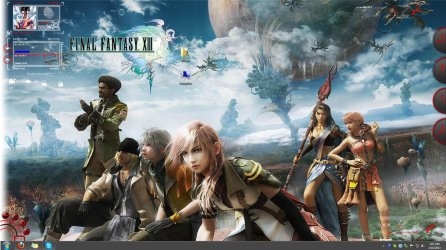
Well as long as the virus is gone I don't care. Here's a picture of my desktop. It put them in the top right corner, but I moved them so that you could see better.

Capture2.jpg
 

My Computer

OS
Windows 7 Home Premium x64
CPU
Intel i7-2600K
Motherboard
ASUS Sabertooth Z77
Memory
G.SKILL Ripjaws (16 GB Total)
Graphics Card(s)
EVGA GeForce GTX 560 Ti
Monitor(s) Displays
ASUS
Screen Resolution
1920x1080 (2 Monitors)
Hard Drives
Hitachi GST Deskstar 2 TB (HDD)
Samsung 840 Pro 256 GB (SSD)
PSU
SeaSonic X Series X650 Gold
Case
Antec DF 85
Keyboard
Microsoft SideWinder X4
Mouse
MadCatz M.M.O. 7 & Logitech G35
Internet Speed
50 down
Antivirus
Avast Free, SuperAntiSpyware Free, Malwarebytes Free
Browser
Mozilla Firefox
Thanks for the image. It shows what you are talking about.

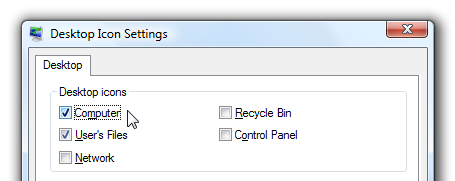
If you do not want the icons to show on the Desktop, do the following:

Right-click on the Desktop and select: Personalize

In the prompt that appears, click on: Change Desktop Icons

In the Desktop Icons area, you can check or uncheck the icons to show (or not) on the Desktop.

desktopiconspanel.png
 

My Computer

Computer type
PC/Desktop
Computer Manufacturer/Model Number
An ol' eMachines
OS
Windows 7 Home Premium
Internet Speed
Fine for me...I'm retired!
Back
Top