Malwarebytes Anti-Exploit popup when opening browser---????

ignatzatsonic

Aspiring Gnome
Guru
Gold Member
VIP
Local time
1:01 PM
Messages
12,011
This just happened for the second time in the last 10 days or so and had never occurred before in the 2 years or so that I've been running MBAE.

I'm running Windows 7 Home Premium 64-bit SP1.

Malwarebytes Anti-Exploit free version 1.06.1.1019.

Along with MSE and Malwarebytes Premium 2.1.6.1022.

Pale Moon is the browser; version 25.1.0 (x86).

Both times, it happened when Pale Moon had been completely closed. I poked an icon on my taskbar which opens the browser and I get the popup. I'm not going to a web site of any kind, just opening the browser to a blank page.

Shutting down the browser and reopening it again is OK, the popup does not reappear.

I did not take a screen shot, but it was pinkish/reddish with words to the effect that it had blocked something.

I looked over the MBAE forum at Malwarebytes.org and did not see any reference to this.

Has this happened to anyone else? Known issue? Unheard of?

It seems to be benign and I cannot explain why it occurs only when opening the browser and only twice in thousands of attempts, both recently.
 

My Computer

Computer type
PC/Desktop
Computer Manufacturer/Model Number
Ignatz Special; 4 speed manual gearbox; factory air conditioning; one of one
OS
Windows 7 Home Premium SP1, 64-bit
CPU
Intel Skylake i5-6600K, not overclocked
Motherboard
AsRock Z170M Extreme 4, micro ATX
Memory
8 GB HyperX DDR4-2666 (2 x 4 GB)
Graphics Card(s)
none; graphics are integrated on CPU
Sound Card
onboard: Realtek ALC1150; external: USB Behringer UF0-202
Monitor(s) Displays
Dell S2340M 23 inch IPS
Screen Resolution
1600 x 900
Hard Drives
System: Crucial MX100 series SSD, 128 GB;
Data: Samsung Spinpoint 103SJ, 1 TB;
Backup: WD Caviar Green WD30EZRX-00D8PB0, 3 TB
PSU
Rosewill SilentNight 500 watt fanless, semi-modular
Case
Antec Solo II
Cooling
Noctua NH-U12S; Noctua F12 intake, Noctua S12A exhaust
Keyboard
Microsoft 200 6JH-00001 USB
Mouse
Dell or Microsoft optical wired; USB
Antivirus
Microsoft Security Essentials and Malwarebytes Premium
Browser
Pale Moon
Other Info
All fans PWM; speeds at idle: CPU circa 500 rpm; intake circa 600 rpm; exhaust circa 600 rpm; CPU temps 27 idle and 47 C load in a warm room (27 C/81 F) when running Intel Extreme Tuning Utility stress test.
I had something similar happen when launching any browser from an Icon on the desktop. Deleted all shortcuts and from File Manager, right clicked on the actual .exe program and selected send to Desktop, create shortcut.
 

My Computer

Computer type
PC/Desktop
Computer Manufacturer/Model Number
Home Built
OS
Windows 7 64 bit (32 bit on desktop)
CPU
Intel core 2 dual
Hello:

That is normal behavior.

With version 1.06, instead of "logging" protection events, they are now displayed in a system tray popup.

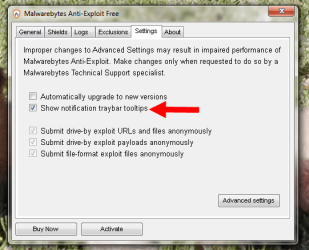
These can be enabled or disabled from the GUI > settings > Show notification traybar tooltips.

You ought to see one each time you open a shielded application (unless you disable the option).;)

More info HERE and HERE

Cheers,
 

Attachments

  • 2015-06-22_20-33-40.png
    2015-06-22_20-33-40.png
    31.3 KB · Views: 30

My Computer

Computer type
PC/Desktop
Computer Manufacturer/Model Number
Dell Studio XPS 8500
OS
OEM Windows 7 Ult (x64) SP1
CPU
Intel Core-i7 3770 @ 3.4 GHz
Motherboard
"Dell" branded
Memory
16 GB DDR3 SDRAM @ 1333 MHz
Graphics Card(s)
NVidia GeForce GT620 1 GB
Sound Card
THX TruStudio PC
Monitor(s) Displays
Dell U2410 Full HD
Hard Drives
2.0 TB SATA2 @ 7200 RPM
PSU
350W
Keyboard
MS 4000 Ergon - Wired
Mouse
Logitech Anywhere MX
Internet Speed
Cable HSI w/Turbo (router)
Antivirus
KIS-MBAM Premium-MBAE Premium
Browser
Fx (current version); IE
Other Info
And a Win7/64 Pro laptop; And a Win10/64 Pro desktop.
Moxie:

Hmmm.......... I looked at both of your links and found no explanation for why the behavior is apparently intermittent.

I use that taskbar icon hundreds of times per month.

The popup has appeared only twice.

Randomly? By design, every 229 browser openings?

What, exactly, is the "protection event" to which you refer?

Opening Pale Moon? If so, why intermittent?

If not, what?

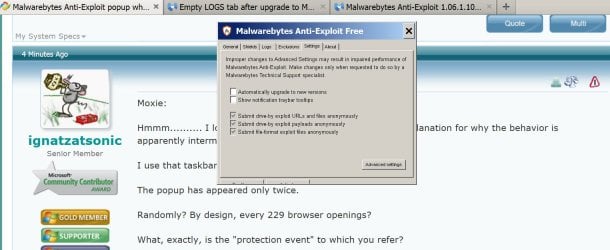
Regardless, as you can see from attached pic, that setting was already unchecked.
 

Attachments

  • Untitled-1.jpg
    Untitled-1.jpg
    123.7 KB · Views: 2

My Computer

Computer type
PC/Desktop
Computer Manufacturer/Model Number
Ignatz Special; 4 speed manual gearbox; factory air conditioning; one of one
OS
Windows 7 Home Premium SP1, 64-bit
CPU
Intel Skylake i5-6600K, not overclocked
Motherboard
AsRock Z170M Extreme 4, micro ATX
Memory
8 GB HyperX DDR4-2666 (2 x 4 GB)
Graphics Card(s)
none; graphics are integrated on CPU
Sound Card
onboard: Realtek ALC1150; external: USB Behringer UF0-202
Monitor(s) Displays
Dell S2340M 23 inch IPS
Screen Resolution
1600 x 900
Hard Drives
System: Crucial MX100 series SSD, 128 GB;
Data: Samsung Spinpoint 103SJ, 1 TB;
Backup: WD Caviar Green WD30EZRX-00D8PB0, 3 TB
PSU
Rosewill SilentNight 500 watt fanless, semi-modular
Case
Antec Solo II
Cooling
Noctua NH-U12S; Noctua F12 intake, Noctua S12A exhaust
Keyboard
Microsoft 200 6JH-00001 USB
Mouse
Dell or Microsoft optical wired; USB
Antivirus
Microsoft Security Essentials and Malwarebytes Premium
Browser
Pale Moon
Other Info
All fans PWM; speeds at idle: CPU circa 500 rpm; intake circa 600 rpm; exhaust circa 600 rpm; CPU temps 27 idle and 47 C load in a warm room (27 C/81 F) when running Intel Extreme Tuning Utility stress test.
I've had this happen a couple of times with Pale Moon.
I looked in the MBAE Logs and there is an entry showing an exploit was blocked, but there is no info about what/where/hash ...
I re-open Pale Moon, no problem ...
 

My Computer

Computer type
PC/Desktop
Computer Manufacturer/Model Number
home built
OS
Multi-Boot W7_Pro_x64 W8.1_Pro_x64 W10_Pro_x64 +Linux_VMs +Chromium_VM
CPU
AMD Athlon II x4 620
Motherboard
Gigabyte GA-MA785G-UD3H
Memory
6GB GSkill DDR2 800
Graphics Card(s)
AMD 4670 GPU + AMD 4200 IGP
Sound Card
on board Realtek ALC889A
Monitor(s) Displays
RCA 40" LCD TV, Insignia 32" LCD TV, HP 15" LCD monitor
Screen Resolution
1680 x 1050
Hard Drives
OCZ Vertex 3 120GB,
Samsung F3 1TB (3),
Several others - WD, Seagate, Hitachi, ...
PSU
Corsair 500 W
Case
Rosewill mid tower
Cooling
CM 90mm rifle
Keyboard
Gyration wireless, Logitech wireless, Dell USB wired
Mouse
Gyration wireless, Logitech wireless, V7 USB wired
Internet Speed
Spectrum - 100Mbps D / 10Mbps U
Antivirus
Avast, MBAM3, EMET, WinPatrol
Browser
Pale Moon, Firefox, IE
Other Info
2 multi-boot PC's
Mainly HTPC/Office/Gen purpose (no gaming).
Trendnet USB KVM.
LG DVD burner/Blue Ray Player.
Tray system for removable SATA backup drives.

Not currently OCd, under-volted.
I use Hybrid sleep, rarely re-boot or shutdown.

Hauppauge HD-PVR, Avermedia PCIe TV Tuner, Hauppauge PCI TV Tuner.
The links explain the changed behavior/changelog for the 1.06 build, including the switch from logging protection events to system tray popups.

EDIT: "Protection event" = "XYZ is protected" notification. These were logged in versions prior to 1.06. Since version 1.06, they are are reported via the system tray popups, instead of the logs.

It shouldn't be intermittent.
If the setting is enabled, then you ought to see a system tray popup every time you open a shielded application, if you have that option enabled.
Since you are using the Free version, your browsers would be shielded.
That includes Pale Moon.

But I'm not sure what you mean when you say "I use that taskbar icon hundreds of times per month"???
MBAE runs in the background, silently.
(That's why a default installation doesn't even put a shortcut on the desktop.)
The program icon is in the notification/system tray, not in the taskbar.
Nonetheless, especially with the Free version, where the shields are pre-determined and pre-configured, there should be little/no need to open the GUI from the system tray icon.

If this doesn't explain or resolve your behavior, then you might want to try a clean reinstall.

Steps for that:

  1. Close all apps
  2. Uninstall MBAE from the Control Panel
  3. Reboot
  4. Delete the C:\ProgramData\Malwarebytes Anti-Exploit folder
  5. Download and install the latest MBAE from http://downloads.malwarebytes.org/file/mbae
We can go from there...
 

My Computer

Computer type
PC/Desktop
Computer Manufacturer/Model Number
Dell Studio XPS 8500
OS
OEM Windows 7 Ult (x64) SP1
CPU
Intel Core-i7 3770 @ 3.4 GHz
Motherboard
"Dell" branded
Memory
16 GB DDR3 SDRAM @ 1333 MHz
Graphics Card(s)
NVidia GeForce GT620 1 GB
Sound Card
THX TruStudio PC
Monitor(s) Displays
Dell U2410 Full HD
Hard Drives
2.0 TB SATA2 @ 7200 RPM
PSU
350W
Keyboard
MS 4000 Ergon - Wired
Mouse
Logitech Anywhere MX
Internet Speed
Cable HSI w/Turbo (router)
Antivirus
KIS-MBAM Premium-MBAE Premium
Browser
Fx (current version); IE
Other Info
And a Win7/64 Pro laptop; And a Win10/64 Pro desktop.
Moxie:

See my revised post for my MBAE settings. That setting was unchecked and has been since day one.

Re the icon on my taskbar:

I am NOT repeat NOT referring to an icon to start or stop MBAE.

I am referring to an icon to start Pale Moon.

No more.

No less.

To quote my original post, "I poked an icon on my taskbar which opens the browser and I get the popup. I'm not going to a web site of any kind, just opening the browser to a blank page."

This is not the same message that I see to the effect that "MBAE is now protecting yada yada application".

It says that something was actually blocked.
 

My Computer

Computer type
PC/Desktop
Computer Manufacturer/Model Number
Ignatz Special; 4 speed manual gearbox; factory air conditioning; one of one
OS
Windows 7 Home Premium SP1, 64-bit
CPU
Intel Skylake i5-6600K, not overclocked
Motherboard
AsRock Z170M Extreme 4, micro ATX
Memory
8 GB HyperX DDR4-2666 (2 x 4 GB)
Graphics Card(s)
none; graphics are integrated on CPU
Sound Card
onboard: Realtek ALC1150; external: USB Behringer UF0-202
Monitor(s) Displays
Dell S2340M 23 inch IPS
Screen Resolution
1600 x 900
Hard Drives
System: Crucial MX100 series SSD, 128 GB;
Data: Samsung Spinpoint 103SJ, 1 TB;
Backup: WD Caviar Green WD30EZRX-00D8PB0, 3 TB
PSU
Rosewill SilentNight 500 watt fanless, semi-modular
Case
Antec Solo II
Cooling
Noctua NH-U12S; Noctua F12 intake, Noctua S12A exhaust
Keyboard
Microsoft 200 6JH-00001 USB
Mouse
Dell or Microsoft optical wired; USB
Antivirus
Microsoft Security Essentials and Malwarebytes Premium
Browser
Pale Moon
Other Info
All fans PWM; speeds at idle: CPU circa 500 rpm; intake circa 600 rpm; exhaust circa 600 rpm; CPU temps 27 idle and 47 C load in a warm room (27 C/81 F) when running Intel Extreme Tuning Utility stress test.
I would guess that Pale Moon (or an add-on) is checking for updates or making some other type of connection when started. Most checks like this only happen once every few days/weeks.

I'm not where I can test this :-(
 

My Computer

Computer type
Laptop
Computer Manufacturer/Model Number
Employer provided Dell Latitude
OS
W7 Pro SP1 64bit
CPU
i7
Memory
8GB
Graphics Card(s)
Intel HD Graphics
Hard Drives
crappy SSD
Antivirus
Employer mandated Symantec Endpoint Protection
Browser
Pale Moon 64bit, IE11 64bit & Chrome 64bit
Sorry for the misunderstanding -- when you said "that taskbar icon" it was not clear whether you were referring to the MBAE icon or another icon.

I'm just trying to help. Without screen shots, it can be confusing. I sincerely apologize.

If you are seeing an "Exploit Blocked" notifications when you open or use a shielded application, then it sure sounds as if MBAE is doing its job.
It could be that -- from time to time -- there *is* something on your browser page that MBAE is blocking.

I have just scanned quickly the MBAE support forum for similar reports and don't find anything that quite matches the behavior you describe.

There's really no way to know without gathering some diagnostic logs for the MBAE product manager.

I respectfully suggest the following for the most rapid and expert assistance with your issue:

  1. Please follow the advice here to collect some basic diagnostic logs: [README FIRST] >>> Posts here need to include MBAE logs <<<
  2. Post the logs in the MBAE support forum >>HERE<<.
pbust will review them and advise you further - he knows every line of code for the program, the intricacies of its operation, and will more than likely be able to resolve your issue promptly and expertly.


Thank you,
 

My Computer

Computer type
PC/Desktop
Computer Manufacturer/Model Number
Dell Studio XPS 8500
OS
OEM Windows 7 Ult (x64) SP1
CPU
Intel Core-i7 3770 @ 3.4 GHz
Motherboard
"Dell" branded
Memory
16 GB DDR3 SDRAM @ 1333 MHz
Graphics Card(s)
NVidia GeForce GT620 1 GB
Sound Card
THX TruStudio PC
Monitor(s) Displays
Dell U2410 Full HD
Hard Drives
2.0 TB SATA2 @ 7200 RPM
PSU
350W
Keyboard
MS 4000 Ergon - Wired
Mouse
Logitech Anywhere MX
Internet Speed
Cable HSI w/Turbo (router)
Antivirus
KIS-MBAM Premium-MBAE Premium
Browser
Fx (current version); IE
Other Info
And a Win7/64 Pro laptop; And a Win10/64 Pro desktop.
I would guess that Pale Moon (or an add-on) is checking for updates or making some other type of connection when started. Most checks like this only happen once every few days/weeks.

I'm not where I can test this :-(

That certainly sounds reasonable.

I don't see reports of this behavior at the support forum.
But that doesn't mean it's not happening.

As I mentioned in my last reply, the fastest and most certain way to get a definitive explanation/solution would be to post over in the MBAE support forum. The product manager is extremely hands-on, engaged and expert. I have no doubt he will be able to help.

Cheers,
 

My Computer

Computer type
PC/Desktop
Computer Manufacturer/Model Number
Dell Studio XPS 8500
OS
OEM Windows 7 Ult (x64) SP1
CPU
Intel Core-i7 3770 @ 3.4 GHz
Motherboard
"Dell" branded
Memory
16 GB DDR3 SDRAM @ 1333 MHz
Graphics Card(s)
NVidia GeForce GT620 1 GB
Sound Card
THX TruStudio PC
Monitor(s) Displays
Dell U2410 Full HD
Hard Drives
2.0 TB SATA2 @ 7200 RPM
PSU
350W
Keyboard
MS 4000 Ergon - Wired
Mouse
Logitech Anywhere MX
Internet Speed
Cable HSI w/Turbo (router)
Antivirus
KIS-MBAM Premium-MBAE Premium
Browser
Fx (current version); IE
Other Info
And a Win7/64 Pro laptop; And a Win10/64 Pro desktop.
See comments in bold:

Sorry for the misunderstanding -- when you said "that taskbar icon" it was not clear whether you were referring to the MBAE icon or another icon.

I did not say "that taskbar icon" at any point in my post.

I'm just trying to help. Without screen shots, it can be confusing. I sincerely apologize.

I added the screen shot into my original post by edit a few minutes later.

If you are seeing an "Exploit Blocked" notifications when you open or use a shielded application, then it sure sounds as if MBAE is doing its job.

I am seeing an exploit blocked notification (intermittently, twice) when I open Pale Moon browser to a blank page. Not to a web site. I don't have the slightest idea if MBAE is or isn't doing its job.


It could be that -- from time to time -- there *is* something on your browser page that MBAE is blocking.


I have no idea. Pale Moon is set to open to a blank page and always does exactly that--other than these 2 instances.


I have just scanned quickly the MBAE support forum for similar reports and don't find anything that quite matches the behavior you describe.

Nor did I.


There's really no way to know without gathering some diagnostic logs for the MBAE product manager.

I respectfully suggest the following for the most rapid and expert assistance with your issue:

  1. Please follow the advice here to collect some basic diagnostic logs: [README FIRST] >>> Posts here need to include MBAE logs <<<
  2. Post the logs in the MBAE support forum >>HERE<<.
pbust will review them and advise you further - he knows every line of code for the program, the intricacies of its operation, and will more than likely be able to resolve your issue promptly and expertly.


If this occurs a third time, I may do that, AFTER taking a screen shot. Depending mostly on whether it starts to occur more often and becomes aggravating for that reason.

Thanks for your time.
 

My Computer

Computer type
PC/Desktop
Computer Manufacturer/Model Number
Ignatz Special; 4 speed manual gearbox; factory air conditioning; one of one
OS
Windows 7 Home Premium SP1, 64-bit
CPU
Intel Skylake i5-6600K, not overclocked
Motherboard
AsRock Z170M Extreme 4, micro ATX
Memory
8 GB HyperX DDR4-2666 (2 x 4 GB)
Graphics Card(s)
none; graphics are integrated on CPU
Sound Card
onboard: Realtek ALC1150; external: USB Behringer UF0-202
Monitor(s) Displays
Dell S2340M 23 inch IPS
Screen Resolution
1600 x 900
Hard Drives
System: Crucial MX100 series SSD, 128 GB;
Data: Samsung Spinpoint 103SJ, 1 TB;
Backup: WD Caviar Green WD30EZRX-00D8PB0, 3 TB
PSU
Rosewill SilentNight 500 watt fanless, semi-modular
Case
Antec Solo II
Cooling
Noctua NH-U12S; Noctua F12 intake, Noctua S12A exhaust
Keyboard
Microsoft 200 6JH-00001 USB
Mouse
Dell or Microsoft optical wired; USB
Antivirus
Microsoft Security Essentials and Malwarebytes Premium
Browser
Pale Moon
Other Info
All fans PWM; speeds at idle: CPU circa 500 rpm; intake circa 600 rpm; exhaust circa 600 rpm; CPU temps 27 idle and 47 C load in a warm room (27 C/81 F) when running Intel Extreme Tuning Utility stress test.
Hi:

I'm sorry I wasn't able to assist you.
The fact that the issue isn't reported suggests that it could be something one-off with your installation, especially if you recently did an on-top upgrade to 1.06.
That is why I suggested a clean reinstall as a first step -- it will only take a few minutes.
Or perhaps UNI's explanation describes what's happening.


Other than that, the most efficient way to get help would be from the product team.
The information to resolve this would most likely be in the MBAE logs, but they are best analyzed by the product experts.
I'm not trying to duck the issue; it's just that, with nearly 20K posts over there at the MBAM forum, I have a pretty good feel for pbust's expertise with his product.
The logs (and/or an MBAE diagnostic tool pbust might ask you to run) will likely explain what you're seeing and provide him with the info needed to resolve your issue (or to replicate a program bug, if that were the case).

Thanks again for your patience.

Take care,


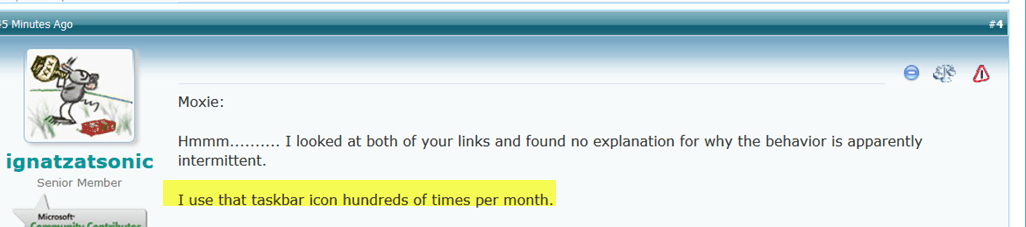
P.S. I don't wish at all to argue, but, for the record, you did say "that taskbar icon" (see screen shot). Again, I sincerely apologize for the misunderstanding and I am truly sorry I could not resolve your issue.
 

Attachments

  • 2015-06-22_21-34-42.png
    2015-06-22_21-34-42.png
    21 KB · Views: 0

My Computer

Computer type
PC/Desktop
Computer Manufacturer/Model Number
Dell Studio XPS 8500
OS
OEM Windows 7 Ult (x64) SP1
CPU
Intel Core-i7 3770 @ 3.4 GHz
Motherboard
"Dell" branded
Memory
16 GB DDR3 SDRAM @ 1333 MHz
Graphics Card(s)
NVidia GeForce GT620 1 GB
Sound Card
THX TruStudio PC
Monitor(s) Displays
Dell U2410 Full HD
Hard Drives
2.0 TB SATA2 @ 7200 RPM
PSU
350W
Keyboard
MS 4000 Ergon - Wired
Mouse
Logitech Anywhere MX
Internet Speed
Cable HSI w/Turbo (router)
Antivirus
KIS-MBAM Premium-MBAE Premium
Browser
Fx (current version); IE
Other Info
And a Win7/64 Pro laptop; And a Win10/64 Pro desktop.
P.S. I don't wish at all to argue, but, for the record, you did say "that taskbar icon" (see screen shot). Again, I sincerely apologize for the misunderstanding and I am truly sorry I could not resolve your issue.

Fair enough. No problem. It appears in my second post, while I was referring to my original post with the detailed explanation of the issue.
 

My Computer

Computer type
PC/Desktop
Computer Manufacturer/Model Number
Ignatz Special; 4 speed manual gearbox; factory air conditioning; one of one
OS
Windows 7 Home Premium SP1, 64-bit
CPU
Intel Skylake i5-6600K, not overclocked
Motherboard
AsRock Z170M Extreme 4, micro ATX
Memory
8 GB HyperX DDR4-2666 (2 x 4 GB)
Graphics Card(s)
none; graphics are integrated on CPU
Sound Card
onboard: Realtek ALC1150; external: USB Behringer UF0-202
Monitor(s) Displays
Dell S2340M 23 inch IPS
Screen Resolution
1600 x 900
Hard Drives
System: Crucial MX100 series SSD, 128 GB;
Data: Samsung Spinpoint 103SJ, 1 TB;
Backup: WD Caviar Green WD30EZRX-00D8PB0, 3 TB
PSU
Rosewill SilentNight 500 watt fanless, semi-modular
Case
Antec Solo II
Cooling
Noctua NH-U12S; Noctua F12 intake, Noctua S12A exhaust
Keyboard
Microsoft 200 6JH-00001 USB
Mouse
Dell or Microsoft optical wired; USB
Antivirus
Microsoft Security Essentials and Malwarebytes Premium
Browser
Pale Moon
Other Info
All fans PWM; speeds at idle: CPU circa 500 rpm; intake circa 600 rpm; exhaust circa 600 rpm; CPU temps 27 idle and 47 C load in a warm room (27 C/81 F) when running Intel Extreme Tuning Utility stress test.
~~~
Malwarebytes Anti-Exploit free version 1.06.1.1019.
~~~
Pale Moon is the browser; version 25.1.0 (x86).
~~~
Silly me, I tested with the latest version of Pale Moon before I noticed that you are using an older version.

I tested again using your older version. I could never get a warning from mbae.
 

My Computer

Computer type
Laptop
Computer Manufacturer/Model Number
Employer provided Dell Latitude
OS
W7 Pro SP1 64bit
CPU
i7
Memory
8GB
Graphics Card(s)
Intel HD Graphics
Hard Drives
crappy SSD
Antivirus
Employer mandated Symantec Endpoint Protection
Browser
Pale Moon 64bit, IE11 64bit & Chrome 64bit
I suspect you're on the right track, UNI.

I suppose it *could* be some sort of FP on the older version of Pale Moon, or perhaps an extension or add-on of some kind that phones home or connects from time to time that trips the MBAE exploit block.
Or perhaps an interaction with some other process on the computer.

Without the MBAE logs and bit of other basic information, it may be impossible to know for sure.

So that we can all learn, please post back if you get it sorted out.

Thanks again and good luck.
 

My Computer

Computer type
PC/Desktop
Computer Manufacturer/Model Number
Dell Studio XPS 8500
OS
OEM Windows 7 Ult (x64) SP1
CPU
Intel Core-i7 3770 @ 3.4 GHz
Motherboard
"Dell" branded
Memory
16 GB DDR3 SDRAM @ 1333 MHz
Graphics Card(s)
NVidia GeForce GT620 1 GB
Sound Card
THX TruStudio PC
Monitor(s) Displays
Dell U2410 Full HD
Hard Drives
2.0 TB SATA2 @ 7200 RPM
PSU
350W
Keyboard
MS 4000 Ergon - Wired
Mouse
Logitech Anywhere MX
Internet Speed
Cable HSI w/Turbo (router)
Antivirus
KIS-MBAM Premium-MBAE Premium
Browser
Fx (current version); IE
Other Info
And a Win7/64 Pro laptop; And a Win10/64 Pro desktop.
A new wrinkle:

This very recent post
at MBAE forum caught my eye just now.
It was posted in response to a query, not to a "problem" report, but I wonder if it might be relevant:

In most cases the symptoms of a conflict are either a false positive by either MBAE or the conflicting software, or inability to open your browser.
I still suspect MBAE is doing its job to block something related to your old version of PM or one of its extensions, but....

Cheers,
 

My Computer

Computer type
PC/Desktop
Computer Manufacturer/Model Number
Dell Studio XPS 8500
OS
OEM Windows 7 Ult (x64) SP1
CPU
Intel Core-i7 3770 @ 3.4 GHz
Motherboard
"Dell" branded
Memory
16 GB DDR3 SDRAM @ 1333 MHz
Graphics Card(s)
NVidia GeForce GT620 1 GB
Sound Card
THX TruStudio PC
Monitor(s) Displays
Dell U2410 Full HD
Hard Drives
2.0 TB SATA2 @ 7200 RPM
PSU
350W
Keyboard
MS 4000 Ergon - Wired
Mouse
Logitech Anywhere MX
Internet Speed
Cable HSI w/Turbo (router)
Antivirus
KIS-MBAM Premium-MBAE Premium
Browser
Fx (current version); IE
Other Info
And a Win7/64 Pro laptop; And a Win10/64 Pro desktop.
Back
Top