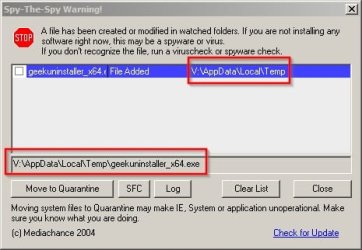
Yes it's an exclusion list for executables that you know are safe and wish to allow to run. I don't think this helps with gadgets though!
Example: I might want to run GeekUninstaller but it runs from an executable that's created in a temp directory and will therefore be blocked by CrytoPrevent. I'd need to add it to the whitelist.
Attachments
Geek.jpg
25.3 KB
· Views: 17
Geek 2.jpg
47.3 KB
· Views: 0
My Computer
Computer type
Laptop
Computer Manufacturer/Model Number
ASUS
OS
Microsoft Windows 7 Home Premium 64-bit 7601 Multiprocessor Free Service Pack 1
CPU
AMD C-60 APU with Radeon(tm) HD Graphics
Motherboard
ASUSTeK COMPUTER INC. X501U
Memory
4.00 GB
Graphics Card(s)
AMD Radeon HD 6290 Graphics
Sound Card
(1) AMD High Definition Audio Device (2) Realtek High Defi
Before I started on this endeavour my RAM usage was always around 25% in idle mode. Adding MBAM Premium pushed it up to c40% idling. Removing CryptoPrevent (first-release) then re-installing it brought RAM use down to c33% in idle mode. Removing CP and replacing it with HitmanProalert2 has brought RAM use back to c25%. I'm not going to bother with CP 7.1 I'm happy with what's in there now. Many thanks to all you folk who helped me and a special thanks to Callender who insisted on persevering against my incomprehension.
My Computer
Computer type
PC/Desktop
Computer Manufacturer/Model Number
Cyberpower PC
OS
windows 7 premium home 64bit
CPU
intel core i5 2500 3.3Ghz 6mb cache OEM
Motherboard
Asus P8Z68-V LX Intel Z68 Chipset DDR3 ATX USB 3
Memory
8GB (2x4GB) PC10666 DDR3/1333mhz Dual
Graphics Card(s)
AMD ATI Radeon Powercolor HD5670 1GB passive cooled
Sound Card
Creative/Soundblaster Digital Music Premium HD/X-Fi-HD
Monitor(s) Displays
Samsung 22; Hanns.G 19
Screen Resolution
1680 x 1050
Hard Drives
SSD: 120 GB Intel 520 Series SATA III
HDD2:West Dig 1TB SATA III 32mb 6gb/s
Hot swap HDD3: 1tb Barracuda Sata 3 32mb 6gb/s