Malwarebytes takes forever to scan

erdos

New member
Local time
10:18 PM
Messages
16
hi,

I've Malwarebytes 3.1 installed on my win7 pc. I've noticed that scan takes forever and more often it stuck in the process. after some search online, I've disabled 'scan archives' and 'scan rootkits' as suggested, but to no vail.

any suggestion?
 

My Computers

System One System Two

  • Computer type
    PC/Desktop
    Computer Manufacturer/Model Number
    HP Pavilion Elite d5100t
    OS
    Windows 7 Ultimate x64 / Enterprise
    CPU
    Core 2 Quad
    Motherboard
    ASUS: IPIBL-TX
    Memory
    4 GB
    Graphics Card(s)
    GeForce 9600 GS
    Sound Card
    7.1 capable sound with front audio ports (integrated)
    Hard Drives
    750 GB 7200 rpm SATA 3G (3.0 Gb/sec)
    PSU
    460 Watt
    Other Info
    PCIe internal modem & Wireless LAN 802.11 b/g/n & external antenna
  • Computer type
    PC/Desktop
    System Manufacturer/Model Number
    Homebuilt
    OS
    Windows 7 Ultimate
    CPU
    AMD Athlon 64 3000+ Newcastle 2.0GHz Socket 754 Single-Core
    Motherboard
    K8N Neo plantinum
    Memory
    2GB
    Graphics Card(s)
    nVidia 6600 GT
    Hard Drives
    1TB Quantum HDD
    Case
    Antec
Is this the old Dell you were talking about in February, if it is then im not surprised its laggy, Ult64 requires at least 3gb ram.

Roy
 

My Computer

Computer type
PC/Desktop
Computer Manufacturer/Model Number
medionl/Aspire 6930G/acer x55a
OS
W7 home premium 32bit/W7HP 64bit/w10 tp insider ring
CPU
E5300 dual core
Motherboard
medion MS7366
Memory
3gb
Graphics Card(s)
Nvidia Geforce 7100 Nforce 630i
Monitor(s) Displays
avixc
Internet Speed
n (isp resticted to 72)
Antivirus
mse/pands
Browser
palemoon
Other Info
Belkin Fd7050 n USB using Railink RT2870 drivers, more upto date

My Computer

Computer type
PC/Desktop
Computer Manufacturer/Model Number
Home made Desktop
OS
Windows 10 Pro. 64/ version 1709 Windows 7 Pro/64
CPU
Intel i7-6800K @ 4.3
Motherboard
ASUS X-99 Deluxe II
Memory
Corsair Platinum 16 gig @2400
Graphics Card(s)
EVGA GTX 1070 OC
Monitor(s) Displays
Asus 27" LED LCD/VE278Q
Screen Resolution
1920-1080 or 1280-720 HDMI
Hard Drives
INTEL SSD 730-240 Gb Sata 3.0/
PSU
EVGA Platium 1200W
Case
Phanteks Luxe Tempered Glass 8 fans/ one radiator
Cooling
XSPC/ Water Cooled CPU
Keyboard
Das 4 Professional
Mouse
Logitech M705/MX Anywhere 2-S
Internet Speed
100 mbits
Antivirus
Microsoft Security Essentials/ Malwarebytes Premium 3.0/ SAS
Browser
I.E. 11 default/Firefox/ ISP Time Warner Cable/Spectrum
Other Info
LG BluRay Burner/
Sound system-KLipsch-THX/
Icy Dock ssd Hot Swap bays.

My Computer

Computer type
PC/Desktop
Computer Manufacturer/Model Number
home built
OS
Multi-Boot W7_Pro_x64 W8.1_Pro_x64 W10_Pro_x64 +Linux_VMs +Chromium_VM
CPU
AMD Athlon II x4 620
Motherboard
Gigabyte GA-MA785G-UD3H
Memory
6GB GSkill DDR2 800
Graphics Card(s)
AMD 4670 GPU + AMD 4200 IGP
Sound Card
on board Realtek ALC889A
Monitor(s) Displays
RCA 40" LCD TV, Insignia 32" LCD TV, HP 15" LCD monitor
Screen Resolution
1680 x 1050
Hard Drives
OCZ Vertex 3 120GB,
Samsung F3 1TB (3),
Several others - WD, Seagate, Hitachi, ...
PSU
Corsair 500 W
Case
Rosewill mid tower
Cooling
CM 90mm rifle
Keyboard
Gyration wireless, Logitech wireless, Dell USB wired
Mouse
Gyration wireless, Logitech wireless, V7 USB wired
Internet Speed
Spectrum - 100Mbps D / 10Mbps U
Antivirus
Avast, MBAM3, EMET, WinPatrol
Browser
Pale Moon, Firefox, IE
Other Info
2 multi-boot PC's
Mainly HTPC/Office/Gen purpose (no gaming).
Trendnet USB KVM.
LG DVD burner/Blue Ray Player.
Tray system for removable SATA backup drives.

Not currently OCd, under-volted.
I use Hybrid sleep, rarely re-boot or shutdown.

Hauppauge HD-PVR, Avermedia PCIe TV Tuner, Hauppauge PCI TV Tuner.

My Computer

Computer type
PC/Desktop
Computer Manufacturer/Model Number
Home made Desktop
OS
Windows 10 Pro. 64/ version 1709 Windows 7 Pro/64
CPU
Intel i7-6800K @ 4.3
Motherboard
ASUS X-99 Deluxe II
Memory
Corsair Platinum 16 gig @2400
Graphics Card(s)
EVGA GTX 1070 OC
Monitor(s) Displays
Asus 27" LED LCD/VE278Q
Screen Resolution
1920-1080 or 1280-720 HDMI
Hard Drives
INTEL SSD 730-240 Gb Sata 3.0/
PSU
EVGA Platium 1200W
Case
Phanteks Luxe Tempered Glass 8 fans/ one radiator
Cooling
XSPC/ Water Cooled CPU
Keyboard
Das 4 Professional
Mouse
Logitech M705/MX Anywhere 2-S
Internet Speed
100 mbits
Antivirus
Microsoft Security Essentials/ Malwarebytes Premium 3.0/ SAS
Browser
I.E. 11 default/Firefox/ ISP Time Warner Cable/Spectrum
Other Info
LG BluRay Burner/
Sound system-KLipsch-THX/
Icy Dock ssd Hot Swap bays.
Good point Jack !

I think we need a lot more info and answers from erdos to know what all we're dealing with.
:rolleyes:
 

My Computer

Computer type
PC/Desktop
Computer Manufacturer/Model Number
home built
OS
Multi-Boot W7_Pro_x64 W8.1_Pro_x64 W10_Pro_x64 +Linux_VMs +Chromium_VM
CPU
AMD Athlon II x4 620
Motherboard
Gigabyte GA-MA785G-UD3H
Memory
6GB GSkill DDR2 800
Graphics Card(s)
AMD 4670 GPU + AMD 4200 IGP
Sound Card
on board Realtek ALC889A
Monitor(s) Displays
RCA 40" LCD TV, Insignia 32" LCD TV, HP 15" LCD monitor
Screen Resolution
1680 x 1050
Hard Drives
OCZ Vertex 3 120GB,
Samsung F3 1TB (3),
Several others - WD, Seagate, Hitachi, ...
PSU
Corsair 500 W
Case
Rosewill mid tower
Cooling
CM 90mm rifle
Keyboard
Gyration wireless, Logitech wireless, Dell USB wired
Mouse
Gyration wireless, Logitech wireless, V7 USB wired
Internet Speed
Spectrum - 100Mbps D / 10Mbps U
Antivirus
Avast, MBAM3, EMET, WinPatrol
Browser
Pale Moon, Firefox, IE
Other Info
2 multi-boot PC's
Mainly HTPC/Office/Gen purpose (no gaming).
Trendnet USB KVM.
LG DVD burner/Blue Ray Player.
Tray system for removable SATA backup drives.

Not currently OCd, under-volted.
I use Hybrid sleep, rarely re-boot or shutdown.

Hauppauge HD-PVR, Avermedia PCIe TV Tuner, Hauppauge PCI TV Tuner.
Hi:

For the record, Chameleon is a highly specialized tool designed for use only on heavily infected systems when MBAM cannot be installed or run normally. Most of the functionality is already incorporated into MBAM, so there's no real need or suggestion to keep the standalone version on one's system. One only needs to keep the current version of MBAM (correctly noted to be 2.2.1.1043) on one's system, and to run normal threat scans.
Only when MBAM cannot run or scan would Chameleon be needed, and even then, it can be called up from within MBAM.

More information here -- Chameleon Portal
What is Malwarebytes Chameleon and when do I need it?
How do I run Malwarebytes Chameleon when it cannot be opened normally through the START menu?
How do I use Malwarebytes Chameleon to run Malwarebytes Anti-Malware on an infected system?
How should I proceed if Malwarebytes Chameleon's help file will not open due to infection?
How do I use Malwarebytes Chameleon to install Malwarebytes Anti-Malware on an infected system?

Getting back to the OP's original problem, however, when MBAM scans hang, there are a number of possible reasons:

  • Corrupt files
  • Bad disk
  • Software conflict
  • Malware
  • Insufficient resources
  • Others
One suggestion would be to disable archives scanning and (perhaps) to disable rootkit scanning, especially on an older system with old hardware, little RAM.

If that doesn't resolve the issue, the general recommendation would be to start with a chkdsk and then sfc /scannow.
Scanning from Windows Safe Mode is another option, but not the first choice, as MBAM needs to be run from Normal Mode in order to work completely and fully.

So, I would suggest that the OP start by disabling archive (and at least for testing purposes) rootkit scanning and then reattempting a regular MBAM THREAT SCAN.
If that still does not work, I would process with the chkdsk and then system file checker before attempting another MBAM THREAT SCAN.

If that doesn't resolve the issue, we can go from there.


HTH,

MM
 
Last edited:

My Computer

Computer type
PC/Desktop
Computer Manufacturer/Model Number
Dell Studio XPS 8500
OS
OEM Windows 7 Ult (x64) SP1
CPU
Intel Core-i7 3770 @ 3.4 GHz
Motherboard
"Dell" branded
Memory
16 GB DDR3 SDRAM @ 1333 MHz
Graphics Card(s)
NVidia GeForce GT620 1 GB
Sound Card
THX TruStudio PC
Monitor(s) Displays
Dell U2410 Full HD
Hard Drives
2.0 TB SATA2 @ 7200 RPM
PSU
350W
Keyboard
MS 4000 Ergon - Wired
Mouse
Logitech Anywhere MX
Internet Speed
Cable HSI w/Turbo (router)
Antivirus
KIS-MBAM Premium-MBAE Premium
Browser
Fx (current version); IE
Other Info
And a Win7/64 Pro laptop; And a Win10/64 Pro desktop.
Where is it getting stuck at? Prescan, rootkit check, scan memory, scan startup files, scan registry,scan file system, heuristic?
 

My Computer

Computer type
PC/Desktop
Computer Manufacturer/Model Number
HP
OS
Windows 7 Home Premium 64 bit
CPU
AMD A4
Memory
5 GB
Graphics Card(s)
Integrated Radeon
Hard Drives
500 gb WD
Antivirus
360 TS
Browser
IE
i'm the O.P.

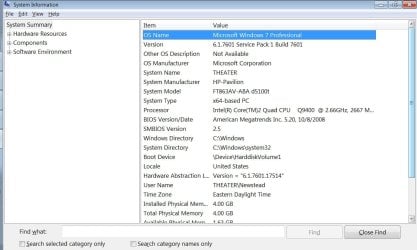
My version of Malwarebye is 2.1.6.1022 premium -not ver 3 as intially stated - and it's installed on win7 (system info attached)

I have 'use advanced heuristic engine' 'scan within archives' and 'scan for rootkits' unchecked, scan process always stuck at 'pre scan operations' stage.
 

Attachments

  • system.jpg
    system.jpg
    83.9 KB · Views: 3

My Computers

System One System Two

  • Computer type
    PC/Desktop
    Computer Manufacturer/Model Number
    HP Pavilion Elite d5100t
    OS
    Windows 7 Ultimate x64 / Enterprise
    CPU
    Core 2 Quad
    Motherboard
    ASUS: IPIBL-TX
    Memory
    4 GB
    Graphics Card(s)
    GeForce 9600 GS
    Sound Card
    7.1 capable sound with front audio ports (integrated)
    Hard Drives
    750 GB 7200 rpm SATA 3G (3.0 Gb/sec)
    PSU
    460 Watt
    Other Info
    PCIe internal modem & Wireless LAN 802.11 b/g/n & external antenna
  • Computer type
    PC/Desktop
    System Manufacturer/Model Number
    Homebuilt
    OS
    Windows 7 Ultimate
    CPU
    AMD Athlon 64 3000+ Newcastle 2.0GHz Socket 754 Single-Core
    Motherboard
    K8N Neo plantinum
    Memory
    2GB
    Graphics Card(s)
    nVidia 6600 GT
    Hard Drives
    1TB Quantum HDD
    Case
    Antec
How about a re-install over the top or even un-install re-install with re-boot in between.
If you take the second option maybe use Revo.
 

My Computer

Computer type
PC/Desktop
Computer Manufacturer/Model Number
Owner Builder
OS
Windows 7 Ultimate x64 SP1 OEM
CPU
Intel i7 3930K
Motherboard
Asus X79 Deluxe
Memory
Kingston Genesis KHX2133C11D3K4/32G
Graphics Card(s)
Asus RTX 2070 Ti Turbo fan series
Sound Card
Creative Sound Blaster ZXR
Monitor(s) Displays
Samsung U32J39 UHD
Screen Resolution
3840 x 2160
Hard Drives
Samsung 860 Pro 256 GB
OCZ Vertex 4 512GB
Western Digital Black 4TB
PSU
Corsair AX850
Case
Gigabyte
Cooling
Push - Pull 120 mm Noctua PWM, Scythe Big Shuriken 2 Rev. B
Keyboard
Logitech K800 Backlit
Mouse
Logitech MX2 Master
Internet Speed
NBN 25 Mbps
Antivirus
Kaspersky Internet Security
Browser
Mozilla FireFox
Other Info
TP-Link Archer VR600v
Sennheiser TR220 WiFi Head Phones.

My Computer

Computer type
PC/Desktop
Computer Manufacturer/Model Number
Self Built
OS
Win 10 Pro x64
CPU
Intel I5-2500K @3.3GHz
Motherboard
Asrock P67 Extreme4
Memory
16GB G.Skill Ripjaws X (4x4GB)
Graphics Card(s)
EVGA GeForce 750 Ti SC 2GB
Sound Card
ASUS Xonar DG 5.1 Channels 24-bit 96KHz PCI Interface Sound
Monitor(s) Displays
auria eq2367
Screen Resolution
1920 x 1080
Hard Drives
250GB Samsung 850 EVO SSD
1TB WD Blue
1TB Hitachi
PSU
SeaSonic X 650W 80 Plus Gold
Case
Corsair Obsidian 750D
Cooling
Corsair H60, Three 140mm case fans
Keyboard
Logitech Wireless Keyboard K520
Mouse
Logitech Wireless Mouse M310
Internet Speed
Wave Broadband ~ 100 dn 5 up
Antivirus
Windows Defender, Malwarebytes Premium
Browser
Edge, IE11, Chrome
Other Info
Laptop specs: HP g7-1365dx /
CPU: AMD A6-3420M APU with Radeon(tm) HD Graphics /
RAM: Crucial 8Gb (2x4Gb) /
SSD: Crucial M4-CT128M4SSD2 ATA Device/ FW 000F /
GFX: AMD Radeon HD 6520G /
OS: Windows 10 Pro x64
i'm the O.P.

My version of Malwarebye is 2.1.6.1022 premium -not ver 3 as intially stated - and it's installed on win7 (system info attached)

That's a very old version. It was released in April 2015. There have been several program updates since then, with performance, stability and security enhancements.

I have 'use advanced heuristic engine' 'scan within archives' and 'scan for rootkits' unchecked, scan process always stuck at 'pre scan operations' stage.
That could have many causes, including the reasons I listed in my previous reply.
@MeOnMine and @Derekimo's advice to reinstall is not unreasonable.
However, since you have a much older program version, an on-top upgrade would not be "best practices".
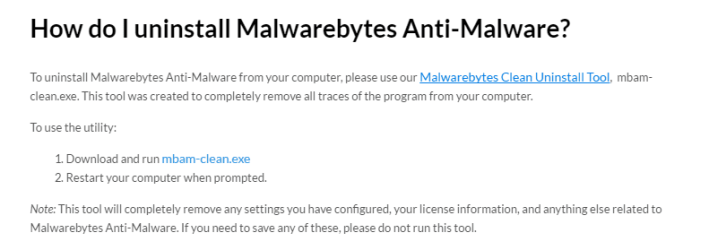
And, to add to @Derekimo's advice about uninstalling, the more complete steps for a proper, clean upgrade are here: MBAM Clean Removal Process 2x


  • Important: If you have Premium, be sure to have your license info handy before you start -- you will need it to reactivate after reinstall
  • Also: If you have Premium, be sure to open the GUI > My Account > click "disable" before you start the removal/reinstall process
  • Also, whether you have Free or Premium, please be sure to reboot when prompted by the removal tool - very important! It's a good idea to reboot again after the reinstall.
  • NOTE: Running Revo Uninstaller ought NOT to be needed and is not recommended; the mbam-clean removal tool and the process outlined in the tutorial linked above is the recommended way to reinstall.
If the clean upgrade does not resolve the issue, then deeper work will be needed.

Please let us know how it goes.

Thanks,
 
Last edited:

My Computer

Computer type
PC/Desktop
Computer Manufacturer/Model Number
Dell Studio XPS 8500
OS
OEM Windows 7 Ult (x64) SP1
CPU
Intel Core-i7 3770 @ 3.4 GHz
Motherboard
"Dell" branded
Memory
16 GB DDR3 SDRAM @ 1333 MHz
Graphics Card(s)
NVidia GeForce GT620 1 GB
Sound Card
THX TruStudio PC
Monitor(s) Displays
Dell U2410 Full HD
Hard Drives
2.0 TB SATA2 @ 7200 RPM
PSU
350W
Keyboard
MS 4000 Ergon - Wired
Mouse
Logitech Anywhere MX
Internet Speed
Cable HSI w/Turbo (router)
Antivirus
KIS-MBAM Premium-MBAE Premium
Browser
Fx (current version); IE
Other Info
And a Win7/64 Pro laptop; And a Win10/64 Pro desktop.
Just my opinion.

Because you have Pavilion H.P. computer and a bios (American Megatreads) I would start by checking and verifying the Windows 7 operating system is properly activated. Information found in picture in post #9.

If Windows 7 is properly activated I would upgrade Malwarebytes to the newest version following MoxieMomma instructions.
 

My Computer

Computer type
PC/Desktop
Computer Manufacturer/Model Number
Home made Desktop
OS
Windows 10 Pro. 64/ version 1709 Windows 7 Pro/64
CPU
Intel i7-6800K @ 4.3
Motherboard
ASUS X-99 Deluxe II
Memory
Corsair Platinum 16 gig @2400
Graphics Card(s)
EVGA GTX 1070 OC
Monitor(s) Displays
Asus 27" LED LCD/VE278Q
Screen Resolution
1920-1080 or 1280-720 HDMI
Hard Drives
INTEL SSD 730-240 Gb Sata 3.0/
PSU
EVGA Platium 1200W
Case
Phanteks Luxe Tempered Glass 8 fans/ one radiator
Cooling
XSPC/ Water Cooled CPU
Keyboard
Das 4 Professional
Mouse
Logitech M705/MX Anywhere 2-S
Internet Speed
100 mbits
Antivirus
Microsoft Security Essentials/ Malwarebytes Premium 3.0/ SAS
Browser
I.E. 11 default/Firefox/ ISP Time Warner Cable/Spectrum
Other Info
LG BluRay Burner/
Sound system-KLipsch-THX/
Icy Dock ssd Hot Swap bays.
thanks for all the suggestions, i'm the OP...

my answer and what i've tried:

1 my copy of win7 is properly activated (see screen1).

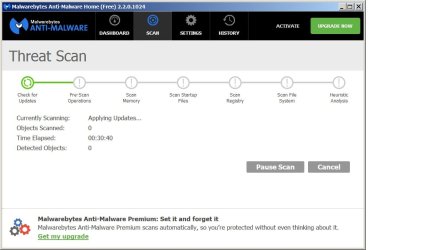
2 I've upgraded to the latest version as recommended, but malwarebyte still couldn't go beyond 'Pre-scan operations...' stage. (screen 2)
 

Attachments

  • screen.jpg
    screen.jpg
    92.6 KB · Views: 5
  • malwarescreen.jpg
    malwarescreen.jpg
    54 KB · Views: 0

My Computers

System One System Two

  • Computer type
    PC/Desktop
    Computer Manufacturer/Model Number
    HP Pavilion Elite d5100t
    OS
    Windows 7 Ultimate x64 / Enterprise
    CPU
    Core 2 Quad
    Motherboard
    ASUS: IPIBL-TX
    Memory
    4 GB
    Graphics Card(s)
    GeForce 9600 GS
    Sound Card
    7.1 capable sound with front audio ports (integrated)
    Hard Drives
    750 GB 7200 rpm SATA 3G (3.0 Gb/sec)
    PSU
    460 Watt
    Other Info
    PCIe internal modem & Wireless LAN 802.11 b/g/n & external antenna
  • Computer type
    PC/Desktop
    System Manufacturer/Model Number
    Homebuilt
    OS
    Windows 7 Ultimate
    CPU
    AMD Athlon 64 3000+ Newcastle 2.0GHz Socket 754 Single-Core
    Motherboard
    K8N Neo plantinum
    Memory
    2GB
    Graphics Card(s)
    nVidia 6600 GT
    Hard Drives
    1TB Quantum HDD
    Case
    Antec
Hi,
Well we can see you're using the free version and you most likely did not deselect the use the trail version on one of the first installs which has tagged you in some way ?
 

My Computer

Computer type
PC/Desktop
Computer Manufacturer/Model Number
Custom assembled by me :}
OS
Win-7-Pro64bit 7-H-Prem-64bit
CPU
i7-5930K 2nd i9-9940x both water blocked VRM's too
Motherboard
ASUS SABERTOOTH X99 2nd ASUS x299 Apex
Memory
Trident-z 3200C14 2nd Trident-z 3600C16
Graphics Card(s)
EVGA 1080ti ftw3 2nd Titan Xp both water blocked
Sound Card
Built-in Realtek
Monitor(s) Displays
1-AOC G2460PG 24"G-Sync 144Hz/ 2nd 1-ASUS VG248QE 24" 144Hz
Screen Resolution
1920 x 1080 144Hz
Hard Drives
2-Samsung M.2 Evo & Evo Plus
2-Samsung 850 EVO 500GB SSD's/ 3-2.5 W.D. Black 1tb-&3-1tb/3-3.5 WD Black 1tb hdd's
PSU
EVGA SuperNOVA 1000-P2 2nd 1200-P2
Case
2-Corsair Obsidian Series 450D Black ATX Mid Tower
Cooling
Custom water loops
Keyboard
Logitech G710+/ 2nd Logitech G910
Mouse
2-RedDragon M901 Perdition 16400 dpi Gaming mouse = wired
Internet Speed
Comcast Ping 19ms 89.31mbps download speed 6.12mbps upload
Antivirus
Malwarebytes Pro/ Superantispyware Pro
Browser
FireFox & Pale moon
Other Info
2nd ASUS X299 Apex/Intel i9-9940x with Custom water loop/7H-Prem-x64/Corsair 450D case/Ram Trident-z 3600C16 4x8gb / Samsung970Evo plus 500gb SSD/Dual ssd EZ swap evo/PSU EVGA SuperNova 1200w-P2 80+Platinum/GPU Titan Xp /8-ML-140 on push-pull on 2-280GTX rads
To me it looks like it's stuck in Applying Updates

EDIT:
Try to do an Update from the Dashboard and see if that works.
 
Last edited:

My Computer

Computer type
PC/Desktop
Computer Manufacturer/Model Number
home built
OS
Multi-Boot W7_Pro_x64 W8.1_Pro_x64 W10_Pro_x64 +Linux_VMs +Chromium_VM
CPU
AMD Athlon II x4 620
Motherboard
Gigabyte GA-MA785G-UD3H
Memory
6GB GSkill DDR2 800
Graphics Card(s)
AMD 4670 GPU + AMD 4200 IGP
Sound Card
on board Realtek ALC889A
Monitor(s) Displays
RCA 40" LCD TV, Insignia 32" LCD TV, HP 15" LCD monitor
Screen Resolution
1680 x 1050
Hard Drives
OCZ Vertex 3 120GB,
Samsung F3 1TB (3),
Several others - WD, Seagate, Hitachi, ...
PSU
Corsair 500 W
Case
Rosewill mid tower
Cooling
CM 90mm rifle
Keyboard
Gyration wireless, Logitech wireless, Dell USB wired
Mouse
Gyration wireless, Logitech wireless, V7 USB wired
Internet Speed
Spectrum - 100Mbps D / 10Mbps U
Antivirus
Avast, MBAM3, EMET, WinPatrol
Browser
Pale Moon, Firefox, IE
Other Info
2 multi-boot PC's
Mainly HTPC/Office/Gen purpose (no gaming).
Trendnet USB KVM.
LG DVD burner/Blue Ray Player.
Tray system for removable SATA backup drives.

Not currently OCd, under-volted.
I use Hybrid sleep, rarely re-boot or shutdown.

Hauppauge HD-PVR, Avermedia PCIe TV Tuner, Hauppauge PCI TV Tuner.
thanks for all the suggestions, i'm the OP...

my answer and what i've tried:

1 my copy of win7 is properly activated (see screen1).

2 I've upgraded to the latest version as recommended, but malwarebyte still couldn't go beyond 'Pre-scan operations...' stage. (screen 2)

In addition to the advice already offered, your screenshot shows that you are still running an outdated program version (2.2.0.1024), which was released back in October 2015.
The current program version is 2.2.1.1043.
And update failures USUALLY generate some sort of error message, such as "no updates available" or "unable to contact the server" or something along those lines.
MBAM seems to be failing updates during the process that's built-in to the scanner to automatically check for updates before a manual scan. There are many possible reasons for that and we don't yet have enough information to determine which one is responsible.

So, I respectfully suggest once again that you please carefully follow ALL of the steps in this tutorial in order to cleanly update to the current program version: MBAM Clean Removal Process 2x

It's very important to reboot the computer when prompted by the removal tool. It's a good idea to reboot again after reinstalling.
Before you attempt the reinstall, please verify that your system date and time are correct (incorrect system date/time can be a cause of update failures).
Don't try to scan yet....

After you have reinstalled MBAM with the 2.2.1.1043 version, but BEFORE trying to run a scan:
1) First, please open the main dashboard/GUI and post back here with another screenshot of that dashboard, including the program version number ribbon at the top.
2) Then, click on the blue "Update" link in the main dashboard for a manual update check and post back with another screenshot and/or the exact error message you receive.

>>If all that fails, deeper work will be needed.
>>We can further assist you here at this forum, or (preferably) at the Malwarebytes support forum HERE.
>>Either way, we'll need to see some basic system info, in the form of the 3 logs created by the 2 tools presented in this tutorial: Diagnostic Logs

Thanks,
MM
 
Last edited:

My Computer

Computer type
PC/Desktop
Computer Manufacturer/Model Number
Dell Studio XPS 8500
OS
OEM Windows 7 Ult (x64) SP1
CPU
Intel Core-i7 3770 @ 3.4 GHz
Motherboard
"Dell" branded
Memory
16 GB DDR3 SDRAM @ 1333 MHz
Graphics Card(s)
NVidia GeForce GT620 1 GB
Sound Card
THX TruStudio PC
Monitor(s) Displays
Dell U2410 Full HD
Hard Drives
2.0 TB SATA2 @ 7200 RPM
PSU
350W
Keyboard
MS 4000 Ergon - Wired
Mouse
Logitech Anywhere MX
Internet Speed
Cable HSI w/Turbo (router)
Antivirus
KIS-MBAM Premium-MBAE Premium
Browser
Fx (current version); IE
Other Info
And a Win7/64 Pro laptop; And a Win10/64 Pro desktop.
Well said MoxieMomma,
One small additive for the OP.
When you install the upgrade of MBam don't forget to un tick the Trial version to get the Free version.
If you can afford it I would advise to pay for the Premium as this will scan in real time.
The Free only works manually.
 

My Computer

Computer type
PC/Desktop
Computer Manufacturer/Model Number
Owner Builder
OS
Windows 7 Ultimate x64 SP1 OEM
CPU
Intel i7 3930K
Motherboard
Asus X79 Deluxe
Memory
Kingston Genesis KHX2133C11D3K4/32G
Graphics Card(s)
Asus RTX 2070 Ti Turbo fan series
Sound Card
Creative Sound Blaster ZXR
Monitor(s) Displays
Samsung U32J39 UHD
Screen Resolution
3840 x 2160
Hard Drives
Samsung 860 Pro 256 GB
OCZ Vertex 4 512GB
Western Digital Black 4TB
PSU
Corsair AX850
Case
Gigabyte
Cooling
Push - Pull 120 mm Noctua PWM, Scythe Big Shuriken 2 Rev. B
Keyboard
Logitech K800 Backlit
Mouse
Logitech MX2 Master
Internet Speed
NBN 25 Mbps
Antivirus
Kaspersky Internet Security
Browser
Mozilla FireFox
Other Info
TP-Link Archer VR600v
Sennheiser TR220 WiFi Head Phones.
Back
Top