
Malwarebytes

RoWin7

New member
I'm still running Malwarebytes in the background. Is it still considered reliable?
 

My Computer

Computer type
PC/Desktop
Computer Manufacturer/Model Number
HP p6-2020t
OS
Win 7 Ult 64-bit
CPU
G620 2.6GHZ Pentium R
Memory
6 GB
Monitor(s) Displays
25" HPLV2311
Screen Resolution
1920 x 1200
Hard Drives
1 SATA, 1 exterior SATA
Case
HP
Cooling
PSU
Antivirus
Glasswire
Browser
Waterfox; Firefox; Chrome for work
Other Info
Firewall--Glasswire
Similar specs in Gateway DX4200
Verizon FIOS Wired network

1 other Win7 computer-- has SSD
Which version of Malwarebytes are you currently using in Windows 7?

I use and update it to a new version on a regular basis, and I've discovered an issue with the last 2 new versions.

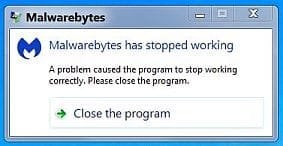
When you close Malwarebytes after using it, I'll display a warning which needs to be closed manually.

After the warning appears twice and is closed manually twice, everything is fine.

This issue occurs only in Windows 7 and not in Windows 10/11, so I'm guessing the new versions are having a compatibility issue with Windows 7.

The newest version at this time is 5.3.1.188.
 

My Computer

Computer type
PC/Desktop
Computer Manufacturer/Model Number
Dell OptiPlex 9020
OS
Windows 7 Professional SP1 64-bit
CPU
Intel Core i7-4790 3.60 GHz
Memory
32 GB DDR3-1600 MHz
Graphics Card(s)
Integrated Intel HD Graphics 4600
Monitor(s) Displays
Viewsonic 32" LCD
Hard Drives
Kingston SATA 3 240 GB SSD
Internet Speed
Spectrum Internet 1000 Mbps
Which version of Malwarebytes are you currently using in Windows 7? I use and update it to a new version on a regular basis, and I've discovered an issue with the last 2 new versions. When you close Malwarebytes after using it, I'll display a warning which needs to be closed manually. After the warning appears twice and is closed manually twice, everything is fine. This issue occurs only in Windows 7 and not in Windows 10/11, so I'm guessing the new versions are having a compatibility issue with Windows 7.
The newest version at this time is 5.3.1.188.

Oops, I guess it was old. I just remembered to update it. 5.3.2.195, and it runs in the background.
 

My Computer

Computer type
PC/Desktop
Computer Manufacturer/Model Number
HP p6-2020t
OS
Win 7 Ult 64-bit
CPU
G620 2.6GHZ Pentium R
Memory
6 GB
Monitor(s) Displays
25" HPLV2311
Screen Resolution
1920 x 1200
Hard Drives
1 SATA, 1 exterior SATA
Case
HP
Cooling
PSU
Antivirus
Glasswire
Browser
Waterfox; Firefox; Chrome for work
Other Info
Firewall--Glasswire
Similar specs in Gateway DX4200
Verizon FIOS Wired network

1 other Win7 computer-- has SSD
Are you using the PAID or FREE version?
Only the PAID version needs to load and run in the background all the time.
 

My Computer

Computer type
PC/Desktop
Computer Manufacturer/Model Number
Dell OptiPlex 9020
OS
Windows 7 Professional SP1 64-bit
CPU
Intel Core i7-4790 3.60 GHz
Memory
32 GB DDR3-1600 MHz
Graphics Card(s)
Integrated Intel HD Graphics 4600
Monitor(s) Displays
Viewsonic 32" LCD
Hard Drives
Kingston SATA 3 240 GB SSD
Internet Speed
Spectrum Internet 1000 Mbps
Are you using the PAID or FREE version?
Only the PAID version needs to load and run in the background all the time.

Free. Didn't know that. It's so long since I set up Win 7.
 

My Computer

Computer type
PC/Desktop
Computer Manufacturer/Model Number
HP p6-2020t
OS
Win 7 Ult 64-bit
CPU
G620 2.6GHZ Pentium R
Memory
6 GB
Monitor(s) Displays
25" HPLV2311
Screen Resolution
1920 x 1200
Hard Drives
1 SATA, 1 exterior SATA
Case
HP
Cooling
PSU
Antivirus
Glasswire
Browser
Waterfox; Firefox; Chrome for work
Other Info
Firewall--Glasswire
Similar specs in Gateway DX4200
Verizon FIOS Wired network

1 other Win7 computer-- has SSD
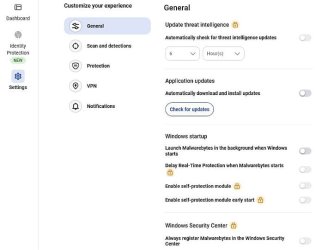
This is what the top part of the general settings window looks like.
You can disable Malwarebytes from loading during startup.
As you can see, all the PAID version settings are already disabled.

This is what appears when you manually close Malwarebytes.
It will probably appear twice, and you will need to close it twice.

I load Malwarebytes about every 14 days, then I check for updates so its definition files can update, then I do a scan.
 

Attachments

  • Capture.JPG
    Capture.JPG
    44.1 KB · Views: 11
  • Capture2.JPG
    Capture2.JPG
    17.9 KB · Views: 11

My Computer

Computer type
PC/Desktop
Computer Manufacturer/Model Number
Dell OptiPlex 9020
OS
Windows 7 Professional SP1 64-bit
CPU
Intel Core i7-4790 3.60 GHz
Memory
32 GB DDR3-1600 MHz
Graphics Card(s)
Integrated Intel HD Graphics 4600
Monitor(s) Displays
Viewsonic 32" LCD
Hard Drives
Kingston SATA 3 240 GB SSD
Internet Speed
Spectrum Internet 1000 Mbps
Back
Top