Trouble Downloading MalwareBytes Updates

debodun

Member
Member
VIP
Local time
12:42 PM
Messages
290
Location
upstate NY
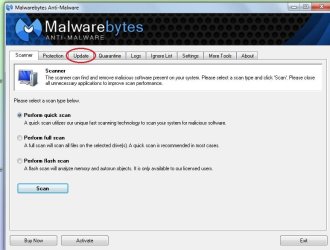
The last 2 days when I tried to update the definitions, I get "Program Not Responding". I have version 1.75.0.1300.

I've just been opening the program from a desktop icon then clicking on the UPDATE tab, but it just freezes. I rand a quick scan with MSE and MBAM and they didn't find any threats.
 

Attachments
  • mbam.jpg
    mbam.jpg
    100.5 KB · Views: 0
Last edited:

My Computer

Computer type
PC/Desktop
Computer Manufacturer/Model Number
refurb in an HP/Compaq case
OS
Windows 7 Ultimate x64
CPU
1.86 GHz Intrel Core 2
Motherboard
HP 0A60h XU1
Memory
3 GB Dual Channel DDR2 @ 3.32 MHz
Graphics Card(s)
Intel Q965/Q963 Express chipset
Monitor(s) Displays
Dell CRT
Hard Drives
977GB Samsung HD 103 SI ATA
Case
HP Compaq DC5800
Mouse
wired optical
Antivirus
Microsoft Security Essentials, MalwareBytes, Spyware Blaster
Browser
Firefox 32-bit
If its an old version they stopped updates an as its not activated that may stop it as well
 

My Computer

Computer type
PC/Desktop
OS
win 8 32 bit
All I can say is that it updated until a few days ago. I'd click on the update tab and it would download the definitions in a few seconds.

Today I waited it out, but for some reason, it took a lot longer than it used to - about 90 seconds.
 

My Computer

Computer type
PC/Desktop
Computer Manufacturer/Model Number
refurb in an HP/Compaq case
OS
Windows 7 Ultimate x64
CPU
1.86 GHz Intrel Core 2
Motherboard
HP 0A60h XU1
Memory
3 GB Dual Channel DDR2 @ 3.32 MHz
Graphics Card(s)
Intel Q965/Q963 Express chipset
Monitor(s) Displays
Dell CRT
Hard Drives
977GB Samsung HD 103 SI ATA
Case
HP Compaq DC5800
Mouse
wired optical
Antivirus
Microsoft Security Essentials, MalwareBytes, Spyware Blaster
Browser
Firefox 32-bit
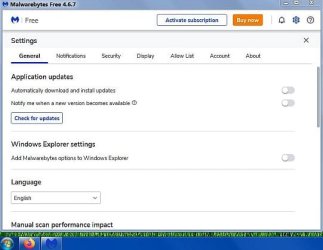
You are using a very old version of Malwarebytes Anti-Malware.
The "Anti-Malware" part of its name was removed a long time ago.

The current version is 4.6.7.301.
This is what the "Settings" section of its main window now looks like.
 

Attachments

  • Capture.JPG
    Capture.JPG
    38 KB · Views: 3

My Computer

Computer type
PC/Desktop
Computer Manufacturer/Model Number
Dell OptiPlex 9020
OS
Windows 7 Professional SP1 64-bit
CPU
Intel Core i7-4790 3.60 GHz
Memory
32 GB DDR3-1600 MHz
Graphics Card(s)
Integrated Intel HD Graphics 4600
Monitor(s) Displays
Viewsonic 32" LCD
Hard Drives
Kingston SATA 3 240 GB SSD
Internet Speed
Spectrum Internet 1000 Mbps
I deleted a bunch of cookies from the browser and so far, that seems to have helped the download speed.
 

My Computer

Computer type
PC/Desktop
Computer Manufacturer/Model Number
refurb in an HP/Compaq case
OS
Windows 7 Ultimate x64
CPU
1.86 GHz Intrel Core 2
Motherboard
HP 0A60h XU1
Memory
3 GB Dual Channel DDR2 @ 3.32 MHz
Graphics Card(s)
Intel Q965/Q963 Express chipset
Monitor(s) Displays
Dell CRT
Hard Drives
977GB Samsung HD 103 SI ATA
Case
HP Compaq DC5800
Mouse
wired optical
Antivirus
Microsoft Security Essentials, MalwareBytes, Spyware Blaster
Browser
Firefox 32-bit
Back
Top