
You are using an out of date browser. It may not display this or other websites correctly.
You should upgrade or use an alternative browser.
You should upgrade or use an alternative browser.
Solved "Manage Add Ons" window keeps opening randomly
- Thread starter grreatpop
- Start date


Hi,
Not really ?
There are of course key board shortcuts to open the dialog,
Possibly your Alt key is sticking ?
Alt+TA will open manage add-ons,
You can also see if the issue happens using clean boot,
http://www.sevenforums.com/tutorials/179159-troubleshoot-application-conflicts-performing-clean-startup.html
Cheers.
Not really ?
There are of course key board shortcuts to open the dialog,
Possibly your Alt key is sticking ?
Alt+TA will open manage add-ons,
You can also see if the issue happens using clean boot,
http://www.sevenforums.com/tutorials/179159-troubleshoot-application-conflicts-performing-clean-startup.html
Cheers.
My Computer
- Computer type
- PC/Desktop
- Computer Manufacturer/Model Number
- Custom assembled by me :}
- OS
- Win-7-Pro64bit 7-H-Prem-64bit
- CPU
- i7-5930K 2nd i9-9940x both water blocked VRM's too
- Motherboard
- ASUS SABERTOOTH X99 2nd ASUS x299 Apex
- Memory
- Trident-z 3200C14 2nd Trident-z 3600C16
- Graphics Card(s)
- EVGA 1080ti ftw3 2nd Titan Xp both water blocked
- Sound Card
- Built-in Realtek
- Monitor(s) Displays
- 1-AOC G2460PG 24"G-Sync 144Hz/ 2nd 1-ASUS VG248QE 24" 144Hz
- Screen Resolution
- 1920 x 1080 144Hz
- Hard Drives
- 2-Samsung M.2 Evo & Evo Plus
2-Samsung 850 EVO 500GB SSD's/ 3-2.5 W.D. Black 1tb-&3-1tb/3-3.5 WD Black 1tb hdd's
- PSU
- EVGA SuperNOVA 1000-P2 2nd 1200-P2
- Case
- 2-Corsair Obsidian Series 450D Black ATX Mid Tower
- Cooling
- Custom water loops
- Keyboard
- Logitech G710+/ 2nd Logitech G910
- Mouse
- 2-RedDragon M901 Perdition 16400 dpi Gaming mouse = wired
- Internet Speed
- Comcast Ping 19ms 89.31mbps download speed 6.12mbps upload
- Antivirus
- Malwarebytes Pro/ Superantispyware Pro
- Browser
- FireFox & Pale moon
- Other Info
- 2nd ASUS X299 Apex/Intel i9-9940x with Custom water loop/7H-Prem-x64/Corsair 450D case/Ram Trident-z 3600C16 4x8gb / Samsung970Evo plus 500gb SSD/Dual ssd EZ swap evo/PSU EVGA SuperNova 1200w-P2 80+Platinum/GPU Titan Xp /8-ML-140 on push-pull on 2-280GTX rads
What were the results using clean boot ?
My Computer
- Computer type
- PC/Desktop
- Computer Manufacturer/Model Number
- Custom assembled by me :}
- OS
- Win-7-Pro64bit 7-H-Prem-64bit
- CPU
- i7-5930K 2nd i9-9940x both water blocked VRM's too
- Motherboard
- ASUS SABERTOOTH X99 2nd ASUS x299 Apex
- Memory
- Trident-z 3200C14 2nd Trident-z 3600C16
- Graphics Card(s)
- EVGA 1080ti ftw3 2nd Titan Xp both water blocked
- Sound Card
- Built-in Realtek
- Monitor(s) Displays
- 1-AOC G2460PG 24"G-Sync 144Hz/ 2nd 1-ASUS VG248QE 24" 144Hz
- Screen Resolution
- 1920 x 1080 144Hz
- Hard Drives
- 2-Samsung M.2 Evo & Evo Plus
2-Samsung 850 EVO 500GB SSD's/ 3-2.5 W.D. Black 1tb-&3-1tb/3-3.5 WD Black 1tb hdd's
- PSU
- EVGA SuperNOVA 1000-P2 2nd 1200-P2
- Case
- 2-Corsair Obsidian Series 450D Black ATX Mid Tower
- Cooling
- Custom water loops
- Keyboard
- Logitech G710+/ 2nd Logitech G910
- Mouse
- 2-RedDragon M901 Perdition 16400 dpi Gaming mouse = wired
- Internet Speed
- Comcast Ping 19ms 89.31mbps download speed 6.12mbps upload
- Antivirus
- Malwarebytes Pro/ Superantispyware Pro
- Browser
- FireFox & Pale moon
- Other Info
- 2nd ASUS X299 Apex/Intel i9-9940x with Custom water loop/7H-Prem-x64/Corsair 450D case/Ram Trident-z 3600C16 4x8gb / Samsung970Evo plus 500gb SSD/Dual ssd EZ swap evo/PSU EVGA SuperNova 1200w-P2 80+Platinum/GPU Titan Xp /8-ML-140 on push-pull on 2-280GTX rads
the results were no change. I did observe, belatedly, that the window opens whenever I go online and open a new IE page. so far, since noticing this, the window has not appeared at any other times. I do appreciate your time and trouble and if you can give me any further assistance I will be grateful.
My Computer
- Computer Manufacturer/Model Number
- Toshiba Satellite
- OS
- Win 7 Home 64 bit
Hi,
The first thing I suppose we should try is reset,
Export Favorites to html file before resetting Internet explorer/ just to be safe.
http://www.sevenforums.com/tutorials/86795-internet-explorer-import-export-favorites.html
The first thing I suppose we should try is reset,
Export Favorites to html file before resetting Internet explorer/ just to be safe.
http://www.sevenforums.com/tutorials/86795-internet-explorer-import-export-favorites.html
Tutorial of Resetting Internet explorer,
http://www.sevenforums.com/tutorials/1222-internet-explorer-reset.html
Accessing Internet Options from the Start menu search,
Reset process first opening Internet explorer
http://www.sevenforums.com/tutorials/1222-internet-explorer-reset.html
Accessing Internet Options from the Start menu search,
Reset process first opening Internet explorer
My Computer
- Computer type
- PC/Desktop
- Computer Manufacturer/Model Number
- Custom assembled by me :}
- OS
- Win-7-Pro64bit 7-H-Prem-64bit
- CPU
- i7-5930K 2nd i9-9940x both water blocked VRM's too
- Motherboard
- ASUS SABERTOOTH X99 2nd ASUS x299 Apex
- Memory
- Trident-z 3200C14 2nd Trident-z 3600C16
- Graphics Card(s)
- EVGA 1080ti ftw3 2nd Titan Xp both water blocked
- Sound Card
- Built-in Realtek
- Monitor(s) Displays
- 1-AOC G2460PG 24"G-Sync 144Hz/ 2nd 1-ASUS VG248QE 24" 144Hz
- Screen Resolution
- 1920 x 1080 144Hz
- Hard Drives
- 2-Samsung M.2 Evo & Evo Plus
2-Samsung 850 EVO 500GB SSD's/ 3-2.5 W.D. Black 1tb-&3-1tb/3-3.5 WD Black 1tb hdd's
- PSU
- EVGA SuperNOVA 1000-P2 2nd 1200-P2
- Case
- 2-Corsair Obsidian Series 450D Black ATX Mid Tower
- Cooling
- Custom water loops
- Keyboard
- Logitech G710+/ 2nd Logitech G910
- Mouse
- 2-RedDragon M901 Perdition 16400 dpi Gaming mouse = wired
- Internet Speed
- Comcast Ping 19ms 89.31mbps download speed 6.12mbps upload
- Antivirus
- Malwarebytes Pro/ Superantispyware Pro
- Browser
- FireFox & Pale moon
- Other Info
- 2nd ASUS X299 Apex/Intel i9-9940x with Custom water loop/7H-Prem-x64/Corsair 450D case/Ram Trident-z 3600C16 4x8gb / Samsung970Evo plus 500gb SSD/Dual ssd EZ swap evo/PSU EVGA SuperNova 1200w-P2 80+Platinum/GPU Titan Xp /8-ML-140 on push-pull on 2-280GTX rads
Okay fair enough it most likely wouldn't do any good if clean boot is not doing any different 
Click Start and type in the search box,
msconfig
Click on the suggestion on top or hit the Enter key,
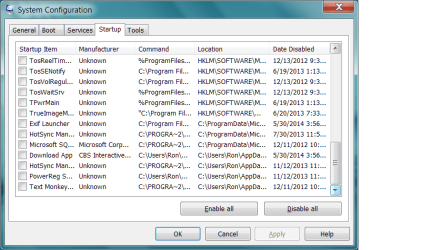
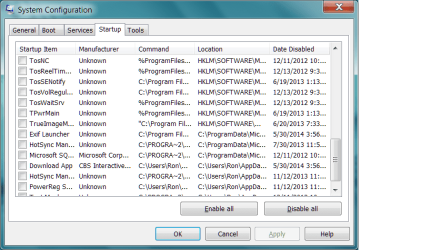
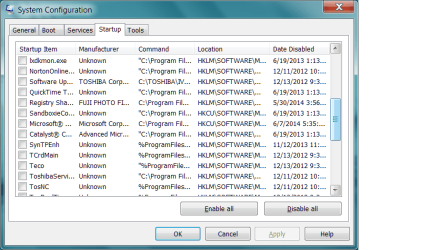
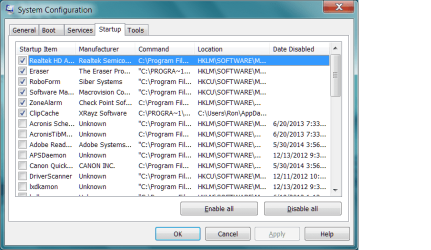
Go to the Startup section and take some screen shots for a complete list,
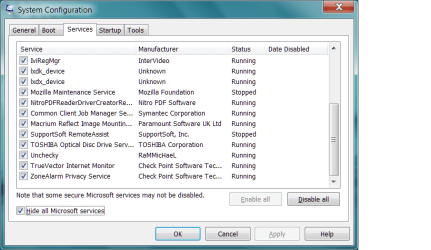
Go to the Services section and on the bottom left Check the box to Hide All Microsoft services,
Repeat the screen shots,
See the links above my signature on how to take and upload screen shots here,
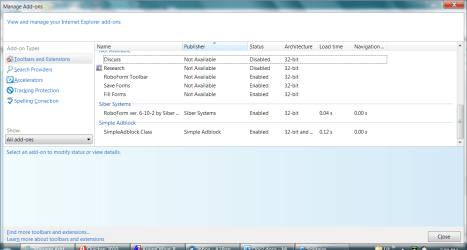
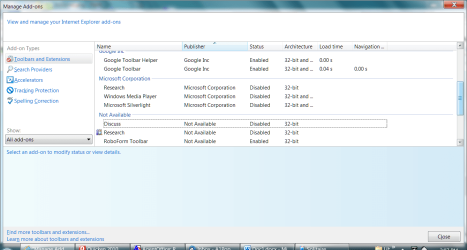
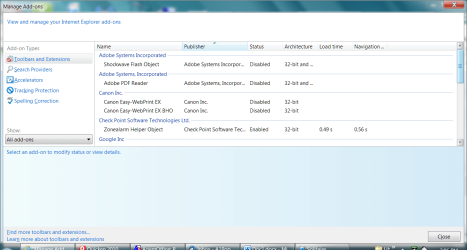
Also lets see what is actually listed in the manage add-ons window,
Make sure Show All add-ons is selected on the bottom left column,

Click Start and type in the search box,
msconfig
Click on the suggestion on top or hit the Enter key,
Go to the Startup section and take some screen shots for a complete list,
Go to the Services section and on the bottom left Check the box to Hide All Microsoft services,
Repeat the screen shots,
See the links above my signature on how to take and upload screen shots here,
Also lets see what is actually listed in the manage add-ons window,
Make sure Show All add-ons is selected on the bottom left column,
My Computer
- Computer type
- PC/Desktop
- Computer Manufacturer/Model Number
- Custom assembled by me :}
- OS
- Win-7-Pro64bit 7-H-Prem-64bit
- CPU
- i7-5930K 2nd i9-9940x both water blocked VRM's too
- Motherboard
- ASUS SABERTOOTH X99 2nd ASUS x299 Apex
- Memory
- Trident-z 3200C14 2nd Trident-z 3600C16
- Graphics Card(s)
- EVGA 1080ti ftw3 2nd Titan Xp both water blocked
- Sound Card
- Built-in Realtek
- Monitor(s) Displays
- 1-AOC G2460PG 24"G-Sync 144Hz/ 2nd 1-ASUS VG248QE 24" 144Hz
- Screen Resolution
- 1920 x 1080 144Hz
- Hard Drives
- 2-Samsung M.2 Evo & Evo Plus
2-Samsung 850 EVO 500GB SSD's/ 3-2.5 W.D. Black 1tb-&3-1tb/3-3.5 WD Black 1tb hdd's
- PSU
- EVGA SuperNOVA 1000-P2 2nd 1200-P2
- Case
- 2-Corsair Obsidian Series 450D Black ATX Mid Tower
- Cooling
- Custom water loops
- Keyboard
- Logitech G710+/ 2nd Logitech G910
- Mouse
- 2-RedDragon M901 Perdition 16400 dpi Gaming mouse = wired
- Internet Speed
- Comcast Ping 19ms 89.31mbps download speed 6.12mbps upload
- Antivirus
- Malwarebytes Pro/ Superantispyware Pro
- Browser
- FireFox & Pale moon
- Other Info
- 2nd ASUS X299 Apex/Intel i9-9940x with Custom water loop/7H-Prem-x64/Corsair 450D case/Ram Trident-z 3600C16 4x8gb / Samsung970Evo plus 500gb SSD/Dual ssd EZ swap evo/PSU EVGA SuperNova 1200w-P2 80+Platinum/GPU Titan Xp /8-ML-140 on push-pull on 2-280GTX rads
Here are the screenshots - Since I couldn't get complete shots for each shot I divided them into parts. Hope you can put them together.
Attachments

My Computer
- Computer Manufacturer/Model Number
- Toshiba Satellite
- OS
- Win 7 Home 64 bit

grreatpop I didn't see the kitchen sink in there. 
Take a look at # 8 in this tutorial by Brink.
http://www.sevenforums.com/tutorials/11728-optimize-windows-7-a.html
This is mine.
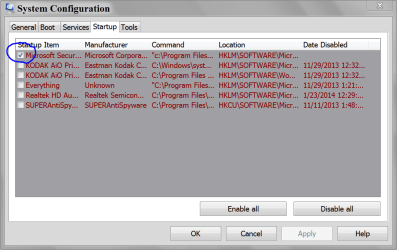
Take a look at # 8 in this tutorial by Brink.
http://www.sevenforums.com/tutorials/11728-optimize-windows-7-a.html
This is mine.
My Computer
- Computer type
- PC/Desktop
- Computer Manufacturer/Model Number
- Home made Desktop
- OS
- Windows 10 Pro. 64/ version 1709 Windows 7 Pro/64
- CPU
- Intel i7-6800K @ 4.3
- Motherboard
- ASUS X-99 Deluxe II
- Memory
- Corsair Platinum 16 gig @2400
- Graphics Card(s)
- EVGA GTX 1070 OC
- Monitor(s) Displays
- Asus 27" LED LCD/VE278Q
- Screen Resolution
- 1920-1080 or 1280-720 HDMI
- Hard Drives
- INTEL SSD 730-240 Gb Sata 3.0/
- PSU
- EVGA Platium 1200W
- Case
- Phanteks Luxe Tempered Glass 8 fans/ one radiator
- Cooling
- XSPC/ Water Cooled CPU
- Keyboard
- Das 4 Professional
- Mouse
- Logitech M705/MX Anywhere 2-S
- Internet Speed
- 100 mbits
- Antivirus
- Microsoft Security Essentials/ Malwarebytes Premium 3.0/ SAS
- Browser
- I.E. 11 default/Firefox/ ISP Time Warner Cable/Spectrum
- Other Info
- LG BluRay Burner/
Sound system-KLipsch-THX/
Icy Dock ssd Hot Swap bays.
Hi thanks for the screen shots great job 
One that sticks out in add-ons is Zonealarm helper object 0.49 - 0.56 to activate,
That's pretty slow,
None of the Zonealarm add-ons have a publisher either which is also a little odd,
I'm going to assume that the Save forms and Fill forms add-ons are from Zonealarm as well ?
After proper reset all of these would be disabled if done properly,
Only adobe flash would not be disabled not sure why it's excluded,
Not sure why add-ons windows would popup unless your referring to this popup message ?

One that sticks out in add-ons is Zonealarm helper object 0.49 - 0.56 to activate,
That's pretty slow,
None of the Zonealarm add-ons have a publisher either which is also a little odd,
I'm going to assume that the Save forms and Fill forms add-ons are from Zonealarm as well ?
After proper reset all of these would be disabled if done properly,
Only adobe flash would not be disabled not sure why it's excluded,
Not sure why add-ons windows would popup unless your referring to this popup message ?
My Computer
- Computer type
- PC/Desktop
- Computer Manufacturer/Model Number
- Custom assembled by me :}
- OS
- Win-7-Pro64bit 7-H-Prem-64bit
- CPU
- i7-5930K 2nd i9-9940x both water blocked VRM's too
- Motherboard
- ASUS SABERTOOTH X99 2nd ASUS x299 Apex
- Memory
- Trident-z 3200C14 2nd Trident-z 3600C16
- Graphics Card(s)
- EVGA 1080ti ftw3 2nd Titan Xp both water blocked
- Sound Card
- Built-in Realtek
- Monitor(s) Displays
- 1-AOC G2460PG 24"G-Sync 144Hz/ 2nd 1-ASUS VG248QE 24" 144Hz
- Screen Resolution
- 1920 x 1080 144Hz
- Hard Drives
- 2-Samsung M.2 Evo & Evo Plus
2-Samsung 850 EVO 500GB SSD's/ 3-2.5 W.D. Black 1tb-&3-1tb/3-3.5 WD Black 1tb hdd's
- PSU
- EVGA SuperNOVA 1000-P2 2nd 1200-P2
- Case
- 2-Corsair Obsidian Series 450D Black ATX Mid Tower
- Cooling
- Custom water loops
- Keyboard
- Logitech G710+/ 2nd Logitech G910
- Mouse
- 2-RedDragon M901 Perdition 16400 dpi Gaming mouse = wired
- Internet Speed
- Comcast Ping 19ms 89.31mbps download speed 6.12mbps upload
- Antivirus
- Malwarebytes Pro/ Superantispyware Pro
- Browser
- FireFox & Pale moon
- Other Info
- 2nd ASUS X299 Apex/Intel i9-9940x with Custom water loop/7H-Prem-x64/Corsair 450D case/Ram Trident-z 3600C16 4x8gb / Samsung970Evo plus 500gb SSD/Dual ssd EZ swap evo/PSU EVGA SuperNova 1200w-P2 80+Platinum/GPU Titan Xp /8-ML-140 on push-pull on 2-280GTX rads
Thanks for your help - the Save forms and Fill forms add-ons are from RoboForm. The pop up you indicated is not the one troubling me. It is the whole window like the print screen shot I sent to you. I have determined that the only time it is popping up is whenever I go online and open the browser the first time; it doesn't do it when I open a new tab. I guess I can live with it.
Have a good life.
Have a good life.
My Computer
- Computer Manufacturer/Model Number
- Toshiba Satellite
- OS
- Win 7 Home 64 bit
If those pop up are in your startup (check marked) they will start every time you boot whether you want them to or not.
If you want them to start every boot just leave them checked.
If you don't uncheck them.
No more complicated than that.
Will un-checking them solve all problems? I don't know.
I'm sure you don't need all them checked and that is why I suggested the tutorial and directed you to that section.
Any suggestion I or anybody else gives are just that suggestion.
Tutorials are a suggestion and method on how to do things.
It's your choice to follow them or not; it's your computer.
Un-checking them won't hurt any things. If you want them to start you just go back and check them again.
Some laptop/notebooks/netbooks will have some options checked that one does not need on a PC.
I posted a picture of one of my system to indicate that all those things are not needed to be checked.
If I may mention. The auto form fill in (RoboForm) is very dangerous.
If you system ever gets infected all that auto form fill in information can be gather up by the infection and called home to who ever infected you system.
Once again it's your computer so it's your call.
If you want them to start every boot just leave them checked.
If you don't uncheck them.
No more complicated than that.
Will un-checking them solve all problems? I don't know.
I'm sure you don't need all them checked and that is why I suggested the tutorial and directed you to that section.
Any suggestion I or anybody else gives are just that suggestion.
Tutorials are a suggestion and method on how to do things.
It's your choice to follow them or not; it's your computer.
Un-checking them won't hurt any things. If you want them to start you just go back and check them again.
Some laptop/notebooks/netbooks will have some options checked that one does not need on a PC.
I posted a picture of one of my system to indicate that all those things are not needed to be checked.
If I may mention. The auto form fill in (RoboForm) is very dangerous.
If you system ever gets infected all that auto form fill in information can be gather up by the infection and called home to who ever infected you system.
Once again it's your computer so it's your call.
My Computer
- Computer type
- PC/Desktop
- Computer Manufacturer/Model Number
- Home made Desktop
- OS
- Windows 10 Pro. 64/ version 1709 Windows 7 Pro/64
- CPU
- Intel i7-6800K @ 4.3
- Motherboard
- ASUS X-99 Deluxe II
- Memory
- Corsair Platinum 16 gig @2400
- Graphics Card(s)
- EVGA GTX 1070 OC
- Monitor(s) Displays
- Asus 27" LED LCD/VE278Q
- Screen Resolution
- 1920-1080 or 1280-720 HDMI
- Hard Drives
- INTEL SSD 730-240 Gb Sata 3.0/
- PSU
- EVGA Platium 1200W
- Case
- Phanteks Luxe Tempered Glass 8 fans/ one radiator
- Cooling
- XSPC/ Water Cooled CPU
- Keyboard
- Das 4 Professional
- Mouse
- Logitech M705/MX Anywhere 2-S
- Internet Speed
- 100 mbits
- Antivirus
- Microsoft Security Essentials/ Malwarebytes Premium 3.0/ SAS
- Browser
- I.E. 11 default/Firefox/ ISP Time Warner Cable/Spectrum
- Other Info
- LG BluRay Burner/
Sound system-KLipsch-THX/
Icy Dock ssd Hot Swap bays.
Still interesting,
Unless somehow this manage add-ons page is listed as one of your home pages,
Possibly verify what is your home page Alt+TO when ie is open,
You can also remove/ delete what ever shortcut you use to open ie and replace it and see if it does any good ?
Cheers.
Unless somehow this manage add-ons page is listed as one of your home pages,
Possibly verify what is your home page Alt+TO when ie is open,
You can also remove/ delete what ever shortcut you use to open ie and replace it and see if it does any good ?
Cheers.
My Computer
- Computer type
- PC/Desktop
- Computer Manufacturer/Model Number
- Custom assembled by me :}
- OS
- Win-7-Pro64bit 7-H-Prem-64bit
- CPU
- i7-5930K 2nd i9-9940x both water blocked VRM's too
- Motherboard
- ASUS SABERTOOTH X99 2nd ASUS x299 Apex
- Memory
- Trident-z 3200C14 2nd Trident-z 3600C16
- Graphics Card(s)
- EVGA 1080ti ftw3 2nd Titan Xp both water blocked
- Sound Card
- Built-in Realtek
- Monitor(s) Displays
- 1-AOC G2460PG 24"G-Sync 144Hz/ 2nd 1-ASUS VG248QE 24" 144Hz
- Screen Resolution
- 1920 x 1080 144Hz
- Hard Drives
- 2-Samsung M.2 Evo & Evo Plus
2-Samsung 850 EVO 500GB SSD's/ 3-2.5 W.D. Black 1tb-&3-1tb/3-3.5 WD Black 1tb hdd's
- PSU
- EVGA SuperNOVA 1000-P2 2nd 1200-P2
- Case
- 2-Corsair Obsidian Series 450D Black ATX Mid Tower
- Cooling
- Custom water loops
- Keyboard
- Logitech G710+/ 2nd Logitech G910
- Mouse
- 2-RedDragon M901 Perdition 16400 dpi Gaming mouse = wired
- Internet Speed
- Comcast Ping 19ms 89.31mbps download speed 6.12mbps upload
- Antivirus
- Malwarebytes Pro/ Superantispyware Pro
- Browser
- FireFox & Pale moon
- Other Info
- 2nd ASUS X299 Apex/Intel i9-9940x with Custom water loop/7H-Prem-x64/Corsair 450D case/Ram Trident-z 3600C16 4x8gb / Samsung970Evo plus 500gb SSD/Dual ssd EZ swap evo/PSU EVGA SuperNova 1200w-P2 80+Platinum/GPU Titan Xp /8-ML-140 on push-pull on 2-280GTX rads
There is no home page issue and all the shortcuts work fine with the same results. I did think of something since you mentioned the possibility of the little window that appears at the bottom of the page; I don't remember seeing that for some time and maybe what we have is some setting somewhere that is opening the large window where it used to open the little window. that would make sense since apparently that could be happening. Give that some thought and let me know what your opinion is.
My Computer
- Computer Manufacturer/Model Number
- Toshiba Satellite
- OS
- Win 7 Home 64 bit
Could possibly be,
That particular popup message would actually take you to another dialog showing you the problematic add-ons which I already pointed out,
But to get to the dialog where they will be listed is available from the command bar Tools listing,
Use Alt+VTC to see the command bar in your page view when ie is open,
Or Menu bar/ View/ Toolbars/ Command bar,
View attachment 320970
That particular popup message would actually take you to another dialog showing you the problematic add-ons which I already pointed out,
But to get to the dialog where they will be listed is available from the command bar Tools listing,
Use Alt+VTC to see the command bar in your page view when ie is open,
Or Menu bar/ View/ Toolbars/ Command bar,
View attachment 320970
Last edited:
My Computer
- Computer type
- PC/Desktop
- Computer Manufacturer/Model Number
- Custom assembled by me :}
- OS
- Win-7-Pro64bit 7-H-Prem-64bit
- CPU
- i7-5930K 2nd i9-9940x both water blocked VRM's too
- Motherboard
- ASUS SABERTOOTH X99 2nd ASUS x299 Apex
- Memory
- Trident-z 3200C14 2nd Trident-z 3600C16
- Graphics Card(s)
- EVGA 1080ti ftw3 2nd Titan Xp both water blocked
- Sound Card
- Built-in Realtek
- Monitor(s) Displays
- 1-AOC G2460PG 24"G-Sync 144Hz/ 2nd 1-ASUS VG248QE 24" 144Hz
- Screen Resolution
- 1920 x 1080 144Hz
- Hard Drives
- 2-Samsung M.2 Evo & Evo Plus
2-Samsung 850 EVO 500GB SSD's/ 3-2.5 W.D. Black 1tb-&3-1tb/3-3.5 WD Black 1tb hdd's
- PSU
- EVGA SuperNOVA 1000-P2 2nd 1200-P2
- Case
- 2-Corsair Obsidian Series 450D Black ATX Mid Tower
- Cooling
- Custom water loops
- Keyboard
- Logitech G710+/ 2nd Logitech G910
- Mouse
- 2-RedDragon M901 Perdition 16400 dpi Gaming mouse = wired
- Internet Speed
- Comcast Ping 19ms 89.31mbps download speed 6.12mbps upload
- Antivirus
- Malwarebytes Pro/ Superantispyware Pro
- Browser
- FireFox & Pale moon
- Other Info
- 2nd ASUS X299 Apex/Intel i9-9940x with Custom water loop/7H-Prem-x64/Corsair 450D case/Ram Trident-z 3600C16 4x8gb / Samsung970Evo plus 500gb SSD/Dual ssd EZ swap evo/PSU EVGA SuperNova 1200w-P2 80+Platinum/GPU Titan Xp /8-ML-140 on push-pull on 2-280GTX rads
Well, I disabled the addons and nothing changed so I enabled some of the add ons again. The next time I went online I got the little window again, then the big window. So, since this only happens when I go online I'll just live with it and close it when it opens. Thanks for all your help and insights.
My Computer
- Computer Manufacturer/Model Number
- Toshiba Satellite
- OS
- Win 7 Home 64 bit
How many listings were on the disable add-ons window ?
And what were they,
You can always test on a new administrator user account to see if the same thing happens,
Cheers.
And what were they,
You can always test on a new administrator user account to see if the same thing happens,
Cheers.
My Computer
- Computer type
- PC/Desktop
- Computer Manufacturer/Model Number
- Custom assembled by me :}
- OS
- Win-7-Pro64bit 7-H-Prem-64bit
- CPU
- i7-5930K 2nd i9-9940x both water blocked VRM's too
- Motherboard
- ASUS SABERTOOTH X99 2nd ASUS x299 Apex
- Memory
- Trident-z 3200C14 2nd Trident-z 3600C16
- Graphics Card(s)
- EVGA 1080ti ftw3 2nd Titan Xp both water blocked
- Sound Card
- Built-in Realtek
- Monitor(s) Displays
- 1-AOC G2460PG 24"G-Sync 144Hz/ 2nd 1-ASUS VG248QE 24" 144Hz
- Screen Resolution
- 1920 x 1080 144Hz
- Hard Drives
- 2-Samsung M.2 Evo & Evo Plus
2-Samsung 850 EVO 500GB SSD's/ 3-2.5 W.D. Black 1tb-&3-1tb/3-3.5 WD Black 1tb hdd's
- PSU
- EVGA SuperNOVA 1000-P2 2nd 1200-P2
- Case
- 2-Corsair Obsidian Series 450D Black ATX Mid Tower
- Cooling
- Custom water loops
- Keyboard
- Logitech G710+/ 2nd Logitech G910
- Mouse
- 2-RedDragon M901 Perdition 16400 dpi Gaming mouse = wired
- Internet Speed
- Comcast Ping 19ms 89.31mbps download speed 6.12mbps upload
- Antivirus
- Malwarebytes Pro/ Superantispyware Pro
- Browser
- FireFox & Pale moon
- Other Info
- 2nd ASUS X299 Apex/Intel i9-9940x with Custom water loop/7H-Prem-x64/Corsair 450D case/Ram Trident-z 3600C16 4x8gb / Samsung970Evo plus 500gb SSD/Dual ssd EZ swap evo/PSU EVGA SuperNova 1200w-P2 80+Platinum/GPU Titan Xp /8-ML-140 on push-pull on 2-280GTX rads