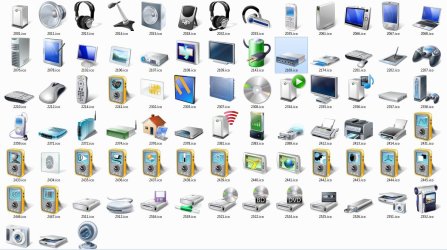
Manually Change Device Icons?

muzicman82

New member
Member
Local time
8:11 PM
Messages
45
Location
Woodstown, NJ
Has anyone figured out how to manually change device icons? It seems like there's only accurate icons for Microsoft hardware or more common things like iPods.

If so, has anyone started a sort of database of icons for specific models?
 

My Computer

OS
Windows 7 Home Premium x64
CPU
Intel Core 2 Quad Q6600
Motherboard
EVGA 680i LT
Memory
8GB
Graphics Card(s)
nVidia Geforce 8800GT
Monitor(s) Displays
Dell 2408W
Screen Resolution
1920x1200
Can't remember where I read it, but there has been some 'looking into' of the subject. Apparently it is possible to change the device icon to one of your own, but as soon as you connect to the internet it will be overwritten, as the device icon cache is refreshed. So until that kink is worked out its really not worth it.
 

My Computer

Computer Manufacturer/Model Number
Dell Inspiron 1545
OS
Windows 7 build 7100 x86
CPU
Intel Core 2 Duo 2.1GHz
Motherboard
GM45 chipset
Memory
3GB
Graphics Card(s)
Intel(TM) Graphics Media Accelerator X4500HD
Sound Card
Realtek HD
Monitor(s) Displays
15.6" WLED 720p
Screen Resolution
1366x768
Hard Drives
320GB 5400rpm hard drive
changing icons

Has anyone figured out how to manually change device icons? It seems like there's only accurate icons for Microsoft hardware or more common things like iPods.

If so, has anyone started a sort of database of icons for specific models?

there are tons of ways to change device icons. I believe there is a tutorial for it in the totorial section.. One way to chage the icon is reshacker. with it you can change the resources of most sounds, icons, and other resources.

hope this helps

Ken
 

My Computer

Computer Manufacturer/Model Number
HP Pavillion dv-7 1005 Tx
OS
Win 8 Release candidate 8400
CPU
[email protected]
Memory
4 gigs
Graphics Card(s)
Nvidia 9600M
Sound Card
HD built-in
Monitor(s) Displays
17" Wxga
Screen Resolution
1440x900
Cooling
none
Internet Speed
45Mb down 5Mb up
there are tons of ways to change device icons. I believe there is a tutorial for it in the totorial section.. One way to chage the icon is reshacker. with it you can change the resources of most sounds, icons, and other resources.

hope this helps

Ken

The way I understood the original post was that he wanted to change the icons under 'Devices and Printers', which has photo-realistic icons of attached devices. As I said, I don't think that these can be changed.
 

My Computer

Computer Manufacturer/Model Number
Dell Inspiron 1545
OS
Windows 7 build 7100 x86
CPU
Intel Core 2 Duo 2.1GHz
Motherboard
GM45 chipset
Memory
3GB
Graphics Card(s)
Intel(TM) Graphics Media Accelerator X4500HD
Sound Card
Realtek HD
Monitor(s) Displays
15.6" WLED 720p
Screen Resolution
1366x768
Hard Drives
320GB 5400rpm hard drive
I think what you are looking for is the DDORes.dll found in System32 and SysWOW64 and it contains all these icons.

2009-07-14_223819.jpg

You will need something like Restorator to replace them, if you like you can post the icons you want to use and I will replace them for you.
 

My Computer

Computer Manufacturer/Model Number
Home Brew
OS
Windows 7 Ultimate Vista Ultimate x64
CPU
Core 2 Duo E8500 3.16Ghz @ 3.8Ghz
Motherboard
eVGA 750i FTW
Memory
2x2Gigs Patriot PC2-6400 LL
Graphics Card(s)
Inno3D GeForce GTX260 216 SP
Monitor(s) Displays
ASUS VW222U 22" 2ms Response time
Screen Resolution
1680x1050
Hard Drives
SATA 150GB
SATA II 250GB
USB IDE 750GB Ext.
PSU
HYTEC 600W & Thermaltake 650W Toughpower Power Exp
Case
Thermaltake Armor LCS (Liquid Cooling System)
Cooling
Liquid Cooling System
Keyboard
Logitech G15 Gaming Keyboard
Mouse
Logitech G9 Gaming Mouse
I think what you are looking for is the DDORes.dll found in System32 and SysWOW64 and it contains all these icons.


You will need something like Restorator to replace them, if you like you can post the icons you want to use and I will replace them for you.
Hello, Thanks for this offer.

I am looking to get the standard keyboard, mouse, and joystick icons replaced with more accurate icons of my devices.
Mouse Icon: http://www.logitech.com/repository/137/jpg/979.1.0.jpg

keyboard icon: http://ucables.com/img/extra/LOGITECH-G15-GAMING-K-R28297-0.jpg

Joystick or gaming device: http://www.logitech.com/repository/104/jpg/505.1.0.jpg

Apple iPod USB Device: http://i212.photobucket.com/albums/cc17/killest/ipodclassic.png

I tried to change these myself, but I couldn't figure it out.
Thanks for your help!
 

My Computer

OS
Windows 7 RC 1
I think what you are looking for is the DDORes.dll found in System32 and SysWOW64 and it contains all these icons.


You will need something like Restorator to replace them, if you like you can post the icons you want to use and I will replace them for you.
Hello, Thanks for this offer.

I am looking to get the standard keyboard, mouse, and joystick icons replaced with more accurate icons of my devices.
Mouse Icon: http://www.logitech.com/repository/137/jpg/979.1.0.jpg

keyboard icon: http://ucables.com/img/extra/LOGITECH-G15-GAMING-K-R28297-0.jpg

Joystick or gaming device: http://www.logitech.com/repository/104/jpg/505.1.0.jpg

Apple iPod USB Device: http://i212.photobucket.com/albums/cc17/killest/ipodclassic.png

I tried to change these myself, but I couldn't figure it out.
Thanks for your help!

I haven't tried this but hopefully it will work for you, I included the icons on their own as well in case you want them.
 

Attachments

My Computer

Computer Manufacturer/Model Number
Home Brew
OS
Windows 7 Ultimate Vista Ultimate x64
CPU
Core 2 Duo E8500 3.16Ghz @ 3.8Ghz
Motherboard
eVGA 750i FTW
Memory
2x2Gigs Patriot PC2-6400 LL
Graphics Card(s)
Inno3D GeForce GTX260 216 SP
Monitor(s) Displays
ASUS VW222U 22" 2ms Response time
Screen Resolution
1680x1050
Hard Drives
SATA 150GB
SATA II 250GB
USB IDE 750GB Ext.
PSU
HYTEC 600W & Thermaltake 650W Toughpower Power Exp
Case
Thermaltake Armor LCS (Liquid Cooling System)
Cooling
Liquid Cooling System
Keyboard
Logitech G15 Gaming Keyboard
Mouse
Logitech G9 Gaming Mouse
Thanks Grim,

That worked well, and the icons look great!
 

My Computer

OS
Windows 7 RC 1
No but the issue is not extracting the device icons. I too am looking to change them. You can turn the automatic driver updates off and that will take car of the OS putting new ones in for you. But the issue is what points to the icon.
 

My Computer

Computer Manufacturer/Model Number
ASUS
OS
Win 7
CPU
quad 2.33
Motherboard
ASUS
Memory
4GB
Graphics Card(s)
Nvidia
Sound Card
Realtek
Monitor(s) Displays
Samsung
Hard Drives
WD
Back
Top