
You are using an out of date browser. It may not display this or other websites correctly.
You should upgrade or use an alternative browser.
You should upgrade or use an alternative browser.
manually install updates
- Thread starter furydeath
- Start date

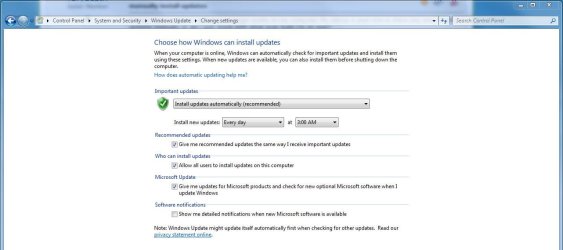
Automatic updates should be working.
Do you mean it won't update even though automatic updates is turned on, or that automatic updates are turned off and you would like them turned on.
Do you mean it won't update even though automatic updates is turned on, or that automatic updates are turned off and you would like them turned on.
My Computer
- Computer type
- PC/Desktop
- Computer Manufacturer/Model Number
- Custom Build
- OS
- Windows 7 Home Premium 64 bit SP1
- CPU
- Intel i7 4790k
- Motherboard
- MSI Z97-G55 SLI
- Memory
- 16 GB Corsair 2400 MHz DDR3
- Graphics Card(s)
- Visiontek Radeon R9 285
- Sound Card
- None
- Monitor(s) Displays
- Gateway FHX2402L
- Screen Resolution
- 1920 X 1080
- Hard Drives
- Samsung 840 EVO 500GB
- PSU
- Corsair 750 TX
- Case
- Fractal Design
- Cooling
- Stock fans
- Keyboard
- Logitech K800
- Mouse
- Logitech M510
- Internet Speed
- 60.88 Mbps download 10.47 Mbps upload (Speedtest.net)
- Antivirus
- Norton
- Browser
- Opera
- Other Info
- First Computer used: A Commodore Pet of course
Love using Manjaro KDE Linux 64 bit and Windows 7/10 64 bit
My Computer
- Computer type
- PC/Desktop
- Computer Manufacturer/Model Number
- Custom Build
- OS
- Windows 7 Home Premium 64 bit SP1
- CPU
- Intel i7 4790k
- Motherboard
- MSI Z97-G55 SLI
- Memory
- 16 GB Corsair 2400 MHz DDR3
- Graphics Card(s)
- Visiontek Radeon R9 285
- Sound Card
- None
- Monitor(s) Displays
- Gateway FHX2402L
- Screen Resolution
- 1920 X 1080
- Hard Drives
- Samsung 840 EVO 500GB
- PSU
- Corsair 750 TX
- Case
- Fractal Design
- Cooling
- Stock fans
- Keyboard
- Logitech K800
- Mouse
- Logitech M510
- Internet Speed
- 60.88 Mbps download 10.47 Mbps upload (Speedtest.net)
- Antivirus
- Norton
- Browser
- Opera
- Other Info
- First Computer used: A Commodore Pet of course
Love using Manjaro KDE Linux 64 bit and Windows 7/10 64 bit
My Computer
- Computer type
- PC/Desktop
- Computer Manufacturer/Model Number
- Custom Build
- OS
- Windows 7 Home Premium 64 bit SP1
- CPU
- Intel i7 4790k
- Motherboard
- MSI Z97-G55 SLI
- Memory
- 16 GB Corsair 2400 MHz DDR3
- Graphics Card(s)
- Visiontek Radeon R9 285
- Sound Card
- None
- Monitor(s) Displays
- Gateway FHX2402L
- Screen Resolution
- 1920 X 1080
- Hard Drives
- Samsung 840 EVO 500GB
- PSU
- Corsair 750 TX
- Case
- Fractal Design
- Cooling
- Stock fans
- Keyboard
- Logitech K800
- Mouse
- Logitech M510
- Internet Speed
- 60.88 Mbps download 10.47 Mbps upload (Speedtest.net)
- Antivirus
- Norton
- Browser
- Opera
- Other Info
- First Computer used: A Commodore Pet of course
Love using Manjaro KDE Linux 64 bit and Windows 7/10 64 bit
I have to go now (bedtime). I will check back tomorrow to see how you made out. Please let me know and good luck.
My Computer
- Computer type
- PC/Desktop
- Computer Manufacturer/Model Number
- Custom Build
- OS
- Windows 7 Home Premium 64 bit SP1
- CPU
- Intel i7 4790k
- Motherboard
- MSI Z97-G55 SLI
- Memory
- 16 GB Corsair 2400 MHz DDR3
- Graphics Card(s)
- Visiontek Radeon R9 285
- Sound Card
- None
- Monitor(s) Displays
- Gateway FHX2402L
- Screen Resolution
- 1920 X 1080
- Hard Drives
- Samsung 840 EVO 500GB
- PSU
- Corsair 750 TX
- Case
- Fractal Design
- Cooling
- Stock fans
- Keyboard
- Logitech K800
- Mouse
- Logitech M510
- Internet Speed
- 60.88 Mbps download 10.47 Mbps upload (Speedtest.net)
- Antivirus
- Norton
- Browser
- Opera
- Other Info
- First Computer used: A Commodore Pet of course
Love using Manjaro KDE Linux 64 bit and Windows 7/10 64 bit
Nope nothing helped it's a code 80070003 when i try to look for updates.
Try this.
Windows Update error 80070003
My Computer
- Computer type
- PC/Desktop
- Computer Manufacturer/Model Number
- Custom Build
- OS
- Windows 7 Home Premium 64 bit SP1
- CPU
- Intel i7 4790k
- Motherboard
- MSI Z97-G55 SLI
- Memory
- 16 GB Corsair 2400 MHz DDR3
- Graphics Card(s)
- Visiontek Radeon R9 285
- Sound Card
- None
- Monitor(s) Displays
- Gateway FHX2402L
- Screen Resolution
- 1920 X 1080
- Hard Drives
- Samsung 840 EVO 500GB
- PSU
- Corsair 750 TX
- Case
- Fractal Design
- Cooling
- Stock fans
- Keyboard
- Logitech K800
- Mouse
- Logitech M510
- Internet Speed
- 60.88 Mbps download 10.47 Mbps upload (Speedtest.net)
- Antivirus
- Norton
- Browser
- Opera
- Other Info
- First Computer used: A Commodore Pet of course
Love using Manjaro KDE Linux 64 bit and Windows 7/10 64 bit
Have you been able to manually update your Windows 7? You could have damaged or corrupt system files preventing automatic updates from working. Try running System File Checker scan. If scan finds damaged/corrupt files, run the scan 3-4 times. Let us know
http://www.sevenforums.com/tutorials/1538-sfc-scannow-command-system-file-checker.html
http://www.sevenforums.com/tutorials/1538-sfc-scannow-command-system-file-checker.html
My Computer
- Computer type
- Laptop
- Computer Manufacturer/Model Number
- Sony Vaio VPCEB47GM Laptop
- OS
- Win 7 Pro 64-bit
- CPU
- Intel i5 2.4 Ghz
- Memory
- 8GB DDR3
- Graphics Card(s)
- Intel HD 3000
- Sound Card
- IDT High Definition
- Monitor(s) Displays
- 15.6 WGXA Anti-Glare LED
- Screen Resolution
- 1280x800
- Hard Drives
- 640Gb 7200rpm
- Antivirus
- MSE
- Browser
- Opera (primary) with IE9 backup
Yep the scan find a few things but can't ever get them fixed.
Under the circumstances, you might consider a Repair Install to fix Windows 7. A Repair Install should fix all your damaged/corrupt files while saving your user accounts, data, programs, system drivers, etc.
http://www.sevenforums.com/tutorials/3413-repair-install.html
My Computer
- Computer type
- Laptop
- Computer Manufacturer/Model Number
- Sony Vaio VPCEB47GM Laptop
- OS
- Win 7 Pro 64-bit
- CPU
- Intel i5 2.4 Ghz
- Memory
- 8GB DDR3
- Graphics Card(s)
- Intel HD 3000
- Sound Card
- IDT High Definition
- Monitor(s) Displays
- 15.6 WGXA Anti-Glare LED
- Screen Resolution
- 1280x800
- Hard Drives
- 640Gb 7200rpm
- Antivirus
- MSE
- Browser
- Opera (primary) with IE9 backup