

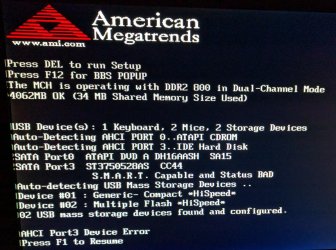
Roughly 2 hours ago I went to restart my father's computer to install Windows 7 updates. While restarting, I received the attached image instead of the loading Windows screen. No matter which of the option given it always will loop back to said screen after a brief Windows loading screen.
F1 key loops it back
Delete key gives me an error sound and will not proceed
F12 gives me a BIOS screen, but if I exit it, I am given the same manufacturer screen
His computer is a Gateway SX2802
Gateway SX2802-07 Specs - CNET
Any advice would be greatly appreciated.
F1 key loops it back
Delete key gives me an error sound and will not proceed
F12 gives me a BIOS screen, but if I exit it, I am given the same manufacturer screen
His computer is a Gateway SX2802
Gateway SX2802-07 Specs - CNET
Any advice would be greatly appreciated.
Attachments
My Computer
At a glance
Windows 7 ProfessionalGenuineIntel Intel(R) Core(TM) i7-3770K CPU @...16.0 GBNVIDIA GeForce GTX 1070
- Computer type
- PC/Desktop
- Computer Manufacturer/Model Number
- Custom Build
- OS
- Windows 7 Professional
- CPU
- GenuineIntel Intel(R) Core(TM) i7-3770K CPU @ 3.50GHz
- Motherboard
- ASRock, Z77 Extreme4
- Memory
- 16.0 GB
- Graphics Card(s)
- NVIDIA GeForce GTX 1070
- Monitor(s) Displays
- Viewsonic VX2450WM-LED 24-Inch
- Screen Resolution
- 1080
- Hard Drives
- 1TB WD Black
250 GB 850 EVO
- PSU
- HX 650
- Antivirus
- MSE
- Browser
- Brave


