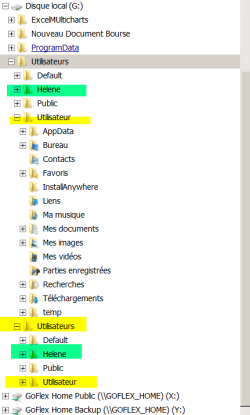
Few month ago, I had problem with a hard disk. After files recupoaration, reinstallation then installation of a new SDD hard disk, I realize that all my directory has been duplicated many time
Is there any tool that I could use to replace in a proper order all my files and directory
Any info appreciated
Martin
My Computer
At a glance
windows 7 Pro x64Intel I5 34508 GB DDR3 dual chanelAsus Radeon 4870 Nevedi Gforce GTX 500Ti
What you are most likely seeing is the result of altering the permissions on those compatibility junctions. (Like Documents and Settings which is a junction to Users in Windows 7)
My Computer
At a glance
Windows 10 Pro (x64)Intel Core i7-3930K (3.2GHz - 4.5GHz)4x Samsung 4GB PC3-12800 DDR3 (16GB 1600MHz)Nvidia Geforce GTX 690
Computer type
PC/Desktop
Computer Manufacturer/Model Number
Alienware Aurora ALX R4
OS
Windows 10 Pro (x64)
CPU
Intel Core i7-3930K (3.2GHz - 4.5GHz)
Motherboard
Alienware Aurora-R4 x79
Memory
4x Samsung 4GB PC3-12800 DDR3 (16GB 1600MHz)
Graphics Card(s)
Nvidia Geforce GTX 690
Sound Card
SteelSeries Siberia Elite
Monitor(s) Displays
Dell UltraSharp U3011
Screen Resolution
2560x1600
Hard Drives
Samsung 850 Pro 256 GB, Seagate 1TB Desktop Hybrid HDD, 2x Western Digital 4TB Green HDD
PSU
875W Some Dell PSU <.<
Case
Alienware Aurora ALX
Cooling
Custom Liquid Cooling (EK CPU & GPU blocks) dual EK 480RAD
Keyboard
Logitech G710+ Mechanical
Mouse
Logitech G700s
Internet Speed
Verizon Fios (50 mbps average)
Other Info
Server: Intel NUC D54250WYK: i5-4250U, 16GB, 256 GB mSATA, Windows Server 2012 R2
What you are most likely seeing is the result of altering the permissions on those compatibility junctions. (Like Documents and Settings which is a junction to Users in Windows 7)
Here is a copy a portion of file path. I don't know how I could give you the whole one.
I have mark some duplicate folder that appear. Each one will contain file of the previous one + other that has been updated. Those are just examples. I thinks I have 4 sets of files on my new hard disk. Some files still present on my SDD drive.
A real mix-up
Martin
Attachments
File path.png
13.9 KB
· Views: 6
My Computer
At a glance
windows 7 Pro x64Intel I5 34508 GB DDR3 dual chanelAsus Radeon 4870 Nevedi Gforce GTX 500Ti
can someone help me on how to do this directory: I would really appreciated thanks
Turn echo off
make directory on c:\ named itsc1325
change directory to itsc1325
list OS version in ver.txt inside c:\itsc1325
append the volume information to ver.txt
list directory(wide format) contents of C: and output it to a file called dir.txt on c:\
copy dir.txt to c:\itsc1325
delete dir.txt from c: without it prompting you
pause the batch file
list the file attributes for contents of itsc1325 directory
make ver.txt read only
verify that it is read only