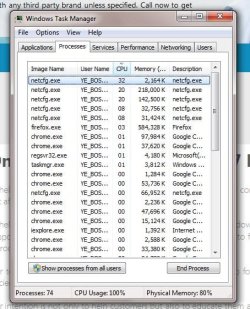
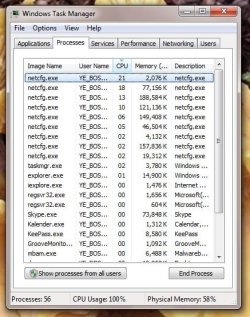
Many instances of netcfg grabbing processor resource.

fopetsys

New member
Local time
3:17 AM
Messages
7
Newb here so bear with me, please.
Maybe the wrong subforum but nothing seems appropriate.

Came back from a couple of days away. Booted computer.
Boy! is it ever slow.

Did some digging assuming it is a browser problem since task manager shows:
(photobucket doesn't seem to load) - please see netcfg problem 23-11-14.jpg

So closed browser (chrome) and rebooted.
Uh. Oh. Still slow. Now task manager looks like this: netcfg problem no browser loaded 23-11-14.jpg
Note the number of instances of netcfg running changes constantly from one to many, I noted seven at one time.

Googling didn't reveal anything helpful. Unsure how to dig this issue out.
 

Attachments

  • netcfg problem 23-11-14.jpg
    netcfg problem 23-11-14.jpg
    61.8 KB · Views: 25
  • netcfg problem no browser loaded 23-11-14.jpg
    netcfg problem no browser loaded 23-11-14.jpg
    58.5 KB · Views: 25

My Computer My Computer

At a glance

Windows 7 Ultimate 32 bitAMD Athlon(tm) 64 X2 Dual Core Processor 4000...Available memory (MB): 3071NVIDIA Corporation G73 [GeForce 7300 GT] NX73...
Computer type
PC/Desktop
Computer Manufacturer/Model Number
ASUS
OS
Windows 7 Ultimate 32 bit
CPU
AMD Athlon(tm) 64 X2 Dual Core Processor 4000+, 2 logical CP
Motherboard
M2N68-AM
Memory
Available memory (MB): 3071
Graphics Card(s)
NVIDIA Corporation G73 [GeForce 7300 GT] NX7300GT-TD256EH
Hard Drives
Western Digital 1TB Black
Antivirus
Malwarebytes
Browser
Chrome, Opera, Firefox
Try another browser like Firefox and see if you find the same thing.
I believe that happens because of the way Chrome loads pages.
 

My Computer My Computer

At a glance

Windows 10 Pro. 64/ version 1709 Windows 7 Pr...Intel i7-6800K @ 4.3Corsair Platinum 16 gig @2400EVGA GTX 1070 OC
Computer type
PC/Desktop
Computer Manufacturer/Model Number
Home made Desktop
OS
Windows 10 Pro. 64/ version 1709 Windows 7 Pro/64
CPU
Intel i7-6800K @ 4.3
Motherboard
ASUS X-99 Deluxe II
Memory
Corsair Platinum 16 gig @2400
Graphics Card(s)
EVGA GTX 1070 OC
Monitor(s) Displays
Asus 27" LED LCD/VE278Q
Screen Resolution
1920-1080 or 1280-720 HDMI
Hard Drives
INTEL SSD 730-240 Gb Sata 3.0/
PSU
EVGA Platium 1200W
Case
Phanteks Luxe Tempered Glass 8 fans/ one radiator
Cooling
XSPC/ Water Cooled CPU
Keyboard
Das 4 Professional
Mouse
Logitech M705/MX Anywhere 2-S
Internet Speed
100 mbits
Antivirus
Microsoft Security Essentials/ Malwarebytes Premium 3.0/ SAS
Browser
I.E. 11 default/Firefox/ ISP Time Warner Cable/Spectrum
Other Info
LG BluRay Burner/
Sound system-KLipsch-THX/
Icy Dock ssd Hot Swap bays.
What Is Netcfg.exe?

Netcfg.exe is a type of EXE file associated with MSDN Disc 4616.01 developed by Microsoft for the Windows Operating System. The latest known version of Netcfg.exe is 1.0.0.0, which was produced for Windows.

What Are EXE Files?

EXE ("executable") files, such as netcfg.exe, are files that contain step-by-step instructions that a computer follows to carry out a function. When you "double-click" an EXE file, your computer automatically executes these instructions designed by a software developer (eg. Microsoft) to run a program (eg. MSDN Disc 4616.01) on your PC.

Every software application on your PC uses an executable file - your web browser, word processor, spreadsheet program, etc. - making it one of the most useful kinds of files in the Windows operating system. Without executable files like netcfg.exe, you wouldn't be able to use any programs on your PC.

Why Do I Have EXE Errors?

Because of their usefulness and ubiquity, EXE files are commonly used as a method of delivery for virus / malware infection. Often, viruses will be disguised as a benign EXE file (such as netcfg.exe) and distributed through SPAM email or malicious websites, which can then infect your computer when executed (eg. when you double-click the EXE file).

In addition, viruses can infect, replace, or corrupt existing EXE files, which can then lead to error messages when MSDN Disc 4616.01 or related programs are executed. Thus, any executable files that you download to your PC should be scanned for viruses before opening - even if you think it is from a reputable source.

When Do EXE Errors Occur?

EXE errors, such as those associated with netcfg.exe, most often occur during computer startup, program startup, or while trying to use a specific function in your program (eg. printing).

Common Netcfg.exe Error Messages

The most common netcfg.exe errors that can appear on a Windows-based computer are:

  • "Netcfg.exe Application Error."
  • "Netcfg.exe is not a valid Win32 application."
  • "Netcfg.exe has encountered a problem and needs to close. We are sorry for the inconvenience."
  • "Cannot find netcfg.exe."
  • "Netcfg.exe not found."
  • "Error starting program: netcfg.exe."
  • "Netcfg.exe is not running."
  • "Netcfg.exe failed."
  • "Faulting Application Path: netcfg.exe
These EXE error messages can appear during program installation, while a netcfg.exe-related software program (eg. MSDN Disc 4616.01) is running, during Windows startup or shutdown, or even during the installation of the Windows operating system. Keeping track of when and where your netcfg.exe error occurs is a critical piece of information in troubleshooting the problem.

Causes of Netcfg.exe Errors

Netcfg.exe problems can be attributed to corrupt or missing files, invalid registry entries associated with Netcfg.exe, or a virus / malware infection. More specifically, these netcfg.exe errors can be caused by:

  • Corrupt Windows registry keys associated with netcfg.exe / MSDN Disc 4616.01.
  • Virus or malware infection that has corrupted the netcfg.exe file or related MSDN Disc 4616.01 program files.
  • Another program maliciously or mistakenly deleted netcfg.exe-related files.
  • Another program is in conflict with MSDN Disc 4616.01 and its shared referenced files.
  • Corrupt download or incomplete installation of MSDN Disc 4616.01 software.
Based on the above, you might want to run a full scan with your anti-virus of choice and then follow up with other free malware scans like Malwarebytes, SuperAntiSpyware, ESET Online Scanner, etc.

You could also check for damaged or corrupt system files by running a System File Checker scan from an elevated command prompt (Option Two.)

http://www.sevenforums.com/tutorials/1538-sfc-scannow-command-system-file-checker.html

 

My Computer My Computer

At a glance

Win 7 Pro 64-bitIntel i5 2.4 Ghz8GB DDR3Intel HD 3000
Computer type
Laptop
Computer Manufacturer/Model Number
Sony Vaio VPCEB47GM Laptop
OS
Win 7 Pro 64-bit
CPU
Intel i5 2.4 Ghz
Memory
8GB DDR3
Graphics Card(s)
Intel HD 3000
Sound Card
IDT High Definition
Monitor(s) Displays
15.6 WGXA Anti-Glare LED
Screen Resolution
1280x800
Hard Drives
640Gb 7200rpm
Antivirus
MSE
Browser
Opera (primary) with IE9 backup
Many thanks, guys. :)

However, it looks like I had a virus or three.
I ran Malwarebytes and it came up with 16 infections :(
The puzzler is that Malware bytes came out with a clean scan immediately before I shut down Friday lunch time.
Then, I booted up yesterday and the problem with many netcgfs was there immediately.

I do get frequent blocks by Malwarebytes to and from port 6881, (bittorrent?), but a request over a week ago for Malwarebytes support has not yet been responded to.
 

My Computer My Computer

At a glance

Windows 7 Ultimate 32 bitAMD Athlon(tm) 64 X2 Dual Core Processor 4000...Available memory (MB): 3071NVIDIA Corporation G73 [GeForce 7300 GT] NX73...
Computer type
PC/Desktop
Computer Manufacturer/Model Number
ASUS
OS
Windows 7 Ultimate 32 bit
CPU
AMD Athlon(tm) 64 X2 Dual Core Processor 4000+, 2 logical CP
Motherboard
M2N68-AM
Memory
Available memory (MB): 3071
Graphics Card(s)
NVIDIA Corporation G73 [GeForce 7300 GT] NX7300GT-TD256EH
Hard Drives
Western Digital 1TB Black
Antivirus
Malwarebytes
Browser
Chrome, Opera, Firefox
When you use bit torrent you have just opened a big door for infection to come into your system. I don't believe any security program will protect you because you have instructed your security programs to let in your system what ever the bit torrent sends you.
 

My Computer My Computer

At a glance

Windows 10 Pro. 64/ version 1709 Windows 7 Pr...Intel i7-6800K @ 4.3Corsair Platinum 16 gig @2400EVGA GTX 1070 OC
Computer type
PC/Desktop
Computer Manufacturer/Model Number
Home made Desktop
OS
Windows 10 Pro. 64/ version 1709 Windows 7 Pro/64
CPU
Intel i7-6800K @ 4.3
Motherboard
ASUS X-99 Deluxe II
Memory
Corsair Platinum 16 gig @2400
Graphics Card(s)
EVGA GTX 1070 OC
Monitor(s) Displays
Asus 27" LED LCD/VE278Q
Screen Resolution
1920-1080 or 1280-720 HDMI
Hard Drives
INTEL SSD 730-240 Gb Sata 3.0/
PSU
EVGA Platium 1200W
Case
Phanteks Luxe Tempered Glass 8 fans/ one radiator
Cooling
XSPC/ Water Cooled CPU
Keyboard
Das 4 Professional
Mouse
Logitech M705/MX Anywhere 2-S
Internet Speed
100 mbits
Antivirus
Microsoft Security Essentials/ Malwarebytes Premium 3.0/ SAS
Browser
I.E. 11 default/Firefox/ ISP Time Warner Cable/Spectrum
Other Info
LG BluRay Burner/
Sound system-KLipsch-THX/
Icy Dock ssd Hot Swap bays.
When you use bit torrent you have just opened a big door for infection to come into your system. I don't believe any security program will protect you because you have instructed your security programs to let in your system what ever the bit torrent sends you.
I accept your warning. If that is what happened then I need to be more careful in future.
Thank you for the advice.
 

My Computer My Computer

At a glance

Windows 7 Ultimate 32 bitAMD Athlon(tm) 64 X2 Dual Core Processor 4000...Available memory (MB): 3071NVIDIA Corporation G73 [GeForce 7300 GT] NX73...
Computer type
PC/Desktop
Computer Manufacturer/Model Number
ASUS
OS
Windows 7 Ultimate 32 bit
CPU
AMD Athlon(tm) 64 X2 Dual Core Processor 4000+, 2 logical CP
Motherboard
M2N68-AM
Memory
Available memory (MB): 3071
Graphics Card(s)
NVIDIA Corporation G73 [GeForce 7300 GT] NX7300GT-TD256EH
Hard Drives
Western Digital 1TB Black
Antivirus
Malwarebytes
Browser
Chrome, Opera, Firefox
Glad to hear things are apparently back to normal. :thumbsup:
 

My Computer My Computer

At a glance

Win 7 Pro 64-bitIntel i5 2.4 Ghz8GB DDR3Intel HD 3000
Computer type
Laptop
Computer Manufacturer/Model Number
Sony Vaio VPCEB47GM Laptop
OS
Win 7 Pro 64-bit
CPU
Intel i5 2.4 Ghz
Memory
8GB DDR3
Graphics Card(s)
Intel HD 3000
Sound Card
IDT High Definition
Monitor(s) Displays
15.6 WGXA Anti-Glare LED
Screen Resolution
1280x800
Hard Drives
640Gb 7200rpm
Antivirus
MSE
Browser
Opera (primary) with IE9 backup
Back
Top