Map Network Drive problems

kevindd992002

New member
Power User
Local time
1:15 PM
Messages
373
My network's main router is a pfsense box. I also have a Thecus N8800 media server that's keeping all my downloaded media files with 8 x 1TB HDDs in JBOD config. I also have a Popcorn Hour C200 media server in my network.

Now, whenever I map a network drive in Windows 7 x64, everything is working properly. When I restart my PC/Laptop/or any computer, it always shows me the "could not reconnect all network drives" message and I can see that all my network drives in My Computer have an "x" mark in them. The weird thing is that when I double-click any network drive, it connects successfully and the x mark disappears. Why is this happening? Why can't Win7 reconnect to the network drives upon startup without me manually accessing them first?

By the way, I'm on a workgroup network.
 

My Computer

Computer Manufacturer/Model Number
Sager NP8130
OS
Windows 7 Ultimate x6
CPU
i5 2670QM
Memory
2x4GB RAM Kingston HyperX Memory DDR3 1600 MHz Sticks
Graphics Card(s)
Nvidia GeForce GTX 560M
Sound Card
Realtek HD Audio (Built-in)
Screen Resolution
1920x1080
Hard Drives
128GB Crucial M4 SSD
500GB Seagate 7200RPM HDD
Internet Speed
12Mbps down/4Mbps up
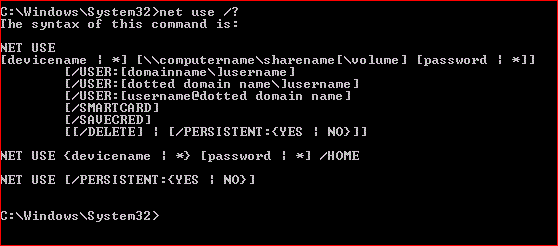
Kevin. give it a shot to run the cmd in administrator mode.


it is the persistant option at the bottom that might help you.

Rich
 

Attachments

  • dos-net-use.GIF
    dos-net-use.GIF
    6.7 KB · Views: 158

My Computer

Computer type
Laptop
Computer Manufacturer/Model Number
Toshiba Laptop Qosimo X870
OS
Windows 7 Pro x64 SP1
CPU
Intel Core I7
Motherboard
Toshiba Qosmio
Memory
16 Gigs
Graphics Card(s)
NVIDIA GeForce GTX 670M
Monitor(s) Displays
17.7" laptop
Screen Resolution
1600 x 900
Hard Drives
256 Gig SanDisk SSD for C
256 Gig Intel SSD for D
Internet Speed
50/25 FIOS
Antivirus
Vipre (all you can eat for 10 machines)
Browser
IE and FF
Other Info
I have dos 6.22, wfwg 3.11, win98, 2000 and xp VHD's available for testing. MS's Virtual PC works great.
Kevin. give it a shot to run the cmd in administrator mode.


it is the persistant option at the bottom that might help you.

Rich

Sorry, I don't quite get what you want me to try? What command should I invoke in cmd?
 

My Computer

Computer Manufacturer/Model Number
Sager NP8130
OS
Windows 7 Ultimate x6
CPU
i5 2670QM
Memory
2x4GB RAM Kingston HyperX Memory DDR3 1600 MHz Sticks
Graphics Card(s)
Nvidia GeForce GTX 560M
Sound Card
Realtek HD Audio (Built-in)
Screen Resolution
1920x1080
Hard Drives
128GB Crucial M4 SSD
500GB Seagate 7200RPM HDD
Internet Speed
12Mbps down/4Mbps up
Kevin. give it a shot to run the cmd in administrator mode.


it is the persistant option at the bottom that might help you.

Rich

Sorry, I don't quite get what you want me to try? What command should I invoke in cmd?


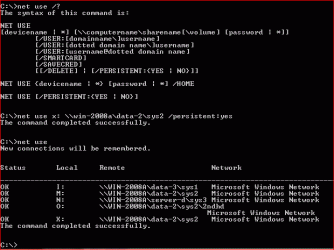
net use drive: slashslash server\share /persistent (can't use \\ in here with name, wierd)

like this.

Rich
 

Attachments

  • netuse-persistent.GIF
    netuse-persistent.GIF
    13.5 KB · Views: 96

My Computer

Computer type
Laptop
Computer Manufacturer/Model Number
Toshiba Laptop Qosimo X870
OS
Windows 7 Pro x64 SP1
CPU
Intel Core I7
Motherboard
Toshiba Qosmio
Memory
16 Gigs
Graphics Card(s)
NVIDIA GeForce GTX 670M
Monitor(s) Displays
17.7" laptop
Screen Resolution
1600 x 900
Hard Drives
256 Gig SanDisk SSD for C
256 Gig Intel SSD for D
Internet Speed
50/25 FIOS
Antivirus
Vipre (all you can eat for 10 machines)
Browser
IE and FF
Other Info
I have dos 6.22, wfwg 3.11, win98, 2000 and xp VHD's available for testing. MS's Virtual PC works great.
Kevin. give it a shot to run the cmd in administrator mode.


it is the persistant option at the bottom that might help you.

Rich

Sorry, I don't quite get what you want me to try? What command should I invoke in cmd?


net use drive: slashslash server\share /persistent (can't use \\ in here with name, wierd)

like this.

Rich

Thanks, I'll try that. What does that persistent switch do anyways? So if I map my network drive under Windows Explorer, by default persistent is set to No?
 

My Computer

Computer Manufacturer/Model Number
Sager NP8130
OS
Windows 7 Ultimate x6
CPU
i5 2670QM
Memory
2x4GB RAM Kingston HyperX Memory DDR3 1600 MHz Sticks
Graphics Card(s)
Nvidia GeForce GTX 560M
Sound Card
Realtek HD Audio (Built-in)
Screen Resolution
1920x1080
Hard Drives
128GB Crucial M4 SSD
500GB Seagate 7200RPM HDD
Internet Speed
12Mbps down/4Mbps up
Ok it still doesn't work. I noticed that if I set the computer to enter password every logon, the problem doesn't occur. But when I set it to NOT enter password, the problem is there. What else can I do?
 

My Computer

Computer Manufacturer/Model Number
Sager NP8130
OS
Windows 7 Ultimate x6
CPU
i5 2670QM
Memory
2x4GB RAM Kingston HyperX Memory DDR3 1600 MHz Sticks
Graphics Card(s)
Nvidia GeForce GTX 560M
Sound Card
Realtek HD Audio (Built-in)
Screen Resolution
1920x1080
Hard Drives
128GB Crucial M4 SSD
500GB Seagate 7200RPM HDD
Internet Speed
12Mbps down/4Mbps up
You can enter the userid and password in the command line. check out the net use /? lines
also, the persistant means keep it permanently

Rich
 

My Computer

Computer type
Laptop
Computer Manufacturer/Model Number
Toshiba Laptop Qosimo X870
OS
Windows 7 Pro x64 SP1
CPU
Intel Core I7
Motherboard
Toshiba Qosmio
Memory
16 Gigs
Graphics Card(s)
NVIDIA GeForce GTX 670M
Monitor(s) Displays
17.7" laptop
Screen Resolution
1600 x 900
Hard Drives
256 Gig SanDisk SSD for C
256 Gig Intel SSD for D
Internet Speed
50/25 FIOS
Antivirus
Vipre (all you can eat for 10 machines)
Browser
IE and FF
Other Info
I have dos 6.22, wfwg 3.11, win98, 2000 and xp VHD's available for testing. MS's Virtual PC works great.
You can enter the userid and password in the command line. check out the net use /? lines
also, the persistant means keep it permanently

Rich

Still doesn't work. AFAIK, using the map network drive in Windows Explorer and checking the "reconnect at logon" is the same as using the persistent switch in cmd.

Also, the network drives that I'm connecting to do not require any username and password.
 

My Computer

Computer Manufacturer/Model Number
Sager NP8130
OS
Windows 7 Ultimate x6
CPU
i5 2670QM
Memory
2x4GB RAM Kingston HyperX Memory DDR3 1600 MHz Sticks
Graphics Card(s)
Nvidia GeForce GTX 560M
Sound Card
Realtek HD Audio (Built-in)
Screen Resolution
1920x1080
Hard Drives
128GB Crucial M4 SSD
500GB Seagate 7200RPM HDD
Internet Speed
12Mbps down/4Mbps up
FWIW: what might be happening is that your ethernet connection is slow in connecting and acquiring an IP and your network drives can't find the server. It is a function of timing. I have had the same problem a couple of times and by rebooting several times after the initial mapping, it solved itself. I am at a loss otherwise.
Can it be assumed that your userid and password are the same on your network share?

Sorry to not be of more help but as I said, I think it is the timing thing..

Rich
 

My Computer

Computer type
Laptop
Computer Manufacturer/Model Number
Toshiba Laptop Qosimo X870
OS
Windows 7 Pro x64 SP1
CPU
Intel Core I7
Motherboard
Toshiba Qosmio
Memory
16 Gigs
Graphics Card(s)
NVIDIA GeForce GTX 670M
Monitor(s) Displays
17.7" laptop
Screen Resolution
1600 x 900
Hard Drives
256 Gig SanDisk SSD for C
256 Gig Intel SSD for D
Internet Speed
50/25 FIOS
Antivirus
Vipre (all you can eat for 10 machines)
Browser
IE and FF
Other Info
I have dos 6.22, wfwg 3.11, win98, 2000 and xp VHD's available for testing. MS's Virtual PC works great.
If you try Googling the problem, you will see a lot of hits regarding this problem. I agree with you that it's all about timing. When I put a username and password with Windows, after login there is no problem. But if there is no username password then it ALWAYS has the problem.
 

My Computer

Computer Manufacturer/Model Number
Sager NP8130
OS
Windows 7 Ultimate x6
CPU
i5 2670QM
Memory
2x4GB RAM Kingston HyperX Memory DDR3 1600 MHz Sticks
Graphics Card(s)
Nvidia GeForce GTX 560M
Sound Card
Realtek HD Audio (Built-in)
Screen Resolution
1920x1080
Hard Drives
128GB Crucial M4 SSD
500GB Seagate 7200RPM HDD
Internet Speed
12Mbps down/4Mbps up
Back
Top