
Mapped Drive Not Connecting at Startup

Alakar

New member
I searched the forums, but didn't find a match to this problem.

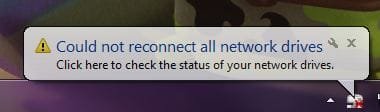
On startup, I get the message shown below. If I open Explorer the network drive is shown with a red "X" through it. If I click the network drive, it connects and displays the contents without an issue. If I run any application that needs files on that drive before clicking it in Explorer, it will say the resource is unavailable.

What appears to be happening is Windows tries to reconnect to the drive before the network connection is reestablished. I believe this to be the case because the network icon in the system tray is still showing the animation for establishing the network connection when the message pop's up. There is no issue with authentication or password's, etc., as the drive connects as soon as I click on it.

My question is, does anybody know of a way to set the mapped drive reconnection farther back in the boot sequence or add a longer wait state to it so it doesn't time out before the network connection is reestablished.?
 

Attachments
  • ntwdrv.JPG
    ntwdrv.JPG
    16.2 KB · Views: 125

My Computer

Computer Manufacturer/Model Number
Home Built
OS
Windows 7 Professional x64, Windows 7 Home Premium x64, WinXP Pro, Mac OS/X 10.5.6
CPU
Core2Duo 2.8Ghz
Motherboard
Gigabyte EP45-UD3R
Memory
4GB G.Skill PC2-8500
Graphics Card(s)
ATI Radeon 4830
Sound Card
Integrated 5.1
Monitor(s) Displays
Samsung SyncMaster 206BW and 740N
Screen Resolution
1680x1050 - 1280x1024
Hard Drives
Samsung 320GB
WD 320GB
PSU
PC Power and Cooling Silencer 750W
Case
Thermaltake Viking
Cooling
CPU: Thermalright XP-90 VGA: Thermalright V2
Keyboard
ZBoard
Mouse
MS Comfort Optical Mouse 3000
Internet Speed
18/2
I don't think this is an issue here. Mapped network shares often get disconnected for a variety of reasons, the destination machine might have been restarted, connections to that machine might have been resetted due to limit exceed, network interruptions, you logged off etc. Once disconnected, i don't know if the system can reconnect until you initiated it by clicking on it manually.
 

My Computer

Computer Manufacturer/Model Number
Lenovo ThinkPad T60
OS
Windows 7 Ultimate 64Bit
CPU
GenuineIntel Intel(R) Core(TM) DuoCore T2400 @ 1.83GHz
Motherboard
Intel(R) 82801G (ICH7 Family)
Memory
2.00 GB
Graphics Card(s)
Mobile Intel(R) 945 Express Chipset
Sound Card
SoundMAX Integrated Digital HD Audio
Monitor(s) Displays
ThinkPad Display
Screen Resolution
1400x1050
Hard Drives
100Gb SATA
Keyboard
Standard Keyboard
Mouse
HID-compliant Mouse
Internet Speed
Cable Broadband - 54Mbps
Other Info
Intel(R) PRO/1000 PL Network Connection
11a/b/g Wireless LAN Mini PCI Express Adapter
Actually it is an issue. This doesn't occur on my XP machines or on my Mac running OS/X. I'm not talking about it getting disconnected; I'm talking about not connecting to the share when the Win 7 machine boots.

As I said before, it looks like a timing issue, with Windows trying to connect to the share before the network connection has been established.
 

My Computer

Computer Manufacturer/Model Number
Home Built
OS
Windows 7 Professional x64, Windows 7 Home Premium x64, WinXP Pro, Mac OS/X 10.5.6
CPU
Core2Duo 2.8Ghz
Motherboard
Gigabyte EP45-UD3R
Memory
4GB G.Skill PC2-8500
Graphics Card(s)
ATI Radeon 4830
Sound Card
Integrated 5.1
Monitor(s) Displays
Samsung SyncMaster 206BW and 740N
Screen Resolution
1680x1050 - 1280x1024
Hard Drives
Samsung 320GB
WD 320GB
PSU
PC Power and Cooling Silencer 750W
Case
Thermaltake Viking
Cooling
CPU: Thermalright XP-90 VGA: Thermalright V2
Keyboard
ZBoard
Mouse
MS Comfort Optical Mouse 3000
Internet Speed
18/2
I don't see manually double clicking to re-activate mapping of share as an issue. As i said there is a reason for Windows not be able to re-connect. Maybe if you can give an example of your network share you think W7 should be able to connected at all times, once pc restarted, then we can discuss further. Some disconnection types, i'm 100% sure cannot be re-established without user initiation.
 

My Computer

Computer Manufacturer/Model Number
Lenovo ThinkPad T60
OS
Windows 7 Ultimate 64Bit
CPU
GenuineIntel Intel(R) Core(TM) DuoCore T2400 @ 1.83GHz
Motherboard
Intel(R) 82801G (ICH7 Family)
Memory
2.00 GB
Graphics Card(s)
Mobile Intel(R) 945 Express Chipset
Sound Card
SoundMAX Integrated Digital HD Audio
Monitor(s) Displays
ThinkPad Display
Screen Resolution
1400x1050
Hard Drives
100Gb SATA
Keyboard
Standard Keyboard
Mouse
HID-compliant Mouse
Internet Speed
Cable Broadband - 54Mbps
Other Info
Intel(R) PRO/1000 PL Network Connection
11a/b/g Wireless LAN Mini PCI Express Adapter
Vista does the same thing. I think the issue is related to authentication. What OS are you connecting to, and does it require a password? You could write script, or I could write it for you, and put it in the start up folder of the user. If you decide to write it, make sure to put the persistent switch in it. Also make sure to put the username and password in the script as well. Another thing you could do, create a user account that matches the one that is assigned to the computer you are mapping to. Use the same password as well. Let me know if you need further help.
Here is an example of the script
net use Z: \\computeryouwantomapto\folderyouwanttoconnecto /user:nameofpersonwithrightstothefolder [theirpassword] /perisistent:yes
 

My Computer

Computer Manufacturer/Model Number
Gigabyte
OS
Windows 7 Ultimate
CPU
Intel Core(TM)2 Quad- Q9550, 2.83GHz
Motherboard
G31M-ES2L
Memory
4GB
Graphics Card(s)
ATI Radeon HD4600
Sound Card
On Board:
Monitor(s) Displays
Acer AL2223W, Acer AL1916
Screen Resolution
1680 x 1050, 1280 x 1024
Hard Drives
160GB
350GB
250GB
250GB
PSU
600W
Case
Cooler Master
Keyboard
Microsoft Laser 6000
Mouse
Logitech Optical Trackman
Internet Speed
1.5MB
Other Info
I am also running a quasar gamatron flux capacitor with twin pulse tronic phasers......jk, I have no such stuff.
I have the same problem, I an HP media server which I have all are company files on, also startup files. Well when I want to run ADT2006 the profile files are on the server and with the network has a red X on it and the program will not run, it go into default setup. I need a way to keep the link between the mapped drive and windows 7 to always be open with out always clicking on the drive to open it.
 

My Computer

OS
Windows 7 Pro / XP Pro
Possible cure for this problem at TechNet. Look to Bottom of page, this fix sets up a delay so that the mapped drives aren't accessed until you click on them. I don't have this problem so I can't test it out on Win 7 but it's the only fix I found for the problem.

Help! Howto delay maping drive until network is up?
 
Last edited:

My Computer

Computer type
PC/Desktop
Computer Manufacturer/Model Number
Home built
OS
Windows 7 Ult, Windows 8.1 Pro,
CPU
Q9650-4.275GHz, E8600 4.5GHz, E6750-3.8GHz
Motherboard
Evga 780i FTW
Memory
G.Skill PC2 9600 1200Mhz 5 5 5 15 2T
Graphics Card(s)
GTX480
Sound Card
Asus Xonar D2
Monitor(s) Displays
HannsG
Screen Resolution
1680X1050
Hard Drives
GSkill Phoenix Pro 120GB SSD
PSU
ThermalTake Toughpower 1000Watt modular
Case
ThermalTake XaserV
Cooling
Xigmatek S1283
Keyboard
Logitech G15
Mouse
Logitech G9
Internet Speed
T1
A workaround that works for me

This is a truely annoying and longstanding issue that is still a problem in Windows 7. I have written a small executable that solves the problem for me by allowing you to specify a timeout up until which the program will keep trying to map the drive until it is successful. I have taken this approach after some fairly extensive research.

You can download the utility here.
 

My Computer

OS
WIndows 7
Last edited:

My Computer

OS
Win 7 Professional and Windows 8 Professional
Thank you so much, this has soloved the biggest problem I have run across with vista and w7. This is going to help so many more people I know with the same problem.

Thanks again;):party:
 

My Computer

OS
Windows 7 Pro / XP Pro
Here is another alternative if you just want to get rid of the warning. Mapped drives will not connect until you click on them for the first time but the annoying warning won't pop up at start up . Again it requires a registry edit and needs to be done with caution.


HKEY_LOCAL_MACHINE\SYSTEM\CurrentControlSet\Control\NetworkProvider\

Set or create a DWORD

RestoreConnection = 0

Do a restart after making the changes.

Just a follow up. My Vista PC has started to display the same problem again even with the registry edit in my previous post. (mapped drives fail to connect and I get the warning message) I will do some investigation and post back with my findings. Win7 PC is still functioning as expected.


My Computer

OS
Win 7 Professional and Windows 8 Professional
Win7 64bit + LG NAS mapping issue

Hi,

I also have this issue as described by Alakar.

Kit list:
2 x Win 7 Pcs Prem home edition
1 x LG RD1 NAS drive (operating in Raid 1 mode)
1 x Trend Gig switch connecting all devices on the the same LAN.
RJ45 cables between all, and all devices running at 1GB FDuplex

Software config
Win7 is setup to map to my NAS with logon info saved.
NAS is configured for user to allow reconnects and access to directory
WIN7 firewall is on currently (see below)

Symptom
--------

Basically Boot PC and icon pops up with message 'Not all network drives could be re-connected' All applications can't see data on drive until you click on drive mapping in Explorer and then all is fine.

I need this not to occur as our photos are all on the NAS to allow my wife and I to share access and I don't want to have to tell her to click on the drive each time she needs to use any data. Frankly she should not have to do this, it should just work.

Tried so far
-----------
Started by turning off Firewall. This seemed to fix it. Therefore I figured maybe the network service was being blocked. Turned on Netlogon service. Seemed to work for a bit but problem is back. Think it is not related at all.

Rebooted NAS, no change to status. NAS I should say is on 100% of the time, standby and hibernation are currently OFF.

What works please?
-------------------
I noticed the link to the MS support page, with a reg edit. Does this work? Seems a bit drastic given such a basic networking function.

I’ve seen others talk about batch files, again this is not the 1990s people, that seems crazy!

Thoughts
---------

I am wondering if this is a Win7 Home Prem issue that somehow the cut down version is not supporting this feature fully. Or its just broken!

Ideas, comments, all welcome.
Thanks
Andy
 

My Computer

OS
Win 7 Home Prem
CPU
AMD Phenom2 X4 II 955
Motherboard
ASUS
Memory
4GB Corsair Kit DRR2 800mhz
Graphics Card(s)
GT240
Hard Drives
500GB SGate 7200rp
PSU
450w
Case
ATX Micro
Cooling
Standard Fan
How can I set up my laptop so it connects automatically on startup to my home network? On startup, in the lower right hand corner,I have to click the internet connection, find my home network, click on it and I am connected. With previous laptops running XP, I connected to the internet on startup automatically.
 

My Computer

OS
Windows 7 Home Permium 64bit
How can I set up my laptop so it connects automatically on startup to my home network? On startup, in the lower right hand corner,I have to click the internet connection, find my home network, click on it and I am connected. With previous laptops running XP, I connected to the internet on startup automatically.

When you click the internet connection and select your home network, check to see that the "connect automatically" box is ticked with a check mark.
 

My Computer

OS
Win 7 Professional and Windows 8 Professional
Does anyone have a copy of that utility? The download link is dead.
 

My Computer

OS
Windows 7 Pro x64
We been having this same issue and after many hours, we have resolved the issue....we are using an intel based PC and the factory nic card. We tried using a diffeent NIC card and found the issue has been resolved extremely quick..

If your Network has to search at all then your mapped drives will fail connection, but using this intel pro/100 s NIC card, the connectivity is instant and the mapped drive is connected at boot!!

Hope my novice language helps all of you out there!!!
 

My Computer

OS
Windows 7 Pro
It amazes me that no one has posted a helpful, REAL solution, aside from "just re-enter your credentials every time". It truly bothers me anyone would post that as a solution.

So, here is the REAL solution.

The issue is that the name of the drive is not being resolved before trying to connect. To get past this, you need to re-map the drive using the server's IP address.


  1. Get the server's IP address.
    • Open the command prompt by typing "cmd" in the search box in the start menu.
    • type "ping server". Write down the IP address that it returns.
  2. Disconnect the network drive
    • Be sure you are not connected to the network drive. You can do this by clicking on "Computer" in the start menu, right-clicking the drive, and selecting "disconnect".
  3. Re-map the network drive
    • In the same folder of windows explorer where you disconnected the drive, click "Map network drive" at the top of the window.
    • Instead of typing "\\server\data" or "\\server\share", use the IP address. For example, "\\192.168.25.10\data".
  4. Connect to the network drive using your credentials
    • Enter your user name and password.
    • Click "remember credentials" or "remember password" checkbox.
  5. Check to see if it worked properly
    • Restart your computer. It should automatically connect to the network drive now.
 

My Computer

Computer type
PC/Desktop
OS
Windows 7 Professional x64, Windows 7 Ultimate x64
Thank you Affe! This started for me about three weeks ago (not auto-mapping NAS drives on boot-up) and I had to disconnect/reconnect WiFi to map. No idea what caused it as I hadn't knowingly changed anything. Remapped the drives using NAS IP address instead of name and all mapped ok after restart. Let's hope this continues to be the case after a cold boot :)
 

My Computer

Computer type
Laptop
OS
Windows 7 Home Premium 32bit
I followed all of this info but still had problems so I thought I'd post another solution. My issues are with a Goflex Home, it maps it's own folders every time but for the USB drive plugged into the back that I use with XBMC for DVD Movies (Backup rips of all my DVD's, no transcoding), TV Shows, and Portable videos. I map directly to each folder in the external drive.

I opened notepad and typed the following, the quotations would be omitted if there were no spaces in the path, but since there are spaces I have to use the quotes. The XXX's is the IP address of the Goflex Home, though I could have just used Goflex Home instead of the IP. The reason I went with the IP address is because if I used Goflex Home, the drives would show up upon reboot/login as unable to connect. When I use the IP address and reboot, the drives always disappear, even though they are set to reconnect at login.

net use M: "\\XXX.XX.X.X\External Drive\FreeAgent 2TB\DVD_Movies"

Then I saved the file to my desktop as "map M.bat"

I repeated the process for two other drives, creating separate files for each, "map V.bat" and "map T.bat".

I moved the files to the root of C: so it'd be easy to find.

I started the task scheduler.

General Tab:
Name: Map Network Drives
Security Options: Selected Run only when user is logged on.
Configure for: Windows 7, Windows Sever 2008 R2

Triggers Tab:
New:
Begin the task: At log on
Settings: Any User
Advanced Settings:
Delay task for: 30 seconds

Actions
New:
Actions: Start a program
Program/script: Browse to C:\map M.bat, Open.
Repeated the last three steps for map V.bat and map T.

Then I clicked "OK", found the task in the list, right clicked and clicked "Run" to test it out.

It works every time. I am not sure if it would work if the mapped drive showed up as disconnected, but when there is no drive showing up at all it fixes the problem.
 

My Computer

Computer type
PC/Desktop
Computer Manufacturer/Model Number
Custom Build
OS
Windows 7 Ultimate 32bit
CPU
Intel Core 2 Quad Q9400 @ 2.66GHz
Motherboard
Asus P5KPL-CM
Memory
4GB
Graphics Card(s)
Asus AMD Radeon HD 6670
Hard Drives
Seagate 1.5TB
Antivirus
AVG Free
Browser
Chrome, Firefox, etc.

My Computer

Computer type
PC/Desktop
Computer Manufacturer/Model Number
Home built
OS
Windows 7 Ult, Windows 8.1 Pro,
CPU
Q9650-4.275GHz, E8600 4.5GHz, E6750-3.8GHz
Motherboard
Evga 780i FTW
Memory
G.Skill PC2 9600 1200Mhz 5 5 5 15 2T
Graphics Card(s)
GTX480
Sound Card
Asus Xonar D2
Monitor(s) Displays
HannsG
Screen Resolution
1680X1050
Hard Drives
GSkill Phoenix Pro 120GB SSD
PSU
ThermalTake Toughpower 1000Watt modular
Case
ThermalTake XaserV
Cooling
Xigmatek S1283
Keyboard
Logitech G15
Mouse
Logitech G9
Internet Speed
T1
Back
Top