
Mapping a external network disk

dabedoo

New member
Local time
11:19 PM
Messages
43
I hooked a network disk to my router but cant get permission to
access the content of it on my computer.

The disk shows up in network but got a this error each time I try
to open it.

I searched the forum for answers but didn't manage to find a good one.
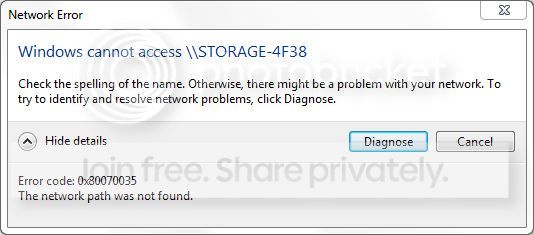
Capture-21.jpg
 

My Computer

OS
Win Seven Ultimate RTM
CPU
Intel Core i7 920
Motherboard
Intel DX 58SO
Memory
4 gigs ram
Graphics Card(s)
Nvidia GTX 260
Sound Card
Digidesign
Monitor(s) Displays
Acer 26"
Screen Resolution
1920*1200
Case
Antec
Cooling
Noctua
Internet Speed
Lan
I hooked a network disk to my router but cant get permission to
access the content of it on my computer.

The disk shows up in network but got a this error each time I try
to open it.

I searched the forum for answers but didn't manage to find a good one.

Capture-21.jpg

Hi and welcome,

First a question.

I assume you have a username and password on the disk?
 

My Computer

OS
Win7 Build 7600 x86
CPU
Pentium II 300MHz
Motherboard
Asus
Memory
32mb EDO RAM
Graphics Card(s)
Diamond Viper
Sound Card
Soundblaster 16
Monitor(s) Displays
14" AOC CRT 16K color
Screen Resolution
800x600
Hard Drives
300mb Quantum fireball
PSU
110 Watts
Cooling
Passive
Keyboard
Trust Ergonomic
Mouse
Generic
Internet Speed
256K u 128K d
You may need to create a share for this disk. Can you ping the disk? How did the disk get connected to the router, wirelessly or wired? Does the disk come with any software utilties?
 

My Computer

Computer Manufacturer/Model Number
Lenovo ThinkPad T60
OS
Windows 7 Ultimate 64Bit
CPU
GenuineIntel Intel(R) Core(TM) DuoCore T2400 @ 1.83GHz
Motherboard
Intel(R) 82801G (ICH7 Family)
Memory
2.00 GB
Graphics Card(s)
Mobile Intel(R) 945 Express Chipset
Sound Card
SoundMAX Integrated Digital HD Audio
Monitor(s) Displays
ThinkPad Display
Screen Resolution
1400x1050
Hard Drives
100Gb SATA
Keyboard
Standard Keyboard
Mouse
HID-compliant Mouse
Internet Speed
Cable Broadband - 54Mbps
Other Info
Intel(R) PRO/1000 PL Network Connection
11a/b/g Wireless LAN Mini PCI Express Adapter
I hooked a network disk to my router but cant get permission to
access the content of it on my computer.

The disk shows up in network but got a this error each time I try
to open it.

I searched the forum for answers but didn't manage to find a good one.

Capture-21.jpg

Its saying path not found. Try static IP.
 

My Computer

Computer Manufacturer/Model Number
HP Pavillion dv-7 1005 Tx
OS
Win 8 Release candidate 8400
CPU
[email protected]
Memory
4 gigs
Graphics Card(s)
Nvidia 9600M
Sound Card
HD built-in
Monitor(s) Displays
17" Wxga
Screen Resolution
1440x900
Cooling
none
Internet Speed
45Mb down 5Mb up
The disk is wired to router and has an ip 192.168.2.9
It has a admin/admin login/password.

The disk is formated in fat32 but cant be formated in ntfs coz the software
doesn't allow it.

I managed to mount the disk with the software but transfert rate is very slow. It feels like I'm connected wirelessly on it.

Is there another way to format it into ntfs coz disk manager doesn't even
show it ?

Could the fat32 issue be a problem with win7 ?
 

My Computer

OS
Win Seven Ultimate RTM
CPU
Intel Core i7 920
Motherboard
Intel DX 58SO
Memory
4 gigs ram
Graphics Card(s)
Nvidia GTX 260
Sound Card
Digidesign
Monitor(s) Displays
Acer 26"
Screen Resolution
1920*1200
Case
Antec
Cooling
Noctua
Internet Speed
Lan
The disk is wired to router and has an ip 192.168.2.9
It has a admin/admin login/password.

The disk is formated in fat32 but cant be formated in ntfs coz the software
doesn't allow it.

I managed to mount the disk with the software but transfert rate is very slow. It feels like I'm connected wirelessly on it.

Is there another way to format it into ntfs coz disk manager doesn't even
show it ?

Could the fat32 issue be a problem with win7 ?

Connect the drive directly to your pc and use the command line format while pointing to the drive.

Open command prompt (run as admin) type "format /?" to get the detailed info on formatting using the command line. I used this process to format a usb flashdrive that would not allow NTFS in the software. Worked for me.
Good luck, let us know how it goes for you.
 

My Computer

Computer Manufacturer/Model Number
Systemax N2000 Gaming PC
OS
Windows 7 Ultimate x64
CPU
Q6600 @2.4ghz (G0 stepping)
Motherboard
XFX nforce 680i LT
Memory
8 gb OCZ vista essential sli PC-6400
Graphics Card(s)
Dual 9800gt in SLI mode
Sound Card
Integrated 8.1 High Definition Audio
Monitor(s) Displays
Dual Sceptre x246w 24 inch monitors
Screen Resolution
1920 x 1200 each monitor
Hard Drives
500 GB SATA II / 7500 rpm
PSU
Cooler Master Real Power Pro 1250W
Case
N2000 server tower
Cooling
Thermaltake Bigwater 760 is
Keyboard
MS Intelitype 6000 v2.0
Mouse
MS Intelipoint 6000
Internet Speed
Wi-power 1.5GB up / 512k down
Other Info
Windows 7 Ultimate x64, Windows 7 Pro x64, Windows Home Premium X86, Windows XP pro, Windows Home Server x86, Ubuntu 10.4 x86 and x64, Ubuntu server 10.4, SQL Server 2005, MySQL 5.0
Why not connect the disk directly to your pc and format it with NTFS? I still think you might need to create a share and give it the right permission in order to connect to it.

As for the connection speed, this is the property of the disk. Being a disk with external power supply i would think it'll be faster than a USB only disk.
 

My Computer

Computer Manufacturer/Model Number
Lenovo ThinkPad T60
OS
Windows 7 Ultimate 64Bit
CPU
GenuineIntel Intel(R) Core(TM) DuoCore T2400 @ 1.83GHz
Motherboard
Intel(R) 82801G (ICH7 Family)
Memory
2.00 GB
Graphics Card(s)
Mobile Intel(R) 945 Express Chipset
Sound Card
SoundMAX Integrated Digital HD Audio
Monitor(s) Displays
ThinkPad Display
Screen Resolution
1400x1050
Hard Drives
100Gb SATA
Keyboard
Standard Keyboard
Mouse
HID-compliant Mouse
Internet Speed
Cable Broadband - 54Mbps
Other Info
Intel(R) PRO/1000 PL Network Connection
11a/b/g Wireless LAN Mini PCI Express Adapter
Why not connect the disk directly to your pc and format it with NTFS? I still think you might need to create a share and give it the right permission in order to connect to it.

As for the connection speed, this is the property of the disk. Being a disk with external power supply i would think it'll be faster than a USB only disk.
Its hooked up to a soho router, most can't understand the NTFS formatting. By using FAT32 you dont have to worry about permission issues on the drive. Having a external power supply doesnt make it any faster, that is solely dependent on the spindle speed of the hard drive and amount of cache it has.
 

My Computer

Computer Manufacturer/Model Number
Black_Box (homebuilt)
OS
windows 7 RTM x64
CPU
Phenom II 965 Quad Core 3.4Ghz
Motherboard
Asus M4A79T Deluxe
Memory
Mushkin Blackline 8GB (4x2gb)
Graphics Card(s)
XFX Radeon 5970 Black Edition
Sound Card
onboard
Monitor(s) Displays
Dell 2408WPF-main Dell E248WFP-secondary
Screen Resolution
1920x1200-main 1920x1200-secondary
Hard Drives
OCZ Vertex Limited Edition 100GB (OS)
x1 WD Black Edition 500GB drive (Storage)
PSU
XFX 850w Black Edition (Modular)
Case
Mountian Mods H2go
Cooling
CoolITSystems ECO A.L.C.
Keyboard
Logitech MX 5500 wireless keyboard
Mouse
Razor Copperhead
Internet Speed
16Mb down/2Mb up Wowway Cable Internet
I'm of the opinion that if the 'USB' external hdd which draws power independently is one which operates more efficiently than one which uses the same cable connecting to the pc for power and uses it also for read/write operations. This is not strickly speaking ofcourse but like you said, depends on the hdd as well.
 

My Computer

Computer Manufacturer/Model Number
Lenovo ThinkPad T60
OS
Windows 7 Ultimate 64Bit
CPU
GenuineIntel Intel(R) Core(TM) DuoCore T2400 @ 1.83GHz
Motherboard
Intel(R) 82801G (ICH7 Family)
Memory
2.00 GB
Graphics Card(s)
Mobile Intel(R) 945 Express Chipset
Sound Card
SoundMAX Integrated Digital HD Audio
Monitor(s) Displays
ThinkPad Display
Screen Resolution
1400x1050
Hard Drives
100Gb SATA
Keyboard
Standard Keyboard
Mouse
HID-compliant Mouse
Internet Speed
Cable Broadband - 54Mbps
Other Info
Intel(R) PRO/1000 PL Network Connection
11a/b/g Wireless LAN Mini PCI Express Adapter
I'm of the opinion that if the 'USB' external hdd which draws power independently is one which operates more efficiently than one which uses the same cable connecting to the pc for power and uses it also for read/write operations. This is not strickly speaking ofcourse but like you said, depends on the hdd as well.

If the drive is capable of drawing power form usb (2,5" disk),
it doesn't matter if it get's it's power from USB or a seperate adapter.

If the drive gets even a tiny bit underpowered it will not perform less,
it will fail.

(With more items hooked to USB it might get underpowered.)

Greetings
 

My Computer

OS
Win7 Build 7600 x86
CPU
Pentium II 300MHz
Motherboard
Asus
Memory
32mb EDO RAM
Graphics Card(s)
Diamond Viper
Sound Card
Soundblaster 16
Monitor(s) Displays
14" AOC CRT 16K color
Screen Resolution
800x600
Hard Drives
300mb Quantum fireball
PSU
110 Watts
Cooling
Passive
Keyboard
Trust Ergonomic
Mouse
Generic
Internet Speed
256K u 128K d
It will not fail (not always), rather freezes until power can be attained. When and it if freeze, the connection can be said to be either slow or dropped.
 

My Computer

Computer Manufacturer/Model Number
Lenovo ThinkPad T60
OS
Windows 7 Ultimate 64Bit
CPU
GenuineIntel Intel(R) Core(TM) DuoCore T2400 @ 1.83GHz
Motherboard
Intel(R) 82801G (ICH7 Family)
Memory
2.00 GB
Graphics Card(s)
Mobile Intel(R) 945 Express Chipset
Sound Card
SoundMAX Integrated Digital HD Audio
Monitor(s) Displays
ThinkPad Display
Screen Resolution
1400x1050
Hard Drives
100Gb SATA
Keyboard
Standard Keyboard
Mouse
HID-compliant Mouse
Internet Speed
Cable Broadband - 54Mbps
Other Info
Intel(R) PRO/1000 PL Network Connection
11a/b/g Wireless LAN Mini PCI Express Adapter
It will not fail (not always), rather freezes until power can be attained. When and it if freeze, the connection can be said to be either slow or dropped.

I had it happening on a few occasions.
Copied data was partly corrupted, and partly not copied at all.
I would call that failure, not freezing or slow.
 

My Computer

OS
Win7 Build 7600 x86
CPU
Pentium II 300MHz
Motherboard
Asus
Memory
32mb EDO RAM
Graphics Card(s)
Diamond Viper
Sound Card
Soundblaster 16
Monitor(s) Displays
14" AOC CRT 16K color
Screen Resolution
800x600
Hard Drives
300mb Quantum fireball
PSU
110 Watts
Cooling
Passive
Keyboard
Trust Ergonomic
Mouse
Generic
Internet Speed
256K u 128K d
I'm of the opinion that if the 'USB' external hdd which draws power independently is one which operates more efficiently than one which uses the same cable connecting to the pc for power and uses it also for read/write operations. This is not strickly speaking ofcourse but like you said, depends on the hdd as well.

If the drive is capable of drawing power form usb (2,5" disk),
it doesn't matter if it get's it's power from USB or a seperate adapter.

If the drive gets even a tiny bit underpowered it will not perform less,
it will fail.

(With more items hooked to USB it might get underpowered.)

Greetings

The quickest way to see if this is the issue, is to plug the drive into a Powered USB hub, then plug that into the router.
 

My Computer

Computer Manufacturer/Model Number
Black_Box (homebuilt)
OS
windows 7 RTM x64
CPU
Phenom II 965 Quad Core 3.4Ghz
Motherboard
Asus M4A79T Deluxe
Memory
Mushkin Blackline 8GB (4x2gb)
Graphics Card(s)
XFX Radeon 5970 Black Edition
Sound Card
onboard
Monitor(s) Displays
Dell 2408WPF-main Dell E248WFP-secondary
Screen Resolution
1920x1200-main 1920x1200-secondary
Hard Drives
OCZ Vertex Limited Edition 100GB (OS)
x1 WD Black Edition 500GB drive (Storage)
PSU
XFX 850w Black Edition (Modular)
Case
Mountian Mods H2go
Cooling
CoolITSystems ECO A.L.C.
Keyboard
Logitech MX 5500 wireless keyboard
Mouse
Razor Copperhead
Internet Speed
16Mb down/2Mb up Wowway Cable Internet
Try this!!!

Create a new shortcut on desktop
Whent asked for location of item, type following:

\\name of network drive\name of shared folder /USER:username,password


If you didnt set a password the just type the username without the
comma.

Let me know if it worked for you
 

My Computer

OS
Windows 7
Back
Top