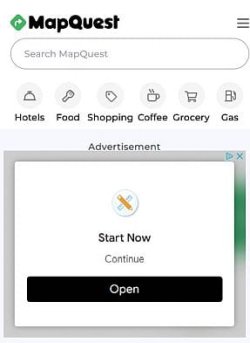
MapQuest has stopped working

debodun

New member
Member
VIP
Local time
11:06 AM
Messages
289
Location
upstate NY
When I try to use it, the data area on the left side of the page is grayed out. When I attempt to enter an address, it says "Couldn't find you. Try again." (see attached screen shot). I am using Firefox 115.19.0 esr (64-bit). It was working fine last week.
 

Attachments

  • MapQuest.jpg
    MapQuest.jpg
    34.2 KB · Views: 17

My Computer

Computer type
PC/Desktop
Computer Manufacturer/Model Number
refurb in an HP/Compaq case
OS
Windows 7 Ultimate x64
CPU
1.86 GHz Intrel Core 2
Motherboard
HP 0A60h XU1
Memory
3 GB Dual Channel DDR2 @ 3.32 MHz
Graphics Card(s)
Intel Q965/Q963 Express chipset
Monitor(s) Displays
Dell CRT
Hard Drives
977GB Samsung HD 103 SI ATA
Case
HP Compaq DC5800
Mouse
wired optical
Antivirus
Microsoft Security Essentials, MalwareBytes, Spyware Blaster
Browser
Firefox 32-bit
I'm having the same issue with Windows 7 64-bit (up-to-date to December 2024) and Firefox ESR 115.19.0, and it was working fine for me a few weeks ago.
As soon as I reboot and switch over to Windows 10 23H2 64-bit and Firefox 134.0, I'll check to see if the same issue exists.

- - - Updated - - -

When I load MapQuest in Windows 10 23H2 64-bit and Firefox 134.0, I get the same image.
And when I click the 3 dashes in the upper right corner, the menu appears.
And when I click "Get directions", the app appears to work like it should.
Both Firefox versions show as being compatible, so I'm guessing MapQuest is not compatible with Windows 7 64-bit.
 

Attachments

  • capture1.jpg
    capture1.jpg
    14.5 KB · Views: 13
  • capture2.jpg
    capture2.jpg
    12.3 KB · Views: 13

My Computer

Computer type
PC/Desktop
Computer Manufacturer/Model Number
Dell OptiPlex 9020
OS
Windows 7 Professional SP1 64-bit
CPU
Intel Core i7-4790 3.60 GHz
Memory
32 GB DDR3-1600 MHz
Graphics Card(s)
Integrated Intel HD Graphics 4600
Monitor(s) Displays
Viewsonic 32" LCD
Hard Drives
Kingston SATA 3 240 GB SSD
Internet Speed
Spectrum Internet 1000 Mbps
Web sites don't know nor care about the operating system itself, but they're very affected by the browser. From both posts I guess that the website updated something that break compatibility with FF 115, but still works with 134. Try updating your browser, or try with a different one to see if it improves.
 

My Computer

Computer type
Laptop
Computer Manufacturer/Model Number
Toshiba Sattelite A665-S6092
OS
Windows 7 Ultimate x64
CPU
Intel Core i7-740QM
Memory
8 GB DDR3
Graphics Card(s)
NVIDIA GeForce 330GT
Screen Resolution
1366x768
Hard Drives
Samsung 840 SSD 500GB
1TB USB3 external HD
Cooling
Coolermaster Notepal U3 notebook cooling pad
Internet Speed
3mbps ASDL
Antivirus
ClamWin 0.98.7
Browser
Opera 12.17 x86 (main), Firefox 38 (sec), IE11 (last resort)
I can't go to any higher FF version in Windows 7.
 

My Computer

Computer type
PC/Desktop
Computer Manufacturer/Model Number
refurb in an HP/Compaq case
OS
Windows 7 Ultimate x64
CPU
1.86 GHz Intrel Core 2
Motherboard
HP 0A60h XU1
Memory
3 GB Dual Channel DDR2 @ 3.32 MHz
Graphics Card(s)
Intel Q965/Q963 Express chipset
Monitor(s) Displays
Dell CRT
Hard Drives
977GB Samsung HD 103 SI ATA
Case
HP Compaq DC5800
Mouse
wired optical
Antivirus
Microsoft Security Essentials, MalwareBytes, Spyware Blaster
Browser
Firefox 32-bit
It worked for me using a chromium based browser (ungoogled chromium version 109). So it's the site using something that doesn't actually adhere to web standards and instead uses chrome-specific details.
 

My Computers

System One System Two

  • Computer type
    Laptop
    Computer Manufacturer/Model Number
    T430
    OS
    Windows 7 Ultimate 64 bit
    Browser
    Pale Moon, Firefox
  • Computer type
    PC/Desktop
Back
Top