
March 12, 2019 - KB4489878 (Monthly Rollup) for Windows 7

Brink

Administrator
Staff member
Local time
5:05 PM
Messages
74,940
Location
Oklahoma
March 12, 2019 - KB4489878 (Monthly Rollup)

Applies to: Windows 7 Service Pack 1, Windows Server 2008 R2 Service Pack 1


Improvements and fixes

This security update includes improvements and fixes that were a part of update KB4486565 (released February 19, 2019) and addresses the following issues:

  • Addresses an issue that may prevent the Event Viewer from showing some event descriptions for network interface cards (NIC).
  • Security updates to Internet Explorer, Windows App Platform and Frameworks, Windows Cryptography, Windows Hyper-V, Windows Storage and Filesystems, Windows Fundamentals, Windows Server, Windows Kernel, Windows MSXML, and the Microsoft JET Database Engine .
For more information about the resolved security vulnerabilities, please refer to the Security Update Guide.

Known issues in this update

KB4489878.jpg

[UPDATED 3/15]
3-15.jpg

[ADDED 3/20]
3-20.jpg

How to get this update

Before installing this update

Microsoft strongly recommends you install the latest servicing stack update (SSU) for your operating system before installing the latest Rollup. SSUs improve the reliability of the update process to mitigate potential issues while installing the Rollup and applying Microsoft security fixes.

If you are using Windows Update, the latest SSU (KB4490628) will be offered to you automatically. To get the standalone package for the latest SSU, go to the Microsoft Update Catalog.

Install this update

This update will be downloaded and installed automatically from Windows Update.

To get the standalone package for this update, go to the Microsoft Update Catalog website.

File information

For a list of the files that are provided in this update, download the file information for update 4489878.
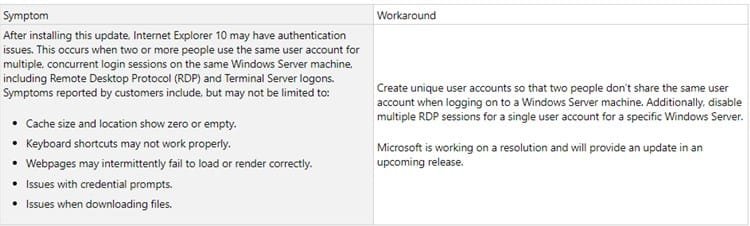
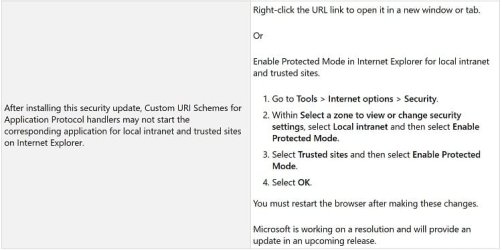
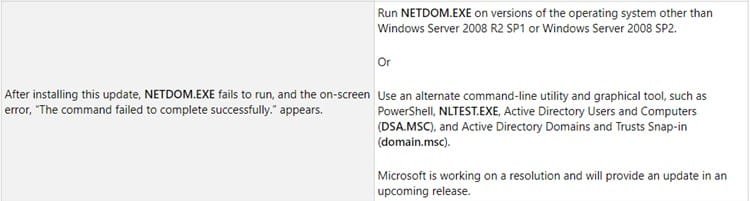
Source: Access Denied


Direct download links for KB4489878 MSU file from Microsoft Update Catalog:

:ar: Download KB4489878 MSU for Windows 7 32-bit (x86) - 148.2 MB

:ar: Download KB4489878 MSU for Windows 7 64-bit (x64) - 243.3 MB
 
Last edited:

My Computer My Computer

At a glance

64-bit Windows 11 Pro for WorkstationsIntel i7-8700K OC'd to 5 GHz64 GB (4x16GB) G.SKILL TridentZ RGB DDR4 3600...ASUS ROG-STRIX-GTX1080TI-O11G-GAMING
Computer type
PC/Desktop
Computer Manufacturer/Model Number
Self built custom
OS
64-bit Windows 11 Pro for Workstations
CPU
Intel i7-8700K OC'd to 5 GHz
Motherboard
ASUS ROG Maximus XI Formula Z390
Memory
64 GB (4x16GB) G.SKILL TridentZ RGB DDR4 3600 MHz
Graphics Card(s)
ASUS ROG-STRIX-GTX1080TI-O11G-GAMING
Sound Card
Integrated
Monitor(s) Displays
2 x Samsung Odyssey G7 27"
Screen Resolution
2560x1440
Hard Drives
1TB Samsung 990 PRO M.2,
4TB Samsung 990 PRO PRO M.2,
TerraMaster F8 SSD Plus NAS
PSU
Seasonic Prime Titanium 850W
Case
Thermaltake Core P3
Cooling
Corsair Hydro H115i
Keyboard
Logitech wireless K800
Mouse
Logitech MX Master 4
Internet Speed
2 Gb/s Download and 100 Mb/s Upload
Antivirus
Malwarebyte Anti-Malware Premium
Browser
Google Chrome
Other Info
Logitech Z625 speaker system,
Logitech BRIO 4K Pro webcam,
HP Color LaserJet Pro MFP M477fdn,
APC SMART-UPS RT 1000 XL - SURT1000XLI,
Galaxy S23 Plus phone
UPDATE 3/13:

New known issue added.
 

My Computer My Computer

At a glance

64-bit Windows 11 Pro for WorkstationsIntel i7-8700K OC'd to 5 GHz64 GB (4x16GB) G.SKILL TridentZ RGB DDR4 3600...ASUS ROG-STRIX-GTX1080TI-O11G-GAMING
Computer type
PC/Desktop
Computer Manufacturer/Model Number
Self built custom
OS
64-bit Windows 11 Pro for Workstations
CPU
Intel i7-8700K OC'd to 5 GHz
Motherboard
ASUS ROG Maximus XI Formula Z390
Memory
64 GB (4x16GB) G.SKILL TridentZ RGB DDR4 3600 MHz
Graphics Card(s)
ASUS ROG-STRIX-GTX1080TI-O11G-GAMING
Sound Card
Integrated
Monitor(s) Displays
2 x Samsung Odyssey G7 27"
Screen Resolution
2560x1440
Hard Drives
1TB Samsung 990 PRO M.2,
4TB Samsung 990 PRO PRO M.2,
TerraMaster F8 SSD Plus NAS
PSU
Seasonic Prime Titanium 850W
Case
Thermaltake Core P3
Cooling
Corsair Hydro H115i
Keyboard
Logitech wireless K800
Mouse
Logitech MX Master 4
Internet Speed
2 Gb/s Download and 100 Mb/s Upload
Antivirus
Malwarebyte Anti-Malware Premium
Browser
Google Chrome
Other Info
Logitech Z625 speaker system,
Logitech BRIO 4K Pro webcam,
HP Color LaserJet Pro MFP M477fdn,
APC SMART-UPS RT 1000 XL - SURT1000XLI,
Galaxy S23 Plus phone
UPDATE 3/15:

Known issues updated.
 

My Computer My Computer

At a glance

64-bit Windows 11 Pro for WorkstationsIntel i7-8700K OC'd to 5 GHz64 GB (4x16GB) G.SKILL TridentZ RGB DDR4 3600...ASUS ROG-STRIX-GTX1080TI-O11G-GAMING
Computer type
PC/Desktop
Computer Manufacturer/Model Number
Self built custom
OS
64-bit Windows 11 Pro for Workstations
CPU
Intel i7-8700K OC'd to 5 GHz
Motherboard
ASUS ROG Maximus XI Formula Z390
Memory
64 GB (4x16GB) G.SKILL TridentZ RGB DDR4 3600 MHz
Graphics Card(s)
ASUS ROG-STRIX-GTX1080TI-O11G-GAMING
Sound Card
Integrated
Monitor(s) Displays
2 x Samsung Odyssey G7 27"
Screen Resolution
2560x1440
Hard Drives
1TB Samsung 990 PRO M.2,
4TB Samsung 990 PRO PRO M.2,
TerraMaster F8 SSD Plus NAS
PSU
Seasonic Prime Titanium 850W
Case
Thermaltake Core P3
Cooling
Corsair Hydro H115i
Keyboard
Logitech wireless K800
Mouse
Logitech MX Master 4
Internet Speed
2 Gb/s Download and 100 Mb/s Upload
Antivirus
Malwarebyte Anti-Malware Premium
Browser
Google Chrome
Other Info
Logitech Z625 speaker system,
Logitech BRIO 4K Pro webcam,
HP Color LaserJet Pro MFP M477fdn,
APC SMART-UPS RT 1000 XL - SURT1000XLI,
Galaxy S23 Plus phone
I am definitely having a problem with my Internet after applying KB4489878 yesterday.
Sometimes, not always, I have noticed a time lag between clicking on a link and the connection being made.
This is just since installing the the KB. the lag is anywhere from 5-20 seconds. A bit annoying but not earth shattering.
It's not my ISP since my Ping is 31, my Up Speed is 15-20 Mbps and Down is ~ 50 Mbps.
Feel free to move this comment to the proper category.
 

My Computer My Computer

At a glance

Windows 7 Pro 64-bit SP1/Windows 10 Dual BootAMD FX-8350Corsair Vengeance 8GBx2 1866Sapphire RX-580 Nitro + 4GB
Computer type
PC/Desktop
Computer Manufacturer/Model Number
Custom
OS
Windows 7 Pro 64-bit SP1/Windows 10 Dual Boot
CPU
AMD FX-8350
Motherboard
ASUS 970 Pro Gaming Aura
Memory
Corsair Vengeance 8GBx2 1866
Graphics Card(s)
Sapphire RX-580 Nitro + 4GB
Sound Card
On-board HD Audio
Monitor(s) Displays
Acer P236H
Screen Resolution
1920x1080
Hard Drives
WD 500GB Blue x 2
WD 500GB Green
Samsung 850 EVO 500 GB
PSU
Corsair RM750
Case
Antec 1100
Keyboard
Kensington Washable
Mouse
Logitech M510
Internet Speed
LTE 30Mbps down/10Mbps up
Antivirus
BitDefender Anti Virus Plus 2019 Paid version
Browser
Firefox, Chrome
I have an HP desktop running Windows 7-32 Home Premium, with two user accounts. I installed KB4474419 & KB4489878 and when it re-booted, the User 1 account was available & usable. The User 2 account was missing & just showed a blank icon window & was unusable. I uninstalled KB4489878 and re-booted. This time User 1 was blank & unusable, but User 2 was available & usable. So I uninstalled KB4474419 and both user accounts were available & usable. I then tried installing KB4489878 by itself and User 1 was available & User 2 was unavailable. So I have now removed both updates & hidden them in Windows Updates. Is there a workaround for this problem? Is Microsoft working on a fix?

I forgot to mention in my first post, that I also have a Windows 7-64 bit Professional PC on which both of the subject updates installed and are working just fine.

4/13/2019
On 4/10/2019 I installed KB4493132 & KB4493472 on my 32 bit machine. Now I have the same problem that I had initially with the other two KBs, in my first posting. Yesterday, I discovered that this problem is the same as the "Other User" problem that shows up with the last user displayed on the logon screen, with the blank user logon box labeled "Other User". So I will pursue that avenue to troubleshoot the problem.
 
Last edited:

My Computer My Computer

At a glance

Windows 7-64bit Professional
Computer type
PC/Desktop
OS
Windows 7-64bit Professional
I just did that myself for both updates and I will now reboot. Will report back on progress.
 

My Computer My Computer

At a glance

Windows 7 Pro 64-bit SP1/Windows 10 Dual BootAMD FX-8350Corsair Vengeance 8GBx2 1866Sapphire RX-580 Nitro + 4GB
Computer type
PC/Desktop
Computer Manufacturer/Model Number
Custom
OS
Windows 7 Pro 64-bit SP1/Windows 10 Dual Boot
CPU
AMD FX-8350
Motherboard
ASUS 970 Pro Gaming Aura
Memory
Corsair Vengeance 8GBx2 1866
Graphics Card(s)
Sapphire RX-580 Nitro + 4GB
Sound Card
On-board HD Audio
Monitor(s) Displays
Acer P236H
Screen Resolution
1920x1080
Hard Drives
WD 500GB Blue x 2
WD 500GB Green
Samsung 850 EVO 500 GB
PSU
Corsair RM750
Case
Antec 1100
Keyboard
Kensington Washable
Mouse
Logitech M510
Internet Speed
LTE 30Mbps down/10Mbps up
Antivirus
BitDefender Anti Virus Plus 2019 Paid version
Browser
Firefox, Chrome
Well that was a long process.
I uninstalled KB4489878 and it wanted me to reboot but since I had one more update to uninstall I did not.
I then uninstalled KB4474419 and when it asked me to reboot I did.
It then went to the "Preparing to configure Windows - do not turn off your computer" screen and sat there for an hour with sporadic disk activity.
It then rebooted and counted up to 30% completed and then rebooted again.
It then counted up to 100% and showed me the login screen.
The Internet is much more responsive now - back to pre update levels.
 

My Computer My Computer

At a glance

Windows 7 Pro 64-bit SP1/Windows 10 Dual BootAMD FX-8350Corsair Vengeance 8GBx2 1866Sapphire RX-580 Nitro + 4GB
Computer type
PC/Desktop
Computer Manufacturer/Model Number
Custom
OS
Windows 7 Pro 64-bit SP1/Windows 10 Dual Boot
CPU
AMD FX-8350
Motherboard
ASUS 970 Pro Gaming Aura
Memory
Corsair Vengeance 8GBx2 1866
Graphics Card(s)
Sapphire RX-580 Nitro + 4GB
Sound Card
On-board HD Audio
Monitor(s) Displays
Acer P236H
Screen Resolution
1920x1080
Hard Drives
WD 500GB Blue x 2
WD 500GB Green
Samsung 850 EVO 500 GB
PSU
Corsair RM750
Case
Antec 1100
Keyboard
Kensington Washable
Mouse
Logitech M510
Internet Speed
LTE 30Mbps down/10Mbps up
Antivirus
BitDefender Anti Virus Plus 2019 Paid version
Browser
Firefox, Chrome
Well that was a long process.
I uninstalled KB4489878 and it wanted me to reboot but since I had one more update to uninstall I did not.
I then uninstalled KB4474419 and when it asked me to reboot I did.
It then went to the "Preparing to configure Windows - do not turn off your computer" screen and sat there for an hour with sporadic disk activity.
It then rebooted and counted up to 30% completed and then rebooted again.
It then counted up to 100% and showed me the login screen.
The Internet is much more responsive now - back to pre update levels.

dlwmacgregor
Thanks for your feedback on this problem. I forgot to mention in my first post, that I also have a Windows 7-64 bit Professional PC on which both of the subject updates installed and are working just fine. So the problem seems to be on Win 7-32 Home Premium only.
 

My Computer My Computer

At a glance

Windows 7-64bit Professional
Computer type
PC/Desktop
OS
Windows 7-64bit Professional
UPDATE 3/20:

New known issue added.
 

My Computer My Computer

At a glance

64-bit Windows 11 Pro for WorkstationsIntel i7-8700K OC'd to 5 GHz64 GB (4x16GB) G.SKILL TridentZ RGB DDR4 3600...ASUS ROG-STRIX-GTX1080TI-O11G-GAMING
Computer type
PC/Desktop
Computer Manufacturer/Model Number
Self built custom
OS
64-bit Windows 11 Pro for Workstations
CPU
Intel i7-8700K OC'd to 5 GHz
Motherboard
ASUS ROG Maximus XI Formula Z390
Memory
64 GB (4x16GB) G.SKILL TridentZ RGB DDR4 3600 MHz
Graphics Card(s)
ASUS ROG-STRIX-GTX1080TI-O11G-GAMING
Sound Card
Integrated
Monitor(s) Displays
2 x Samsung Odyssey G7 27"
Screen Resolution
2560x1440
Hard Drives
1TB Samsung 990 PRO M.2,
4TB Samsung 990 PRO PRO M.2,
TerraMaster F8 SSD Plus NAS
PSU
Seasonic Prime Titanium 850W
Case
Thermaltake Core P3
Cooling
Corsair Hydro H115i
Keyboard
Logitech wireless K800
Mouse
Logitech MX Master 4
Internet Speed
2 Gb/s Download and 100 Mb/s Upload
Antivirus
Malwarebyte Anti-Malware Premium
Browser
Google Chrome
Other Info
Logitech Z625 speaker system,
Logitech BRIO 4K Pro webcam,
HP Color LaserJet Pro MFP M477fdn,
APC SMART-UPS RT 1000 XL - SURT1000XLI,
Galaxy S23 Plus phone
Back
Top