
March 13, 2018 - KB4088875 (Monthly Rollup) Windows 7

Brink

Administrator
Staff member
Local time
6:23 PM
Messages
74,940
Location
Oklahoma
March 13, 2018 - KB4088875 (Monthly Rollup)

Applies to: Windows 7 Service Pack 1, Windows Server 2008 R2 Service Pack 1


Improvements and fixes

This security update includes improvements and fixes that were a part of update KB4075211 (released February 21, 2018) and addresses the following issues:

  • Addresses issue where Internet Explorer is unresponsive in certain scenarios when a Browser Helper Object is installed.
  • Updates legacy Document Mode cell visibility in Internet Explorer.
  • Addresses issue where Internet Explorer stops working in certain printing scenarios.
  • Addresses issue where Internet Explorer stops working when using F12-based developer tools.
  • Provides cumulative Spectre and Meltdown protections for 32-Bit (x86) and 64-Bit (x64) versions of Windows except the KB4078130 update that was offered to disable mitigation against Spectre Variant 2.
  • Provides security updates to Internet Explorer, the Microsoft Graphics component, Windows Kernel, Windows Shell, Windows MSXML, Windows Installer, and Windows Hyper-V.
For more information about the resolved security vulnerabilities, see the Security Update Guide.

Prerequisites

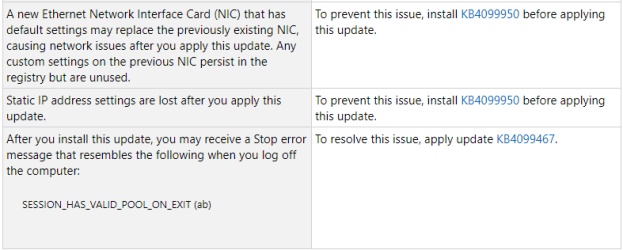
Important Please apply KB4099950 before installing this update.

Notes

Important Please apply KB4100480 immediately after applying this update. KB4100480 resolves an elevation of privilege vulnerability in the Windows Kernel for the 64-Bit (x64) version of Windows. This vulnerability is documented in CVE-2018-1038.

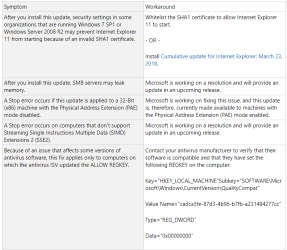
Known issues in this update

KB4088875-1.png
KB4088875-2.png

How to get this update

This update will be downloaded and installed automatically from Windows Update. To get the standalone package for this update, go to the Microsoft Update Catalog website.

File information

For a list of the files that are provided in this update, download the file information for update 4088875.
Source: https://support.microsoft.com/en-us/help/4088875


Direct download links for KB4088875 MSU file from Microsoft Update Catalog:

:ar: Download KB4088875 MSU for Windows 7 32-bit (x86) - 138.9 MB

:ar: Download KB4088875 MSU for Windows 7 64-bit (x64) - 236.5 MB
 
Last edited:

My Computer My Computer

At a glance

64-bit Windows 11 Pro for WorkstationsIntel i7-8700K OC'd to 5 GHz64 GB (4x16GB) G.SKILL TridentZ RGB DDR4 3600...ASUS ROG-STRIX-GTX1080TI-O11G-GAMING
Computer type
PC/Desktop
Computer Manufacturer/Model Number
Self built custom
OS
64-bit Windows 11 Pro for Workstations
CPU
Intel i7-8700K OC'd to 5 GHz
Motherboard
ASUS ROG Maximus XI Formula Z390
Memory
64 GB (4x16GB) G.SKILL TridentZ RGB DDR4 3600 MHz
Graphics Card(s)
ASUS ROG-STRIX-GTX1080TI-O11G-GAMING
Sound Card
Integrated
Monitor(s) Displays
2 x Samsung Odyssey G7 27"
Screen Resolution
2560x1440
Hard Drives
1TB Samsung 990 PRO M.2,
4TB Samsung 990 PRO PRO M.2,
TerraMaster F8 SSD Plus NAS
PSU
Seasonic Prime Titanium 850W
Case
Thermaltake Core P3
Cooling
Corsair Hydro H115i
Keyboard
Logitech wireless K800
Mouse
Logitech MX Master 4
Internet Speed
2 Gb/s Download and 100 Mb/s Upload
Antivirus
Malwarebyte Anti-Malware Premium
Browser
Google Chrome
Other Info
Logitech Z625 speaker system,
Logitech BRIO 4K Pro webcam,
HP Color LaserJet Pro MFP M477fdn,
APC SMART-UPS RT 1000 XL - SURT1000XLI,
Galaxy S23 Plus phone
Hmmm... KB4088875 is billed as a monthly security roll-up... but WinUpd fails to install it. Comments/experience? (Concerned about the Stop error on machines that don't support "Streaming Single Extensions Multiple Data (SIMD) Extensions 2 (SSE2)" ...
No clue if my low-end Celeron x64 processor falls in that category.

About all I know is that WU didn't install it, which concerns me, if this is really a monthly security roll-up.

Experiences?
 

My Computer My Computer

At a glance

Windows 7 Home Premium 64-bitCeleron 9003GB
Computer type
Laptop
Computer Manufacturer/Model Number
HP G56
OS
Windows 7 Home Premium 64-bit
CPU
Celeron 900
Memory
3GB
Mouse
Logitech M210 + K260 keyboard, cordless via USB
Internet Speed
Wi-fi constrained
Antivirus
MSSE (+ Malwarebytes)
Browser
Firefox 68, IE11, Chrome (in decreasing frequency of use)
Other Info
Fortunate enough to successfully apply monthly updates for several months... now VERY concerned about losing my device to 4515206 or 4474419. Advice??
Hmmm... KB4088875 is billed as a monthly security roll-up... but WinUpd fails to install it. Comments/experience? (Concerned about the Stop error on machines that don't support "Streaming Single Extensions Multiple Data (SIMD) Extensions 2 (SSE2)" ...
No clue if my low-end Celeron x64 processor falls in that category.

About all I know is that WU didn't install it, which concerns me, if this is really a monthly security roll-up.

Experiences?

no billm5. your x64 Intel celeron CPU is okay. :D (what kind of Intel Celeron CPU is it? use the CPU-Z tool to identify your Celeron processor)
It's the older 32bit/x86 CPUs (AMD Athlon XPs, Intel Pentium 3s, some Pentium 4s and earlier) that are non-SSE2, non-PAE compliant that will get bit with BSODs when the KB4088875 update on 32bit Win7 SP1 gets installed. although all Pentium 4s have SSE2, the early generations of P4s [like the Willamette & Northwood series] don't have XD/NX & PAE support. only the Prescott & Cedar Mill series [later gens] of Pentium 4s have the XD, PAE & x64 support

It look like Microsoft has stopped offering the KB4088875 update on all my Win7 PCs when checking thru Windows Update this past weekend:
Microsoft Has Pulled KB4088875 to Save Customers Further Pain | myITforum.com
currently KB4088875 is more trouble than its worth - to put it another way, the cure is worse than the disease itself. so I'm avoiding this update until a newer one comes out that will fix the problems KB4088875 is having
 

My Computer My Computer

At a glance

Windows 7 SP1 Home Premium 64bit [x64]Intel(R) Core(TM) i5-2310 CPU @ 2.90GHz6 GBIntel HD Graphics 2000
Computer type
PC/Desktop
Computer Manufacturer/Model Number
Dell Inspiron 620
OS
Windows 7 SP1 Home Premium 64bit [x64]
CPU
Intel(R) Core(TM) i5-2310 CPU @ 2.90GHz
Memory
6 GB
Graphics Card(s)
Intel HD Graphics 2000
Sound Card
Conexant CX20641 HD Audio
Hard Drives
Western Digital 1TB (1024GB) WD10EALX-759BA1
Internet Speed
Spectrum Cable Internet up to 100Mbps
Last edited:

My Computer My Computer

At a glance

Windows 7 Home Premium 64-bitCeleron 9003GB
Computer type
Laptop
Computer Manufacturer/Model Number
HP G56
OS
Windows 7 Home Premium 64-bit
CPU
Celeron 900
Memory
3GB
Mouse
Logitech M210 + K260 keyboard, cordless via USB
Internet Speed
Wi-fi constrained
Antivirus
MSSE (+ Malwarebytes)
Browser
Firefox 68, IE11, Chrome (in decreasing frequency of use)
Other Info
Fortunate enough to successfully apply monthly updates for several months... now VERY concerned about losing my device to 4515206 or 4474419. Advice??
KB4088875 article on first post updated.
 

My Computer My Computer

At a glance

64-bit Windows 11 Pro for WorkstationsIntel i7-8700K OC'd to 5 GHz64 GB (4x16GB) G.SKILL TridentZ RGB DDR4 3600...ASUS ROG-STRIX-GTX1080TI-O11G-GAMING
Computer type
PC/Desktop
Computer Manufacturer/Model Number
Self built custom
OS
64-bit Windows 11 Pro for Workstations
CPU
Intel i7-8700K OC'd to 5 GHz
Motherboard
ASUS ROG Maximus XI Formula Z390
Memory
64 GB (4x16GB) G.SKILL TridentZ RGB DDR4 3600 MHz
Graphics Card(s)
ASUS ROG-STRIX-GTX1080TI-O11G-GAMING
Sound Card
Integrated
Monitor(s) Displays
2 x Samsung Odyssey G7 27"
Screen Resolution
2560x1440
Hard Drives
1TB Samsung 990 PRO M.2,
4TB Samsung 990 PRO PRO M.2,
TerraMaster F8 SSD Plus NAS
PSU
Seasonic Prime Titanium 850W
Case
Thermaltake Core P3
Cooling
Corsair Hydro H115i
Keyboard
Logitech wireless K800
Mouse
Logitech MX Master 4
Internet Speed
2 Gb/s Download and 100 Mb/s Upload
Antivirus
Malwarebyte Anti-Malware Premium
Browser
Google Chrome
Other Info
Logitech Z625 speaker system,
Logitech BRIO 4K Pro webcam,
HP Color LaserJet Pro MFP M477fdn,
APC SMART-UPS RT 1000 XL - SURT1000XLI,
Galaxy S23 Plus phone
Brink... I don't know how to interpret that last comment.

Meanwhile KB4088875 DID auto-install itself in the last day or two. (So much for "Microsoft Has Pulled KB4088875 to Save Customers Further Pain | myITforum.com")

Other than usual everyday use... what should I be trying, to see if the presence of 4088875 is a good thing or a bad thing?


user_offline.gif


My Computer My Computer

At a glance

Windows 7 Home Premium 64-bitCeleron 9003GB
Computer type
Laptop
Computer Manufacturer/Model Number
HP G56
OS
Windows 7 Home Premium 64-bit
CPU
Celeron 900
Memory
3GB
Mouse
Logitech M210 + K260 keyboard, cordless via USB
Internet Speed
Wi-fi constrained
Antivirus
MSSE (+ Malwarebytes)
Browser
Firefox 68, IE11, Chrome (in decreasing frequency of use)
Other Info
Fortunate enough to successfully apply monthly updates for several months... now VERY concerned about losing my device to 4515206 or 4474419. Advice??
Hey Bill, :)

It just means that Microsoft has made updates to the content of that KB article.

I wouldn't worry too much about having issues with KB4088875. If you do, you could always uninstall it or system restore until a newer update is available.
 

My Computer My Computer

At a glance

64-bit Windows 11 Pro for WorkstationsIntel i7-8700K OC'd to 5 GHz64 GB (4x16GB) G.SKILL TridentZ RGB DDR4 3600...ASUS ROG-STRIX-GTX1080TI-O11G-GAMING
Computer type
PC/Desktop
Computer Manufacturer/Model Number
Self built custom
OS
64-bit Windows 11 Pro for Workstations
CPU
Intel i7-8700K OC'd to 5 GHz
Motherboard
ASUS ROG Maximus XI Formula Z390
Memory
64 GB (4x16GB) G.SKILL TridentZ RGB DDR4 3600 MHz
Graphics Card(s)
ASUS ROG-STRIX-GTX1080TI-O11G-GAMING
Sound Card
Integrated
Monitor(s) Displays
2 x Samsung Odyssey G7 27"
Screen Resolution
2560x1440
Hard Drives
1TB Samsung 990 PRO M.2,
4TB Samsung 990 PRO PRO M.2,
TerraMaster F8 SSD Plus NAS
PSU
Seasonic Prime Titanium 850W
Case
Thermaltake Core P3
Cooling
Corsair Hydro H115i
Keyboard
Logitech wireless K800
Mouse
Logitech MX Master 4
Internet Speed
2 Gb/s Download and 100 Mb/s Upload
Antivirus
Malwarebyte Anti-Malware Premium
Browser
Google Chrome
Other Info
Logitech Z625 speaker system,
Logitech BRIO 4K Pro webcam,
HP Color LaserJet Pro MFP M477fdn,
APC SMART-UPS RT 1000 XL - SURT1000XLI,
Galaxy S23 Plus phone
KB4088875 article on first post updated.
 

My Computer My Computer

At a glance

64-bit Windows 11 Pro for WorkstationsIntel i7-8700K OC'd to 5 GHz64 GB (4x16GB) G.SKILL TridentZ RGB DDR4 3600...ASUS ROG-STRIX-GTX1080TI-O11G-GAMING
Computer type
PC/Desktop
Computer Manufacturer/Model Number
Self built custom
OS
64-bit Windows 11 Pro for Workstations
CPU
Intel i7-8700K OC'd to 5 GHz
Motherboard
ASUS ROG Maximus XI Formula Z390
Memory
64 GB (4x16GB) G.SKILL TridentZ RGB DDR4 3600 MHz
Graphics Card(s)
ASUS ROG-STRIX-GTX1080TI-O11G-GAMING
Sound Card
Integrated
Monitor(s) Displays
2 x Samsung Odyssey G7 27"
Screen Resolution
2560x1440
Hard Drives
1TB Samsung 990 PRO M.2,
4TB Samsung 990 PRO PRO M.2,
TerraMaster F8 SSD Plus NAS
PSU
Seasonic Prime Titanium 850W
Case
Thermaltake Core P3
Cooling
Corsair Hydro H115i
Keyboard
Logitech wireless K800
Mouse
Logitech MX Master 4
Internet Speed
2 Gb/s Download and 100 Mb/s Upload
Antivirus
Malwarebyte Anti-Malware Premium
Browser
Google Chrome
Other Info
Logitech Z625 speaker system,
Logitech BRIO 4K Pro webcam,
HP Color LaserJet Pro MFP M477fdn,
APC SMART-UPS RT 1000 XL - SURT1000XLI,
Galaxy S23 Plus phone
Back
Top