marooned in a memory muddle.

mrmurder1975

New member
Local time
1:14 AM
Messages
18
Location
wales,uk.
hi,
i have been thinking about getting some more ram for the 2 slots i still have open in my pc but it seems the ram i purchased for it back in '04 is no longer made! now im a bit confused as to what i should go for. i dont want to spend the money only to find out its not compatible..

currently installed i have,

slot one:

Type DDR
Size 1024 MBytes
Manufacturer Hyundai Electronics
Max Bandwidth PC3200 (200 MHz)
and the same in slot 2.

i can find ones that match the type and size but not the 200mhz...would installing some with a higher bandwidth cause problems? im a bit lost. help!:confused:

if anyone could provide a link or 2 to uk sites i would find that most helpfull! the cheaper the better! thanks:)(i would also like to increase ram by the gig and not mbytes if poss)
 

My Computer

Computer Manufacturer/Model Number
asust ek computer inc. (laptop)
OS
windows 7 home premium 64bit sp1
CPU
intel celeron [email protected] conroe-l 65nm
Motherboard
asus corp k50c
Memory
3.00gb single channel ddr2@333mhz (5-5-5-15)
Graphics Card(s)
sis mirage 3
Sound Card
realtek high def audio
Monitor(s) Displays
generic pnp monitor
Screen Resolution
(1366x768@60ghz)
Hard Drives
244gb seagate st9250315as ata device (sata)
PSU
cant find the info for this?!
Most, if not all, will agree
Dont mix and match ram, even if you can find compatible
If you want to do it right, buy all you need and remove ram that is currently installed.
 

My Computer

Computer type
PC/Desktop
Computer Manufacturer/Model Number
Dell XPS 420
OS
Windows 10, Home Clean Install
CPU
Intel Core2 processsor Q8200(2.33Ghz 1333FSB) Quad Core Tech
Motherboard
Dell
Memory
6 gb
Graphics Card(s)
ATI Radeon 256MB HD3650
Sound Card
Intergrated 7.1 Channel Audio
Monitor(s) Displays
Dell SP2009W 20"
Hard Drives
640 GB Serial ATA Hard drive
Cooling
Fan
Keyboard
Dell USB Keyboard
Mouse
Dell Premium Optical USB
Internet Speed
DSL 2.85
Most, if not all, will agree
Dont mix and match ram, even if you can find compatible
If you want to do it right, buy all you need and remove ram that is currently installed.


ouch. that sounds expensive! thanks for the advice :D

edit:

would removing both slots of the ram i have installed now and replacing with this:

Corsair 1GB DDR 400MHz/PC3200 Memory Non-ECC Unbuffered CL3


be a good move? (sorry about the bold!)

another edit. having thought about that,if i remember correctly there are 1000 mbytes to a gig,so i would have less ram than i do now. my bad.:p
 

My Computer

Computer Manufacturer/Model Number
asust ek computer inc. (laptop)
OS
windows 7 home premium 64bit sp1
CPU
intel celeron [email protected] conroe-l 65nm
Motherboard
asus corp k50c
Memory
3.00gb single channel ddr2@333mhz (5-5-5-15)
Graphics Card(s)
sis mirage 3
Sound Card
realtek high def audio
Monitor(s) Displays
generic pnp monitor
Screen Resolution
(1366x768@60ghz)
Hard Drives
244gb seagate st9250315as ata device (sata)
PSU
cant find the info for this?!
Yes, it is expensive, but its more expensive to buy ram that is not compatible.
Ram has frequency and frequency (most important) and other factors have to match perfectly or there are problems.
 

My Computer

Computer type
PC/Desktop
Computer Manufacturer/Model Number
Dell XPS 420
OS
Windows 10, Home Clean Install
CPU
Intel Core2 processsor Q8200(2.33Ghz 1333FSB) Quad Core Tech
Motherboard
Dell
Memory
6 gb
Graphics Card(s)
ATI Radeon 256MB HD3650
Sound Card
Intergrated 7.1 Channel Audio
Monitor(s) Displays
Dell SP2009W 20"
Hard Drives
640 GB Serial ATA Hard drive
Cooling
Fan
Keyboard
Dell USB Keyboard
Mouse
Dell Premium Optical USB
Internet Speed
DSL 2.85
VS2GBKIT400C3 Corsair Value Select 2048Mb (2x1GB) Kit 400MHz 184Pin PC3200 CL3 : novatech.co.uk

Which is as much as it may hurt to hear, is pretty much more than your whole computer is worth. Also another thing to consider is if you have any plans for a new computer in the near future, then any money spent on upgrades for your current computer will be wasted as you will not be able to move any new parts (short of a hard drive) to a new computer.

i can find ones that match the type and size but not the 200mhz

That 200 MHz is the FSB the ram is rated to run at, which with being DDR means the effective speed is 400 MHz (don't forget DDR stands for double data rate). If you do still want to increase the ram in it I wouldn't go any further than up to 2 GB, which with that old SiS chipset (would help if you listed the actual motherboard and not just the chipset) you would probably be able to get away with the cheapest 512 MB stick you can find as dual channel isn't a factor as it isn't supported by the chipset (that was only supported on the old Nforce 2 chipset, and even then only provided about 5% extra performance if you were lucky). Also grab this,

CPUID - System & hardware benchmark, monitoring, reporting

and on the SPD tab it should show what timings your current ram is rated for. Then just look for something with the same speed and timings (a little lower if you find it should be OK as it should downclock to the speed/timings of the slowest stick).
 

My Computer

Computer type
PC/Desktop
Computer Manufacturer/Model Number
Me
OS
Win 7 Ultimate x64
CPU
FX-8350 @ 4.6 GHz so far
Motherboard
Asus M5A97 EVO
Memory
ADATA XPG V1 Series Black 8GB DDR3 1600
Graphics Card(s)
Sapphire R9 270x Dual-X
Sound Card
Xonar DGX w/ Corsair Vengence 1300
Monitor(s) Displays
Acer S232HL Abid
Screen Resolution
1920x1080
Hard Drives
120 GB OCZ Vertex 3
500 GB Seagate 7200.12
PSU
Antec Earthwatts 650W Green
Case
Antec Three Hundred
Cooling
Cooler Master 212 EVO
Keyboard
Logitech G510
Mouse
Logitech G500s
Internet Speed
35000/3000
VS2GBKIT400C3 Corsair Value Select 2048Mb (2x1GB) Kit 400MHz 184Pin PC3200 CL3 : novatech.co.uk

Which is as much as it may hurt to hear, is pretty much more than your whole computer is worth. Also another thing to consider is if you have any plans for a new computer in the near future, then any money spent on upgrades for your current computer will be wasted as you will not be able to move any new parts (short of a hard drive) to a new computer.

i can find ones that match the type and size but not the 200mhz
That 200 MHz is the FSB the ram is rated to run at, which with being DDR means the effective speed is 400 MHz (don't forget DDR stands for double data rate). If you do still want to increase the ram in it I wouldn't go any further than up to 2 GB, which with that old SiS chipset (would help if you listed the actual motherboard and not just the chipset) you would probably be able to get away with the cheapest 512 MB stick you can find as dual channel isn't a factor as it isn't supported by the chipset (that was only supported on the old Nforce 2 chipset, and even then only provided about 5% extra performance if you were lucky). Also grab this,

CPUID - System & hardware benchmark, monitoring, reporting

and on the SPD tab it should show what timings your current ram is rated for. Then just look for something with the same speed and timings (a little lower if you find it should be OK as it should downclock to the speed/timings of the slowest stick).


ok,thanks stormy..im trying not to cry after what you said about my old beast lol,i know its old and underpowered but its lasted me a while now! as long as i dont want to do anything too intensive on it,it does run pretty good.i dont use it for gaming or anything like that really,i prefere consoles,but it is high time i got a higher spec system and finally put this one to bed lol

i am planning on getting a better system in the new year so like you say,maybe its really not worth doing any upgrades on this one. and on the new system im going to make sure i have at least 2gig of ram,as i will be wanting to use it for more performance intensive stuff. as for the info on my motherboard,all the info i have on it is what speccy brings up for me which is

Model SiS-748
Chipset Vendor SiS
Chipset Model 746FX
Chipset Revision 10
Southbridge Vendor SiS
Southbridge Model 964
southbridge revision 36

i had and have no idea what any of that means so didnt know if it was relevent or not!;)
 

My Computer

Computer Manufacturer/Model Number
asust ek computer inc. (laptop)
OS
windows 7 home premium 64bit sp1
CPU
intel celeron [email protected] conroe-l 65nm
Motherboard
asus corp k50c
Memory
3.00gb single channel ddr2@333mhz (5-5-5-15)
Graphics Card(s)
sis mirage 3
Sound Card
realtek high def audio
Monitor(s) Displays
generic pnp monitor
Screen Resolution
(1366x768@60ghz)
Hard Drives
244gb seagate st9250315as ata device (sata)
PSU
cant find the info for this?!
I think that the advice that you were given is right on spot.
Money is tight everywhere. Try to make do with what you have and save the money. When you are ready to buy, you will have that much more to spend on a puter that will make you very happy.
 

My Computer

Computer type
PC/Desktop
Computer Manufacturer/Model Number
Dell XPS 420
OS
Windows 10, Home Clean Install
CPU
Intel Core2 processsor Q8200(2.33Ghz 1333FSB) Quad Core Tech
Motherboard
Dell
Memory
6 gb
Graphics Card(s)
ATI Radeon 256MB HD3650
Sound Card
Intergrated 7.1 Channel Audio
Monitor(s) Displays
Dell SP2009W 20"
Hard Drives
640 GB Serial ATA Hard drive
Cooling
Fan
Keyboard
Dell USB Keyboard
Mouse
Dell Premium Optical USB
Internet Speed
DSL 2.85
You'd get better compatibility information if you could identify the specific mainboard. SiS 748 is its chipset type. The free version of SANDRA from:

SiSoftware Zone

may give you more specific information.

I don't buy from the UK, but you might take a look at:

DDR upgrades from Crucial.com

Choose DDR PC3200/DDR-400, 184-pin DIMM, Unbuffered, non-ECC. The largest DIMMs that they offer are 1GB each, 2GB for a matched pair. The price is £74.01 inc. VAT.

You may be able to get them to play with your existing RAM, but it might require manually setting the memory voltages and timings in the BIOS setup. Buying two pair may give less frustration, though.

I don't know whether to recommend such an upgrade. If you already have 2GB, that's not bad. As your PC probably dates from 2003, saving your money for a total system replacement may be wiser. You'll be pleasantly surprised with the performance of even a low-end desktop PC compared with a system that old.
 

My Computer

Computer Manufacturer/Model Number
homegrown
OS
Windows 7 Pro X64 SP1
CPU
Intel Core I7-3930k
Motherboard
Asus P9X79 Pro
Memory
16 GB Gskill DDR3-2133
Graphics Card(s)
eVGA GTX680
Sound Card
Creative X-Fi Titanium
Monitor(s) Displays
As PA246Q
Screen Resolution
1920 X 1200
Hard Drives
Corsair Force GT, 120 GB
WDC 1.5TB Caviar Black
PSU
PCP&C Silencer 750 Crossfire
Case
Silverstone FT02
Cooling
Noctua NH-D14
Keyboard
cheap Logitech USB
Mouse
Microsoft Intellimouse Explorer (old optical) USB
Internet Speed
6Mb cable
Other Info
Pioneer BDR-205
Samsung SH-203B
Monsoon 5.1 speakers
You may be able to get them to play with your existing RAM, but it might require manually setting the memory voltages and timings in the BIOS setup.

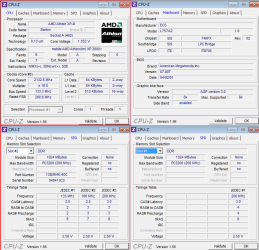
The old DDR was a lot more forgiving when running different sticks than the DDR2 and DDR3 of today. For what it's worth (kids computer),

oldcomp.png

Old ECS board with the same chipset on it with a pair of mis-matched sticks in it, and been running that way for the pasty year or so (and had 3 different sticks of 512 MB for a few years before that) and is as stable as an old comp can be. Only reason it has the two 1 GB sticks in it is an old socket 939 board I had died, so I recycled the ram from it into this one.
 

My Computer

Computer type
PC/Desktop
Computer Manufacturer/Model Number
Me
OS
Win 7 Ultimate x64
CPU
FX-8350 @ 4.6 GHz so far
Motherboard
Asus M5A97 EVO
Memory
ADATA XPG V1 Series Black 8GB DDR3 1600
Graphics Card(s)
Sapphire R9 270x Dual-X
Sound Card
Xonar DGX w/ Corsair Vengence 1300
Monitor(s) Displays
Acer S232HL Abid
Screen Resolution
1920x1080
Hard Drives
120 GB OCZ Vertex 3
500 GB Seagate 7200.12
PSU
Antec Earthwatts 650W Green
Case
Antec Three Hundred
Cooling
Cooler Master 212 EVO
Keyboard
Logitech G510
Mouse
Logitech G500s
Internet Speed
35000/3000
Back
Top