Marvell Yukon Controller cant connect

MJB281

New member
Local time
10:44 AM
Messages
7
Hi,
I just loaded Windows 7 Build 7600 and cant connect to network or internet through my on-board Marvell Yukon gigabit controller. I've updated my drivers to the latest i can find (v. 11.22.4.3) and still nothing. Occasionally it will show I'm connected, but when I launch IE it drops connection. My router is a Microsoft MN-700. Any thoughts?

Thanks in advance,
Matt
 

My Computer

OS
Windows 7 64bit
CPU
Intel Core i3 540
Motherboard
Asus P7H55-M Pro
Memory
4gb
Graphics Card(s)
Intel Graphics Media Controller HD (on-board)
Monitor(s) Displays
42" Samsung Digital LCD
Screen Resolution
1920x1080
Hard Drives
750 GB
PSU
600W Viotek
Internet Speed
Broadband
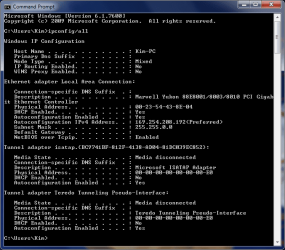
Where did you get the drivers - from Asus or somewhere else? If you open a command prompt and run ipconfig /all, what do you get? Do you get a standard IP address, or do you get something funky? Please copy and paste your ipconfig results.
 

My Computer

Computer Manufacturer/Model Number
Dell XPS 15 L502x
OS
Windows 7 Ultimate x64 SP1
CPU
Core i7-2670QM
Memory
8GB DDR3 PC3-10600
Graphics Card(s)
Intel HD Graphics 3000 + GeForce GT 540M
Screen Resolution
1920x1080
Hard Drives
1TB 5400RPM Seagate
I went to Marvell to get the drivers,but Ive also used microsoft generic divers and others and none have worked so far. When I run ipconfig I do get a crazy IP address, but in my system information window the supplied IP address from the router is displayed for the ethernet controller. How can I make the two consistant with each other? Is it a matter of setting up static IPs for windows 7?
Capture.PNG
 

My Computer

OS
Windows 7 64bit
CPU
Intel Core i3 540
Motherboard
Asus P7H55-M Pro
Memory
4gb
Graphics Card(s)
Intel Graphics Media Controller HD (on-board)
Monitor(s) Displays
42" Samsung Digital LCD
Screen Resolution
1920x1080
Hard Drives
750 GB
PSU
600W Viotek
Internet Speed
Broadband
Enable DHCP (in services)
 

My Computer

Computer type
PC/Desktop
Computer Manufacturer/Model Number
Bruce ... somewhere in his 40's
OS
Windows 7 Ultimate 32bit SP1
CPU
Intel(R) Core(TM)2 Quad CPU @ 2.40GHz, 2400 MHz
Motherboard
INTEL/D975XBX2
Memory
4 GB
Graphics Card(s)
ATI Radeon HD 2600 Pro
Monitor(s) Displays
Samsung SyncMaster 914v
Screen Resolution
1280 x 1024
Hard Drives
2/500GB each ... ST3500630AS ATA Device.
One is not connected
PSU
Rocketfish 700 W
Case
G.Skill Gigabyte Chassis
Keyboard
Standard PS/2 Keyboard
Mouse
Microsoft PS/2 Mouse
Internet Speed
DSL
Antivirus
Avira Internet Security
Browser
IE 11
Other Info
ATI HDMI Audio
So i enabled dhcp and now i get a crazy ip address and still no connection.
Would a new controller card be the easiest answer?
 

My Computer

OS
Windows 7 64bit
CPU
Intel Core i3 540
Motherboard
Asus P7H55-M Pro
Memory
4gb
Graphics Card(s)
Intel Graphics Media Controller HD (on-board)
Monitor(s) Displays
42" Samsung Digital LCD
Screen Resolution
1920x1080
Hard Drives
750 GB
PSU
600W Viotek
Internet Speed
Broadband
Checked your specs, but couldn't determine if you are running 64 bit Win 7, if so the issue is discussed here ASUSTeK Computer Inc.-Forum- Long standing memory issues...resolved ?? seems that, at least on 64bit systems the issue has existed even back to Vista 64, it seems to be a combination of your motherboard, your yukon marvell chipset and 4 gigs of ram. The solution seems to be reducing ram to something below 4gigs. Not sure if this helps since I don't even know if you're running Win7 64bit...just thought I would give it a shot
 

My Computer

Computer Manufacturer/Model Number
PartsIsParts
OS
Windows 7 Ultimate 64bit
CPU
Intel Pentium D 3Ghz
Motherboard
ASRock G31M-S
Memory
4 Gigs PC 6400
Graphics Card(s)
Nvidia GeForce 8500 GT
Sound Card
Realtek High Definition Audio Integrated
Monitor(s) Displays
AOC 19inch X2
Screen Resolution
1024 X 768 (I'm Old)
Hard Drives
Segate ST3160815AS Serial ATAII
Western Digital WD1600AAJA-75PSA0 Serial ATAII
PSU
500 watt..don't know mfg.
Case
Giant Black 4u rackmount I've had for years
Cooling
Stock CPU extra 120s in case
Keyboard
Generic Made in China
Mouse
Logitech USB Optical Scroll
Internet Speed
What ever comcast decides to give me usually 21Mbps up/5mbps
THATS IT! I am running 64 bit Windows 7 with 4gb of RAM. Now the question is - how can I get arround this? If I get another controller card and disable the onboard marvell controller will that fix this issue?

Thanks for the info.
 

My Computer

OS
Windows 7 64bit
CPU
Intel Core i3 540
Motherboard
Asus P7H55-M Pro
Memory
4gb
Graphics Card(s)
Intel Graphics Media Controller HD (on-board)
Monitor(s) Displays
42" Samsung Digital LCD
Screen Resolution
1920x1080
Hard Drives
750 GB
PSU
600W Viotek
Internet Speed
Broadband
flush the DNS cache... open a command prompt, type ipconfig /flushdns then press 'enter'.

**note the space between 'g' and '/'
 

My Computer

Computer type
PC/Desktop
Computer Manufacturer/Model Number
Bruce ... somewhere in his 40's
OS
Windows 7 Ultimate 32bit SP1
CPU
Intel(R) Core(TM)2 Quad CPU @ 2.40GHz, 2400 MHz
Motherboard
INTEL/D975XBX2
Memory
4 GB
Graphics Card(s)
ATI Radeon HD 2600 Pro
Monitor(s) Displays
Samsung SyncMaster 914v
Screen Resolution
1280 x 1024
Hard Drives
2/500GB each ... ST3500630AS ATA Device.
One is not connected
PSU
Rocketfish 700 W
Case
G.Skill Gigabyte Chassis
Keyboard
Standard PS/2 Keyboard
Mouse
Microsoft PS/2 Mouse
Internet Speed
DSL
Antivirus
Avira Internet Security
Browser
IE 11
Other Info
ATI HDMI Audio
use the search facility in the root of this forum and type in your motherboard Asus P5NSLI, take a look at the threads from other members. I know Marvell released an update that seemed to help Vista 64bit but did not seem to produce the same results for Win7 64bit...not sure why
 

My Computer

Computer Manufacturer/Model Number
PartsIsParts
OS
Windows 7 Ultimate 64bit
CPU
Intel Pentium D 3Ghz
Motherboard
ASRock G31M-S
Memory
4 Gigs PC 6400
Graphics Card(s)
Nvidia GeForce 8500 GT
Sound Card
Realtek High Definition Audio Integrated
Monitor(s) Displays
AOC 19inch X2
Screen Resolution
1024 X 768 (I'm Old)
Hard Drives
Segate ST3160815AS Serial ATAII
Western Digital WD1600AAJA-75PSA0 Serial ATAII
PSU
500 watt..don't know mfg.
Case
Giant Black 4u rackmount I've had for years
Cooling
Stock CPU extra 120s in case
Keyboard
Generic Made in China
Mouse
Logitech USB Optical Scroll
Internet Speed
What ever comcast decides to give me usually 21Mbps up/5mbps
I am going to try getting a 7 compatable pci adapter and disable the onboard marvell adapter. Let you know what happens.
 

My Computer

OS
Windows 7 64bit
CPU
Intel Core i3 540
Motherboard
Asus P7H55-M Pro
Memory
4gb
Graphics Card(s)
Intel Graphics Media Controller HD (on-board)
Monitor(s) Displays
42" Samsung Digital LCD
Screen Resolution
1920x1080
Hard Drives
750 GB
PSU
600W Viotek
Internet Speed
Broadband
Thanks and be sure to let us know. I saw in one of the threads that someone had tried that without success but they may have not tried to disable the onboard lan. I'd really like to know if you get it fixed.
 

My Computer

Computer Manufacturer/Model Number
PartsIsParts
OS
Windows 7 Ultimate 64bit
CPU
Intel Pentium D 3Ghz
Motherboard
ASRock G31M-S
Memory
4 Gigs PC 6400
Graphics Card(s)
Nvidia GeForce 8500 GT
Sound Card
Realtek High Definition Audio Integrated
Monitor(s) Displays
AOC 19inch X2
Screen Resolution
1024 X 768 (I'm Old)
Hard Drives
Segate ST3160815AS Serial ATAII
Western Digital WD1600AAJA-75PSA0 Serial ATAII
PSU
500 watt..don't know mfg.
Case
Giant Black 4u rackmount I've had for years
Cooling
Stock CPU extra 120s in case
Keyboard
Generic Made in China
Mouse
Logitech USB Optical Scroll
Internet Speed
What ever comcast decides to give me usually 21Mbps up/5mbps
Marvell Yukon Controller cant connect (resolved)

Installed a D-Link PCI Network adapter and de-activated the onboard Marvell adapter in BIOS and everything now works with 4gb of RAM on an ASUS P5NSLI Board. If you don't deactivate the onboard LAN it will NOT work (I tried it just to see if it would)

Thanks again for all your input on this issue!
 

My Computer

OS
Windows 7 64bit
CPU
Intel Core i3 540
Motherboard
Asus P7H55-M Pro
Memory
4gb
Graphics Card(s)
Intel Graphics Media Controller HD (on-board)
Monitor(s) Displays
42" Samsung Digital LCD
Screen Resolution
1920x1080
Hard Drives
750 GB
PSU
600W Viotek
Internet Speed
Broadband
Thanks much for letting us know, glad you were successful. Hang around and enjoy this forum and share your experience.
 

My Computer

Computer Manufacturer/Model Number
PartsIsParts
OS
Windows 7 Ultimate 64bit
CPU
Intel Pentium D 3Ghz
Motherboard
ASRock G31M-S
Memory
4 Gigs PC 6400
Graphics Card(s)
Nvidia GeForce 8500 GT
Sound Card
Realtek High Definition Audio Integrated
Monitor(s) Displays
AOC 19inch X2
Screen Resolution
1024 X 768 (I'm Old)
Hard Drives
Segate ST3160815AS Serial ATAII
Western Digital WD1600AAJA-75PSA0 Serial ATAII
PSU
500 watt..don't know mfg.
Case
Giant Black 4u rackmount I've had for years
Cooling
Stock CPU extra 120s in case
Keyboard
Generic Made in China
Mouse
Logitech USB Optical Scroll
Internet Speed
What ever comcast decides to give me usually 21Mbps up/5mbps
Checked your specs, but couldn't determine if you are running 64 bit Win 7, if so the issue is discussed here ASUSTeK Computer Inc.-Forum- Long standing memory issues...resolved ?? seems that, at least on 64bit systems the issue has existed even back to Vista 64, it seems to be a combination of your motherboard, your yukon marvell chipset and 4 gigs of ram. The solution seems to be reducing ram to something below 4gigs. Not sure if this helps since I don't even know if you're running Win7 64bit...just thought I would give it a shot

You're RIGHT!
I've registered just to say tks!
 

My Computer

OS
Windows 7, Centos 32bit and Mac Os Leopard!
Of course you a very welcome. Glad to have been some small help. Thanks for posting and stick around, share your experiences and help others. Hope to see you around the forum.
 

My Computer

Computer Manufacturer/Model Number
PartsIsParts
OS
Windows 7 Ultimate 64bit
CPU
Intel Pentium D 3Ghz
Motherboard
ASRock G31M-S
Memory
4 Gigs PC 6400
Graphics Card(s)
Nvidia GeForce 8500 GT
Sound Card
Realtek High Definition Audio Integrated
Monitor(s) Displays
AOC 19inch X2
Screen Resolution
1024 X 768 (I'm Old)
Hard Drives
Segate ST3160815AS Serial ATAII
Western Digital WD1600AAJA-75PSA0 Serial ATAII
PSU
500 watt..don't know mfg.
Case
Giant Black 4u rackmount I've had for years
Cooling
Stock CPU extra 120s in case
Keyboard
Generic Made in China
Mouse
Logitech USB Optical Scroll
Internet Speed
What ever comcast decides to give me usually 21Mbps up/5mbps
Back
Top