Microsoft Security Essentials and Malwarebytes Premium
Browser
Pale Moon
Other Info
All fans PWM; speeds at idle: CPU circa 500 rpm; intake circa 600 rpm; exhaust circa 600 rpm; CPU temps 27 idle and 47 C load in a warm room (27 C/81 F) when running Intel Extreme Tuning Utility stress test.
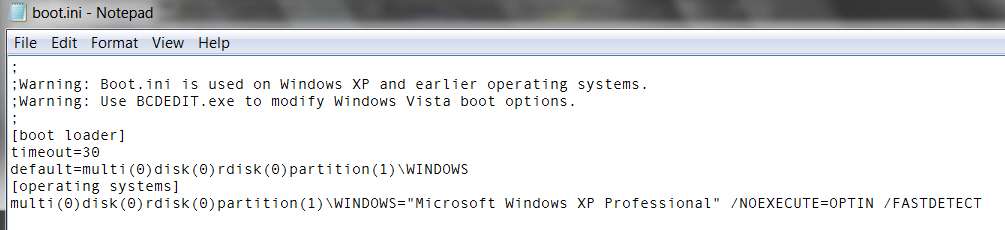
The countdown value is contained in BOOT.INI on your "active" partition. But it's a "hidden" file (attribute H) and not normally shown in Windows Explorer.
You have to change your Tools -> Folder Options -> View tab, to check the "show hidden files, folders, and drives" in order to see it.
However it is also a "system" file (attribute S) and not normally eligible for editing. So you have to use some program capable of altering attributes to temporarily turn off that H attribute. You could even turn off both S and H at the same time, if you didn't want to change the "show hidden files" folder View option.
Anyway, if you eventually get it open with Notepad you can edit it, and save it. Then you can restore the S and H attributes, and you're in business.
Just don't screw up the editing. Probably a good idea to create a restore point before you do this, just in case.
Didn't know about that!! I've been using EasyBCD forever.
It can also be done with EasyBCD (if you have that installed to manage the boot manager menu). Just push the "edit boot menu" button to get the following, and change that "boot default OS after..." time value:
I don't advise going below 3 seconds as you will need that time to make a change in the boot order if you have been having problems with the default OS.
My Computer
Computer type
PC/Desktop
Computer Manufacturer/Model Number
Self Built Custom Computer.
OS
Windows 10 Pro x64
CPU
i7-4770K
Motherboard
Asus Z87 Sabertooth
Memory
16Gig DDR3-2400
Graphics Card(s)
Gigabyte GT740
Sound Card
Onboard
Monitor(s) Displays
Benq 27" - Dell 23' - Benq 22"
Screen Resolution
1680x1050
Hard Drives
Samsung 840 Pro 128g SSD
1xWestern Digital Caviar Green 1tb
2xWestern Digital Caviar Green 2 tb
PSU
Seasonic 760 watt Platinum
Case
Coolermaster Haf - X
Cooling
Noctua NH-C12P CPU Cooler
Keyboard
Logitech illuminated keyboard
Mouse
Logitech Perfomance MX
Internet Speed
Cable = speeds to 20Mbps downsteam and 512kbps upsteam