MAX CPU usage while internet browsing

ssandoval83

New member
Local time
1:31 PM
Messages
16
Hi People im new to sevenforums.
My computer for some reason while im browsing the internet uses MAXIMUM CPU.
I know i have more than enough CPU power and ram. Im using a Cricket broadband USB modem it's the A600 one and it only happens with that type of internet connection
I tried a Ethernet port and it didnt do the max cpu thing .

oh by the way it happens with all the browsers on my computer both Safari and IE9

Heres my Computer specs:
CPU-3.1GHz AMD Athlon X2 64 6000+ Series
ECS Nettle 2 MOBO
4GB of DDR2 6400 Ram Unknown Brand (got it off a friend) (not The problem)
OS- Windows 7 Home Premium 32Bit SP1
GFX Card- Nvidia GeForce 6150 SE (MOBO GFX)


(PS: It Goes Away when i minimize the browser window and comes back a few minutes after i maximize it:confused:)
 

My Computer

Computer Manufacturer/Model Number
HP m8200N
OS
Windows 7 Home Premium 32Bit, Windows 7 pro VM, ubuntu9.10 VM, Win XP Pro VM, Win Vista Buiss VM
CPU
AMD Athlon X2 64 6000+
Motherboard
ECS Nettle 2
Memory
4GB
Graphics Card(s)
Nvidia GeForce 6150 SE (Motherboard)
Sound Card
Realtek HD Audio (Motherboard)
Monitor(s) Displays
HP w1907
Screen Resolution
1440x900
Hard Drives
1x 500GB HDD 7200RPM (I Really Dont Know the brand)
PSU
Original HP 350 Watt PSu
Case
HP m8200n Case
Cooling
Original HP Factory Implimented Cooling
Keyboard
HP
Mouse
HP
Internet Speed
SLOW Cricket USB Modem
Other Info
I also have Android 2.1.2 on VM
Hello ssandoval, my name's Dusty, I'll see what I can do.

Can you post a picture of your task manager (Processes tab) and order it (CPU) so that it lists the highest resource hogs at the top, descending. And right before you get a picture (Perhaps using snipping tool), do what you do to cause it to use 100% of the CPU.

Hopefully you are able to do this (assuming computer doesn't lock up)
 

My Computer

Computer type
PC/Desktop
Computer Manufacturer/Model Number
Custom Asus Build
OS
Microsoft Windows 8.1 Pro 64-bit
CPU
Intel(R) Core(TM) i3-4130 CPU @ 3.40GHz
Motherboard
B85M-E
Memory
8.00 GB
Graphics Card(s)
None
Sound Card
Realtek High Definition Audio
Monitor(s) Displays
Asus 23.6" Monitor
Screen Resolution
1920 x 1080 x 32 bits (4294967296 colors) @ 60 Hz
Hard Drives
INTEL SSDSC2BW180A4
Samsung SSD 840 PRO Series
PSU
Seasonic S12II-380Bronze
Case
Lian Li
Cooling
Fan, Passive
Keyboard
Logitech K120
Mouse
Microsoft Touch Mouse
Internet Speed
4ms Ping, 19.0 Mbps Download, 19.0 Mbps Upload
Antivirus
Eset Endpoint
Browser
Internet Explorer, Chrome
Hi Dusty

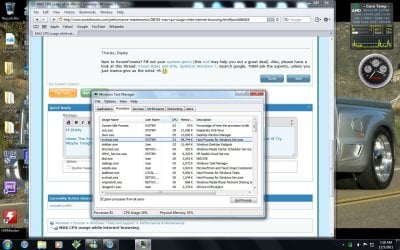
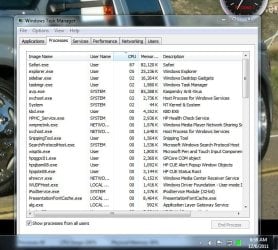
Heres The Screenshot Of Task Manager For Some Reason I Couldnt Get the Problem To Happen Right Now But Ill Try Maybe Tonight

Oh And I also Noticed That Its almost always one of the svchost.exe Processes
And the computer Almost Never Locks up it just runs at 100% and whenever i right click everything in the menu just seems to flicker
 

Attachments

  • Capture.JPG
    Capture.JPG
    205.7 KB · Views: 93

My Computer

Computer Manufacturer/Model Number
HP m8200N
OS
Windows 7 Home Premium 32Bit, Windows 7 pro VM, ubuntu9.10 VM, Win XP Pro VM, Win Vista Buiss VM
CPU
AMD Athlon X2 64 6000+
Motherboard
ECS Nettle 2
Memory
4GB
Graphics Card(s)
Nvidia GeForce 6150 SE (Motherboard)
Sound Card
Realtek HD Audio (Motherboard)
Monitor(s) Displays
HP w1907
Screen Resolution
1440x900
Hard Drives
1x 500GB HDD 7200RPM (I Really Dont Know the brand)
PSU
Original HP 350 Watt PSu
Case
HP m8200n Case
Cooling
Original HP Factory Implimented Cooling
Keyboard
HP
Mouse
HP
Internet Speed
SLOW Cricket USB Modem
Other Info
I also have Android 2.1.2 on VM

My Computer

Computer type
PC/Desktop
Computer Manufacturer/Model Number
Custom Asus Build
OS
Microsoft Windows 8.1 Pro 64-bit
CPU
Intel(R) Core(TM) i3-4130 CPU @ 3.40GHz
Motherboard
B85M-E
Memory
8.00 GB
Graphics Card(s)
None
Sound Card
Realtek High Definition Audio
Monitor(s) Displays
Asus 23.6" Monitor
Screen Resolution
1920 x 1080 x 32 bits (4294967296 colors) @ 60 Hz
Hard Drives
INTEL SSDSC2BW180A4
Samsung SSD 840 PRO Series
PSU
Seasonic S12II-380Bronze
Case
Lian Li
Cooling
Fan, Passive
Keyboard
Logitech K120
Mouse
Microsoft Touch Mouse
Internet Speed
4ms Ping, 19.0 Mbps Download, 19.0 Mbps Upload
Antivirus
Eset Endpoint
Browser
Internet Explorer, Chrome
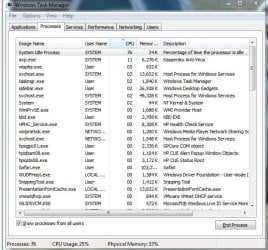
Heres A Closer Look at the task manager

i have the power set to high performance mode

oh and its a desktop with a 3+ GHZ processor And 4GB of RAM
 

Attachments

  • Capture2.JPG
    Capture2.JPG
    80.9 KB · Views: 49

My Computer

Computer Manufacturer/Model Number
HP m8200N
OS
Windows 7 Home Premium 32Bit, Windows 7 pro VM, ubuntu9.10 VM, Win XP Pro VM, Win Vista Buiss VM
CPU
AMD Athlon X2 64 6000+
Motherboard
ECS Nettle 2
Memory
4GB
Graphics Card(s)
Nvidia GeForce 6150 SE (Motherboard)
Sound Card
Realtek HD Audio (Motherboard)
Monitor(s) Displays
HP w1907
Screen Resolution
1440x900
Hard Drives
1x 500GB HDD 7200RPM (I Really Dont Know the brand)
PSU
Original HP 350 Watt PSu
Case
HP m8200n Case
Cooling
Original HP Factory Implimented Cooling
Keyboard
HP
Mouse
HP
Internet Speed
SLOW Cricket USB Modem
Other Info
I also have Android 2.1.2 on VM
I can't see anything bad here.. It's all good. Your antivirius protection use 11% from CPU at the moment. Other is good.
Also as I can see, CPU Usage is 25%.
 

My Computer

Computer type
PC/Desktop
Computer Manufacturer/Model Number
Custom Build
OS
Windows 10 Pro x64
CPU
Intel Core i5 4440 @Stock
Motherboard
Gigabyte Z97 D3H
Memory
4 x 4GB HyperX Fury DDR3
Graphics Card(s)
Gigabyte GTX 1050Ti O4G
Sound Card
Integrated
Monitor(s) Displays
Dell P2417H
Screen Resolution
1920 x 1080
Hard Drives
Samsung EVO 850 120GB / Toshiba DT01ACA050 1TB 7200prm 32MB
PSU
Riotoro Onyx 750W
Case
NZXT H500 Black-Red
Cooling
Stock CPU + NZXT 120mm + 2x120mm red fans
Keyboard
Modecom Volcano Lanparty
Mouse
Asus ROG Gladius / DeepCool E-Pad Plus
Internet Speed
DOCSIS 50/3 Mbit
Browser
Google Chrome
Other Info
Asus K55VJ(i5 3210M, GT635M / 2GB, 8GB DDR3, 500GB HDD)
You are using Kaspersky Internet Security Suite? That looks like it is taking a heafty 11%, were you running it just then? If you weren't, I myself would consider another AV, but up to you. Make sure you use the Kaspersky uninstaller to remove as it can leave nasty things behind if not removed correctly, if you wanted to do that. I recommend MSE if you do.

This next one is using 5%: If you don't have a Tablet PC and don't want an unnecessary process eating up resources, you can uninstall Windows Journal from the add/remove programs in the control panel. Alternatively, you could go to Regional Settings > Language > Details and remove Advanced Text Services.
space.gif
- Neuber

Your sidebar is using 2%, but it is up to you if you disable it or not.

And also, Stalker is right seeing your CPU at 25%.
do what you do to cause it to use 100% of the CPU.
I need to see it when it is using a lot of CPU, like 50% or greater

Do you generally have other programs running when it happens?
 

My Computer

Computer type
PC/Desktop
Computer Manufacturer/Model Number
Custom Asus Build
OS
Microsoft Windows 8.1 Pro 64-bit
CPU
Intel(R) Core(TM) i3-4130 CPU @ 3.40GHz
Motherboard
B85M-E
Memory
8.00 GB
Graphics Card(s)
None
Sound Card
Realtek High Definition Audio
Monitor(s) Displays
Asus 23.6" Monitor
Screen Resolution
1920 x 1080 x 32 bits (4294967296 colors) @ 60 Hz
Hard Drives
INTEL SSDSC2BW180A4
Samsung SSD 840 PRO Series
PSU
Seasonic S12II-380Bronze
Case
Lian Li
Cooling
Fan, Passive
Keyboard
Logitech K120
Mouse
Microsoft Touch Mouse
Internet Speed
4ms Ping, 19.0 Mbps Download, 19.0 Mbps Upload
Antivirus
Eset Endpoint
Browser
Internet Explorer, Chrome
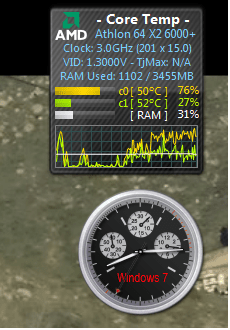
Yea I Know I Have Kaspersky and It does Take A Hefty Amount Of CPU But its not internet Security Its The Basic AV and i prefer it because it is way better then what i had it detected viruses that the old av left behind oh and i have a screen shot of the CPU Temp Gadget I Have Running When Its About To Have A Total MAX out but i didnt have Enough time to bring up task manager and take a screen shot of that before it stopped


(its weird... if i Minimize the window or make it smaller it stops for a few minutes and then comes back)
 

Attachments

  • Untitled.png
    Untitled.png
    38.3 KB · Views: 6

My Computer

Computer Manufacturer/Model Number
HP m8200N
OS
Windows 7 Home Premium 32Bit, Windows 7 pro VM, ubuntu9.10 VM, Win XP Pro VM, Win Vista Buiss VM
CPU
AMD Athlon X2 64 6000+
Motherboard
ECS Nettle 2
Memory
4GB
Graphics Card(s)
Nvidia GeForce 6150 SE (Motherboard)
Sound Card
Realtek HD Audio (Motherboard)
Monitor(s) Displays
HP w1907
Screen Resolution
1440x900
Hard Drives
1x 500GB HDD 7200RPM (I Really Dont Know the brand)
PSU
Original HP 350 Watt PSu
Case
HP m8200n Case
Cooling
Original HP Factory Implimented Cooling
Keyboard
HP
Mouse
HP
Internet Speed
SLOW Cricket USB Modem
Other Info
I also have Android 2.1.2 on VM
do what you do to cause it to use 100% of the CPU.

all i have to do is go on to the internet on any web browser (happens more on safari but still happens on IE9)(never happened on IE8)
 

My Computer

Computer Manufacturer/Model Number
HP m8200N
OS
Windows 7 Home Premium 32Bit, Windows 7 pro VM, ubuntu9.10 VM, Win XP Pro VM, Win Vista Buiss VM
CPU
AMD Athlon X2 64 6000+
Motherboard
ECS Nettle 2
Memory
4GB
Graphics Card(s)
Nvidia GeForce 6150 SE (Motherboard)
Sound Card
Realtek HD Audio (Motherboard)
Monitor(s) Displays
HP w1907
Screen Resolution
1440x900
Hard Drives
1x 500GB HDD 7200RPM (I Really Dont Know the brand)
PSU
Original HP 350 Watt PSu
Case
HP m8200n Case
Cooling
Original HP Factory Implimented Cooling
Keyboard
HP
Mouse
HP
Internet Speed
SLOW Cricket USB Modem
Other Info
I also have Android 2.1.2 on VM
Have you tryed running browser in Safe Mode ?
 

My Computer

Computer type
PC/Desktop
Computer Manufacturer/Model Number
Custom Build
OS
Windows 10 Pro x64
CPU
Intel Core i5 4440 @Stock
Motherboard
Gigabyte Z97 D3H
Memory
4 x 4GB HyperX Fury DDR3
Graphics Card(s)
Gigabyte GTX 1050Ti O4G
Sound Card
Integrated
Monitor(s) Displays
Dell P2417H
Screen Resolution
1920 x 1080
Hard Drives
Samsung EVO 850 120GB / Toshiba DT01ACA050 1TB 7200prm 32MB
PSU
Riotoro Onyx 750W
Case
NZXT H500 Black-Red
Cooling
Stock CPU + NZXT 120mm + 2x120mm red fans
Keyboard
Modecom Volcano Lanparty
Mouse
Asus ROG Gladius / DeepCool E-Pad Plus
Internet Speed
DOCSIS 50/3 Mbit
Browser
Google Chrome
Other Info
Asus K55VJ(i5 3210M, GT635M / 2GB, 8GB DDR3, 500GB HDD)
no i dont have any toolbars or anything on my main browser (safari)
 

My Computer

Computer Manufacturer/Model Number
HP m8200N
OS
Windows 7 Home Premium 32Bit, Windows 7 pro VM, ubuntu9.10 VM, Win XP Pro VM, Win Vista Buiss VM
CPU
AMD Athlon X2 64 6000+
Motherboard
ECS Nettle 2
Memory
4GB
Graphics Card(s)
Nvidia GeForce 6150 SE (Motherboard)
Sound Card
Realtek HD Audio (Motherboard)
Monitor(s) Displays
HP w1907
Screen Resolution
1440x900
Hard Drives
1x 500GB HDD 7200RPM (I Really Dont Know the brand)
PSU
Original HP 350 Watt PSu
Case
HP m8200n Case
Cooling
Original HP Factory Implimented Cooling
Keyboard
HP
Mouse
HP
Internet Speed
SLOW Cricket USB Modem
Other Info
I also have Android 2.1.2 on VM
Im Trying to make it happen Right Now
 

My Computer

Computer Manufacturer/Model Number
HP m8200N
OS
Windows 7 Home Premium 32Bit, Windows 7 pro VM, ubuntu9.10 VM, Win XP Pro VM, Win Vista Buiss VM
CPU
AMD Athlon X2 64 6000+
Motherboard
ECS Nettle 2
Memory
4GB
Graphics Card(s)
Nvidia GeForce 6150 SE (Motherboard)
Sound Card
Realtek HD Audio (Motherboard)
Monitor(s) Displays
HP w1907
Screen Resolution
1440x900
Hard Drives
1x 500GB HDD 7200RPM (I Really Dont Know the brand)
PSU
Original HP 350 Watt PSu
Case
HP m8200n Case
Cooling
Original HP Factory Implimented Cooling
Keyboard
HP
Mouse
HP
Internet Speed
SLOW Cricket USB Modem
Other Info
I also have Android 2.1.2 on VM
I Havent Put Any Addons On Safari And On IE Ive only Put Google Toolbar
 

My Computer

Computer Manufacturer/Model Number
HP m8200N
OS
Windows 7 Home Premium 32Bit, Windows 7 pro VM, ubuntu9.10 VM, Win XP Pro VM, Win Vista Buiss VM
CPU
AMD Athlon X2 64 6000+
Motherboard
ECS Nettle 2
Memory
4GB
Graphics Card(s)
Nvidia GeForce 6150 SE (Motherboard)
Sound Card
Realtek HD Audio (Motherboard)
Monitor(s) Displays
HP w1907
Screen Resolution
1440x900
Hard Drives
1x 500GB HDD 7200RPM (I Really Dont Know the brand)
PSU
Original HP 350 Watt PSu
Case
HP m8200n Case
Cooling
Original HP Factory Implimented Cooling
Keyboard
HP
Mouse
HP
Internet Speed
SLOW Cricket USB Modem
Other Info
I also have Android 2.1.2 on VM
ssand,

You can make google your search provider in IE (and be able to type in the web address bar in order to to search google by writing out what you want to search, without adding .com or like). That way you don't have to install any toolbar; besides, that one isn't very recommended. It just adds time to how long it takes your browser to function. I'm not sure, but I heard it logs information about you. Just what I wouldn't know. Search for it for more if you are curious.

Safari also isn't recommended as it is more at risk than other web browsers

All in all the choice is yours what you keep.

So you aren't able to capture a snip of your task manager when the CPU gets to over 50% usage? How about over 25%? Can you tell us what processes are taking up all the resources?
 
Last edited:

My Computer

Computer type
PC/Desktop
Computer Manufacturer/Model Number
Custom Asus Build
OS
Microsoft Windows 8.1 Pro 64-bit
CPU
Intel(R) Core(TM) i3-4130 CPU @ 3.40GHz
Motherboard
B85M-E
Memory
8.00 GB
Graphics Card(s)
None
Sound Card
Realtek High Definition Audio
Monitor(s) Displays
Asus 23.6" Monitor
Screen Resolution
1920 x 1080 x 32 bits (4294967296 colors) @ 60 Hz
Hard Drives
INTEL SSDSC2BW180A4
Samsung SSD 840 PRO Series
PSU
Seasonic S12II-380Bronze
Case
Lian Li
Cooling
Fan, Passive
Keyboard
Logitech K120
Mouse
Microsoft Touch Mouse
Internet Speed
4ms Ping, 19.0 Mbps Download, 19.0 Mbps Upload
Antivirus
Eset Endpoint
Browser
Internet Explorer, Chrome
i am capable its just hard because ill have to sit here for hours until it gets crazy

Oh and most of the time the process is one of the svchost.exe processes
 

My Computer

Computer Manufacturer/Model Number
HP m8200N
OS
Windows 7 Home Premium 32Bit, Windows 7 pro VM, ubuntu9.10 VM, Win XP Pro VM, Win Vista Buiss VM
CPU
AMD Athlon X2 64 6000+
Motherboard
ECS Nettle 2
Memory
4GB
Graphics Card(s)
Nvidia GeForce 6150 SE (Motherboard)
Sound Card
Realtek HD Audio (Motherboard)
Monitor(s) Displays
HP w1907
Screen Resolution
1440x900
Hard Drives
1x 500GB HDD 7200RPM (I Really Dont Know the brand)
PSU
Original HP 350 Watt PSu
Case
HP m8200n Case
Cooling
Original HP Factory Implimented Cooling
Keyboard
HP
Mouse
HP
Internet Speed
SLOW Cricket USB Modem
Other Info
I also have Android 2.1.2 on VM
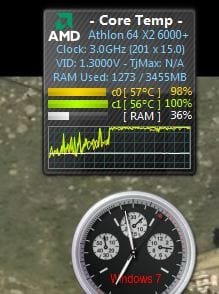
Finally I Got it While It Went Crazy Heres Some Screen Shots
 

Attachments

  • Capture3.JPG
    Capture3.JPG
    22.5 KB · Views: 193
  • Capture4.JPG
    Capture4.JPG
    95.7 KB · Views: 24

My Computer

Computer Manufacturer/Model Number
HP m8200N
OS
Windows 7 Home Premium 32Bit, Windows 7 pro VM, ubuntu9.10 VM, Win XP Pro VM, Win Vista Buiss VM
CPU
AMD Athlon X2 64 6000+
Motherboard
ECS Nettle 2
Memory
4GB
Graphics Card(s)
Nvidia GeForce 6150 SE (Motherboard)
Sound Card
Realtek HD Audio (Motherboard)
Monitor(s) Displays
HP w1907
Screen Resolution
1440x900
Hard Drives
1x 500GB HDD 7200RPM (I Really Dont Know the brand)
PSU
Original HP 350 Watt PSu
Case
HP m8200n Case
Cooling
Original HP Factory Implimented Cooling
Keyboard
HP
Mouse
HP
Internet Speed
SLOW Cricket USB Modem
Other Info
I also have Android 2.1.2 on VM
I Think Its Safari

Oh Well Time to Go To FireFox
 

My Computer

Computer Manufacturer/Model Number
HP m8200N
OS
Windows 7 Home Premium 32Bit, Windows 7 pro VM, ubuntu9.10 VM, Win XP Pro VM, Win Vista Buiss VM
CPU
AMD Athlon X2 64 6000+
Motherboard
ECS Nettle 2
Memory
4GB
Graphics Card(s)
Nvidia GeForce 6150 SE (Motherboard)
Sound Card
Realtek HD Audio (Motherboard)
Monitor(s) Displays
HP w1907
Screen Resolution
1440x900
Hard Drives
1x 500GB HDD 7200RPM (I Really Dont Know the brand)
PSU
Original HP 350 Watt PSu
Case
HP m8200n Case
Cooling
Original HP Factory Implimented Cooling
Keyboard
HP
Mouse
HP
Internet Speed
SLOW Cricket USB Modem
Other Info
I also have Android 2.1.2 on VM
Well, just try firefox. Not always is it the browser's fault when something bad happens, but let me know if firefox does this or not.
 

My Computer

Computer type
PC/Desktop
Computer Manufacturer/Model Number
Custom Asus Build
OS
Microsoft Windows 8.1 Pro 64-bit
CPU
Intel(R) Core(TM) i3-4130 CPU @ 3.40GHz
Motherboard
B85M-E
Memory
8.00 GB
Graphics Card(s)
None
Sound Card
Realtek High Definition Audio
Monitor(s) Displays
Asus 23.6" Monitor
Screen Resolution
1920 x 1080 x 32 bits (4294967296 colors) @ 60 Hz
Hard Drives
INTEL SSDSC2BW180A4
Samsung SSD 840 PRO Series
PSU
Seasonic S12II-380Bronze
Case
Lian Li
Cooling
Fan, Passive
Keyboard
Logitech K120
Mouse
Microsoft Touch Mouse
Internet Speed
4ms Ping, 19.0 Mbps Download, 19.0 Mbps Upload
Antivirus
Eset Endpoint
Browser
Internet Explorer, Chrome
As member above said, and you also see the problem is in Safari. I suggest to try Mozilla Firefox.
If you need Safari, you can try clearing the cache/cookies or to reinstall it.
 

My Computer

Computer type
PC/Desktop
Computer Manufacturer/Model Number
Custom Build
OS
Windows 10 Pro x64
CPU
Intel Core i5 4440 @Stock
Motherboard
Gigabyte Z97 D3H
Memory
4 x 4GB HyperX Fury DDR3
Graphics Card(s)
Gigabyte GTX 1050Ti O4G
Sound Card
Integrated
Monitor(s) Displays
Dell P2417H
Screen Resolution
1920 x 1080
Hard Drives
Samsung EVO 850 120GB / Toshiba DT01ACA050 1TB 7200prm 32MB
PSU
Riotoro Onyx 750W
Case
NZXT H500 Black-Red
Cooling
Stock CPU + NZXT 120mm + 2x120mm red fans
Keyboard
Modecom Volcano Lanparty
Mouse
Asus ROG Gladius / DeepCool E-Pad Plus
Internet Speed
DOCSIS 50/3 Mbit
Browser
Google Chrome
Other Info
Asus K55VJ(i5 3210M, GT635M / 2GB, 8GB DDR3, 500GB HDD)
Back
Top