Max usable memory???

jebuchanan

New member
Power User
Local time
12:18 PM
Messages
211
Location
Dartmouth, N.S., Canada
I just upgraded my memory to Corsair 16GB (4x4GB) Vengeance DDR3-1600 Dual Channel.
My mobo supports 16GB, but it is saying only 8GB is available for use.
Does anyone know how to resolve this so I have all my memory available to use?
Thank you in advance.
 

My Computer

Computer Manufacturer/Model Number
Personal build
OS
Windows 7 Ultimate x64 (Retail)
CPU
Intel I7-860
Motherboard
Asus Maximus III Formula
Memory
G.Skill RipJaw DDR3-1333 16GB (4x4GB)
Graphics Card(s)
Nvidia GTS-250 1GB
Sound Card
SupremeFX X-Fi 7.1 HD sound system.
Monitor(s) Displays
VisionQuest VQL-22WSHD LCD Monitor
Screen Resolution
1680x1050
Hard Drives
1x Seagate ST3500418AS 500G SATA2 HDD
1x Western Digital Caviar SE16 500G SATA2 HDD
1x Western Digital Caviar SE16 750G SATA2 HDD
2x Western Digital Caviar Green 2TB SATA2 HDD, configured RAID1
PSU
OCZ EliteXtream OCZ1000EXS 1000W ATX12V 20/24 Pin Active PFC
Case
Antec 1200
Cooling
Swifteck H2O-220 Ultima XT Liquid Cooling w/ 320 Radiator
Keyboard
Logitech G11 Keyboard
Mouse
Logitech MX518 Optical Mouse
Internet Speed
Cable Modem
Other Info
Visiontek TV Wonder 650 Theater PCI-E TV Tuner Card
Logitech 9000 Pro Web Camera
Logitech Cordless RumblePad 2 game controller
LG 18x SuperMulti SATA2 DVD Writer
NmediaPC CR98 Multi Card reader
Nmedia Pro-LCD
Corsair Dominator Memory Fan
Coolermaster R4-L2R-20ac 120mm Case Fan x2
hi there :)

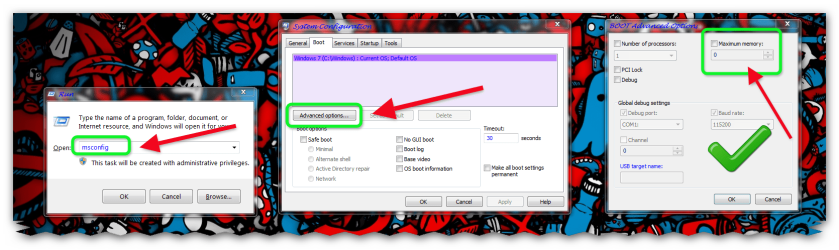
first please check how much ram is allocated

1 > windows key+R

2 > msconfig

3 > click ok

4 > click boot

5 > click advanced

6 > un-check maximum memory if ticked
 

Attachments

  • Brys snap ?30 ?April ?2011 08h00m24s 01.png
    Brys snap ?30 ?April ?2011 08h00m24s 01.png
    171.4 KB · Views: 201

My Computer

Computer Manufacturer/Model Number
packard bell IXTREME M5722
OS
Operating System : Windows 7 Home Premium Edition 6.01.7600 SP1 (x64)
CPU
Processor : Intel Core 2 Quad Q8300 @ 2500 MHz
Motherboard
Mainboard : Packard Bell (Acer EG43M )
Memory
Physical Memory :8GB Corsair4x 2GB 800MHz C5 DDR2
Graphics Card(s)
Video Card : XFX 6700 AMD
Monitor(s) Displays
Maestro 234DL - BenQ V2220 - BenQ VW2420H
Screen Resolution
Current Display :1920x1080p pixels at 60 Hz in HD LED
Hard Drives
Hard Disks : WDC (1000 GB)
Drive C: (Hard Disk) : 428 GB available on 491 GB
Drive D: (Hard Disk) : 426 GB available on 492 GB
SAMSUNG spinpoint HD103SJ 1000.2 GB
(X 2) KINGSTON SSD NOW V 30GB
PSU
XFX ProSeries 550W PSU
Case
PACKARD BELL IXTREME
Cooling
System Blower Current: 150mA Air Flow16CFM ;Akasa 90mm rear
Keyboard
Gigabyte Aivia K8100
Mouse
TRUST-Wireless Laser Mouse - Carbon edition MI-7770C
Internet Speed
TP-LINK > TL-WN951N / AV500 Gigabit Powerline Adapters
Browser
chrome dev
Other Info
EXTRA COOLING>(FAN CONTROLLER) PC Bay Cooler 3 x 40mm fans; Akasa AK-HD-BL Blue hard drive cooler 2 x 40 mm fan 4500 rpm 29.7 dBA
Bios> American Megatrends Inc.
Version : P01-A1
Date : 08/31/2009
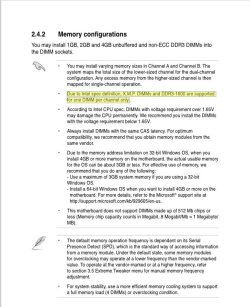
I think I found the answer, from you MB users manual:

Mem.jpg

Looks like DDR3-1600 are supported for one DIMM per channel only.

A Guy
 

My Computer

Computer type
PC/Desktop
OS
Windows 10 Home x64
CPU
INTEL Core i5-750 Quad-Core 3.37GHz
Motherboard
ASUS P7P55D
Memory
HyperX Fury Black Series 8GB (2 x 4GB) 1866Mhz
Graphics Card(s)
EVGA GeForce GTX 750 Superclocked 1GB 128-Bit GDDR5
Monitor(s) Displays
LG 32MA68HY 32" IPS
Screen Resolution
1920 x 1080
Hard Drives
Samsung 840 Evo 120GB, SEAGATE 500GB Barracuda® 7200.12, SATA 3 Gb/s, 7200 RPM, 16MB cache
PSU
ANTEC TruePower New TP-550, 80 PLUS, 550W
Case
ANTEC Three Hundred Illusion
Cooling
COOLER MASTER Hyper 212 Plus, 4 x 120mm 1 x 140mm Noctua's
Internet Speed
85 + Mbps
Antivirus
Avast
Browser
Vivaldi
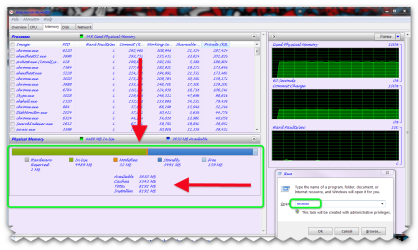
second check open resource monitor to see details of memory

1 > windows key+R

2 > type resmon
 

Attachments

  • Brys snap ?30 ?April ?2011 08h06m17s 02.png
    Brys snap ?30 ?April ?2011 08h06m17s 02.png
    72.9 KB · Views: 185

My Computer

Computer Manufacturer/Model Number
packard bell IXTREME M5722
OS
Operating System : Windows 7 Home Premium Edition 6.01.7600 SP1 (x64)
CPU
Processor : Intel Core 2 Quad Q8300 @ 2500 MHz
Motherboard
Mainboard : Packard Bell (Acer EG43M )
Memory
Physical Memory :8GB Corsair4x 2GB 800MHz C5 DDR2
Graphics Card(s)
Video Card : XFX 6700 AMD
Monitor(s) Displays
Maestro 234DL - BenQ V2220 - BenQ VW2420H
Screen Resolution
Current Display :1920x1080p pixels at 60 Hz in HD LED
Hard Drives
Hard Disks : WDC (1000 GB)
Drive C: (Hard Disk) : 428 GB available on 491 GB
Drive D: (Hard Disk) : 426 GB available on 492 GB
SAMSUNG spinpoint HD103SJ 1000.2 GB
(X 2) KINGSTON SSD NOW V 30GB
PSU
XFX ProSeries 550W PSU
Case
PACKARD BELL IXTREME
Cooling
System Blower Current: 150mA Air Flow16CFM ;Akasa 90mm rear
Keyboard
Gigabyte Aivia K8100
Mouse
TRUST-Wireless Laser Mouse - Carbon edition MI-7770C
Internet Speed
TP-LINK > TL-WN951N / AV500 Gigabit Powerline Adapters
Browser
chrome dev
Other Info
EXTRA COOLING>(FAN CONTROLLER) PC Bay Cooler 3 x 40mm fans; Akasa AK-HD-BL Blue hard drive cooler 2 x 40 mm fan 4500 rpm 29.7 dBA
Bios> American Megatrends Inc.
Version : P01-A1
Date : 08/31/2009
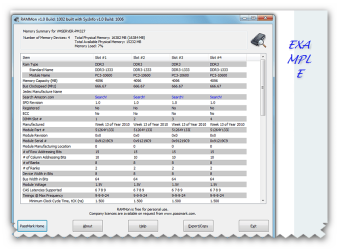
here ia a good free program to see details of your ram called RAMMon by pasmark

link >>> PassMark RAMMon - Identify RAM type, speed & memory timings

RAMMon is an easy to use Windows based application that allows users to quickly retrieve the Serial Presence Detect (SPD) data from their RAM modules. It will allow users to identify a multitude of attributes, of which, includes the manufacturer, the clockspeed and other data of their DDR2, DDR3, XMP and EPP memory devices and even some older memory types. It uses SysInfo DLL SDK to gather the SPD attributes from RAM devices. This information provides a snapshot of the available data for each RAM module installed on the system.

What is SPD?
Serial Presence Detect (SPD) is the standard set forth by JEDEC for a host system to retrieve attributes of memory modules. The SPD standard is intended for use on any memory module, independent of memory technology or module form factor.

RAMMon displays the values stored on RAM module such as the memory capacity, the manufactuer, serial number, model part number, the CAS latencies supported and the module voltage.

Also, depending on your RAM type, other specific SPD data can be retreived as well. Such as the module thickness, module width, maximum operating temperature and more.
 

Attachments

  • Brys snap ?30 ?April ?2011 08h12m59s 03.png
    Brys snap ?30 ?April ?2011 08h12m59s 03.png
    57.3 KB · Views: 62

My Computer

Computer Manufacturer/Model Number
packard bell IXTREME M5722
OS
Operating System : Windows 7 Home Premium Edition 6.01.7600 SP1 (x64)
CPU
Processor : Intel Core 2 Quad Q8300 @ 2500 MHz
Motherboard
Mainboard : Packard Bell (Acer EG43M )
Memory
Physical Memory :8GB Corsair4x 2GB 800MHz C5 DDR2
Graphics Card(s)
Video Card : XFX 6700 AMD
Monitor(s) Displays
Maestro 234DL - BenQ V2220 - BenQ VW2420H
Screen Resolution
Current Display :1920x1080p pixels at 60 Hz in HD LED
Hard Drives
Hard Disks : WDC (1000 GB)
Drive C: (Hard Disk) : 428 GB available on 491 GB
Drive D: (Hard Disk) : 426 GB available on 492 GB
SAMSUNG spinpoint HD103SJ 1000.2 GB
(X 2) KINGSTON SSD NOW V 30GB
PSU
XFX ProSeries 550W PSU
Case
PACKARD BELL IXTREME
Cooling
System Blower Current: 150mA Air Flow16CFM ;Akasa 90mm rear
Keyboard
Gigabyte Aivia K8100
Mouse
TRUST-Wireless Laser Mouse - Carbon edition MI-7770C
Internet Speed
TP-LINK > TL-WN951N / AV500 Gigabit Powerline Adapters
Browser
chrome dev
Other Info
EXTRA COOLING>(FAN CONTROLLER) PC Bay Cooler 3 x 40mm fans; Akasa AK-HD-BL Blue hard drive cooler 2 x 40 mm fan 4500 rpm 29.7 dBA
Bios> American Megatrends Inc.
Version : P01-A1
Date : 08/31/2009

My Computer

Computer Manufacturer/Model Number
packard bell IXTREME M5722
OS
Operating System : Windows 7 Home Premium Edition 6.01.7600 SP1 (x64)
CPU
Processor : Intel Core 2 Quad Q8300 @ 2500 MHz
Motherboard
Mainboard : Packard Bell (Acer EG43M )
Memory
Physical Memory :8GB Corsair4x 2GB 800MHz C5 DDR2
Graphics Card(s)
Video Card : XFX 6700 AMD
Monitor(s) Displays
Maestro 234DL - BenQ V2220 - BenQ VW2420H
Screen Resolution
Current Display :1920x1080p pixels at 60 Hz in HD LED
Hard Drives
Hard Disks : WDC (1000 GB)
Drive C: (Hard Disk) : 428 GB available on 491 GB
Drive D: (Hard Disk) : 426 GB available on 492 GB
SAMSUNG spinpoint HD103SJ 1000.2 GB
(X 2) KINGSTON SSD NOW V 30GB
PSU
XFX ProSeries 550W PSU
Case
PACKARD BELL IXTREME
Cooling
System Blower Current: 150mA Air Flow16CFM ;Akasa 90mm rear
Keyboard
Gigabyte Aivia K8100
Mouse
TRUST-Wireless Laser Mouse - Carbon edition MI-7770C
Internet Speed
TP-LINK > TL-WN951N / AV500 Gigabit Powerline Adapters
Browser
chrome dev
Other Info
EXTRA COOLING>(FAN CONTROLLER) PC Bay Cooler 3 x 40mm fans; Akasa AK-HD-BL Blue hard drive cooler 2 x 40 mm fan 4500 rpm 29.7 dBA
Bios> American Megatrends Inc.
Version : P01-A1
Date : 08/31/2009
Explain 1 DIMM per channel?
I previously had DDR3-1600 4x2GB dual channel and had a total of 8GB memory.
Now I have DDR3-1600 4x4GB dual channel and have a total of 16GB, but only 8GB available.
Resmon and CPU-Z both say I have a total of 16GB installed.
 

My Computer

Computer Manufacturer/Model Number
Personal build
OS
Windows 7 Ultimate x64 (Retail)
CPU
Intel I7-860
Motherboard
Asus Maximus III Formula
Memory
G.Skill RipJaw DDR3-1333 16GB (4x4GB)
Graphics Card(s)
Nvidia GTS-250 1GB
Sound Card
SupremeFX X-Fi 7.1 HD sound system.
Monitor(s) Displays
VisionQuest VQL-22WSHD LCD Monitor
Screen Resolution
1680x1050
Hard Drives
1x Seagate ST3500418AS 500G SATA2 HDD
1x Western Digital Caviar SE16 500G SATA2 HDD
1x Western Digital Caviar SE16 750G SATA2 HDD
2x Western Digital Caviar Green 2TB SATA2 HDD, configured RAID1
PSU
OCZ EliteXtream OCZ1000EXS 1000W ATX12V 20/24 Pin Active PFC
Case
Antec 1200
Cooling
Swifteck H2O-220 Ultima XT Liquid Cooling w/ 320 Radiator
Keyboard
Logitech G11 Keyboard
Mouse
Logitech MX518 Optical Mouse
Internet Speed
Cable Modem
Other Info
Visiontek TV Wonder 650 Theater PCI-E TV Tuner Card
Logitech 9000 Pro Web Camera
Logitech Cordless RumblePad 2 game controller
LG 18x SuperMulti SATA2 DVD Writer
NmediaPC CR98 Multi Card reader
Nmedia Pro-LCD
Corsair Dominator Memory Fan
Coolermaster R4-L2R-20ac 120mm Case Fan x2
Hmmm, one dimm per channel on a dual channel MB, would mean a total of 2 dimms. This is for X.M.P. and DDR3 1600, according to the manual. But if you had 4 dimms of 1600 working ok before...

Let me do some looking. A Guy
 

My Computer

Computer type
PC/Desktop
OS
Windows 10 Home x64
CPU
INTEL Core i5-750 Quad-Core 3.37GHz
Motherboard
ASUS P7P55D
Memory
HyperX Fury Black Series 8GB (2 x 4GB) 1866Mhz
Graphics Card(s)
EVGA GeForce GTX 750 Superclocked 1GB 128-Bit GDDR5
Monitor(s) Displays
LG 32MA68HY 32" IPS
Screen Resolution
1920 x 1080
Hard Drives
Samsung 840 Evo 120GB, SEAGATE 500GB Barracuda® 7200.12, SATA 3 Gb/s, 7200 RPM, 16MB cache
PSU
ANTEC TruePower New TP-550, 80 PLUS, 550W
Case
ANTEC Three Hundred Illusion
Cooling
COOLER MASTER Hyper 212 Plus, 4 x 120mm 1 x 140mm Noctua's
Internet Speed
85 + Mbps
Antivirus
Avast
Browser
Vivaldi

My Computer

Computer type
PC/Desktop
OS
Windows 10 Home x64
CPU
INTEL Core i5-750 Quad-Core 3.37GHz
Motherboard
ASUS P7P55D
Memory
HyperX Fury Black Series 8GB (2 x 4GB) 1866Mhz
Graphics Card(s)
EVGA GeForce GTX 750 Superclocked 1GB 128-Bit GDDR5
Monitor(s) Displays
LG 32MA68HY 32" IPS
Screen Resolution
1920 x 1080
Hard Drives
Samsung 840 Evo 120GB, SEAGATE 500GB Barracuda® 7200.12, SATA 3 Gb/s, 7200 RPM, 16MB cache
PSU
ANTEC TruePower New TP-550, 80 PLUS, 550W
Case
ANTEC Three Hundred Illusion
Cooling
COOLER MASTER Hyper 212 Plus, 4 x 120mm 1 x 140mm Noctua's
Internet Speed
85 + Mbps
Antivirus
Avast
Browser
Vivaldi
as I posted above, Resource Monitor says I have 16GB total RAM installed.
 

My Computer

Computer Manufacturer/Model Number
Personal build
OS
Windows 7 Ultimate x64 (Retail)
CPU
Intel I7-860
Motherboard
Asus Maximus III Formula
Memory
G.Skill RipJaw DDR3-1333 16GB (4x4GB)
Graphics Card(s)
Nvidia GTS-250 1GB
Sound Card
SupremeFX X-Fi 7.1 HD sound system.
Monitor(s) Displays
VisionQuest VQL-22WSHD LCD Monitor
Screen Resolution
1680x1050
Hard Drives
1x Seagate ST3500418AS 500G SATA2 HDD
1x Western Digital Caviar SE16 500G SATA2 HDD
1x Western Digital Caviar SE16 750G SATA2 HDD
2x Western Digital Caviar Green 2TB SATA2 HDD, configured RAID1
PSU
OCZ EliteXtream OCZ1000EXS 1000W ATX12V 20/24 Pin Active PFC
Case
Antec 1200
Cooling
Swifteck H2O-220 Ultima XT Liquid Cooling w/ 320 Radiator
Keyboard
Logitech G11 Keyboard
Mouse
Logitech MX518 Optical Mouse
Internet Speed
Cable Modem
Other Info
Visiontek TV Wonder 650 Theater PCI-E TV Tuner Card
Logitech 9000 Pro Web Camera
Logitech Cordless RumblePad 2 game controller
LG 18x SuperMulti SATA2 DVD Writer
NmediaPC CR98 Multi Card reader
Nmedia Pro-LCD
Corsair Dominator Memory Fan
Coolermaster R4-L2R-20ac 120mm Case Fan x2

My Computer

Computer type
Laptop
Computer Manufacturer/Model Number
Sony Vaio VPCEB47GM Laptop
OS
Win 7 Pro 64-bit
CPU
Intel i5 2.4 Ghz
Memory
8GB DDR3
Graphics Card(s)
Intel HD 3000
Sound Card
IDT High Definition
Monitor(s) Displays
15.6 WGXA Anti-Glare LED
Screen Resolution
1280x800
Hard Drives
640Gb 7200rpm
Antivirus
MSE
Browser
Opera (primary) with IE9 backup
Last edited:

My Computer

Computer Manufacturer/Model Number
Personal build
OS
Windows 7 Ultimate x64 (Retail)
CPU
Intel I7-860
Motherboard
Asus Maximus III Formula
Memory
G.Skill RipJaw DDR3-1333 16GB (4x4GB)
Graphics Card(s)
Nvidia GTS-250 1GB
Sound Card
SupremeFX X-Fi 7.1 HD sound system.
Monitor(s) Displays
VisionQuest VQL-22WSHD LCD Monitor
Screen Resolution
1680x1050
Hard Drives
1x Seagate ST3500418AS 500G SATA2 HDD
1x Western Digital Caviar SE16 500G SATA2 HDD
1x Western Digital Caviar SE16 750G SATA2 HDD
2x Western Digital Caviar Green 2TB SATA2 HDD, configured RAID1
PSU
OCZ EliteXtream OCZ1000EXS 1000W ATX12V 20/24 Pin Active PFC
Case
Antec 1200
Cooling
Swifteck H2O-220 Ultima XT Liquid Cooling w/ 320 Radiator
Keyboard
Logitech G11 Keyboard
Mouse
Logitech MX518 Optical Mouse
Internet Speed
Cable Modem
Other Info
Visiontek TV Wonder 650 Theater PCI-E TV Tuner Card
Logitech 9000 Pro Web Camera
Logitech Cordless RumblePad 2 game controller
LG 18x SuperMulti SATA2 DVD Writer
NmediaPC CR98 Multi Card reader
Nmedia Pro-LCD
Corsair Dominator Memory Fan
Coolermaster R4-L2R-20ac 120mm Case Fan x2
Please accept my apologies for these obvious suggestions. Have you tried swapping sticks to different slots? Running them one at a time to rule out bad memory? Do you have the latest BIOS from Asus? Have you tried lowering the memory frequency from 1600 to 1333 just to see if it makes any difference? I agree with A Guy's earlier post. I also found a lot of people reporting the same problem but no real solutions.
 

My Computer

Computer type
Laptop
Computer Manufacturer/Model Number
Sony Vaio VPCEB47GM Laptop
OS
Win 7 Pro 64-bit
CPU
Intel i5 2.4 Ghz
Memory
8GB DDR3
Graphics Card(s)
Intel HD 3000
Sound Card
IDT High Definition
Monitor(s) Displays
15.6 WGXA Anti-Glare LED
Screen Resolution
1280x800
Hard Drives
640Gb 7200rpm
Antivirus
MSE
Browser
Opera (primary) with IE9 backup
BIOS 2401, latest version, swapping makes no difference, changing the frequency makes no difference, each DIMM checks out as good on its own. (tried this before you had asked)
 

My Computer

Computer Manufacturer/Model Number
Personal build
OS
Windows 7 Ultimate x64 (Retail)
CPU
Intel I7-860
Motherboard
Asus Maximus III Formula
Memory
G.Skill RipJaw DDR3-1333 16GB (4x4GB)
Graphics Card(s)
Nvidia GTS-250 1GB
Sound Card
SupremeFX X-Fi 7.1 HD sound system.
Monitor(s) Displays
VisionQuest VQL-22WSHD LCD Monitor
Screen Resolution
1680x1050
Hard Drives
1x Seagate ST3500418AS 500G SATA2 HDD
1x Western Digital Caviar SE16 500G SATA2 HDD
1x Western Digital Caviar SE16 750G SATA2 HDD
2x Western Digital Caviar Green 2TB SATA2 HDD, configured RAID1
PSU
OCZ EliteXtream OCZ1000EXS 1000W ATX12V 20/24 Pin Active PFC
Case
Antec 1200
Cooling
Swifteck H2O-220 Ultima XT Liquid Cooling w/ 320 Radiator
Keyboard
Logitech G11 Keyboard
Mouse
Logitech MX518 Optical Mouse
Internet Speed
Cable Modem
Other Info
Visiontek TV Wonder 650 Theater PCI-E TV Tuner Card
Logitech 9000 Pro Web Camera
Logitech Cordless RumblePad 2 game controller
LG 18x SuperMulti SATA2 DVD Writer
NmediaPC CR98 Multi Card reader
Nmedia Pro-LCD
Corsair Dominator Memory Fan
Coolermaster R4-L2R-20ac 120mm Case Fan x2
I hate to leave a problem unsolved but I can't think of anything else you haven't already tried. Only other thing I can suggest is to contact Asus via Technical Inquiry Form or possibly their On Line Service (IM). This may be an issue with 7 not recognizing your available memory rather than a mobo or memory problem. Hopefully Asus has a solution. Or now that it's morning in Canada and the US some of our experts will be waking up with fresh eyes and ideas. Please post back if you find a fix so others can benefit from your aggravation.

ASUSTeK Computer Inc. -Support- Contact us
 

My Computer

Computer type
Laptop
Computer Manufacturer/Model Number
Sony Vaio VPCEB47GM Laptop
OS
Win 7 Pro 64-bit
CPU
Intel i5 2.4 Ghz
Memory
8GB DDR3
Graphics Card(s)
Intel HD 3000
Sound Card
IDT High Definition
Monitor(s) Displays
15.6 WGXA Anti-Glare LED
Screen Resolution
1280x800
Hard Drives
640Gb 7200rpm
Antivirus
MSE
Browser
Opera (primary) with IE9 backup
I thank you for the response. I have already posted a request with ASUS, both their Tech support and via their Forums.
 

My Computer

Computer Manufacturer/Model Number
Personal build
OS
Windows 7 Ultimate x64 (Retail)
CPU
Intel I7-860
Motherboard
Asus Maximus III Formula
Memory
G.Skill RipJaw DDR3-1333 16GB (4x4GB)
Graphics Card(s)
Nvidia GTS-250 1GB
Sound Card
SupremeFX X-Fi 7.1 HD sound system.
Monitor(s) Displays
VisionQuest VQL-22WSHD LCD Monitor
Screen Resolution
1680x1050
Hard Drives
1x Seagate ST3500418AS 500G SATA2 HDD
1x Western Digital Caviar SE16 500G SATA2 HDD
1x Western Digital Caviar SE16 750G SATA2 HDD
2x Western Digital Caviar Green 2TB SATA2 HDD, configured RAID1
PSU
OCZ EliteXtream OCZ1000EXS 1000W ATX12V 20/24 Pin Active PFC
Case
Antec 1200
Cooling
Swifteck H2O-220 Ultima XT Liquid Cooling w/ 320 Radiator
Keyboard
Logitech G11 Keyboard
Mouse
Logitech MX518 Optical Mouse
Internet Speed
Cable Modem
Other Info
Visiontek TV Wonder 650 Theater PCI-E TV Tuner Card
Logitech 9000 Pro Web Camera
Logitech Cordless RumblePad 2 game controller
LG 18x SuperMulti SATA2 DVD Writer
NmediaPC CR98 Multi Card reader
Nmedia Pro-LCD
Corsair Dominator Memory Fan
Coolermaster R4-L2R-20ac 120mm Case Fan x2
I thank you for the response. I have already posted a request with ASUS, both their Tech support and via their Forums.

:thumbsup: Hopefully they'll have an easy fix and I'll slap my forehead for not thinking of it!
 

My Computer

Computer type
Laptop
Computer Manufacturer/Model Number
Sony Vaio VPCEB47GM Laptop
OS
Win 7 Pro 64-bit
CPU
Intel i5 2.4 Ghz
Memory
8GB DDR3
Graphics Card(s)
Intel HD 3000
Sound Card
IDT High Definition
Monitor(s) Displays
15.6 WGXA Anti-Glare LED
Screen Resolution
1280x800
Hard Drives
640Gb 7200rpm
Antivirus
MSE
Browser
Opera (primary) with IE9 backup
I thank you for the response. I have already posted a request with ASUS, both their Tech support and via their Forums.

OK, two things.....

Do the modules match?

Also have you checked to make sure the modules are running at their correct voltage?

Manually set the voltages for the modules. I suspect they may not be getting enough voltage, especially if you have the MB "Auto" set the memory. Do this manually and see what happens.

And yeah, according to the article a guy posted, you may have to drop your frequencies. Disable XMP (if enabled) and drop your frequencies to 1066MHz. You may be overloading your memory controller with all that RAM running at (trying to run at) 1600MHz.

That note is basically saying the memory controllers can't handle all that memory at those high speeds.

Let me know.
 

My Computer

Computer type
PC/Desktop
Computer Manufacturer/Model Number
Custom built by me.
OS
Windows 10 Pro
CPU
Intel Core i7-4770K (3.5Ghz)
Motherboard
Gigabyte G1 Sniper 5 (F10 Bios)
Memory
32 gig Corsair Dominator Platinum (4x8Gig)
Graphics Card(s)
Sapphire Tri-X R9 Fury
Sound Card
Soundblaster ZXR
Monitor(s) Displays
NEC PA242W 24" LCD Monitor
Screen Resolution
1920 x 1200
Hard Drives
Primary - Samsung 850 Pro (512gig), Samsung 840 Pro (256gig), 2TB WD Caviar Black.
PSU
EVGA Supernova 1000 G2
Case
Cooler Master HAF X
Cooling
Corsair H100i with Corsair Air Series SP120 Quiet Fans
Keyboard
Logitech Wireless Wave
Mouse
Logitech Performance MX
Internet Speed
High Speed Cable
Antivirus
Norton Security
Browser
IE11
Other Info
Memory Timings - 1866MHz @ 9-9-9-27-1T @ 1.5 volts
All modules match, and voltages and timings are set correctly (all settings manually done, not Auto). XMP disabled, and dropping the frequency made no difference.
I am going to order 2 8GB kits of RipJaw 1333 memory as that should resolve the problem.
Thank you for your responses.
 

My Computer

Computer Manufacturer/Model Number
Personal build
OS
Windows 7 Ultimate x64 (Retail)
CPU
Intel I7-860
Motherboard
Asus Maximus III Formula
Memory
G.Skill RipJaw DDR3-1333 16GB (4x4GB)
Graphics Card(s)
Nvidia GTS-250 1GB
Sound Card
SupremeFX X-Fi 7.1 HD sound system.
Monitor(s) Displays
VisionQuest VQL-22WSHD LCD Monitor
Screen Resolution
1680x1050
Hard Drives
1x Seagate ST3500418AS 500G SATA2 HDD
1x Western Digital Caviar SE16 500G SATA2 HDD
1x Western Digital Caviar SE16 750G SATA2 HDD
2x Western Digital Caviar Green 2TB SATA2 HDD, configured RAID1
PSU
OCZ EliteXtream OCZ1000EXS 1000W ATX12V 20/24 Pin Active PFC
Case
Antec 1200
Cooling
Swifteck H2O-220 Ultima XT Liquid Cooling w/ 320 Radiator
Keyboard
Logitech G11 Keyboard
Mouse
Logitech MX518 Optical Mouse
Internet Speed
Cable Modem
Other Info
Visiontek TV Wonder 650 Theater PCI-E TV Tuner Card
Logitech 9000 Pro Web Camera
Logitech Cordless RumblePad 2 game controller
LG 18x SuperMulti SATA2 DVD Writer
NmediaPC CR98 Multi Card reader
Nmedia Pro-LCD
Corsair Dominator Memory Fan
Coolermaster R4-L2R-20ac 120mm Case Fan x2
If the board is limited to a certain amount of memory at a certain speed, no matter what brand you put in, it's not going to overcome the limit placed by the MB manufacturer.

What you might want to do is see if there is a BIOS update that addresses/fixes the issue first.... instead of spending more money.

My two cents.
 

My Computer

Computer type
PC/Desktop
Computer Manufacturer/Model Number
Custom built by me.
OS
Windows 10 Pro
CPU
Intel Core i7-4770K (3.5Ghz)
Motherboard
Gigabyte G1 Sniper 5 (F10 Bios)
Memory
32 gig Corsair Dominator Platinum (4x8Gig)
Graphics Card(s)
Sapphire Tri-X R9 Fury
Sound Card
Soundblaster ZXR
Monitor(s) Displays
NEC PA242W 24" LCD Monitor
Screen Resolution
1920 x 1200
Hard Drives
Primary - Samsung 850 Pro (512gig), Samsung 840 Pro (256gig), 2TB WD Caviar Black.
PSU
EVGA Supernova 1000 G2
Case
Cooler Master HAF X
Cooling
Corsair H100i with Corsair Air Series SP120 Quiet Fans
Keyboard
Logitech Wireless Wave
Mouse
Logitech Performance MX
Internet Speed
High Speed Cable
Antivirus
Norton Security
Browser
IE11
Other Info
Memory Timings - 1866MHz @ 9-9-9-27-1T @ 1.5 volts
Back
Top