Maximize button inop on two seperate programs

coop795

New member
I am having a issue with two separate programs in that the maximize buttons do not work, I can't grab a corner and resize the program to get it to fit the screen area. They seem to be stuck in a partial minimized state. I am not very savvy with the pc so explain as simply as possible. Thank you very much.
 

My Computer

OS
Windows 7 64 bit
what are the programs?
to maximize in win7--just double click the title bar at the top--it should maximize to fill your screen--if it maximizes bigger than your screen--single click the program name in your taskbar--then change your resolution to a higher setting (it's also possible that the programs are not compatible with your 64bit system and may require changing their compatibility settings--so--it's important to know the names (and version number) of the programs
 

My Computer

Computer Manufacturer/Model Number
SALEON model 2.2b
OS
win7 ultimate 32bit
CPU
core2 Extreme QX6850-OCd to 3.15 GHz
Motherboard
ASUS P5G41-M LE
Memory
4 GB
Graphics Card(s)
NVidia 8600 GT
Monitor(s) Displays
23" acer
Hard Drives
one SATA 250GB partitioned equally in half
one SATA 160GB-internal storage
PSU
500W Thermaltake
Case
mini tower
I am trying to run a program that Code 3 and Rontan built, they are both software programs for programming siren controllers for police cars. I am set at maximum resolution on my screen setting. I have messed with that and it did not help.

I had the same issue with outlook at first. Now it is these programs that are doing it.

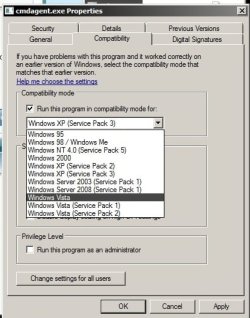
When I go into proprieties and look at the compatibility I have windows 7 checked. They do not give me a option of 64 bit
 

My Computer

OS
Windows 7 64 bit
try changing 'compatibility' to something other than win7
 

Attachments

  • Untitled.jpg
    Untitled.jpg
    149.4 KB · Views: 3

My Computer

Computer Manufacturer/Model Number
SALEON model 2.2b
OS
win7 ultimate 32bit
CPU
core2 Extreme QX6850-OCd to 3.15 GHz
Motherboard
ASUS P5G41-M LE
Memory
4 GB
Graphics Card(s)
NVidia 8600 GT
Monitor(s) Displays
23" acer
Hard Drives
one SATA 250GB partitioned equally in half
one SATA 160GB-internal storage
PSU
500W Thermaltake
Case
mini tower
Welcome to Seven Forums coop795. The program is meant to be able to be maximized? The maximize button is not grayed out? Here is a workaround that may serve you. Create a shortcut to the programs executable (exe). Right click the shortcut and on the shortcut tab, Run:, choose Open maximized.

Maximized.jpg

See if that allows you to open it maximized.

A Guy
 

My Computer

Computer type
PC/Desktop
OS
Windows 10 Home x64
CPU
INTEL Core i5-750 Quad-Core 3.37GHz
Motherboard
ASUS P7P55D
Memory
HyperX Fury Black Series 8GB (2 x 4GB) 1866Mhz
Graphics Card(s)
EVGA GeForce GTX 750 Superclocked 1GB 128-Bit GDDR5
Monitor(s) Displays
LG 32MA68HY 32" IPS
Screen Resolution
1920 x 1080
Hard Drives
Samsung 840 Evo 120GB, SEAGATE 500GB Barracuda® 7200.12, SATA 3 Gb/s, 7200 RPM, 16MB cache
PSU
ANTEC TruePower New TP-550, 80 PLUS, 550W
Case
ANTEC Three Hundred Illusion
Cooling
COOLER MASTER Hyper 212 Plus, 4 x 120mm 1 x 140mm Noctua's
Internet Speed
85 + Mbps
Antivirus
Avast
Browser
Vivaldi
Hi coop795

Some programs are designed in such a way that they cannot be maximized or the window size changed. I myself have designed some programs like that (Calc ++) where maximizing the window does not have any use. The maximize button would be disabled for those programs.
I'm not sure if there is any way to resize or maximize those.
 

My Computer

Computer type
Laptop
Computer Manufacturer/Model Number
HP EliteBook 8530w Mobile Workstation
OS
Windows 7 Ultimate x64 (XP, 98SE, 95, 3.11, DOS 7.10 on VM) + Ubuntu 10.04 LTS Lucid Lynx
CPU
Intel Core 2 Duo Processor P8600 (2.40 GHz, 3 MB L2 cache)
Motherboard
Mobile Intel PM45 Express Chipset ICH9M-Enhanced
Memory
4GB 800 MHz DDR2 SDRAM
Graphics Card(s)
ATI Mobility FireGL V5700 with 256 MB
Sound Card
SoundMAX Integrated Digital HD Audio
Monitor(s) Displays
15.4-inch WXGA anti-glare (1280 x 800 resolution)
Screen Resolution
1280 x 800
Hard Drives
500GB + 1TB
Mouse
Synaptics PS/2 Port Touchpad, USB Mouse
Internet Speed
4 Mbps
Antivirus
MSE
Browser
Firefox, Chrome, IE
Other Info
Authentec AES2810 Fingerprint Reader
I am trying to run a program that Code 3 and Rontan built, they are both software programs for programming siren controllers for police cars. I am set at maximum resolution on my screen setting. I have messed with that and it did not help.

I had the same issue with outlook at first. Now it is these programs that are doing it.

When I go into proprieties and look at the compatibility I have windows 7 checked. They do not give me a option of 64 bit

Have you tried doing a malware scan such as with Malwarebytes anti-malware? The Registry has many settings you wouldn't think would be there. For example when I first got Vista for awhile I couldn't delete any file in Explorer. I scanned with Malwarebytes and it picked up a setting under Explorer NoModify. In other works, I could not change any files with Explorer. It cleaned it right off and the PC was back to normal.

http://www.malwarebytes.org/products/malwarebytes_free
 

My Computer

Computer Manufacturer/Model Number
HP Media Center
OS
Windows 7 32 bit
CPU
AMD 5200+ dual core
Memory
2 GB
Graphics Card(s)
NVidia GeForce 6150SE 128 MB
Monitor(s) Displays
CRT
Screen Resolution
1280x1024
Hard Drives
500 GB Sata internal :

SIIG USB 3.0 docking stations w/WD Caviar Black 6 Gb/s drives
Keyboard
PS/2
Mouse
PS/2 Wheel Mouse
Other Info
SIIG USB 3.0 PCIexpress card.
Back
Top