Solved Maximize folders

Riptorn

Windows 7 Guru
Power User
VIP
Local time
4:14 PM
Messages
120
Location
Brisbane
hi, i have tried everything to maximise my folders,documents,etc,but nothing works?each time i open a folder it is still small,why does it keep resetting back again?,any ideas? thank riptorn:mad:
 

My Computer

Computer Manufacturer/Model Number
Dell Inspiron 1525
OS
Windows 7 - 32 Bit
Memory
4 GB
Hard Drives
320 GB
Internet Speed
Broadband
Huh? Maximize your folders? What?
 

My Computer

Computer type
PC/Desktop
Computer Manufacturer/Model Number
Alienware Aurora ALX R4
OS
Windows 10 Pro (x64)
CPU
Intel Core i7-3930K (3.2GHz - 4.5GHz)
Motherboard
Alienware Aurora-R4 x79
Memory
4x Samsung 4GB PC3-12800 DDR3 (16GB 1600MHz)
Graphics Card(s)
Nvidia Geforce GTX 690
Sound Card
SteelSeries Siberia Elite
Monitor(s) Displays
Dell UltraSharp U3011
Screen Resolution
2560x1600
Hard Drives
Samsung 850 Pro 256 GB, Seagate 1TB Desktop Hybrid HDD, 2x Western Digital 4TB Green HDD
PSU
875W Some Dell PSU <.<
Case
Alienware Aurora ALX
Cooling
Custom Liquid Cooling (EK CPU & GPU blocks) dual EK 480RAD
Keyboard
Logitech G710+ Mechanical
Mouse
Logitech G700s
Internet Speed
Verizon Fios (50 mbps average)
Other Info
Server: Intel NUC D54250WYK: i5-4250U, 16GB, 256 GB mSATA, Windows Server 2012 R2
Try hitting the Windows + Down Arrow keys at the same time.

It's keyboard shortcut for maximizing a window.

Windows + Down Arrow unmaximizes a window.​
 

My Computer

Computer Manufacturer/Model Number
Compaq Presario CQ60 Notebook PC
OS
Windows 7 Ultimate
CPU
Processor AMD Athlon Dual-Core QL-62, 2000 Mhz, 2 Core(s), 2
Motherboard
Wistron 303C (Socket A)
Memory
2.0GB DDR2
Graphics Card(s)
NVIDIA GeForce 8200M G
Sound Card
Conexant High Definition SmartAudio 221
Screen Resolution
1366 x 768
Hard Drives
232GB SAMSUNG HM251JI ATA Device
Keyboard
tandard PS/2 Keyboard
Mouse
Synaptics PS/2 Port TouchPad
Try hitting the Windows + Down Arrow keys at the same time.

It's keyboard shortcut for maximizing a window.

Windows + Down Arrow unmaximizes a window.​
hi, i did all that,but it still opens up small,after i exit:cry:
 

My Computer

Computer Manufacturer/Model Number
Dell Inspiron 1525
OS
Windows 7 - 32 Bit
Memory
4 GB
Hard Drives
320 GB
Internet Speed
Broadband

My Computer

Computer type
PC/Desktop
Computer Manufacturer/Model Number
Self built custom
OS
64-bit Windows 11 Pro for Workstations
CPU
Intel i7-8700K OC'd to 5 GHz
Motherboard
ASUS ROG Maximus XI Formula Z390
Memory
64 GB (4x16GB) G.SKILL TridentZ RGB DDR4 3600 MHz
Graphics Card(s)
ASUS ROG-STRIX-GTX1080TI-O11G-GAMING
Sound Card
Integrated
Monitor(s) Displays
2 x Samsung Odyssey G7 27"
Screen Resolution
2560x1440
Hard Drives
1TB Samsung 990 PRO M.2,
4TB Samsung 990 PRO PRO M.2,
TerraMaster F8 SSD Plus NAS
PSU
Seasonic Prime Titanium 850W
Case
Thermaltake Core P3
Cooling
Corsair Hydro H115i
Keyboard
Logitech wireless K800
Mouse
Logitech MX Master 4
Internet Speed
2 Gb/s Download and 100 Mb/s Upload
Antivirus
Malwarebyte Anti-Malware Premium
Browser
Google Chrome
Other Info
Logitech Z625 speaker system,
Logitech BRIO 4K Pro webcam,
HP Color LaserJet Pro MFP M477fdn,
APC SMART-UPS RT 1000 XL - SURT1000XLI,
Galaxy S23 Plus phone
Option in Properties

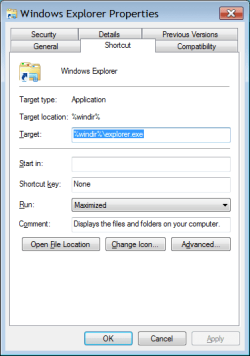
Have you set the "Run:" option in "Windows Explorer Properties"?

84723d1278911556-what-dont-you-like-about-windows-7-windows-explorer-properties.png

I have set that option and my windows normally start "Maximized".
However often after installing updates, my windows start opening in "Normal window" format.

I need to maximize them and then click "Ctrl + Close button" to reset them.

Are you running a System Cleaner?
Some of them have a setting that cleans the window size/position setting.

CCleaner for example:

CC Advanced Options.png
 

My Computer

Computer type
PC/Desktop
Computer Manufacturer/Model Number
n/a
OS
W7 Ultimate SP1, LM19.2 MATE, W10 Home 1703, W10 Pro 1703 VM, #All 64 bit
CPU
AMD Phenom II x6 1100T, 3.3 GHz
Motherboard
ASUS M4A88T-M/USB3 (AM3)
Memory
12GB DDR3 1333 G-Skill (4GB x 2), G-Skill (2GB x 2)
Graphics Card(s)
NVIDIA GeForce GTX 660
Sound Card
Realtek?
Monitor(s) Displays
Samsung S23B350
Screen Resolution
1920x1080
Hard Drives
WD Green 2TB (SATA), WD Green 3TB (SATA), WD Blue 4TB (SATA), WD Blue 6TB (SATA)
PSU
Cooler Master
Case
Antec GX300 Tower
Cooling
3x Antec TRICOOL 120mm Fans
Mouse
Wired Optical
Internet Speed
DSL
Antivirus
Avast
Browser
Pale Moon (64 bit)
Other Info
2018-12-27 Upgraded HDDs
2015-12-10 Upgraded case, graphics card, storage
2015-08-15 Upgraded motherboard & RAM
2015-07-15 Upgraded LM17.1 to LM17.2
Have you set the "Run:" option in "Windows Explorer Properties"?

View attachment 175275

I have set that option and my windows normally start "Maximized".
However often after installing updates, my windows start opening in "Normal window" format.

I need to maximize them and then click "Ctrl + Close button" to reset them.

Are you running a System Cleaner?
Some of them have a setting that cleans the window size/position setting.

CCleaner for example:

View attachment 175276
run-maximised seemed to work,thanks very much:D
 

My Computer

Computer Manufacturer/Model Number
Dell Inspiron 1525
OS
Windows 7 - 32 Bit
Memory
4 GB
Hard Drives
320 GB
Internet Speed
Broadband
No problems

No problems. :)

Hopefully your windows will stay the size you want.
As I mentioned, my windows often reset when I get updates.
 

My Computer

Computer type
PC/Desktop
Computer Manufacturer/Model Number
n/a
OS
W7 Ultimate SP1, LM19.2 MATE, W10 Home 1703, W10 Pro 1703 VM, #All 64 bit
CPU
AMD Phenom II x6 1100T, 3.3 GHz
Motherboard
ASUS M4A88T-M/USB3 (AM3)
Memory
12GB DDR3 1333 G-Skill (4GB x 2), G-Skill (2GB x 2)
Graphics Card(s)
NVIDIA GeForce GTX 660
Sound Card
Realtek?
Monitor(s) Displays
Samsung S23B350
Screen Resolution
1920x1080
Hard Drives
WD Green 2TB (SATA), WD Green 3TB (SATA), WD Blue 4TB (SATA), WD Blue 6TB (SATA)
PSU
Cooler Master
Case
Antec GX300 Tower
Cooling
3x Antec TRICOOL 120mm Fans
Mouse
Wired Optical
Internet Speed
DSL
Antivirus
Avast
Browser
Pale Moon (64 bit)
Other Info
2018-12-27 Upgraded HDDs
2015-12-10 Upgraded case, graphics card, storage
2015-08-15 Upgraded motherboard & RAM
2015-07-15 Upgraded LM17.1 to LM17.2
Back
Top