Maximum performance on battery

ryujakk

New member
Local time
3:42 PM
Messages
5
Hi,

I want to have maximum CPU speed while on battery (for some CPU intensive calculations that must be run far away from an AC source), but windows apparently
does something to slow it down when the AC is not plugged in.
I've searched for this in the power options, but didn't find what I was looking for!

Any help is greatly appreciated :)
Thanks!
 

My Computer

OS
windows 7
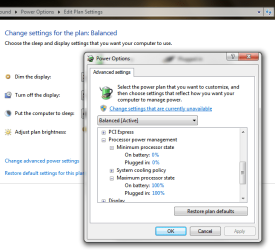
This: (Set the maximum state)
 

Attachments

  • Untitled.png
    Untitled.png
    78.5 KB · Views: 139

My Computer

Computer type
PC/Desktop
Computer Manufacturer/Model Number
Alienware Aurora ALX R4
OS
Windows 10 Pro (x64)
CPU
Intel Core i7-3930K (3.2GHz - 4.5GHz)
Motherboard
Alienware Aurora-R4 x79
Memory
4x Samsung 4GB PC3-12800 DDR3 (16GB 1600MHz)
Graphics Card(s)
Nvidia Geforce GTX 690
Sound Card
SteelSeries Siberia Elite
Monitor(s) Displays
Dell UltraSharp U3011
Screen Resolution
2560x1600
Hard Drives
Samsung 850 Pro 256 GB, Seagate 1TB Desktop Hybrid HDD, 2x Western Digital 4TB Green HDD
PSU
875W Some Dell PSU <.<
Case
Alienware Aurora ALX
Cooling
Custom Liquid Cooling (EK CPU & GPU blocks) dual EK 480RAD
Keyboard
Logitech G710+ Mechanical
Mouse
Logitech G700s
Internet Speed
Verizon Fios (50 mbps average)
Other Info
Server: Intel NUC D54250WYK: i5-4250U, 16GB, 256 GB mSATA, Windows Server 2012 R2
Thanks, but I checked that option already. Both are set at 100% and the problem remains. (Even setting the minimum processor state to 100% does not solve my issue.)
 

My Computer

OS
windows 7
Then the BIOS is not listening, switch it off from there.
 

My Computer

Computer type
PC/Desktop
Computer Manufacturer/Model Number
Alienware Aurora ALX R4
OS
Windows 10 Pro (x64)
CPU
Intel Core i7-3930K (3.2GHz - 4.5GHz)
Motherboard
Alienware Aurora-R4 x79
Memory
4x Samsung 4GB PC3-12800 DDR3 (16GB 1600MHz)
Graphics Card(s)
Nvidia Geforce GTX 690
Sound Card
SteelSeries Siberia Elite
Monitor(s) Displays
Dell UltraSharp U3011
Screen Resolution
2560x1600
Hard Drives
Samsung 850 Pro 256 GB, Seagate 1TB Desktop Hybrid HDD, 2x Western Digital 4TB Green HDD
PSU
875W Some Dell PSU <.<
Case
Alienware Aurora ALX
Cooling
Custom Liquid Cooling (EK CPU & GPU blocks) dual EK 480RAD
Keyboard
Logitech G710+ Mechanical
Mouse
Logitech G700s
Internet Speed
Verizon Fios (50 mbps average)
Other Info
Server: Intel NUC D54250WYK: i5-4250U, 16GB, 256 GB mSATA, Windows Server 2012 R2
I wish it were that simple! Unfortunately, I have Sony Vaio FW, and Sony locked the Bios. I can only access the date/time, password, and boot device order settings :cry:
I'm looking into flashing a non OEM bios now. Any pointers on that?
 

My Computer

OS
windows 7
Use the High Performance power plan.
 

My Computer

Computer Manufacturer/Model Number
Sony Vaio Z46GDU
OS
Windows 7 Ultimate x86-64
CPU
[email protected] 1066MHz FSB
Motherboard
Sony branded
Memory
6GB DDR3 1066MHz
Graphics Card(s)
9300M GS 256MB Dedicated (Speed) + Intel4500MHD (Stamina)
Sound Card
Realtek HD Audio
Monitor(s) Displays
13.1' WXGA
Screen Resolution
1600x900
Hard Drives
320GB 7200RPM w/ 16MB cache
Internet Speed
1MB/s
That is my current power plan actually. I even tried putting all the fields of "processor power management" to 100%, butt my CPU freq still drops by 50% whenever I plug out the AC (according to CPU-Z and other tests.)
 

My Computer

OS
windows 7
That is my current power plan actually. I even tried putting all the fields of "processor power management" to 100%, butt my CPU freq still drops by 50% whenever I plug out the AC (according to CPU-Z and other tests.)

It will increase as necessary though.
 

My Computer

Computer Manufacturer/Model Number
Sony Vaio Z46GDU
OS
Windows 7 Ultimate x86-64
CPU
[email protected] 1066MHz FSB
Motherboard
Sony branded
Memory
6GB DDR3 1066MHz
Graphics Card(s)
9300M GS 256MB Dedicated (Speed) + Intel4500MHD (Stamina)
Sound Card
Realtek HD Audio
Monitor(s) Displays
13.1' WXGA
Screen Resolution
1600x900
Hard Drives
320GB 7200RPM w/ 16MB cache
Internet Speed
1MB/s
But it does not! That is the problem. When I have a CPU intensive (90 to 100% of the CPU usage) program running with the AC on, the frequency is 2194 MHz. As soon as I unplug the AC, it drops to 1196 (although the CPU intensive program is still running) but goes back up to 2194 when I plug the AC back in.
Could this be a locked setting of the BIOS? As a reminder, I have an extremely limited OEM BIOS that does not let me access anything besides the time/date, password, and boot order.
 

My Computer

OS
windows 7
But it does not! That is the problem. When I have a CPU intensive (90 to 100% of the CPU usage) program running with the AC on, the frequency is 2194 MHz. As soon as I unplug the AC, it drops to 1196 (although the CPU intensive program is still running) but goes back up to 2194 when I plug the AC back in.
Could this be a locked setting of the BIOS? As a reminder, I have an extremely limited OEM BIOS that does not let me access anything besides the time/date, password, and boot order.

Flash the BIOS.
 

My Computer

Computer Manufacturer/Model Number
Sony Vaio Z46GDU
OS
Windows 7 Ultimate x86-64
CPU
[email protected] 1066MHz FSB
Motherboard
Sony branded
Memory
6GB DDR3 1066MHz
Graphics Card(s)
9300M GS 256MB Dedicated (Speed) + Intel4500MHD (Stamina)
Sound Card
Realtek HD Audio
Monitor(s) Displays
13.1' WXGA
Screen Resolution
1600x900
Hard Drives
320GB 7200RPM w/ 16MB cache
Internet Speed
1MB/s
Back
Top