

May 14, 2019 - KB4499164 (Monthly Rollup)
Applies to: Windows 7 Service Pack 1, Windows Server 2008 R2 Service Pack 1
Starting with KB4493472 Monthly Rollup updates will no longer include PciClearStaleCache.exe. This installation utility addressees inconsistencies in the internal PCI cache. This can cause the symptoms listed below when installing monthly updates that do NOT include PciClearStaleCache:
These symptoms are especially common on guest virtual machines and on machines which have not been updated since March, 2018.
- Existing NIC definitions in control panel networks may be replaced with a new Ethernet Network Interface Card (NIC) but with default settings. Any custom settings on the previously NIC persist in the registry but were unused.
- Static IP address settings were lost on network interfaces.
- Wi-Fi profile settings were not displayed in the network flyout.
- WIFI network adapters were disabled
Administrators should ensure that any one or more of the Monthly rollups released between April 10, 2018 (KB4093118) and March 12, 2019 (KB4489878) have been installed prior to installing April 2019 and later updates. Each of these rollup updates includes PciClearStaleCache.exe.
Improvements and fixes
This security update includes improvements and fixes that were a part of update KB4493453 (released April 25, 2019) and addresses the following issues:
For more information about the resolved security vulnerabilities, please refer to the Security Update Guide.
- Provides protections against a new subclass of speculative execution side-channel vulnerabilities, known as Microarchitectural Data Sampling, for 64-Bit (x64) versions of Windows (CVE-2018-11091, CVE-2018-12126, CVE-2018-12127, CVE-2018-12130). Use the registry settings as described in the Windows Client and Windows Server articles. (These registry settings are enabled by default for Windows Client OS editions, but disabled by default for Windows Server OS editions).
- Addresses an issue that prevents the Microsoft Visual Studio Simulator from starting.
- Addresses an issue that may prevent applications that rely on unconstrained delegation from authenticating after the Kerberos ticket-granting ticket (TGT) expires (the default is 10 hours).
- Addresses an issue that may cause the text, layout, or cell size to become narrower or wider than expected in Microsoft Excel when using the MS UI Gothic or MS PGothic fonts.
- Security updates to Windows App Platform and Frameworks, Microsoft Graphics Component, Windows Storage and Filesystems, Windows Cryptography, Windows Wireless Networking, Windows Kernel, Windows Server, and the Microsoft JET Database.
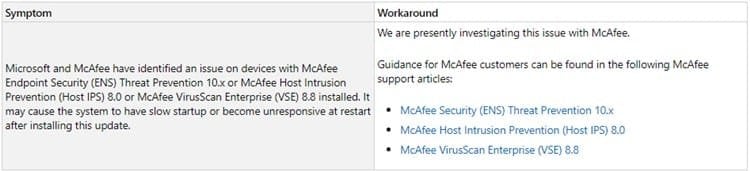
Known issues in this update
[ADDED 5/16]
[UPDATED 5/18] KB4505050 Cumulative update for Internet Explorer: May 18, 2019
How to get this update
Before installing this update
Microsoft strongly recommends you install the latest servicing stack update (SSU) for your operating system before installing the latest Rollup. SSUs improve the reliability of the update process to mitigate potential issues while installing the Rollup and applying Microsoft security fixes.
If you are using Windows Update, the latest SSU (KB4490628) will be offered to you automatically. To get the standalone package for the latest SSU, search for it in the Microsoft Update Catalog.
Install this update
This update will be downloaded and installed automatically from Windows Update.
To get the standalone package for this update, go to the Microsoft Update Catalog website.


Source: https://support.microsoft.com/en-us/help/4499164
Direct download links for KB4499164 MSU file from Microsoft Update Catalog:
:ar: Download KB4499164 MSU for Windows 7 32-bit (x86) - 174.4 MB
:ar: Download KB4499164 MSU for Windows 7 64-bit (x64) - 269.8 MB
Last edited:
My Computer
At a glance
64-bit Windows 11 Pro for WorkstationsIntel i7-8700K OC'd to 5 GHz64 GB (4x16GB) G.SKILL TridentZ RGB DDR4 3600...ASUS ROG-STRIX-GTX1080TI-O11G-GAMING
- Computer type
- PC/Desktop
- Computer Manufacturer/Model Number
- Self built custom
- OS
- 64-bit Windows 11 Pro for Workstations
- CPU
- Intel i7-8700K OC'd to 5 GHz
- Motherboard
- ASUS ROG Maximus XI Formula Z390
- Memory
- 64 GB (4x16GB) G.SKILL TridentZ RGB DDR4 3600 MHz
- Graphics Card(s)
- ASUS ROG-STRIX-GTX1080TI-O11G-GAMING
- Sound Card
- Integrated
- Monitor(s) Displays
- 2 x Samsung Odyssey G7 27"
- Screen Resolution
- 2560x1440
- Hard Drives
- 1TB Samsung 990 PRO M.2,
4TB Samsung 990 PRO PRO M.2,
TerraMaster F8 SSD Plus NAS
- PSU
- Seasonic Prime Titanium 850W
- Case
- Thermaltake Core P3
- Cooling
- Corsair Hydro H115i
- Keyboard
- Logitech wireless K800
- Mouse
- Logitech MX Master 4
- Internet Speed
- 2 Gb/s Download and 100 Mb/s Upload
- Antivirus
- Malwarebyte Anti-Malware Premium
- Browser
- Google Chrome
- Other Info
- Logitech Z625 speaker system,
Logitech BRIO 4K Pro webcam,
HP Color LaserJet Pro MFP M477fdn,
APC SMART-UPS RT 1000 XL - SURT1000XLI,
Galaxy S23 Plus phone

