Solved MBAM cannot remove "culprit" access to 5.45.64.145/5.45.69.131

dsperber

New member
Guru
Gold Member
VIP
Local time
2:53 PM
Messages
2,752
Location
Marina Del Rey, CA
MBAM cannot remove "culprit" access to 5.45.64.145/5.45.69.131

A friend's Vista laptop (his wife is an AOL user, so AOL email is involved) was in need of help. I installed a proper anti-virus (Microsoft Security Essentials) as well as Anti-Malware Pro.

Almost immediately after installing MBAM I began to see popups about "successfully blocked access..." for two sites: 5.45.64.145 and 5.45.69.131, which are both well known malicious sites registered in the Netherlands. The access is unwanted and malicious (presumably), and the fact that MBAM blocked it is a good thing. But this happens regularly (especially when a browser or AOL is open), and each such blockage comes with a popup bubble message that must be clicked to make it disappear... and this annoying.

The initial scan by MBAM produced about 15 items which I purged, and then re-booted. No change. Still fairly regular popups for blocking of these two sites, whether using IE7, newly installed Firefox 26, or AOL. So whatever was found and deleted appears to have been unrelated to whatever is causing the continued ongoing access of these two IP addresses.

Cleaned out all cookies and history from IE, deleted all TEMP folders, re-booted. No change. Still fairly regular popups advising MBAM blocking these two sites. Something's still present somewhere that MBAM is not finding.

Deleted all unwanted programs and products in Control Panel, and removed/uninstalled/disabled all plugins and add-ons for IE. No change. Access to these two sites persists.

Applied all Windows Updates for Vista, including application of Service Pack 3. This installs IE8, and I further upgraded to IE9. Once again, still can't stop this accesses to the two sites. Yes, MBAM is blocking them. But there's no way to turn off the bubble-message advising that the access has been blocked, an it's just perpetually annoying to have to click on the message to make it go away or wait 10 seconds while it just fades away naturally.

Upgraded AOL from 9.1 to 9.5. Still no change. Obviously something is still "active" and attempting to contact these two sites, which has escaped detection.

Re-scanned with MBAM, and found another 3 suspect files. Deleted them, re-booted, no change. Still MBAM blocks the ongoing access of the two IP addresses.

I'm kind of at my wits end here, and looking for outside assistance. Is there a "more robust" piece of anti-malware software which might finally get to the bottom of this and locate the offending file(s) or Registry entries associated with the access of these two IP addresses?


As far as MBAM is concerned, I'd actually be willing to just accept the fact that it correctly and thankfully blocked access to these two sites "quietly and silently", rather than also bother me advising of each blockage with a popup bubble-message. But I don't see any such setting to prescribe that behavior.

Many thanks in advance for any advice or direction.


I also did run a FULL scan (as opposed to a QUICK scan), and MBAM found 2 more suspect files. But once again, deleting them and re-booting produced no change. I'm still getting ongoing attempts to access those two IP address and associated proper blocking of those attempts by MBAM.

==> I'd really like to truly remove whatever is responsible. But MBAM is obviously not finding it.
 

My Computer My Computer

At a glance

Windows 7 Pro x64 (1), Win7 Pro X64 (2)i5-3350p 3.1Ghz/6MB-cache (1); E8400 3.0Ghz/6...8GB PC3-12800 DDR3 (1); 4GB PC3-10600 DDR3 (2)ATI HD7750 (1), (see TV cards); ATI R7 250 (2)
Computer type
PC/Desktop
Computer Manufacturer/Model Number
Home-built, two systems (1) and (2)
OS
Windows 7 Pro x64 (1), Win7 Pro X64 (2)
CPU
i5-3350p 3.1Ghz/6MB-cache (1); E8400 3.0Ghz/6MB-cache (2)
Motherboard
ASUS P8Z77-V Pro (1); ASUS P5Q3 (2)
Memory
8GB PC3-12800 DDR3 (1); 4GB PC3-10600 DDR3 (2)
Graphics Card(s)
ATI HD7750 (1), (see TV cards); ATI R7 250 (2)
Sound Card
Realtek ALC892 HD Audio (1); Realtek ALC1200 HD Audio (2)
Monitor(s) Displays
Eizo HD2441W LCD, Eizo S2433W (1); Eizo 24" S2433W (2)
Screen Resolution
1920x1200, 1920x1200 (1); 1920x1200 (2)
Hard Drives
(1) 1TB SATA-II (7200RPM), 2x2TB SATA-III (7200RPM), 250GB SATA-III (10000RPM) for OS; 2x2TB external USB 3.0

(2) 320GB SATA-II (7200RPM), 750GB SATA-II (7200RPM), 150GB SATA-II (10000RPM) for OS; 2TB external USB 3.0
PSU
Nesteq ECS-6001 600W (1); Nesteq ECS-5001 500W (2)
Case
Acousti-Case 360 (1) and (2)
Cooling
Noctua NH-U12P SE2 for CPU, 2x120mm case fans (1) and (2)
Keyboard
IBM PS/2 (1) and (2)
Mouse
Logitech MX Revolution wireless (1); Microsoft wired (2)
Internet Speed
100mbps down / 10mbps up
Antivirus
Microsoft Security Essentials; Malwarebyte Anti-Malware Pro
Browser
Firefox
Other Info
Ceton InfiniTV 4-tuner cablecard-enabled TV card as well as Hauppauge HVR-2250 OTA/ATSC 2-tuner TV card in (1), running under Win7 WMC
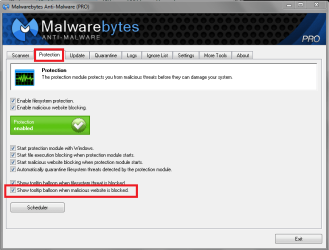
The Protection tab has a "Show tooltip balloon when malicious website is blocked".
Does unchecking that turn off the popup message?
I assume you're using MBAM 1.75, not the new 2.0 BETA.

It looks like you created a thread in the MBAM Removal Help forum for this ...
I don't know how quickly they help with cleaning malware, and it's a weekend ...

MBPSP01.PNG
 

My Computer My Computer

At a glance

Multi-Boot W7_Pro_x64 W8.1_Pro_x64 W10_Pro_x6...AMD Athlon II x4 6206GB GSkill DDR2 800AMD 4670 GPU + AMD 4200 IGP
Computer type
PC/Desktop
Computer Manufacturer/Model Number
home built
OS
Multi-Boot W7_Pro_x64 W8.1_Pro_x64 W10_Pro_x64 +Linux_VMs +Chromium_VM
CPU
AMD Athlon II x4 620
Motherboard
Gigabyte GA-MA785G-UD3H
Memory
6GB GSkill DDR2 800
Graphics Card(s)
AMD 4670 GPU + AMD 4200 IGP
Sound Card
on board Realtek ALC889A
Monitor(s) Displays
RCA 40" LCD TV, Insignia 32" LCD TV, HP 15" LCD monitor
Screen Resolution
1680 x 1050
Hard Drives
OCZ Vertex 3 120GB,
Samsung F3 1TB (3),
Several others - WD, Seagate, Hitachi, ...
PSU
Corsair 500 W
Case
Rosewill mid tower
Cooling
CM 90mm rifle
Keyboard
Gyration wireless, Logitech wireless, Dell USB wired
Mouse
Gyration wireless, Logitech wireless, V7 USB wired
Internet Speed
Spectrum - 100Mbps D / 10Mbps U
Antivirus
Avast, MBAM3, EMET, WinPatrol
Browser
Pale Moon, Firefox, IE
Other Info
2 multi-boot PC's
Mainly HTPC/Office/Gen purpose (no gaming).
Trendnet USB KVM.
LG DVD burner/Blue Ray Player.
Tray system for removable SATA backup drives.

Not currently OCd, under-volted.
I use Hybrid sleep, rarely re-boot or shutdown.

Hauppauge HD-PVR, Avermedia PCIe TV Tuner, Hauppauge PCI TV Tuner.
I think that David has the solution to your MBAM popup.

Have you looked at Resource Monitor to see what app is contacting the IP addresses? Just as a test, turn disable the DNS service and restart the computer. That may make the info in Resource Monitor clearer.

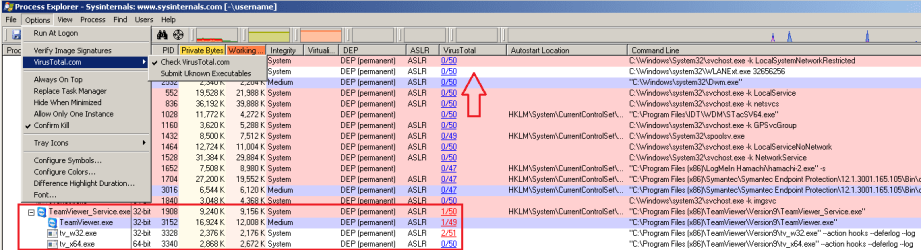
You might also want to download/run Process Explorer. It can now send a file hash to VirusTotal for every process the it finds running - of course, root kits can hide from Process Explorer, MSE and MBAM.

Since support for MSE is going away for XP boxes that I support, I've been playing with Panda Cloud Antivirus. That AV tool can also tell you which app is connecting to those IP addresses.
 

My Computer My Computer

At a glance

W7 Pro SP1 64biti78GBIntel HD Graphics
Computer type
Laptop
Computer Manufacturer/Model Number
Employer provided Dell Latitude
OS
W7 Pro SP1 64bit
CPU
i7
Memory
8GB
Graphics Card(s)
Intel HD Graphics
Hard Drives
crappy SSD
Antivirus
Employer mandated Symantec Endpoint Protection
Browser
Pale Moon 64bit, IE11 64bit & Chrome 64bit
The Protection tab has a "Show tooltip balloon when malicious website is blocked".
Does unchecking that turn off the popup message?
I assume you're using MBAM 1.75, not the new 2.0 BETA.
AHA!! I'm an idiot! Don't know how I did not see that option before you pointed it out!

I un-checked it, but the now "furiously frantic" attempts for the malware to "phone home" had increased to every few seconds, and I was unable to stop it even with this check box un-checked.

In frustration, I re-booted. And now, finally, the bubble messages were suppressed (even though entries in the LOG continued to be recorded).

So at least now the desktop user-experience is back to "silent normal" with no intrusively annoying constant popup messages indicating the blocked IP access attempts. Even though that's only part of the "solution", along with MBAM doing the blocking of the attempted IP access being another part of the solution, the remainder will come when I determine the true "culprit" rogue code and get rid of it.

Many many thanks for this tip. And yes, I'm using the official 1.75 version of the program.
 

My Computer My Computer

At a glance

Windows 7 Pro x64 (1), Win7 Pro X64 (2)i5-3350p 3.1Ghz/6MB-cache (1); E8400 3.0Ghz/6...8GB PC3-12800 DDR3 (1); 4GB PC3-10600 DDR3 (2)ATI HD7750 (1), (see TV cards); ATI R7 250 (2)
Computer type
PC/Desktop
Computer Manufacturer/Model Number
Home-built, two systems (1) and (2)
OS
Windows 7 Pro x64 (1), Win7 Pro X64 (2)
CPU
i5-3350p 3.1Ghz/6MB-cache (1); E8400 3.0Ghz/6MB-cache (2)
Motherboard
ASUS P8Z77-V Pro (1); ASUS P5Q3 (2)
Memory
8GB PC3-12800 DDR3 (1); 4GB PC3-10600 DDR3 (2)
Graphics Card(s)
ATI HD7750 (1), (see TV cards); ATI R7 250 (2)
Sound Card
Realtek ALC892 HD Audio (1); Realtek ALC1200 HD Audio (2)
Monitor(s) Displays
Eizo HD2441W LCD, Eizo S2433W (1); Eizo 24" S2433W (2)
Screen Resolution
1920x1200, 1920x1200 (1); 1920x1200 (2)
Hard Drives
(1) 1TB SATA-II (7200RPM), 2x2TB SATA-III (7200RPM), 250GB SATA-III (10000RPM) for OS; 2x2TB external USB 3.0

(2) 320GB SATA-II (7200RPM), 750GB SATA-II (7200RPM), 150GB SATA-II (10000RPM) for OS; 2TB external USB 3.0
PSU
Nesteq ECS-6001 600W (1); Nesteq ECS-5001 500W (2)
Case
Acousti-Case 360 (1) and (2)
Cooling
Noctua NH-U12P SE2 for CPU, 2x120mm case fans (1) and (2)
Keyboard
IBM PS/2 (1) and (2)
Mouse
Logitech MX Revolution wireless (1); Microsoft wired (2)
Internet Speed
100mbps down / 10mbps up
Antivirus
Microsoft Security Essentials; Malwarebyte Anti-Malware Pro
Browser
Firefox
Other Info
Ceton InfiniTV 4-tuner cablecard-enabled TV card as well as Hauppauge HVR-2250 OTA/ATSC 2-tuner TV card in (1), running under Win7 WMC
I think that David has the solution to your MBAM popup.
Indeed... don't know how I missed that option.

But un-checking it quieted down the "patient" so that I could focus on some more data gathering.


Have you looked at Resource Monitor to see what app is contacting the IP addresses?
Excellent idea. Again, I should have thought of that as well. Many thanks for the "crack on the head" to wake me up!

Anyway, it does appear (at least in this Windows session) to be related to service PID=876, which is running through the appearance of SVCHOST.EXE (DcomLaunch). Other than that, there's not much of any identification to go on.

However it does appear to be attempting to contact 62.75.136.158/159, which are two IP addresses in Russia registered to Abuzam.net. I'm guessing these are what externally appear eventually as 5.45.69.131 and 5.45.69.131 for MBAM to block, as the 5.45 addresses never actually showed up in Resource Monitor whereas the 62.75 addresses did.

I have not yet tried to simply "remove" that PID=876 service task.

r9ex.jpg


niu6.jpg


You might also want to download/run Process Explorer. It can now send a file hash to VirusTotal for every process the it finds running - of course, root kits can hide from Process Explorer, MSE and MBAM.
Another EXCELLENT suggestion.

There was some seemingly relevant information revealed by SysInternals as a clue here for PID=876. Again, the annotation of DcomLaunch appears closely involved.

0d8u.jpg


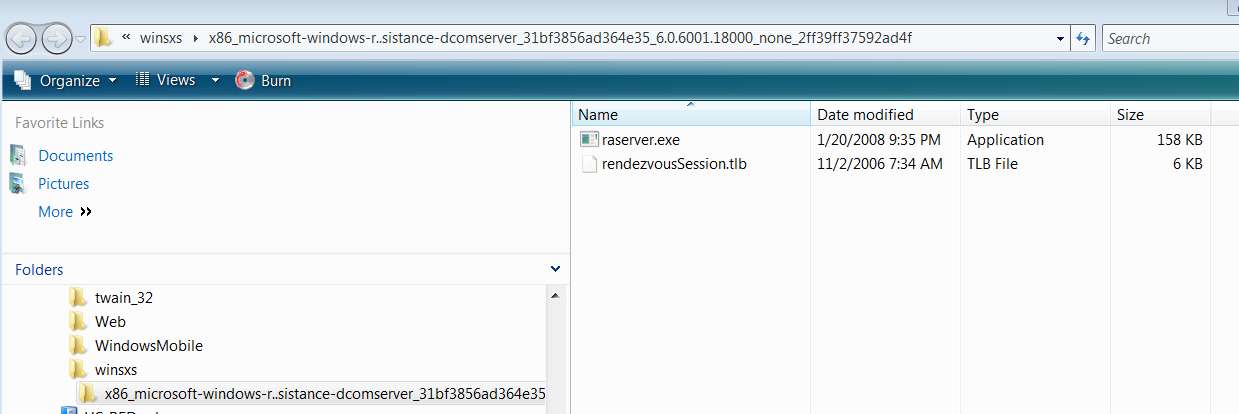
I did a "search" on the Vista machine for Dcom, and didn't find much that might be applicable other than the "Microsoft remote assistance DcomServer" folder. But I have the same folder on my own Win7 machine, so it looks probably legit... although that may be precisely the "ruse".

vl0x.jpg


Anyway, as you point out, no response yet over on the Malwarebytes forum thread. But you definitely have gotten me headed in the right direction research-wise. I'll do some Interweb searching on DcomLaunch and see if that turns up anything.

Many many thanks.
 

My Computer My Computer

At a glance

Windows 7 Pro x64 (1), Win7 Pro X64 (2)i5-3350p 3.1Ghz/6MB-cache (1); E8400 3.0Ghz/6...8GB PC3-12800 DDR3 (1); 4GB PC3-10600 DDR3 (2)ATI HD7750 (1), (see TV cards); ATI R7 250 (2)
Computer type
PC/Desktop
Computer Manufacturer/Model Number
Home-built, two systems (1) and (2)
OS
Windows 7 Pro x64 (1), Win7 Pro X64 (2)
CPU
i5-3350p 3.1Ghz/6MB-cache (1); E8400 3.0Ghz/6MB-cache (2)
Motherboard
ASUS P8Z77-V Pro (1); ASUS P5Q3 (2)
Memory
8GB PC3-12800 DDR3 (1); 4GB PC3-10600 DDR3 (2)
Graphics Card(s)
ATI HD7750 (1), (see TV cards); ATI R7 250 (2)
Sound Card
Realtek ALC892 HD Audio (1); Realtek ALC1200 HD Audio (2)
Monitor(s) Displays
Eizo HD2441W LCD, Eizo S2433W (1); Eizo 24" S2433W (2)
Screen Resolution
1920x1200, 1920x1200 (1); 1920x1200 (2)
Hard Drives
(1) 1TB SATA-II (7200RPM), 2x2TB SATA-III (7200RPM), 250GB SATA-III (10000RPM) for OS; 2x2TB external USB 3.0

(2) 320GB SATA-II (7200RPM), 750GB SATA-II (7200RPM), 150GB SATA-II (10000RPM) for OS; 2TB external USB 3.0
PSU
Nesteq ECS-6001 600W (1); Nesteq ECS-5001 500W (2)
Case
Acousti-Case 360 (1) and (2)
Cooling
Noctua NH-U12P SE2 for CPU, 2x120mm case fans (1) and (2)
Keyboard
IBM PS/2 (1) and (2)
Mouse
Logitech MX Revolution wireless (1); Microsoft wired (2)
Internet Speed
100mbps down / 10mbps up
Antivirus
Microsoft Security Essentials; Malwarebyte Anti-Malware Pro
Browser
Firefox
Other Info
Ceton InfiniTV 4-tuner cablecard-enabled TV card as well as Hauppauge HVR-2250 OTA/ATSC 2-tuner TV card in (1), running under Win7 WMC

Did you disable the DNS service while testing? Of course, the app connecting to the 5.... IP addresses will not need to make a DNS inquiry to connect to an IP address that is already known, but with the DNS service disabled, malware usually sticks out by making lots of DNS queries to other computers.

Did you notice the option to have Process Explorer check out each process?

PM-VT.png
Expect a few hits on TeamViewer - if that is installed.


I find it odd that the 5.... IP addresses did not show up in Resource Monitor. What does one of the MBAM log enties for those addresses look like? If you feel real adventurous, you can uninstall MSE and put Panda Cloud Antivirus on for a second opinion on what app is connecting to what external IP or server. Let me know if you want to try that and I'll document the screens to click on to set up Panda to log such connections.


BTW, I think that the AOL browser is just a wrapper for very old versions of Chrome. AOL 9.7 is Chrome 21. (Chrome is up to 32.) Surf to whatsmyuseragent.com using AOL and see if it IDs the Chrome rev.
 

My Computer My Computer

At a glance

W7 Pro SP1 64biti78GBIntel HD Graphics
Computer type
Laptop
Computer Manufacturer/Model Number
Employer provided Dell Latitude
OS
W7 Pro SP1 64bit
CPU
i7
Memory
8GB
Graphics Card(s)
Intel HD Graphics
Hard Drives
crappy SSD
Antivirus
Employer mandated Symantec Endpoint Protection
Browser
Pale Moon 64bit, IE11 64bit & Chrome 64bit
It sounds as though your system needs a good thorough malware cleanup.

Start with this scanner:
AdwCleaner (by Xplode) Download > AdwCleaner Download
Save to the Desktop.

Before running the program, please read the AdwCleaner Usage Instructions.
It alerts users of Antivir Webguard to the consequences of using this program.
Also, be aware the program resets search settings to the default Microsoft search, if changed by adware.

To proceed, right-click on AdwCleaner.exe and select: Run as Administrator

At the main window, press the [Scan] button.
The Scan function does not delete anything. It just lists elements.

Once AdwCleaner completes its scan, it shows a list of elements.
You can uncheck any item(s) you do not want to remove.

Next, click the [Clean] button.

A small window appears to inform that all programs will close.

AdwCleaner proceeds to delete all checked elements.

If a reboot is needed, a small window appears notifying of such. Please click: OK

When the AdwCleaner logfile appears, please provide it in your reply.

(The logfile is also saved in C:\AdwCleaner\AdwCleaner[R0].txt)
more information can be found on the author's site: Xplode


Then collect some information:
I've started using and recommending herdProtect - a multi-engine scanner.

Try downloading the portable version here. Then run herdProtect on the infected system.
Unfortunately herdProtect is still in beta, so it's a report only scanner; it doesn't fix the problem.
 

My Computer My Computer

At a glance

x64 (6.3.9600) Win8.1 Pro & soon dual boot x6...AMD A6-3420M APU with Radeon(tm) HD Graphics6.00 GBAMD Radeon(TM) HD 6520G
Computer type
Laptop
Computer Manufacturer/Model Number
HP Pavilion dv6-6c10us
OS
x64 (6.3.9600) Win8.1 Pro & soon dual boot x64 (6.1.7601) Win7_SP1 HomePrem
CPU
AMD A6-3420M APU with Radeon(tm) HD Graphics
Motherboard
Hewlett-Packard 1805
Memory
6.00 GB
Graphics Card(s)
AMD Radeon(TM) HD 6520G
Sound Card
(1) AMD High Definition Audio Device (2) IDT High Definiti
Monitor(s) Displays
HP W2072a 20" LCD (1600 x 900) @ 60 Hz
Screen Resolution
1366 x 768 x 32 bits (4294967296 colors) @ 60 Hz
Hard Drives
ST640LM0 00 HM641JI SATA Disk Device
Keyboard
Logitech k520 wireless KB
Mouse
Logitech m320 wireless mouse (bundled with KB)
Internet Speed
15/5 | 54 MB Wireless 'n'
Antivirus
Realtime: Defender or Avast | On-demand: Malwarebytes, ESET
Browser
IE 11 on Win8, IE 10 on win 7
Other Info
Media: [Gimp, Audacity, VLC] || Comm: [WEmail 2012, Skype] || Productivity: [OpenOffice,| Textpad] || Utils: [Sysinternals, cCleaner, Speccy, Defraggler]
Did you disable the DNS service while testing? Of course, the app connecting to the 5.... IP addresses will not need to make a DNS inquiry to connect to an IP address that is already known, but with the DNS service disabled, malware usually sticks out by making lots of DNS queries to other computers.
Did not do that, at least not yet. I was kind of poking around just enough to get some high-level information that might be very revealing, and I think it was.

But I will probably do some deeper probing, especially after [hopefully] the Malwarebytes forum post produces some response from their support people.


Did you notice the option to have Process Explorer check out each process?
Again, I didn't really do much playing here. I was focused simply on the DcomLaunch revelation and tie-in, and just wanted to get that documented.

I will no doubt use its more in-depth tools when I continue on with this later today. (need some sleep)


I find it odd that the 5.... IP addresses did not show up in Resource Monitor. What does one of the MBAM log enties for those addresses look like?
Plain and simple:

Code:
2014/02/01 08:56:08 -0500    PAUL    susan    IP-BLOCK    5.45.69.131 (Type: outgoing, Port: 51956, Process: svchost.exe)
2014/02/01 08:58:00 -0500    PAUL    susan    IP-BLOCK    5.45.64.145 (Type: outgoing, Port: 52168, Process: svchost.exe)
2014/02/01 08:59:13 -0500    PAUL    susan    IP-BLOCK    5.45.64.145 (Type: outgoing, Port: 52307, Process: svchost.exe)
2014/02/01 09:00:49 -0500    PAUL    susan    IP-BLOCK    5.45.64.145 (Type: outgoing, Port: 52477, Process: svchost.exe)
2014/02/01 09:01:37 -0500    PAUL    susan    IP-BLOCK    5.45.64.145 (Type: outgoing, Port: 52538, Process: svchost.exe)
2014/02/01 09:02:26 -0500    PAUL    susan    IP-BLOCK    5.45.64.145 (Type: outgoing, Port: 52557, Process: svchost.exe)
2014/02/01 09:02:34 -0500    PAUL    susan    IP-BLOCK    5.45.69.131 (Type: outgoing, Port: 52560, Process: svchost.exe)
2014/02/01 09:03:30 -0500    PAUL    susan    IP-BLOCK    5.45.69.131 (Type: outgoing, Port: 52568, Process: svchost.exe)
2014/02/01 09:04:18 -0500    PAUL    susan    IP-BLOCK    5.45.64.145 (Type: outgoing, Port: 52574, Process: svchost.exe)
2014/02/01 09:06:34 -0500    PAUL    susan    IP-BLOCK    5.45.64.145 (Type: outgoing, Port: 52593, Process: svchost.exe)
BTW, I think that the AOL browser is just a wrapper for very old versions of Chrome. AOL 9.7 is Chrome 21. (Chrome is up to 32.) Surf to whatsmyuseragent.com using AOL and see if it IDs the Chrome rev.
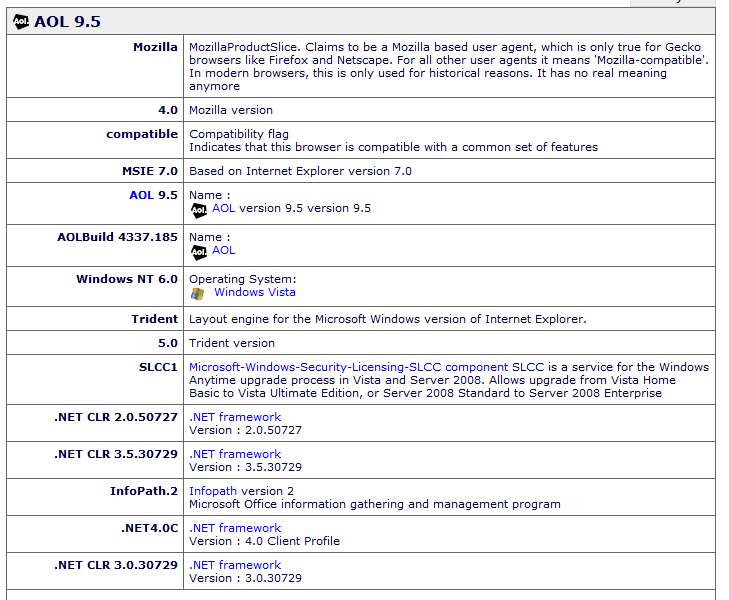
I upgraded to AOL 9.5, not 9.7. But there is no reference to Chrome. Actually it looks like some underlying reference to Mozilla, although it's really using the installed IE9.

bqgr.jpg


vijd.jpg


Now, the above useragent string is VERY VERY VERY interesting to me... because there is a SECOND problem on this Vista laptop as relates to AOL that I'm also trying to solve. I'm not an AOL expert (or even novice, really), so any help would be appreciated.

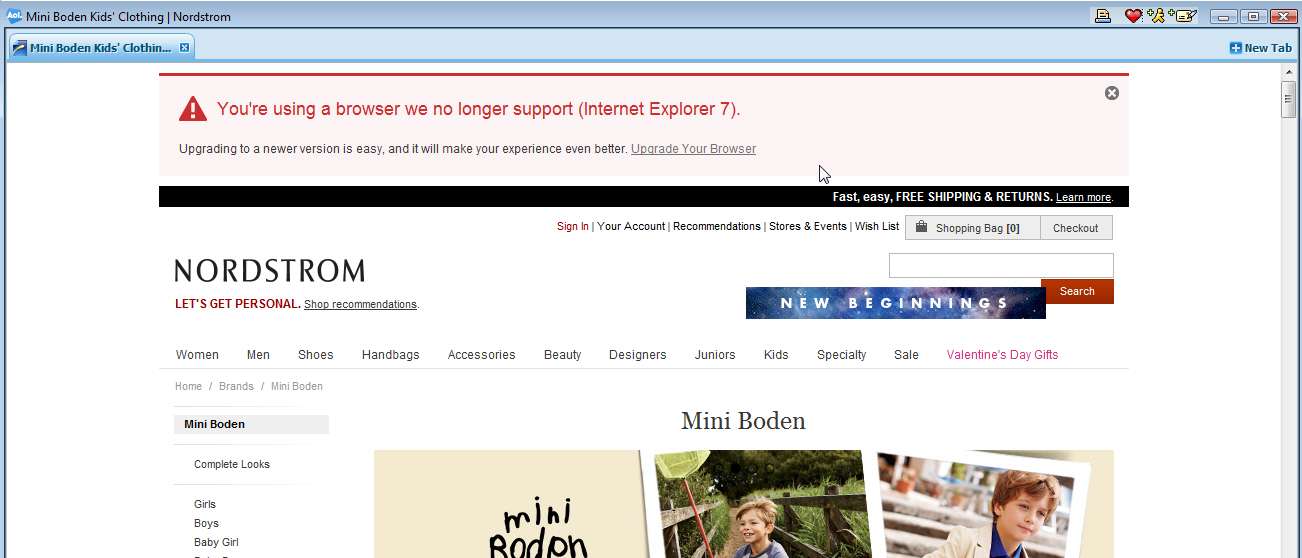
Yes, this machine previously was at Vista Service Pack 2 and using IE7 and AOL 9.1. But she had a problem "seeing the pictures" via for shopping via advert email sent from Nordstrom's, that she would read using AOL email. The problem was that Nordstrom's web site made a change a few months ago which required IE higher than 7, in order to support the new graphics functionality their web pages now utilized. So the pictures on the web pages were not showing up, instead replaced by the standard "dead links" icons.

So I fully expected my application of Vista Service Pack 3, and the subsequent upgrade to IE8 followed by my manual upgrade to IE9, along with my AOL software upgrade from 9.1 to 9.5, well I expected that this all would "fix" the problem of "dead graphics links icons" on those Nordstrom pages.

Remarkably, it did NOT fix the problem! Instead, the Nordstrom pages continued to display (in what is actually an IE browser window launched by AOL when you click on the "view email in a browser window" link) an error message stating "we no longer support the browser you are using, IE7". Clearly this is tied to the loss of graphics issue on their web pages when viewed through AOL, but should no longer be happening because it is now IE9 which is currently installed... not IE7 as it definitely used to be.

So now I see this useragentstring value which also shows IE7!!! And yet, it is really IE9 that is on the machine.

So, if I knew how to purge that "cookie" or whatever AOL saves in order to populate the useragentstring, so that it would pick up a current and correct value of IE9, well I suspect that would obviously now send the proper useragentstring to the Nordstrom web site when queried, and the online sales pages would [hopefully and presumably] now populate the graphics correctly on those pages.

So... you wouldn't happen to know how/where to get that AOL value changed to properly reflect IE9?
 
Last edited:

My Computer My Computer

At a glance

Windows 7 Pro x64 (1), Win7 Pro X64 (2)i5-3350p 3.1Ghz/6MB-cache (1); E8400 3.0Ghz/6...8GB PC3-12800 DDR3 (1); 4GB PC3-10600 DDR3 (2)ATI HD7750 (1), (see TV cards); ATI R7 250 (2)
Computer type
PC/Desktop
Computer Manufacturer/Model Number
Home-built, two systems (1) and (2)
OS
Windows 7 Pro x64 (1), Win7 Pro X64 (2)
CPU
i5-3350p 3.1Ghz/6MB-cache (1); E8400 3.0Ghz/6MB-cache (2)
Motherboard
ASUS P8Z77-V Pro (1); ASUS P5Q3 (2)
Memory
8GB PC3-12800 DDR3 (1); 4GB PC3-10600 DDR3 (2)
Graphics Card(s)
ATI HD7750 (1), (see TV cards); ATI R7 250 (2)
Sound Card
Realtek ALC892 HD Audio (1); Realtek ALC1200 HD Audio (2)
Monitor(s) Displays
Eizo HD2441W LCD, Eizo S2433W (1); Eizo 24" S2433W (2)
Screen Resolution
1920x1200, 1920x1200 (1); 1920x1200 (2)
Hard Drives
(1) 1TB SATA-II (7200RPM), 2x2TB SATA-III (7200RPM), 250GB SATA-III (10000RPM) for OS; 2x2TB external USB 3.0

(2) 320GB SATA-II (7200RPM), 750GB SATA-II (7200RPM), 150GB SATA-II (10000RPM) for OS; 2TB external USB 3.0
PSU
Nesteq ECS-6001 600W (1); Nesteq ECS-5001 500W (2)
Case
Acousti-Case 360 (1) and (2)
Cooling
Noctua NH-U12P SE2 for CPU, 2x120mm case fans (1) and (2)
Keyboard
IBM PS/2 (1) and (2)
Mouse
Logitech MX Revolution wireless (1); Microsoft wired (2)
Internet Speed
100mbps down / 10mbps up
Antivirus
Microsoft Security Essentials; Malwarebyte Anti-Malware Pro
Browser
Firefox
Other Info
Ceton InfiniTV 4-tuner cablecard-enabled TV card as well as Hauppauge HVR-2250 OTA/ATSC 2-tuner TV card in (1), running under Win7 WMC

I upgraded to AOL 9.5, not 9.7. But there is no reference to Chrome. Actually it looks like some underlying reference to Mozilla, although it's really using the installed IE9.

How's that AdwCleaner scan coming along? I know threads get hectic sometimes, run the scan when you get the chance.

Could you explain what you mean by although it's really using the installed IE9

I think you're also confusing "IE7 broswer" with "IE7 HTML std"

I saw that you applied Vista SP3 and I recommend running Windows Update (WU) on that machine until all there are no further updates offered.

See where that gets you.
 

My Computer My Computer

At a glance

x64 (6.3.9600) Win8.1 Pro & soon dual boot x6...AMD A6-3420M APU with Radeon(tm) HD Graphics6.00 GBAMD Radeon(TM) HD 6520G
Computer type
Laptop
Computer Manufacturer/Model Number
HP Pavilion dv6-6c10us
OS
x64 (6.3.9600) Win8.1 Pro & soon dual boot x64 (6.1.7601) Win7_SP1 HomePrem
CPU
AMD A6-3420M APU with Radeon(tm) HD Graphics
Motherboard
Hewlett-Packard 1805
Memory
6.00 GB
Graphics Card(s)
AMD Radeon(TM) HD 6520G
Sound Card
(1) AMD High Definition Audio Device (2) IDT High Definiti
Monitor(s) Displays
HP W2072a 20" LCD (1600 x 900) @ 60 Hz
Screen Resolution
1366 x 768 x 32 bits (4294967296 colors) @ 60 Hz
Hard Drives
ST640LM0 00 HM641JI SATA Disk Device
Keyboard
Logitech k520 wireless KB
Mouse
Logitech m320 wireless mouse (bundled with KB)
Internet Speed
15/5 | 54 MB Wireless 'n'
Antivirus
Realtime: Defender or Avast | On-demand: Malwarebytes, ESET
Browser
IE 11 on Win8, IE 10 on win 7
Other Info
Media: [Gimp, Audacity, VLC] || Comm: [WEmail 2012, Skype] || Productivity: [OpenOffice,| Textpad] || Utils: [Sysinternals, cCleaner, Speccy, Defraggler]
How's that AdwCleaner scan coming along?
I'm back on that machine again. It's actually in Florida and I'm in LA, remoting in with RealVNC.

I will run this shortly.


Could you explain what you mean by although it's really using the installed IE9
It is no longer IE7 which is actually installed and currently running when the "E" gets launched. It's IE9.

And yet the "useragentstring" value that gets sent out when using the AOL browser (and which is presumably than parsed by the Nordstrom web site to confirm that a compatible version of IE is in use on the client machine) shows that it is "MSIE 7.0" which is in use (if my interpretation of that value is correct), rather than what I would now expect to see as "MSIE 9.0".

IE7 previously was installed until yesterday's software upgrades. It's now IE9, and I'd think that is what would now be in "useragentstring".


I think you're also confusing "IE7 broswer" with "IE7 HTML std"
Might be. If so, then my theory as to why the Nordstrom site presents the error message that is is presenting would suggest it is deciding IE7 is in use must be from something other than "useragentstring"... which I honestly doubt.

f857.jpg


I saw that you applied Vista SP3 and I recommend running Windows Update (WU) on that machine until all there are no further updates offered.
Good idea, although there is no Windows Update icon showing in the system tray.

But while this is certainly prudent and wise and appropriate, it still doesn't address either of my two issues:

(1) malware attempting to contact Russia, and

(2) AOL sending indication to Nordstrom site of instlaled_browser=MSIE7 when it should be sending installed_browser=MSIE9. If it's not in "useragentstring" then where else might it be??
 

My Computer My Computer

At a glance

Windows 7 Pro x64 (1), Win7 Pro X64 (2)i5-3350p 3.1Ghz/6MB-cache (1); E8400 3.0Ghz/6...8GB PC3-12800 DDR3 (1); 4GB PC3-10600 DDR3 (2)ATI HD7750 (1), (see TV cards); ATI R7 250 (2)
Computer type
PC/Desktop
Computer Manufacturer/Model Number
Home-built, two systems (1) and (2)
OS
Windows 7 Pro x64 (1), Win7 Pro X64 (2)
CPU
i5-3350p 3.1Ghz/6MB-cache (1); E8400 3.0Ghz/6MB-cache (2)
Motherboard
ASUS P8Z77-V Pro (1); ASUS P5Q3 (2)
Memory
8GB PC3-12800 DDR3 (1); 4GB PC3-10600 DDR3 (2)
Graphics Card(s)
ATI HD7750 (1), (see TV cards); ATI R7 250 (2)
Sound Card
Realtek ALC892 HD Audio (1); Realtek ALC1200 HD Audio (2)
Monitor(s) Displays
Eizo HD2441W LCD, Eizo S2433W (1); Eizo 24" S2433W (2)
Screen Resolution
1920x1200, 1920x1200 (1); 1920x1200 (2)
Hard Drives
(1) 1TB SATA-II (7200RPM), 2x2TB SATA-III (7200RPM), 250GB SATA-III (10000RPM) for OS; 2x2TB external USB 3.0

(2) 320GB SATA-II (7200RPM), 750GB SATA-II (7200RPM), 150GB SATA-II (10000RPM) for OS; 2TB external USB 3.0
PSU
Nesteq ECS-6001 600W (1); Nesteq ECS-5001 500W (2)
Case
Acousti-Case 360 (1) and (2)
Cooling
Noctua NH-U12P SE2 for CPU, 2x120mm case fans (1) and (2)
Keyboard
IBM PS/2 (1) and (2)
Mouse
Logitech MX Revolution wireless (1); Microsoft wired (2)
Internet Speed
100mbps down / 10mbps up
Antivirus
Microsoft Security Essentials; Malwarebyte Anti-Malware Pro
Browser
Firefox
Other Info
Ceton InfiniTV 4-tuner cablecard-enabled TV card as well as Hauppauge HVR-2250 OTA/ATSC 2-tuner TV card in (1), running under Win7 WMC
How's that AdwCleaner scan coming along?
Well, some new GOOD news, and some "no difference" news.

First, there was what I suspected was malware installed on the Vista machine, a thing named "MyWebSearch". It had its fingers in IE as toolbar, plugins, etc. I could not uninstall it entirely (using Control Panel) though I was able to remove some of it, including its traces in IE. But the final piece couldn't actually be uninstalled because the UNINSTALL process claimed that one of its DLL files could not be found. I suspect this is part of the whole idea, to get it installed and then make it also non-uninstallable.

Anyway, MBAM's scans did NOT find this. However ADWCleaner DID find it! I was very excited to let it go ahead and CLEAN it out. And in fact it DID seem to do the job successfully. Following the re-boot it was no longer shown in Control Panel as a program. Definitely seemed that ADWCleaner "paid for itself" (although it's free!) here.

Nothing else was found. Here is the log which appears following re-boot.

Code:
# AdwCleaner v3.018 - Report created 01/02/2014 at 11:14:09
# Updated 28/01/2014 by Xplode
# Operating System : Windows Vista (TM) Home Basic Service Pack 2 (32 bits)
# Username : susan - PAUL
# Running from : C:\BBS\ADWCleaner\AdwCleaner.exe
# Option : Clean

***** [ Services ] *****

Service Deleted : MyWebSearchService

***** [ Files / Folders ] *****

Folder Deleted : C:\ProgramData\Viewpoint
Folder Deleted : C:\Program Files\FunWebProducts
Folder Deleted : C:\Program Files\MyWebSearch
Folder Deleted : C:\Program Files\Viewpoint
Folder Deleted : C:\Program Files\Common Files\Software Update Utility
Folder Deleted : C:\Users\susan\AppData\LocalLow\FunWebProducts
Folder Deleted : C:\Users\susan\AppData\LocalLow\MyWebSearch

***** [ Shortcuts ] *****


***** [ Registry ] *****

Value Deleted : HKLM\SOFTWARE\Mozilla\Firefox\Extensions [[email protected]]
Key Deleted : HKLM\SOFTWARE\Classes\AppID\dnu.EXE
Key Deleted : HKLM\SOFTWARE\Classes\AxMetaStream.MetaStreamCtl
Key Deleted : HKLM\SOFTWARE\Classes\AxMetaStream.MetaStreamCtl.1
Key Deleted : HKLM\SOFTWARE\Classes\AxMetaStream.MetaStreamCtlSecondary
Key Deleted : HKLM\SOFTWARE\Classes\AxMetaStream.MetaStreamCtlSecondary.1
Key Deleted : HKLM\SOFTWARE\Classes\dnUpdate
Key Deleted : HKLM\SOFTWARE\Classes\dnUpdater.DownloadUIBrowser
Key Deleted : HKLM\SOFTWARE\Classes\dnUpdater.DownloadUIBrowser.1
Key Deleted : HKLM\SOFTWARE\Classes\dnUpdater.DownloadUpdController
Key Deleted : HKLM\SOFTWARE\Classes\dnUpdater.DownloadUpdController.1
Key Deleted : HKLM\SOFTWARE\Classes\FunWebProducts.DataControl
Key Deleted : HKLM\SOFTWARE\Classes\FunWebProducts.DataControl.1
Key Deleted : HKLM\SOFTWARE\Classes\FunWebProducts.HistoryKillerScheduler
Key Deleted : HKLM\SOFTWARE\Classes\FunWebProducts.HistoryKillerScheduler.1
Key Deleted : HKLM\SOFTWARE\Classes\FunWebProducts.HistorySwatterControlBar
Key Deleted : HKLM\SOFTWARE\Classes\FunWebProducts.HistorySwatterControlBar.1
Key Deleted : HKLM\SOFTWARE\Classes\FunWebProducts.HTMLMenu
Key Deleted : HKLM\SOFTWARE\Classes\FunWebProducts.HTMLMenu.1
Key Deleted : HKLM\SOFTWARE\Classes\FunWebProducts.HTMLMenu.2
Key Deleted : HKLM\SOFTWARE\Classes\FunWebProducts.IECookiesManager
Key Deleted : HKLM\SOFTWARE\Classes\FunWebProducts.IECookiesManager.1
Key Deleted : HKLM\SOFTWARE\Classes\FunWebProducts.KillerObjManager
Key Deleted : HKLM\SOFTWARE\Classes\FunWebProducts.KillerObjManager.1
Key Deleted : HKLM\SOFTWARE\Classes\FunWebProducts.PopSwatterBarButton
Key Deleted : HKLM\SOFTWARE\Classes\FunWebProducts.PopSwatterBarButton.1
Key Deleted : HKLM\SOFTWARE\Classes\FunWebProducts.PopSwatterSettingsControl
Key Deleted : HKLM\SOFTWARE\Classes\FunWebProducts.PopSwatterSettingsControl.1
Key Deleted : HKLM\SOFTWARE\Classes\MyWebSearch.ChatSessionPlugin
Key Deleted : HKLM\SOFTWARE\Classes\MyWebSearch.ChatSessionPlugin.1
Key Deleted : HKLM\SOFTWARE\Classes\MyWebSearch.HTMLPanel
Key Deleted : HKLM\SOFTWARE\Classes\MyWebSearch.HTMLPanel.1
Key Deleted : HKLM\SOFTWARE\Classes\MyWebSearch.MultipleButton
Key Deleted : HKLM\SOFTWARE\Classes\MyWebSearch.MultipleButton.1
Key Deleted : HKLM\SOFTWARE\Classes\MyWebSearch.OutlookAddin
Key Deleted : HKLM\SOFTWARE\Classes\MyWebSearch.OutlookAddin.1
Key Deleted : HKLM\SOFTWARE\Classes\MyWebSearch.PseudoTransparentPlugin
Key Deleted : HKLM\SOFTWARE\Classes\MyWebSearch.PseudoTransparentPlugin.1
Key Deleted : HKLM\SOFTWARE\Classes\MyWebSearch.ThirdPartyInstaller
Key Deleted : HKLM\SOFTWARE\Classes\MyWebSearch.ThirdPartyInstaller.1
Key Deleted : HKLM\SOFTWARE\Classes\MyWebSearch.UrlAlertButton
Key Deleted : HKLM\SOFTWARE\Classes\MyWebSearch.UrlAlertButton.1
Key Deleted : HKLM\SOFTWARE\Classes\MyWebSearchToolBar.SettingsPlugin
Key Deleted : HKLM\SOFTWARE\Classes\MyWebSearchToolBar.SettingsPlugin.1
Key Deleted : HKLM\SOFTWARE\Classes\MyWebSearchToolBar.ToolbarPlugin
Key Deleted : HKLM\SOFTWARE\Classes\MyWebSearchToolBar.ToolbarPlugin.1
Key Deleted : HKLM\SOFTWARE\Classes\protector_dll.protectorbho
Key Deleted : HKLM\SOFTWARE\Classes\protector_dll.protectorbho.1
Key Deleted : HKLM\SOFTWARE\Classes\ScreenSaverControl.ScreenSaverInstaller
Key Deleted : HKLM\SOFTWARE\Classes\ScreenSaverControl.ScreenSaverInstaller.1
Key Deleted : HKLM\SOFTWARE\Microsoft\Active Setup\Installed Components\{03F998B2-0E00-11D3-A498-00104B6EB52E}
Key Deleted : HKLM\SOFTWARE\Microsoft\Active Setup\Installed Components\{1B00725B-C455-4DE6-BFB6-AD540AD427CD}
Key Deleted : HKLM\SOFTWARE\Microsoft\Internet Explorer\Low Rights\RunDll32Policy\f3ScrCtr.dll
Key Deleted : HKLM\SOFTWARE\Microsoft\Multimedia\WMPlayer\Schemes\f3pss
Key Deleted : HKLM\SOFTWARE\Microsoft\Office\Outlook\Addins\MyWebSearch.OutlookAddin
Key Deleted : HKLM\SOFTWARE\Microsoft\Office\Word\Addins\MyWebSearch.OutlookAddin
Value Deleted : HKLM\SOFTWARE\Microsoft\Windows Media\Wmsdk\Sources [F3PopularScreenSavers]
Value Deleted : HKLM\SOFTWARE\Microsoft\Windows\CurrentVersion\Internet Settings\User Agent\post platform [FunWebProducts]
Key Deleted : HKLM\SOFTWARE\MozillaPlugins\@mywebsearch.com/Plugin
Key Deleted : HKLM\SOFTWARE\MozillaPlugins\@viewpoint.com/VMP
Key Deleted : HKLM\SOFTWARE\Classes\AppID\{6C259840-5BA8-46E6-8ED1-EF3BA47D8BA1}
Key Deleted : HKLM\SOFTWARE\Classes\AppID\{B27D9527-3762-4D71-963D-FB7A94FDD678}
Key Deleted : HKLM\SOFTWARE\Classes\CLSID\{00A6FAF6-072E-44CF-8957-5838F569A31D}
Key Deleted : HKLM\SOFTWARE\Classes\CLSID\{03F998B2-0E00-11D3-A498-00104B6EB52E}
Key Deleted : HKLM\SOFTWARE\Classes\CLSID\{07B18EA9-A523-4961-B6BB-170DE4475CCA}
Key Deleted : HKLM\SOFTWARE\Classes\CLSID\{07B18EAB-A523-4961-B6BB-170DE4475CCA}
Key Deleted : HKLM\SOFTWARE\Classes\CLSID\{08858AF6-42AD-4914-95D2-AC3AB0DC8E28}
Key Deleted : HKLM\SOFTWARE\Classes\CLSID\{0F8ECF4F-3646-4C3A-8881-8E138FFCAF70}
Key Deleted : HKLM\SOFTWARE\Classes\CLSID\{147A976F-EEE1-4377-8EA7-4716E4CDD239}
Key Deleted : HKLM\SOFTWARE\Classes\CLSID\{1B00725B-C455-4DE6-BFB6-AD540AD427CD}
Key Deleted : HKLM\SOFTWARE\Classes\CLSID\{1E0DE227-5CE4-4EA3-AB0C-8B03E1AA76BC}
Key Deleted : HKLM\SOFTWARE\Classes\CLSID\{25560540-9571-4D7B-9389-0F166788785A}
Key Deleted : HKLM\SOFTWARE\Classes\CLSID\{3DC201FB-E9C9-499C-A11F-23C360D7C3F8}
Key Deleted : HKLM\SOFTWARE\Classes\CLSID\{3E720452-B472-4954-B7AA-33069EB53906}
Key Deleted : HKLM\SOFTWARE\Classes\CLSID\{53CED2D0-5E9A-4761-9005-648404E6F7E5}
Key Deleted : HKLM\SOFTWARE\Classes\CLSID\{63D0ED2C-B45B-4458-8B3B-60C69BBBD83C}
Key Deleted : HKLM\SOFTWARE\Classes\CLSID\{67FA02C4-AB30-4E77-A640-78EE8EC8673B}
Key Deleted : HKLM\SOFTWARE\Classes\CLSID\{7473D292-B7BB-4F24-AE82-7E2CE94BB6A9}
Key Deleted : HKLM\SOFTWARE\Classes\CLSID\{7473D294-B7BB-4F24-AE82-7E2CE94BB6A9}
Key Deleted : HKLM\SOFTWARE\Classes\CLSID\{7473D296-B7BB-4F24-AE82-7E2CE94BB6A9}
Key Deleted : HKLM\SOFTWARE\Classes\CLSID\{799391D3-EB86-4BAC-9BD3-CBFEA58A0E15}
Key Deleted : HKLM\SOFTWARE\Classes\CLSID\{7B089B94-D1DC-4C6B-87E1-8156E22C1D96}
Key Deleted : HKLM\SOFTWARE\Classes\CLSID\{819FFE22-35C7-4925-8CDA-4E0E2DB94302}
Key Deleted : HKLM\SOFTWARE\Classes\CLSID\{84DA4FDF-A1CF-4195-8688-3E961F505983}
Key Deleted : HKLM\SOFTWARE\Classes\CLSID\{8E6F1832-9607-4440-8530-13BE7C4B1D14}
Key Deleted : HKLM\SOFTWARE\Classes\CLSID\{938AA51A-996C-4884-98CE-80DD16A5C9DA}
Key Deleted : HKLM\SOFTWARE\Classes\CLSID\{98D9753D-D73B-42D5-8C85-4469CDA897AB}
Key Deleted : HKLM\SOFTWARE\Classes\CLSID\{9AFB8248-617F-460D-9366-D71CDEDA3179}
Key Deleted : HKLM\SOFTWARE\Classes\CLSID\{9FF05104-B030-46FC-94B8-81276E4E27DF}
Key Deleted : HKLM\SOFTWARE\Classes\CLSID\{A4730EBE-43A6-443E-9776-36915D323AD3}
Key Deleted : HKLM\SOFTWARE\Classes\CLSID\{A9571378-68A1-443D-B082-284F960C6D17}
Key Deleted : HKLM\SOFTWARE\Classes\CLSID\{ADB01E81-3C79-4272-A0F1-7B2BE7A782DC}
Key Deleted : HKLM\SOFTWARE\Classes\CLSID\{B813095C-81C0-4E40-AA14-67520372B987}
Key Deleted : HKLM\SOFTWARE\Classes\CLSID\{C9D7BE3E-141A-4C85-8CD6-32461F3DF2C7}
Key Deleted : HKLM\SOFTWARE\Classes\CLSID\{CFF4CE82-3AA2-451F-9B77-7165605FB835}
Key Deleted : HKLM\SOFTWARE\Classes\CLSID\{D858DAFC-9573-4811-B323-7011A3AA7E61}
Key Deleted : HKLM\SOFTWARE\Classes\CLSID\{D9FFFB27-D62A-4D64-8CEC-1FF006528805}
Key Deleted : HKLM\SOFTWARE\Classes\CLSID\{E15A9BFD-D16D-496D-8222-44CADF316E70}
Key Deleted : HKLM\SOFTWARE\Classes\CLSID\{E79DFBCA-5697-4FBD-94E5-5B2A9C7C1612}
Key Deleted : HKLM\SOFTWARE\Classes\Interface\{01947140-417F-46B6-8751-A3A2B8345E1A}
Key Deleted : HKLM\SOFTWARE\Classes\Interface\{07B18EAC-A523-4961-B6BB-170DE4475CCA}
Key Deleted : HKLM\SOFTWARE\Classes\Interface\{1093995A-BA37-41D2-836E-091067C4AD17}
Key Deleted : HKLM\SOFTWARE\Classes\Interface\{120927BF-1700-43BC-810F-FAB92549B390}
Key Deleted : HKLM\SOFTWARE\Classes\Interface\{17DE5E5E-BFE3-4E83-8E1F-8755795359EC}
Key Deleted : HKLM\SOFTWARE\Classes\Interface\{1F52A5FA-A705-4415-B975-88503B291728}
Key Deleted : HKLM\SOFTWARE\Classes\Interface\{247A115F-06C2-4FB3-967D-2D62D3CF4F0A}
Key Deleted : HKLM\SOFTWARE\Classes\Interface\{2E3537FC-CF2F-4F56-AF54-5A6A3DD375CC}
Key Deleted : HKLM\SOFTWARE\Classes\Interface\{2E9937FC-CF2F-4F56-AF54-5A6A3DD375CC}
Key Deleted : HKLM\SOFTWARE\Classes\Interface\{3E1656ED-F60E-4597-B6AA-B6A58E171495}
Key Deleted : HKLM\SOFTWARE\Classes\Interface\{3E53E2CB-86DB-4A4A-8BD9-FFEB7A64DF82}
Key Deleted : HKLM\SOFTWARE\Classes\Interface\{3E720451-B472-4954-B7AA-33069EB53906}
Key Deleted : HKLM\SOFTWARE\Classes\Interface\{3E720453-B472-4954-B7AA-33069EB53906}
Key Deleted : HKLM\SOFTWARE\Classes\Interface\{63D0ED2B-B45B-4458-8B3B-60C69BBBD83C}
Key Deleted : HKLM\SOFTWARE\Classes\Interface\{63D0ED2D-B45B-4458-8B3B-60C69BBBD83C}
Key Deleted : HKLM\SOFTWARE\Classes\Interface\{660E6F4F-840D-436D-B668-433D9591BAC5}
Key Deleted : HKLM\SOFTWARE\Classes\Interface\{6E74766C-4D93-4CC0-96D1-47B8E07FF9CA}
Key Deleted : HKLM\SOFTWARE\Classes\Interface\{72EE7F04-15BD-4845-A005-D6711144D86A}
Key Deleted : HKLM\SOFTWARE\Classes\Interface\{741DE825-A6F0-4497-9AA6-8023CF9B0FFF}
Key Deleted : HKLM\SOFTWARE\Classes\Interface\{7473D291-B7BB-4F24-AE82-7E2CE94BB6A9}
Key Deleted : HKLM\SOFTWARE\Classes\Interface\{7473D293-B7BB-4F24-AE82-7E2CE94BB6A9}
Key Deleted : HKLM\SOFTWARE\Classes\Interface\{7473D295-B7BB-4F24-AE82-7E2CE94BB6A9}
Key Deleted : HKLM\SOFTWARE\Classes\Interface\{7473D297-B7BB-4F24-AE82-7E2CE94BB6A9}
Key Deleted : HKLM\SOFTWARE\Classes\Interface\{819FFE21-35C7-4925-8CDA-4E0E2DB94302}
Key Deleted : HKLM\SOFTWARE\Classes\Interface\{8E9CF769-3D3B-40EB-9E2D-76E7A205E4D2}
Key Deleted : HKLM\SOFTWARE\Classes\Interface\{90449521-D834-4703-BB4E-D3AA44042FF8}
Key Deleted : HKLM\SOFTWARE\Classes\Interface\{991AAC62-B100-47CE-8B75-253965244F69}
Key Deleted : HKLM\SOFTWARE\Classes\Interface\{A626CDBD-3D13-4F78-B819-440A28D7E8FC}
Key Deleted : HKLM\SOFTWARE\Classes\Interface\{BBABDC90-F3D5-4801-863A-EE6AE529862D}
Key Deleted : HKLM\SOFTWARE\Classes\Interface\{CF54BE1C-9359-4395-8533-1657CF209CFE}
Key Deleted : HKLM\SOFTWARE\Classes\Interface\{D6FF3684-AD3B-48EB-BBB4-B9E6C5A355C1}
Key Deleted : HKLM\SOFTWARE\Classes\Interface\{DE38C398-B328-4F4C-A3AD-1B5E4ED93477}
Key Deleted : HKLM\SOFTWARE\Classes\Interface\{E342AF55-B78A-4CD0-A2BB-DA7F52D9D25E}
Key Deleted : HKLM\SOFTWARE\Classes\Interface\{E342AF55-B78A-4CD0-A2BB-DA7F52D9D25F}
Key Deleted : HKLM\SOFTWARE\Classes\Interface\{E7435878-65B9-44D1-A443-81754E5DFC90}
Key Deleted : HKLM\SOFTWARE\Classes\Interface\{E79DFBC9-5697-4FBD-94E5-5B2A9C7C1612}
Key Deleted : HKLM\SOFTWARE\Classes\Interface\{E79DFBCB-5697-4FBD-94E5-5B2A9C7C1612}
Key Deleted : HKLM\SOFTWARE\Classes\Interface\{EB9E5C1C-B1F9-4C2B-BE8A-27D6446FDAF8}
Key Deleted : HKLM\SOFTWARE\Classes\Interface\{F87D7FB5-9DC5-4C8C-B998-D8DFE02E2978}
Key Deleted : HKLM\SOFTWARE\Classes\TypeLib\{0D26BC71-A633-4E71-AD31-EADC3A1B6A3A}
Key Deleted : HKLM\SOFTWARE\Classes\TypeLib\{29D67D3C-509A-4544-903F-C8C1B8236554}
Key Deleted : HKLM\SOFTWARE\Classes\TypeLib\{3E720450-B472-4954-B7AA-33069EB53906}
Key Deleted : HKLM\SOFTWARE\Classes\TypeLib\{7473D290-B7BB-4F24-AE82-7E2CE94BB6A9}
Key Deleted : HKLM\SOFTWARE\Classes\TypeLib\{819FFE20-35C7-4925-8CDA-4E0E2DB94302}
Key Deleted : HKLM\SOFTWARE\Classes\TypeLib\{8CA01F0E-987C-49C3-B852-2F1AC4A7094C}
Key Deleted : HKLM\SOFTWARE\Classes\TypeLib\{8E6F1830-9607-4440-8530-13BE7C4B1D14}
Key Deleted : HKLM\SOFTWARE\Classes\TypeLib\{8FFDF636-0D87-4B33-B9E9-79A53F6E1DAE}
Key Deleted : HKLM\SOFTWARE\Classes\TypeLib\{92380354-381A-471F-BE2E-DD9ACD9777EA}
Key Deleted : HKLM\SOFTWARE\Classes\TypeLib\{C8CECDE3-1AE1-4C4A-AD82-6D5B00212144}
Key Deleted : HKLM\SOFTWARE\Classes\TypeLib\{D518921A-4A03-425E-9873-B9A71756821E}
Key Deleted : HKLM\SOFTWARE\Classes\TypeLib\{E47CAEE0-DEEA-464A-9326-3F2801535A4D}
Key Deleted : HKLM\SOFTWARE\Classes\TypeLib\{E79DFBC0-5697-4FBD-94E5-5B2A9C7C1612}
Key Deleted : HKLM\SOFTWARE\Classes\TypeLib\{F42228FB-E84E-479E-B922-FBBD096E792C}
Key Deleted : HKLM\SOFTWARE\Microsoft\Windows\CurrentVersion\Explorer\Browser Helper Objects\{02478D38-C3F9-4EFB-9B51-7695ECA05670}
Key Deleted : HKCU\Software\Microsoft\Windows\CurrentVersion\Ext\Stats\{00A6FAF6-072E-44CF-8957-5838F569A31D}
Key Deleted : HKCU\Software\Microsoft\Windows\CurrentVersion\Ext\Stats\{02478D38-C3F9-4EFB-9B51-7695ECA05670}
Key Deleted : HKCU\Software\Microsoft\Windows\CurrentVersion\Ext\Stats\{07B18EA9-A523-4961-B6BB-170DE4475CCA}
Key Deleted : HKCU\Software\Microsoft\Windows\CurrentVersion\Ext\Stats\{1E0DE227-5CE4-4EA3-AB0C-8B03E1AA76BC}
Key Deleted : HKCU\Software\Microsoft\Windows\CurrentVersion\Ext\Settings\{00A6FAF6-072E-44CF-8957-5838F569A31D}
Key Deleted : HKCU\Software\Microsoft\Windows\CurrentVersion\Ext\Settings\{07B18EA9-A523-4961-B6BB-170DE4475CCA}
Key Deleted : HKCU\Software\Microsoft\Windows\CurrentVersion\Ext\Settings\{1E0DE227-5CE4-4EA3-AB0C-8B03E1AA76BC}
Key Deleted : HKLM\SOFTWARE\Microsoft\Windows\CurrentVersion\Ext\PreApproved\{02478D38-C3F9-4EFB-9B51-7695ECA05670}
Key Deleted : HKLM\SOFTWARE\Microsoft\Windows\CurrentVersion\Ext\PreApproved\{07B18EAB-A523-4961-B6BB-170DE4475CCA}
Key Deleted : HKLM\SOFTWARE\Microsoft\Windows\CurrentVersion\Ext\PreApproved\{08858AF6-42AD-4914-95D2-AC3AB0DC8E28}
Key Deleted : HKLM\SOFTWARE\Microsoft\Windows\CurrentVersion\Ext\PreApproved\{25560540-9571-4D7B-9389-0F166788785A}
Key Deleted : HKLM\SOFTWARE\Microsoft\Windows\CurrentVersion\Ext\PreApproved\{3DC201FB-E9C9-499C-A11F-23C360D7C3F8}
Key Deleted : HKLM\SOFTWARE\Microsoft\Windows\CurrentVersion\Ext\PreApproved\{3E720452-B472-4954-B7AA-33069EB53906}
Key Deleted : HKLM\SOFTWARE\Microsoft\Windows\CurrentVersion\Ext\PreApproved\{63D0ED2C-B45B-4458-8B3B-60C69BBBD83C}
Key Deleted : HKLM\SOFTWARE\Microsoft\Windows\CurrentVersion\Ext\PreApproved\{7473D294-B7BB-4F24-AE82-7E2CE94BB6A9}
Key Deleted : HKLM\SOFTWARE\Microsoft\Windows\CurrentVersion\Ext\PreApproved\{7B089B94-D1DC-4C6B-87E1-8156E22C1D96}
Key Deleted : HKLM\SOFTWARE\Microsoft\Windows\CurrentVersion\Ext\PreApproved\{98D9753D-D73B-42D5-8C85-4469CDA897AB}
Key Deleted : HKLM\SOFTWARE\Microsoft\Windows\CurrentVersion\Ext\PreApproved\{9FF05104-B030-46FC-94B8-81276E4E27DF}
Key Deleted : HKLM\SOFTWARE\Microsoft\Windows\CurrentVersion\Ext\PreApproved\{E79DFBCA-5697-4FBD-94E5-5B2A9C7C1612}
Key Deleted : HKLM\SOFTWARE\Microsoft\Windows\CurrentVersion\Ext\PreApproved\{EF99BD32-C1FB-11D2-892F-0090271D4F88}
Key Deleted : HKLM\SOFTWARE\Microsoft\Internet Explorer\Low Rights\ElevationPolicy\{59C7FC09-1C83-4648-B3E6-003D2BBC7481}
Key Deleted : HKLM\SOFTWARE\Microsoft\Internet Explorer\Low Rights\ElevationPolicy\{68AF847F-6E91-45DD-9B68-D6A12C30E5D7}
Key Deleted : HKLM\SOFTWARE\Microsoft\Internet Explorer\Low Rights\ElevationPolicy\{9170B96C-28D4-4626-8358-27E6CAEEF907}
Key Deleted : HKLM\SOFTWARE\Microsoft\Internet Explorer\Low Rights\ElevationPolicy\{D1A71FA0-FF48-48DD-9B6D-7A13A3E42127}
Key Deleted : HKLM\SOFTWARE\Microsoft\Internet Explorer\Low Rights\ElevationPolicy\{DDB1968E-EAD6-40FD-8DAE-FF14757F60C7}
Key Deleted : HKLM\SOFTWARE\Microsoft\Internet Explorer\Low Rights\ElevationPolicy\{F138D901-86F0-4383-99B6-9CDD406036DA}
Key Deleted : HKLM\SOFTWARE\Microsoft\Internet Explorer\SearchScopes\{443789B7-F39C-4B5C-9287-DA72D38F4FE6}
Value Deleted : HKLM\SOFTWARE\Microsoft\Internet Explorer\Toolbar [{07B18EA9-A523-4961-B6BB-170DE4475CCA}]
Value Deleted : HKCU\Software\Microsoft\Internet Explorer\Toolbar\WebBrowser [{07B18EA9-A523-4961-B6BB-170DE4475CCA}]
Key Deleted : HKCU\Software\MyWebSearch
Key Deleted : HKCU\Software\AppDataLow\Software\Fun Web Products
Key Deleted : HKCU\Software\AppDataLow\Software\FunWebProducts
Key Deleted : HKCU\Software\AppDataLow\Software\MyWebSearch
Key Deleted : HKLM\Software\FocusInteractive
Key Deleted : HKLM\Software\Fun Web Products
Key Deleted : HKLM\Software\MetaStream
Key Deleted : HKLM\Software\MyWebSearch
Key Deleted : HKLM\Software\Viewpoint
Key Deleted : HKLM\SOFTWARE\Microsoft\Windows\CurrentVersion\Uninstall\mywebsearch bar uninstall
Key Deleted : HKLM\SOFTWARE\Microsoft\Windows\CurrentVersion\Uninstall\SoftwareUpdUtility
Key Deleted : HKLM\SOFTWARE\Microsoft\Windows\CurrentVersion\Uninstall\ViewpointMediaPlayer
Key Deleted : HKCU\Software\Microsoft\Windows\CurrentVersion\App Management\ARPCache\mywebsearch bar uninstall
Key Deleted : HKCU\Software\Microsoft\Windows\CurrentVersion\App Management\ARPCache\SoftwareUpdUtility
Key Deleted : HKCU\Software\Microsoft\Windows\CurrentVersion\App Management\ARPCache\ViewpointMediaPlayer

***** [ Browsers ] *****

-\\ Internet Explorer v9.0.8112.16526


-\\ Mozilla Firefox v26.0 (en-US)

[ File : C:\Users\susan\AppData\Roaming\Mozilla\Firefox\Profiles\z72w00ua.default\prefs.js ]


*************************

AdwCleaner[R0].txt - [17415 octets] - [01/02/2014 11:13:11]
AdwCleaner[S0].txt - [17759 octets] - [01/02/2014 11:14:09]

########## EOF - C:\AdwCleaner\AdwCleaner[S0].txt - [17820 octets] ##########
 

My Computer My Computer

At a glance

Windows 7 Pro x64 (1), Win7 Pro X64 (2)i5-3350p 3.1Ghz/6MB-cache (1); E8400 3.0Ghz/6...8GB PC3-12800 DDR3 (1); 4GB PC3-10600 DDR3 (2)ATI HD7750 (1), (see TV cards); ATI R7 250 (2)
Computer type
PC/Desktop
Computer Manufacturer/Model Number
Home-built, two systems (1) and (2)
OS
Windows 7 Pro x64 (1), Win7 Pro X64 (2)
CPU
i5-3350p 3.1Ghz/6MB-cache (1); E8400 3.0Ghz/6MB-cache (2)
Motherboard
ASUS P8Z77-V Pro (1); ASUS P5Q3 (2)
Memory
8GB PC3-12800 DDR3 (1); 4GB PC3-10600 DDR3 (2)
Graphics Card(s)
ATI HD7750 (1), (see TV cards); ATI R7 250 (2)
Sound Card
Realtek ALC892 HD Audio (1); Realtek ALC1200 HD Audio (2)
Monitor(s) Displays
Eizo HD2441W LCD, Eizo S2433W (1); Eizo 24" S2433W (2)
Screen Resolution
1920x1200, 1920x1200 (1); 1920x1200 (2)
Hard Drives
(1) 1TB SATA-II (7200RPM), 2x2TB SATA-III (7200RPM), 250GB SATA-III (10000RPM) for OS; 2x2TB external USB 3.0

(2) 320GB SATA-II (7200RPM), 750GB SATA-II (7200RPM), 150GB SATA-II (10000RPM) for OS; 2TB external USB 3.0
PSU
Nesteq ECS-6001 600W (1); Nesteq ECS-5001 500W (2)
Case
Acousti-Case 360 (1) and (2)
Cooling
Noctua NH-U12P SE2 for CPU, 2x120mm case fans (1) and (2)
Keyboard
IBM PS/2 (1) and (2)
Mouse
Logitech MX Revolution wireless (1); Microsoft wired (2)
Internet Speed
100mbps down / 10mbps up
Antivirus
Microsoft Security Essentials; Malwarebyte Anti-Malware Pro
Browser
Firefox
Other Info
Ceton InfiniTV 4-tuner cablecard-enabled TV card as well as Hauppauge HVR-2250 OTA/ATSC 2-tuner TV card in (1), running under Win7 WMC
(previous post was too long to show the following, so I'm doing it in a second reply)

=======================================================

However, this MyWebSearch definitely does NOT appear tied to my primary issue, which is the continued ongoing access coming from SVCHOST (DcomLaunch) of those IP addresses in Russia (or The Netherlands, whichever you believe... MBAM's blocked IP values or Task Manager's actual accessed IP values).

Here is the opening snippet from MBAM's log right after the re-boot caused by the ADWCleaner scan. You can see that the 5.45 IP addresses continue to be accessed.

Code:
2014/02/01 11:15:54 -0500       PAUL    susan   MESSAGE Starting protection
2014/02/01 11:15:54 -0500       PAUL    susan   MESSAGE Protection started successfully
2014/02/01 11:15:54 -0500       PAUL    susan   MESSAGE Starting IP protection
2014/02/01 11:16:01 -0500       PAUL    susan   MESSAGE IP Protection started successfully
2014/02/01 11:16:34 -0500       PAUL    susan   IP-BLOCK        5.45.64.145 (Type: outgoing, Port: 49200, Process: svchost.exe)
2014/02/01 11:18:11 -0500       PAUL    susan   IP-BLOCK        5.45.64.145 (Type: outgoing, Port: 49282, Process: svchost.exe)
2014/02/01 11:18:20 -0500       PAUL    susan   IP-BLOCK        5.45.69.131 (Type: outgoing, Port: 49285, Process: svchost.exe)
2014/02/01 11:18:28 -0500       PAUL    susan   IP-BLOCK        5.45.64.145 (Type: outgoing, Port: 49292, Process: svchost.exe)
2014/02/01 11:20:52 -0500       PAUL    susan   IP-BLOCK        5.45.64.145 (Type: outgoing, Port: 49322, Process: svchost.exe)
2014/02/01 11:25:01 -0500       PAUL    susan   IP-BLOCK        5.45.64.145 (Type: outgoing, Port: 49467, Process: svchost.exe)
2014/02/01 11:25:17 -0500       PAUL    susan   IP-BLOCK         5.45.64.145 (Type: outgoing, Port: 49470, Process: svchost.exe)
 

My Computer My Computer

At a glance

Windows 7 Pro x64 (1), Win7 Pro X64 (2)i5-3350p 3.1Ghz/6MB-cache (1); E8400 3.0Ghz/6...8GB PC3-12800 DDR3 (1); 4GB PC3-10600 DDR3 (2)ATI HD7750 (1), (see TV cards); ATI R7 250 (2)
Computer type
PC/Desktop
Computer Manufacturer/Model Number
Home-built, two systems (1) and (2)
OS
Windows 7 Pro x64 (1), Win7 Pro X64 (2)
CPU
i5-3350p 3.1Ghz/6MB-cache (1); E8400 3.0Ghz/6MB-cache (2)
Motherboard
ASUS P8Z77-V Pro (1); ASUS P5Q3 (2)
Memory
8GB PC3-12800 DDR3 (1); 4GB PC3-10600 DDR3 (2)
Graphics Card(s)
ATI HD7750 (1), (see TV cards); ATI R7 250 (2)
Sound Card
Realtek ALC892 HD Audio (1); Realtek ALC1200 HD Audio (2)
Monitor(s) Displays
Eizo HD2441W LCD, Eizo S2433W (1); Eizo 24" S2433W (2)
Screen Resolution
1920x1200, 1920x1200 (1); 1920x1200 (2)
Hard Drives
(1) 1TB SATA-II (7200RPM), 2x2TB SATA-III (7200RPM), 250GB SATA-III (10000RPM) for OS; 2x2TB external USB 3.0

(2) 320GB SATA-II (7200RPM), 750GB SATA-II (7200RPM), 150GB SATA-II (10000RPM) for OS; 2TB external USB 3.0
PSU
Nesteq ECS-6001 600W (1); Nesteq ECS-5001 500W (2)
Case
Acousti-Case 360 (1) and (2)
Cooling
Noctua NH-U12P SE2 for CPU, 2x120mm case fans (1) and (2)
Keyboard
IBM PS/2 (1) and (2)
Mouse
Logitech MX Revolution wireless (1); Microsoft wired (2)
Internet Speed
100mbps down / 10mbps up
Antivirus
Microsoft Security Essentials; Malwarebyte Anti-Malware Pro
Browser
Firefox
Other Info
Ceton InfiniTV 4-tuner cablecard-enabled TV card as well as Hauppauge HVR-2250 OTA/ATSC 2-tuner TV card in (1), running under Win7 WMC
Fair enough, but oen step at a time.

Malware -> AdWcleaner
Browser -> Windows Updates

I'd start with cleaning Malware.

We can go round after round about why or how, once your system is cleaned up.

I'll stick around and help, but I'm not the kind of person who wants to know all the gritty details first. I do try to understand the issue before beginning, and the first thing I saw was what looked like malware.

This can be a long process or it can be short. There are lag times inheirent in trouble shooting on a forum. I try to be as thorough as possible when delaing with malware - that means using more than one utility.

I'll check back and see if there's AdwCleaner output posted or if you decided to run Windows Update (Vista is different - check control panel or IE options)

Bill
.
 

My Computer My Computer

At a glance

x64 (6.3.9600) Win8.1 Pro & soon dual boot x6...AMD A6-3420M APU with Radeon(tm) HD Graphics6.00 GBAMD Radeon(TM) HD 6520G
Computer type
Laptop
Computer Manufacturer/Model Number
HP Pavilion dv6-6c10us
OS
x64 (6.3.9600) Win8.1 Pro & soon dual boot x64 (6.1.7601) Win7_SP1 HomePrem
CPU
AMD A6-3420M APU with Radeon(tm) HD Graphics
Motherboard
Hewlett-Packard 1805
Memory
6.00 GB
Graphics Card(s)
AMD Radeon(TM) HD 6520G
Sound Card
(1) AMD High Definition Audio Device (2) IDT High Definiti
Monitor(s) Displays
HP W2072a 20" LCD (1600 x 900) @ 60 Hz
Screen Resolution
1366 x 768 x 32 bits (4294967296 colors) @ 60 Hz
Hard Drives
ST640LM0 00 HM641JI SATA Disk Device
Keyboard
Logitech k520 wireless KB
Mouse
Logitech m320 wireless mouse (bundled with KB)
Internet Speed
15/5 | 54 MB Wireless 'n'
Antivirus
Realtime: Defender or Avast | On-demand: Malwarebytes, ESET
Browser
IE 11 on Win8, IE 10 on win 7
Other Info
Media: [Gimp, Audacity, VLC] || Comm: [WEmail 2012, Skype] || Productivity: [OpenOffice,| Textpad] || Utils: [Sysinternals, cCleaner, Speccy, Defraggler]
I type too slow :)

Ok, AdwCleaner found a browser bug - that's good.
The problem remains - that's bad. As with any malware one means more.

Let me take another look at the AdwCleaner log and I'll see what's next.
 

My Computer My Computer

At a glance

x64 (6.3.9600) Win8.1 Pro & soon dual boot x6...AMD A6-3420M APU with Radeon(tm) HD Graphics6.00 GBAMD Radeon(TM) HD 6520G
Computer type
Laptop
Computer Manufacturer/Model Number
HP Pavilion dv6-6c10us
OS
x64 (6.3.9600) Win8.1 Pro & soon dual boot x64 (6.1.7601) Win7_SP1 HomePrem
CPU
AMD A6-3420M APU with Radeon(tm) HD Graphics
Motherboard
Hewlett-Packard 1805
Memory
6.00 GB
Graphics Card(s)
AMD Radeon(TM) HD 6520G
Sound Card
(1) AMD High Definition Audio Device (2) IDT High Definiti
Monitor(s) Displays
HP W2072a 20" LCD (1600 x 900) @ 60 Hz
Screen Resolution
1366 x 768 x 32 bits (4294967296 colors) @ 60 Hz
Hard Drives
ST640LM0 00 HM641JI SATA Disk Device
Keyboard
Logitech k520 wireless KB
Mouse
Logitech m320 wireless mouse (bundled with KB)
Internet Speed
15/5 | 54 MB Wireless 'n'
Antivirus
Realtime: Defender or Avast | On-demand: Malwarebytes, ESET
Browser
IE 11 on Win8, IE 10 on win 7
Other Info
Media: [Gimp, Audacity, VLC] || Comm: [WEmail 2012, Skype] || Productivity: [OpenOffice,| Textpad] || Utils: [Sysinternals, cCleaner, Speccy, Defraggler]

My Computer My Computer

At a glance

Win 10 Pro x64Intel I5-2500K @3.3GHz16GB G.Skill Ripjaws X (4x4GB)EVGA GeForce 750 Ti SC 2GB
Computer type
PC/Desktop
Computer Manufacturer/Model Number
Self Built
OS
Win 10 Pro x64
CPU
Intel I5-2500K @3.3GHz
Motherboard
Asrock P67 Extreme4
Memory
16GB G.Skill Ripjaws X (4x4GB)
Graphics Card(s)
EVGA GeForce 750 Ti SC 2GB
Sound Card
ASUS Xonar DG 5.1 Channels 24-bit 96KHz PCI Interface Sound
Monitor(s) Displays
auria eq2367
Screen Resolution
1920 x 1080
Hard Drives
250GB Samsung 850 EVO SSD
1TB WD Blue
1TB Hitachi
PSU
SeaSonic X 650W 80 Plus Gold
Case
Corsair Obsidian 750D
Cooling
Corsair H60, Three 140mm case fans
Keyboard
Logitech Wireless Keyboard K520
Mouse
Logitech Wireless Mouse M310
Internet Speed
Wave Broadband ~ 100 dn 5 up
Antivirus
Windows Defender, Malwarebytes Premium
Browser
Edge, IE11, Chrome
Other Info
Laptop specs: HP g7-1365dx /
CPU: AMD A6-3420M APU with Radeon(tm) HD Graphics /
RAM: Crucial 8Gb (2x4Gb) /
SSD: Crucial M4-CT128M4SSD2 ATA Device/ FW 000F /
GFX: AMD Radeon HD 6520G /
OS: Windows 10 Pro x64
I have to be honest, I use all of these utilties on Win7, I'm not sure how they will behave on Vista. My expectation is that there will not be any issues, but you're my eyes. Please read any Vista notes on the utility page (most of these utils have little documenation - so your might only find that Vista is listed or Vista isn't listed.

You might also find that I posted a download link and there's nothing to read. - In that cae, download it and try it.

Ok, let's see what Farbar tells us. This is a bit more involved, you run it and post the log, I'll look at teh log and create a script, then you run farbar with the script again.

That's if farbar finds something, if not I'll suggest teh next tool in my toolbox.

Please download the Farbar Recovery Scan Tool
Select the 64-bit version.
edit: select the bitdepth for your machine 32 or 64


Save it to your Desktop.
  • Double-click the downloaded file to run it.
  • When the tool opens click Yes to disclaimer.
  • Press the Scan button.
  • FRST makes a log (FRST.txt) in the same directory (Desktop) from which the tool is run.
Please provide the FRST.txt in your reply. <<---

I'll check back for the attached text
 
Last edited:

My Computer My Computer

At a glance

x64 (6.3.9600) Win8.1 Pro & soon dual boot x6...AMD A6-3420M APU with Radeon(tm) HD Graphics6.00 GBAMD Radeon(TM) HD 6520G
Computer type
Laptop
Computer Manufacturer/Model Number
HP Pavilion dv6-6c10us
OS
x64 (6.3.9600) Win8.1 Pro & soon dual boot x64 (6.1.7601) Win7_SP1 HomePrem
CPU
AMD A6-3420M APU with Radeon(tm) HD Graphics
Motherboard
Hewlett-Packard 1805
Memory
6.00 GB
Graphics Card(s)
AMD Radeon(TM) HD 6520G
Sound Card
(1) AMD High Definition Audio Device (2) IDT High Definiti
Monitor(s) Displays
HP W2072a 20" LCD (1600 x 900) @ 60 Hz
Screen Resolution
1366 x 768 x 32 bits (4294967296 colors) @ 60 Hz
Hard Drives
ST640LM0 00 HM641JI SATA Disk Device
Keyboard
Logitech k520 wireless KB
Mouse
Logitech m320 wireless mouse (bundled with KB)
Internet Speed
15/5 | 54 MB Wireless 'n'
Antivirus
Realtime: Defender or Avast | On-demand: Malwarebytes, ESET
Browser
IE 11 on Win8, IE 10 on win 7
Other Info
Media: [Gimp, Audacity, VLC] || Comm: [WEmail 2012, Skype] || Productivity: [OpenOffice,| Textpad] || Utils: [Sysinternals, cCleaner, Speccy, Defraggler]
Guess this is going to be the long process version. I'll check back.
 

My Computer My Computer

At a glance

x64 (6.3.9600) Win8.1 Pro & soon dual boot x6...AMD A6-3420M APU with Radeon(tm) HD Graphics6.00 GBAMD Radeon(TM) HD 6520G
Computer type
Laptop
Computer Manufacturer/Model Number
HP Pavilion dv6-6c10us
OS
x64 (6.3.9600) Win8.1 Pro & soon dual boot x64 (6.1.7601) Win7_SP1 HomePrem
CPU
AMD A6-3420M APU with Radeon(tm) HD Graphics
Motherboard
Hewlett-Packard 1805
Memory
6.00 GB
Graphics Card(s)
AMD Radeon(TM) HD 6520G
Sound Card
(1) AMD High Definition Audio Device (2) IDT High Definiti
Monitor(s) Displays
HP W2072a 20" LCD (1600 x 900) @ 60 Hz
Screen Resolution
1366 x 768 x 32 bits (4294967296 colors) @ 60 Hz
Hard Drives
ST640LM0 00 HM641JI SATA Disk Device
Keyboard
Logitech k520 wireless KB
Mouse
Logitech m320 wireless mouse (bundled with KB)
Internet Speed
15/5 | 54 MB Wireless 'n'
Antivirus
Realtime: Defender or Avast | On-demand: Malwarebytes, ESET
Browser
IE 11 on Win8, IE 10 on win 7
Other Info
Media: [Gimp, Audacity, VLC] || Comm: [WEmail 2012, Skype] || Productivity: [OpenOffice,| Textpad] || Utils: [Sysinternals, cCleaner, Speccy, Defraggler]
I posted this in your other thread,

dsperber said:
I upgraded the Vista machine from Service Pack 2 to Service Pack 3.

The latest service pack for Windows Vista is Service Pack 2 (SP2).
Service Pack and Update Center - Microsoft Windows

Where did you get service pack 3?

Carry on with what you are doing here.
As I humbly apologized for in the other AOL-related thread, my brain screwed up. My eyes noticed "Service Pack 3" a few lines below (dealing with MS Office 7 Service Pack 3) and filed that phrase along with the Vista Service pack a few lines up (which as you've expressed doubt about should have been typed as Service Pack 2 and not Service Pack 3 as I mistakenly did).

So yes, the Vista machine was clearly updated from Service Pack 1 to Service Pack 2 yesterday, not Service Pack 2 to Service Pack 3.

My mistake. Typo. Sorry for the confusion on that fact.

Nevertheless, we persist in trying to root out the "blocked IP address" issue here.
 

My Computer My Computer

At a glance

Windows 7 Pro x64 (1), Win7 Pro X64 (2)i5-3350p 3.1Ghz/6MB-cache (1); E8400 3.0Ghz/6...8GB PC3-12800 DDR3 (1); 4GB PC3-10600 DDR3 (2)ATI HD7750 (1), (see TV cards); ATI R7 250 (2)
Computer type
PC/Desktop
Computer Manufacturer/Model Number
Home-built, two systems (1) and (2)
OS
Windows 7 Pro x64 (1), Win7 Pro X64 (2)
CPU
i5-3350p 3.1Ghz/6MB-cache (1); E8400 3.0Ghz/6MB-cache (2)
Motherboard
ASUS P8Z77-V Pro (1); ASUS P5Q3 (2)
Memory
8GB PC3-12800 DDR3 (1); 4GB PC3-10600 DDR3 (2)
Graphics Card(s)
ATI HD7750 (1), (see TV cards); ATI R7 250 (2)
Sound Card
Realtek ALC892 HD Audio (1); Realtek ALC1200 HD Audio (2)
Monitor(s) Displays
Eizo HD2441W LCD, Eizo S2433W (1); Eizo 24" S2433W (2)
Screen Resolution
1920x1200, 1920x1200 (1); 1920x1200 (2)
Hard Drives
(1) 1TB SATA-II (7200RPM), 2x2TB SATA-III (7200RPM), 250GB SATA-III (10000RPM) for OS; 2x2TB external USB 3.0

(2) 320GB SATA-II (7200RPM), 750GB SATA-II (7200RPM), 150GB SATA-II (10000RPM) for OS; 2TB external USB 3.0
PSU
Nesteq ECS-6001 600W (1); Nesteq ECS-5001 500W (2)
Case
Acousti-Case 360 (1) and (2)
Cooling
Noctua NH-U12P SE2 for CPU, 2x120mm case fans (1) and (2)
Keyboard
IBM PS/2 (1) and (2)
Mouse
Logitech MX Revolution wireless (1); Microsoft wired (2)
Internet Speed
100mbps down / 10mbps up
Antivirus
Microsoft Security Essentials; Malwarebyte Anti-Malware Pro
Browser
Firefox
Other Info
Ceton InfiniTV 4-tuner cablecard-enabled TV card as well as Hauppauge HVR-2250 OTA/ATSC 2-tuner TV card in (1), running under Win7 WMC
No need to apologize, I was merely posting for clarity. Not trying to derail the ongoing efforts here.
 

My Computer My Computer

At a glance

Win 10 Pro x64Intel I5-2500K @3.3GHz16GB G.Skill Ripjaws X (4x4GB)EVGA GeForce 750 Ti SC 2GB
Computer type
PC/Desktop
Computer Manufacturer/Model Number
Self Built
OS
Win 10 Pro x64
CPU
Intel I5-2500K @3.3GHz
Motherboard
Asrock P67 Extreme4
Memory
16GB G.Skill Ripjaws X (4x4GB)
Graphics Card(s)
EVGA GeForce 750 Ti SC 2GB
Sound Card
ASUS Xonar DG 5.1 Channels 24-bit 96KHz PCI Interface Sound
Monitor(s) Displays
auria eq2367
Screen Resolution
1920 x 1080
Hard Drives
250GB Samsung 850 EVO SSD
1TB WD Blue
1TB Hitachi
PSU
SeaSonic X 650W 80 Plus Gold
Case
Corsair Obsidian 750D
Cooling
Corsair H60, Three 140mm case fans
Keyboard
Logitech Wireless Keyboard K520
Mouse
Logitech Wireless Mouse M310
Internet Speed
Wave Broadband ~ 100 dn 5 up
Antivirus
Windows Defender, Malwarebytes Premium
Browser
Edge, IE11, Chrome
Other Info
Laptop specs: HP g7-1365dx /
CPU: AMD A6-3420M APU with Radeon(tm) HD Graphics /
RAM: Crucial 8Gb (2x4Gb) /
SSD: Crucial M4-CT128M4SSD2 ATA Device/ FW 000F /
GFX: AMD Radeon HD 6520G /
OS: Windows 10 Pro x64
I'm not a security expert, so take what I say with a BIG grain of salt!

If/when MBAM helps with fixing this, I suggest giving them the link to this SF thread so they know what you have done to try and fix it.
Having multiple people trying to help in different threads can cause confusion and more problems.

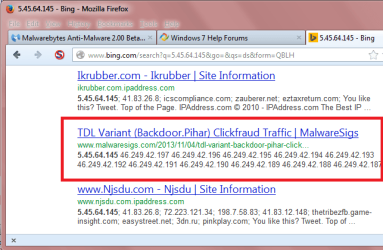
You can search for an IP address to try and find info that may help ...
Searching with Bing for 5.45.64.145 it looks like it could be a TDL Variant (Backdoor.Pihar) malware issue.

IPASP01.PNG
 

My Computer My Computer

At a glance

Multi-Boot W7_Pro_x64 W8.1_Pro_x64 W10_Pro_x6...AMD Athlon II x4 6206GB GSkill DDR2 800AMD 4670 GPU + AMD 4200 IGP
Computer type
PC/Desktop
Computer Manufacturer/Model Number
home built
OS
Multi-Boot W7_Pro_x64 W8.1_Pro_x64 W10_Pro_x64 +Linux_VMs +Chromium_VM
CPU
AMD Athlon II x4 620
Motherboard
Gigabyte GA-MA785G-UD3H
Memory
6GB GSkill DDR2 800
Graphics Card(s)
AMD 4670 GPU + AMD 4200 IGP
Sound Card
on board Realtek ALC889A
Monitor(s) Displays
RCA 40" LCD TV, Insignia 32" LCD TV, HP 15" LCD monitor
Screen Resolution
1680 x 1050
Hard Drives
OCZ Vertex 3 120GB,
Samsung F3 1TB (3),
Several others - WD, Seagate, Hitachi, ...
PSU
Corsair 500 W
Case
Rosewill mid tower
Cooling
CM 90mm rifle
Keyboard
Gyration wireless, Logitech wireless, Dell USB wired
Mouse
Gyration wireless, Logitech wireless, V7 USB wired
Internet Speed
Spectrum - 100Mbps D / 10Mbps U
Antivirus
Avast, MBAM3, EMET, WinPatrol
Browser
Pale Moon, Firefox, IE
Other Info
2 multi-boot PC's
Mainly HTPC/Office/Gen purpose (no gaming).
Trendnet USB KVM.
LG DVD burner/Blue Ray Player.
Tray system for removable SATA backup drives.

Not currently OCd, under-volted.
I use Hybrid sleep, rarely re-boot or shutdown.

Hauppauge HD-PVR, Avermedia PCIe TV Tuner, Hauppauge PCI TV Tuner.
Back
Top