MBR Issue with Dual Boot

Walkerj4

New member
Local time
3:33 PM
Messages
2
Ok there is a very long story behind the cause involving a Distro of Debian, Fedora, Kubuntu, and Ubuntu. As well as a second install of Win7. Currently when i boot my laptop i get three otions. Windows 7, Windows 7, and Ubuntu. the first entry is invalid. I was a second install on the wrong partition, i deleted it using EASEUS Partition Master and installed Ubuntu, but the MBR is still showing an option for this second Windows option. When i highlight the entry and press F8 it tells me to insert the installation CD, this is not possible because i upgraded from vista and the Toshiba upgrade disk does not have any recovery console. How can i fix the MBR to only show my current Win7 and Ubuntu OS options? I have tried MBRfix and it opens a cmd window for 2 seconds and closes. I would rather not use MBRfix anyway as it is very dangerous and i am not skilled with the command line. Help Please.
 

My Computer

Computer Manufacturer/Model Number
Toshiba Sat' / L505D-S5965
OS
Windows 7 / Ubuntu 9.10
CPU
AMD Athalon
I believe you have to use the GRUB bootmanager for Ubuntu, uninstall it until after Win7 is installed and then reinstall.

Otherwise the ways to remove boot menu listings are with EasyBCD or in the boot tab of msconfig.
 
Ok there is a very long story behind the cause involving a Distro of Debian, Fedora, Kubuntu, and Ubuntu. As well as a second install of Win7. Currently when i boot my laptop i get three otions. Windows 7, Windows 7, and Ubuntu. the first entry is invalid. I was a second install on the wrong partition, i deleted it using EASEUS Partition Master and installed Ubuntu, but the MBR is still showing an option for this second Windows option. When i highlight the entry and press F8 it tells me to insert the installation CD, this is not possible because i upgraded from vista and the Toshiba upgrade disk does not have any recovery console. How can i fix the MBR to only show my current Win7 and Ubuntu OS options? I have tried MBRfix and it opens a cmd window for 2 seconds and closes. I would rather not use MBRfix anyway as it is very dangerous and i am not skilled with the command line. Help Please.
Hello WSalkerj4, and welcome to Windows Seven Forums. I also use Ubuntu. :(

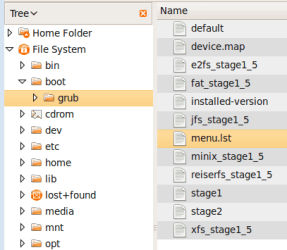
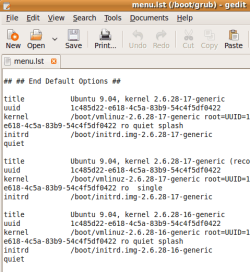
As gregrocker said, When you install a Linux flavor like Ubuntu, you must use the Grub bootloader (or LILO) to boot to your Linux partition. Grub will gladly add any windows OS partitions to its menu, so if there is an errant menu item in Grub you can edit it out.

Boot to Ubuntu, open your file browser, boot, Grub, and edit munu.lst:

grub_menu_list.png

grub_menu.png

Cheers!
Robert
 

My Computer

OS
...
Sweet!

Thank you both VERY much. Those are the best, most straight foreward answers i have found. It really was a long story and when i choose Ubuntu from the Win boot Mgr it loads grub where it only show one Win7 OS. MSCONFIG!!!!!! OMG!! It had the the second Win7 listed. I have just removed it am wanted to tell you both thank you (i will be using that Boot, Grub, List option to remove the extra bootables that i do not use in GRUB) in case there is meltdown when i restart. You Rock!
 

My Computer

Computer Manufacturer/Model Number
Toshiba Sat' / L505D-S5965
OS
Windows 7 / Ubuntu 9.10
CPU
AMD Athalon
Thank you both VERY much. Those are the best, most straight foreward answers i have found. It really was a long story and when i choose Ubuntu from the Win boot Mgr it loads grub where it only show one Win7 OS. MSCONFIG!!!!!! OMG!! It had the the second Win7 listed. I have just removed it am wanted to tell you both thank you (i will be using that Boot, Grub, List option to remove the extra bootables that i do not use in GRUB) in case there is meltdown when i restart. You Rock!
You are most welcome.

Happy surfing!
Robert
 

My Computer

OS
...
Back
Top