MBR Partition issue during CCE scan operation... how to recover MBR

jonnyhotchkiss

New member
Member
VIP
Local time
7:58 PM
Messages
260
Hi

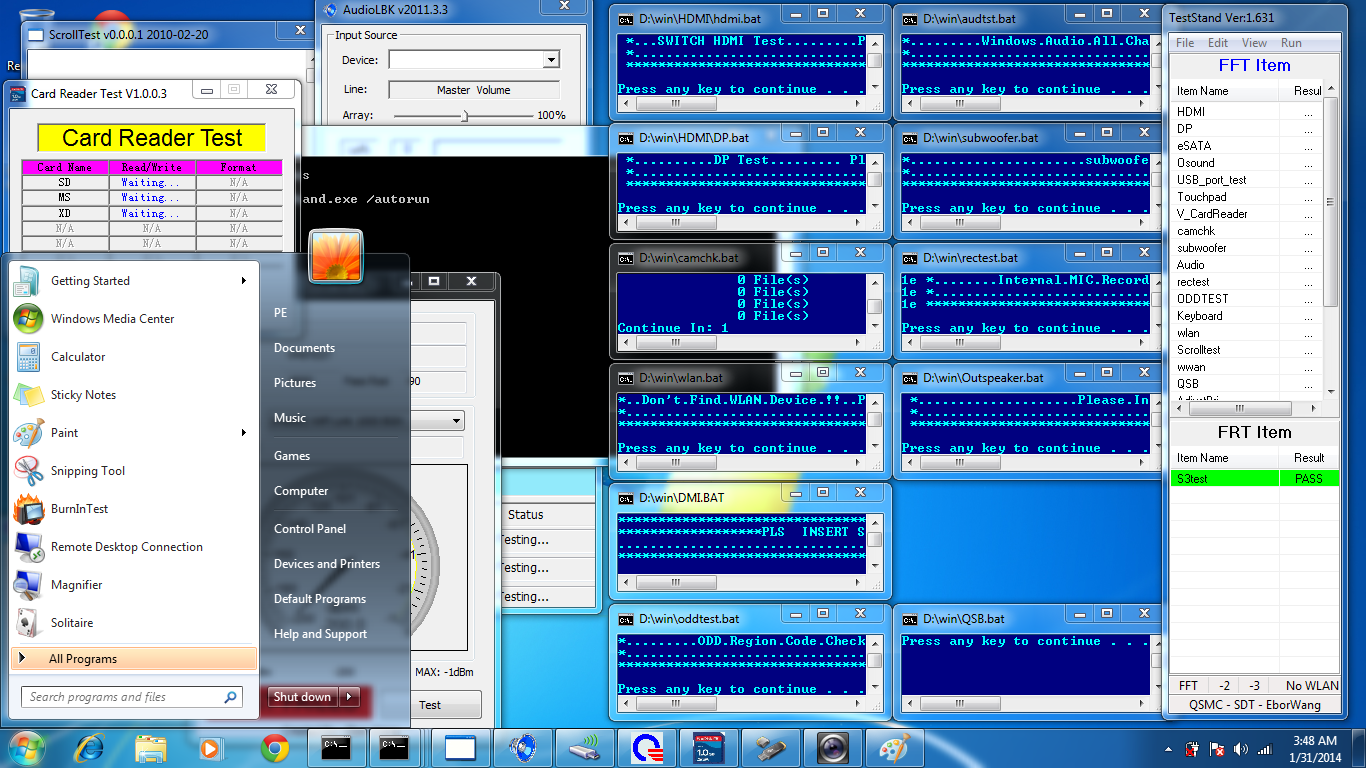
I ran CCE. I got the definition file, it asked if I wanted to reboot, restarted and windows startup repair ran... let it run, reported MBR corruption, restarted, booted into NEW OS with loads of apps testing all my hardware... and a new C drive

2lt1pa0.png


Has CCE installed a portable OS over my existing system?

Is there something I can do to restore my MBR to previous?

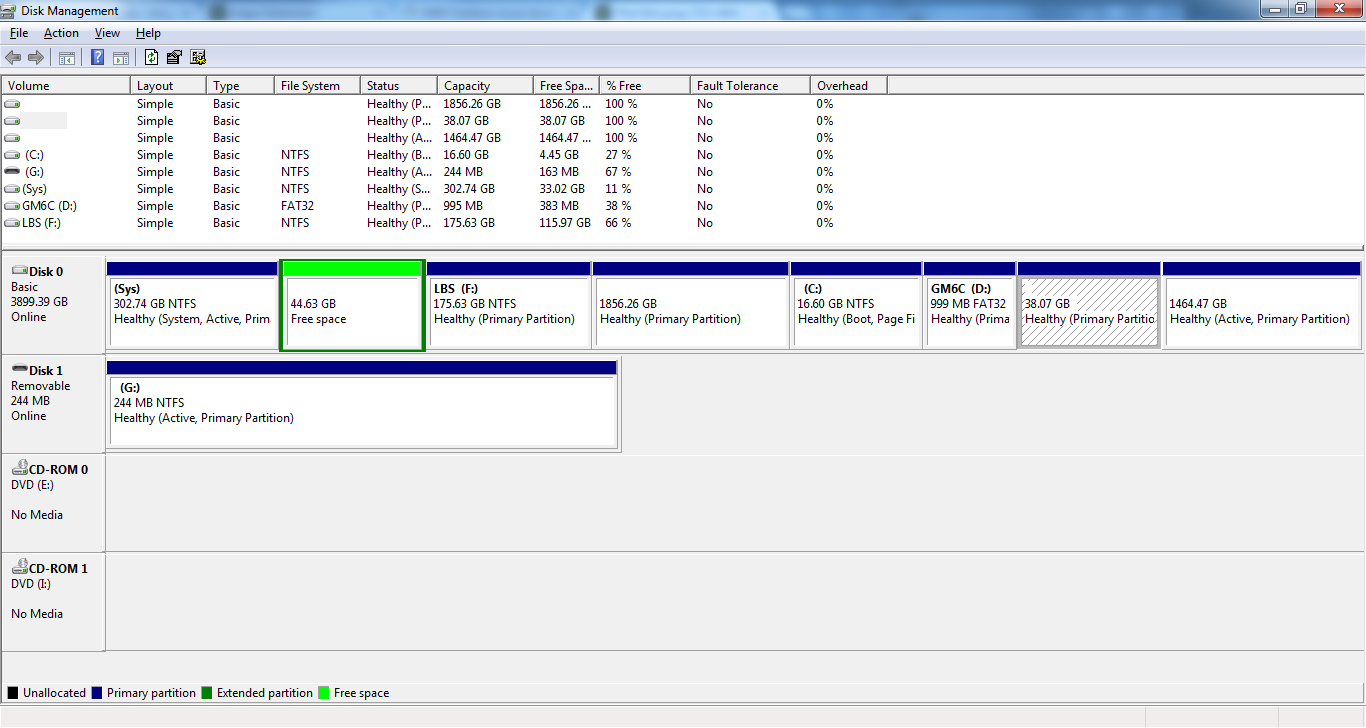
(the 44gig 'free space' is a partition that got 'lost' after perfect disk crashed during defrag operations... I imaged the partition, and a 45gig .dim image resides on an external, awaiting analysis/recovery, before I reallocate the space)

Does this sound like a malware issue?

I don't even know what version of CCE I ran, as the entire FS is not currently traverseable..

Any ideas welcome :cry:
 

My Computer My Computer

At a glance

Windows 7 Ultimate 64bit2.28GbNVIDIA
Computer type
Laptop
Computer Manufacturer/Model Number
Dell
OS
Windows 7 Ultimate 64bit
CPU
2.2
Memory
8Gb
Graphics Card(s)
NVIDIA
Screen Resolution
1280/762
Mouse
built in pad || iphone || MS wireless
Internet Speed
100MB
Antivirus
Avast
Browser
Chrome, Chrome portable
Did whatever made the .dim image of the "free space" happen to save a copy of the MBR? I know when I restore a partition with Macrium Reflect after the partition restore it will ask if I want to restore the MBR from the saved image.
 

My Computer My Computer

At a glance

Windows 7 32 bitAMD 5200+ dual core2 GBNVidia GeForce 6150SE 128 MB
Computer Manufacturer/Model Number
HP Media Center
OS
Windows 7 32 bit
CPU
AMD 5200+ dual core
Memory
2 GB
Graphics Card(s)
NVidia GeForce 6150SE 128 MB
Monitor(s) Displays
CRT
Screen Resolution
1280x1024
Hard Drives
500 GB Sata internal :

SIIG USB 3.0 docking stations w/WD Caviar Black 6 Gb/s drives
Keyboard
PS/2
Mouse
PS/2 Wheel Mouse
Other Info
SIIG USB 3.0 PCIexpress card.
Why do you have a 300gb System partition booting Win7, but the C partition actually holding the OS is only 38gb - it's hard to see the exact figures since the snip is not posted as shown in Disk Management - Post a Screen Capture Image?

What else is on the System partition?

In addition you have way more than the 4 Primary partition limit, so something must have been done to the disk to get by this limitation which has damaged the OS.

This is quite a mess so I would back up my files, delete all partitions during a booted Clean Reinstall - Factory OEM Windows 7 . Then after correctly setting up your System Reserved and C partition on the left side of the HD where they are read fastest, make any data partition(s) you need on the right side where speed isn't as important.

Because you've apparently modded or otherwise mucked with the HD I would also wipe the HD first before install to clear all boot code and partition table using Diskpart Clean Command .

If you want to try to preserve the mess, then I would use Partition Wizard bootable CD to resize the System partition to 200mb, after moving any data off it. Then I;d back up their data to delete the other partitions preceding C, grab and slide C over to the left against the System partition, then extend C's right border into the space made to right-size it. Partition Wizard Resize Partition - Video Help.

Then I would convert all other data partitions to Logical: How to Set Partition as Primary or Logical

After applying all of these steps, I'd finally fun Partition Wizard Rebuild MBR - Video Help.

If Win7 doesn't start after reboot run Startup Repair - Run 3 Separate Times after confirming System is still Partition Marked Active
 
If there's a way to get the original MBR back I think I would do that, then see what the disk map looks like. All that stuff displayed by Disk Management may be its confused attempt to make sense out of funky MBR numbers.

Edit: but I do agree now is the time to attempt to save data, before taking any action.
 

My Computer My Computer

At a glance

Windows 7 32 bitAMD 5200+ dual core2 GBNVidia GeForce 6150SE 128 MB
Computer Manufacturer/Model Number
HP Media Center
OS
Windows 7 32 bit
CPU
AMD 5200+ dual core
Memory
2 GB
Graphics Card(s)
NVidia GeForce 6150SE 128 MB
Monitor(s) Displays
CRT
Screen Resolution
1280x1024
Hard Drives
500 GB Sata internal :

SIIG USB 3.0 docking stations w/WD Caviar Black 6 Gb/s drives
Keyboard
PS/2
Mouse
PS/2 Wheel Mouse
Other Info
SIIG USB 3.0 PCIexpress card.
Thanks for all the info. I've just learned that notepad can be launched from the recovery console, so here's more info...

First, to answer Greg's q's,

- the 300gig partition is not related to the 30gig partition. I'm not sure where the partition came from, my diskpart output might tell you more (type: EB? created by winPE?)

- I have more than 4 primary partitions currently active right now, but not intentionally, not with my knowledge... in fact, when the VHD is mounted and booted (which is always, when working!) it has just one partition, active and primary.

First, this was a native VHD - on first Windows 7 Ultimate install to fresh HD, I created a VHD, and made it active, formatted a primary partition, made some bootsector 'thing' and wrote a BCD entry. exit diskpart, proceed with windows install into the VHD.

I planned on setting up differencing disks, but never got that far.

So the extended partition 'disappeared', marked as free space. A repository of sounds, it appears the partition is intact, but not linked (was able to recover a DIM image of this partition, will attempt recovery later, as now a secondary issue)

YESTERDAY, after running Comodo CEssentials, it rebooted and reported startup repair a being attempted. The details of the operation (I think) reported the boot table configuration data was missing.... On restart, the computer booted into what looked like a boot from startup disk operation, but was actually like a new install. (about to boot into 'new OS', but attempts to fix other bcd entries and repeated startup repairs appear to have corrupted both BCD entries: on boot my options are

Windows 7 ultimate (recovered) - the new OS/partition/WinPE
VHD Win 7 0 newly created entry pointing to VHD (#5 http://reboot.pro/topic/15516-create-native-boot-vhds/)

Will try and burn part.magic cd (bootable usb stick doesn't work, partex msg displayed then boot option cancels) and report back.

Does anyone have experience with native VHDs, and if so, can ou confirm where (if at all) this '200mb sys partition' resides, and how it relates to the 'bigger picture'? (I ask only because I don't remember seeing it)

There were further, even more convoluted configuration steps that I took that could have contributed to the problem - after losing a system partition (vhd) on an ( otherwise empty) SSD, I thought, "instead of just backing up dox/app settings/user folders... why not have them outside the OS (VHD), in case of data corruption?

I had unused free space, and was moving large data out of the VHD, prior to shrinking it to a more appropriate size (weighing in at over 250, it was occupying ~ 90% of the partition, making defragmentation impossible). I created a new partition (or volume, not sure) via dskmgmt, and noticed that a path a junction, or pointer) could be assigned, instead of 'just' a drive letter. so C:\localbigstore is a 44gig partition, with desktop, download, documents. It worked! A bit confusing, and maybe stupid...

posting all partition info (from diskpart) asap (though I saved it to a SD card, but must've gone to another device), thank you again for all your help, hopefully partition magic can help me fix the issues and recreate the MBR
 

My Computer My Computer

At a glance

Windows 7 Ultimate 64bit2.28GbNVIDIA
Computer type
Laptop
Computer Manufacturer/Model Number
Dell
OS
Windows 7 Ultimate 64bit
CPU
2.2
Memory
8Gb
Graphics Card(s)
NVIDIA
Screen Resolution
1280/762
Mouse
built in pad || iphone || MS wireless
Internet Speed
100MB
Antivirus
Avast
Browser
Chrome, Chrome portable
ok, I startup repaired the 'fresh install' that I'm guessing CCE and MS decided to make without my express consent.

eTgV7PF.png


I found the diskpart log I made

DISKPART> list disk

Disk ### Status Size Free Dyn Gpt
-------- ------------- ------- ------- --- ---
* Disk 0 Online 698 GB 44 GB (the disk!)
Disk 1 Online 244 MB 0 B (SD card)

This is actual disk of disk 0, whilst diskmgmt.msc currently says

t8MZrru.png

____________________________________________________________________
DISKPART> list vol

Volume ### Ltr Label Fs Type Size Status
---------- --- ----------- ----- ---------- ------- --------
Volume 0 G DVD-ROM 0 B No Media
Volume 1 C (Sys) NTFS Partition 302 GB Healthy (partition with VHD file on)
Volume 2 E LBS NTFS Partition 175 GB Healthy
Volume 3 F NTFS Partition 16 GB Healthy
Volume 4 D GM6C FAT32 Partition 999 MB Healthy

DISKPART> sel vol 1
Volume 1 is the selected volume.
DISKPART> list par

Partition ### Type Size Offset
------------- ---------------- ------- -------
* Partition 1 Primary 302 GB 1024 KB (original active, primary, system partition, location of system ['c:'] vhd)
Partition 0 Extended 44 GB 302 GB ('free space', previously 'lost' ext.part.)
Partition 2 Primary 175 GB 347 GB (localbigstore, currently mapped to f, not by me)
Partition 5 Primary 1856 GB 386 GB (not real)
Partition 3 Primary 16 GB 681 GB (newly created, not by me directly)
Partition 4 Primary 999 MB 697 GB (newly created 'tools' FAT32 partition D, not by me)
Partition 6 Primary 38 GB 1068 GB (healthy, empty, not assigned, not by me directly)
Partition 7 Primary 1464 GB 1326 GB (not real)

____________________________________________________________________
DISKPART> det par
Partition 0
Type : 0F Hidden: No Active: No Offset in Bytes: 325070062080
There is no volume associated with this partition.
____________________________________________________________________
Partition 1
Type : 07 Hidden: No Active: Yes Offset in Bytes: 1048576

Volume ### Ltr Label Fs Type Size Status
---------- --- ----------- ----- ---------- ------- --------
* Volume 1 C (Sys) NTFS Partition 302 GB Healthy
____________________________________________________________________
Partition 2
Type : 07 Hidden: No Active: No Offset in Bytes: 372988968960

Volume ### Ltr Label Fs Type Size Status
---------- --- ----------- ----- ---------- ------- --------
* Volume 2 E LBS NTFS Partition 175 GB Healthy
____________________________________________________________________
Partition 3
Type : 07 Hidden: No Active: No Offset in Bytes: 731280048128

Volume ### Ltr Label Fs Type Size Status
---------- --- ----------- ----- ---------- ------- ---------
* Volume 3 F NTFS Partition 16 GB Healthy
____________________________________________________________________
Partition 4
Type : 0C Hidden: No Active: No Offset in Bytes: 749106888704

Volume ### Ltr Label Fs Type Size Status
---------- --- ----------- ----- ---------- ------- ---------
* Volume 4 D GM6C FAT32 Partition 999 MB Healthy
____________________________________________________________________
Partition 5
Type : FF Hidden: Yes Active: No Offset in Bytes: 414878597632
There is no volume associated with this partition.
____________________________________________________________________
Partition 6
Type : EB Hidden: Yes Active: No Offset in Bytes: 1147556299264
There is no volume associated with this partition.
____________________________________________________________________
Partition 7
Type : DB Hidden: Yes Active: Yes Offset in Bytes: 1424581801984
There is no volume associated with this partition.

***********************************
VHD
***********************************
DISKPART> sel vdisk file=c:\vhd\win7\win7u.vhd
DiskPart successfully selected the virtual disk file.

DISKPART> attach vdisk
100 percent completed
DiskPart successfully attached the virtual disk file.

Volume 5 H Win7VHD NTFS Partition 268 GB Healthy

DISKPART> sel vol 5
Volume 5 is the selected volume.

DISKPART> list par
Partition ### Type Size Offset
------------- ---------------- ------- -------
* Partition 1 Primary 268 GB 1024 KB

DISKPART> det par

Partition 1
Type : 07
Hidden: No
Active: Yes
Offset in Bytes: 1048576

Volume ### Ltr Label Fs Type Size Status
---------- --- ----------- ----- ---------- ------- --------
* Volume 5 H Win7VHD NTFS Partition 268 GB Healthy

Would you advise deleting the bad partitions?

(I found a screenshot of before the latest MBR/BCD issues, ie details of what's where)
 

My Computer My Computer

At a glance

Windows 7 Ultimate 64bit2.28GbNVIDIA
Computer type
Laptop
Computer Manufacturer/Model Number
Dell
OS
Windows 7 Ultimate 64bit
CPU
2.2
Memory
8Gb
Graphics Card(s)
NVIDIA
Screen Resolution
1280/762
Mouse
built in pad || iphone || MS wireless
Internet Speed
100MB
Antivirus
Avast
Browser
Chrome, Chrome portable
What is Comodo Essentials? Sounds like a tweaking suite which is death to Win7. And Comodo has never caused anything but problems seen here. So I am not surprised that you report issues after running it.

I already gave you my advice. I'm not messing any further with one of the worst messes I've ever seen.

In addition to the preparation, actual install steps, and tools/methods which work best to get and keep a perfect Clean Reinstall - Factory OEM Windows 7, which are same for retail:

I would additionally wipe the HD with Diskpart Clean Command from the booted Windows 7 installation media's System Recovery Options Command Line, to erase the boot code and partition table which has been badly damaged.

Then I would make my install partition, full (not Quick) Format it, mark it Active using Step 2.2 from SSD - HDD Optimize for Windows Reinstallation.

Then run a full Disk Check from installer's Command Line to check its condition just before install.
 
Last edited:
I have more than 4 primary partitions currently active right now, but not intentionally, not with my knowledge... in fact, when the VHD is mounted and booted (which is always, when working!) it has just one partition, active and primary.
You cannot have more than 4 primary partitions on a single MBR HD. The MBR is only 512 bytes long. It has startup code and a partition table. The partition table has 4 "slots" for the 4 primary partitions. An extended partition is just a primary partition that's split up with the info not kept in the MBR (the logical partition info.) So if Disk Management thinks you have more than 4 primary partitions on a single physical drive, it's likely confused by erroneous info in the MBR.

So, if you could just get hold of an MBR saved from before your HD being all fouled up, there's a chance for an easy fix. If not then there's nothing to be done for it. But I would at least take a look.
 

My Computer My Computer

At a glance

Windows 7 32 bitAMD 5200+ dual core2 GBNVidia GeForce 6150SE 128 MB
Computer Manufacturer/Model Number
HP Media Center
OS
Windows 7 32 bit
CPU
AMD 5200+ dual core
Memory
2 GB
Graphics Card(s)
NVidia GeForce 6150SE 128 MB
Monitor(s) Displays
CRT
Screen Resolution
1280x1024
Hard Drives
500 GB Sata internal :

SIIG USB 3.0 docking stations w/WD Caviar Black 6 Gb/s drives
Keyboard
PS/2
Mouse
PS/2 Wheel Mouse
Other Info
SIIG USB 3.0 PCIexpress card.
Any ideas welcome :cry:

Back up your C:\users directory
Back up your C:\programData folder

Back up any any other data you want to keep

Then find your 7 installation disk because it's time to nuke it all and do a fresh format.

You've gone and broken it all. The most expedient way to resolve it all is a fresh format/OS installation.
 

My Computer My Computer

At a glance

8 Pro x64i7 3770K 4.6GHz16GB G.Skill Trident X 2666mhzx2 EVGA 780 Ti Superclocked SLI
Computer type
PC/Desktop
Computer Manufacturer/Model Number
Systems by SmartEyeball
OS
8 Pro x64
CPU
i7 3770K 4.6GHz
Motherboard
ASUS P8Z77 WS
Memory
16GB G.Skill Trident X 2666mhz
Graphics Card(s)
x2 EVGA 780 Ti Superclocked SLI
Sound Card
SB X-FI Surround 5.1 PRO USB / ATH-AD900 Headphones
Monitor(s) Displays
x3 Dell U2410 / 58" Samsung
Screen Resolution
5760*1200/ 1920*1200
Hard Drives
2x Intel 520 240GB (RAID 0) * 2x WD Caviar Blacks 2TB (RAID 0) * 2TB WD Caviar Black * Sony Optirac DVD
PSU
Silverstone Strider Evolution 1200W
Case
Thermaltake Level 10 GT Snow Edition
Cooling
Noctua NH-D14
Keyboard
Topre Realforce // Ducky Shine MX Black // Filco Ninja TKL
Mouse
Thermaltake Theron (Highly Recommended) + Razer Imperator
Antivirus
MSE
Browser
IE, FF, WaterFox
Other Info
GT Extreme V2 Sim Racing Cockpit + 40" LCD and K/B Mouse stand ▼
Fanatec CSR Elite Wheel + Clubsport V1 Pedals + CSR shifter/7G-H ▼Saitek X52 Pro ▼ TrackIR 5 Pro
Buttkicker v2 Seat Rumbler with Dedicated 5.1 and Sub Woofer attached to frame ▼
=
Bloody Big Grin
In fact, since you have the screen shot of the partition layout, you should be able to use an MBR editor to put the numbers in. After backing up everything you can back up, you're in a "nothing to lose" position. I'd search for an MBR editor. I'm sure there are free ones out there.
 

My Computer My Computer

At a glance

Windows 7 32 bitAMD 5200+ dual core2 GBNVidia GeForce 6150SE 128 MB
Computer Manufacturer/Model Number
HP Media Center
OS
Windows 7 32 bit
CPU
AMD 5200+ dual core
Memory
2 GB
Graphics Card(s)
NVidia GeForce 6150SE 128 MB
Monitor(s) Displays
CRT
Screen Resolution
1280x1024
Hard Drives
500 GB Sata internal :

SIIG USB 3.0 docking stations w/WD Caviar Black 6 Gb/s drives
Keyboard
PS/2
Mouse
PS/2 Wheel Mouse
Other Info
SIIG USB 3.0 PCIexpress card.
In fact, since you have the screen shot of the partition layout, you should be able to use an MBR editor to put the numbers in. After backing up everything you can back up, you're in a "nothing to lose" position. I'd search for an MBR editor. I'm sure there are free ones out there.
Holy Moly! Isn't it fowled up enough already? :) There's a copy of the MBR in Sys reserved but I doubt that it's any good now especially with all those partitions.

Save what you can and start fresh. Chalk it up to a learning experience.
 

My Computer My Computer

At a glance

Windows 7 Pro-x64i7-2600 3.4GHz - 3.8GHz Turbo8Gb - 2x4GB, Muskin 991770 PC3-1333Integrated Intel HD 2000
Computer type
PC/Desktop
Computer Manufacturer/Model Number
Built 2/11/2011
OS
Windows 7 Pro-x64
CPU
i7-2600 3.4GHz - 3.8GHz Turbo
Motherboard
Intel DH67BL-B3
Memory
8Gb - 2x4GB, Muskin 991770 PC3-1333
Graphics Card(s)
Integrated Intel HD 2000
Sound Card
Integrated Intel 10.1 HD, RealTek ALC892
Monitor(s) Displays
Asus LCD VH222H, Haier HL24XSL2a
Screen Resolution
1920x1080, 1920x1080
Hard Drives
Crucial SSD C300-128Gb,
Western Digital WD5002AALX - 500Gb,
Western Digital WD7501AALS - 750Gb
PSU
Seasonic 650W 80+ Gold Modular
Case
Rosewill Defender
Cooling
Stock CPU, Four 120mm case fans, PCH fan added
Keyboard
Logitech EX100 Y-RBH94 Wireless
Mouse
Logitech EX100 M-RCE95 Wireless
Internet Speed
3.0/1.5 Mbs
Antivirus
Microsoft Security Essentials
Browser
Microsoft Internet Explorer 11
Other Info
Antec Veris Premier-Multimedia IR Station,
Cyber Accoustics-3602 Speakers,
AFT XM-5U Card Reader,
Hauppauge TV-HVR-2250,
Sony LX300 USB Turntable
In fact, since you have the screen shot of the partition layout, you should be able to use an MBR editor to put the numbers in. After backing up everything you can back up, you're in a "nothing to lose" position. I'd search for an MBR editor. I'm sure there are free ones out there.
Holy Moly! Isn't it fowled up enough already? :) There's a copy of the MBR in Sys reserved but I doubt that it's any good now especially with all those partitions.

Save what you can and start fresh. Chalk it up to a learning experience.

I don't understand the hostility towards learning something about the MBR. If the OP is going to wipe the disk then tell me what is at risk other than spending a bit of time. It stands to reason if something hosed the MBR then it could be fixed. There's probably a calculator someplace to generate the right numbers given the HD geometry and partition sizes.

What's everyone afraid of?
 

My Computer My Computer

At a glance

Windows 7 32 bitAMD 5200+ dual core2 GBNVidia GeForce 6150SE 128 MB
Computer Manufacturer/Model Number
HP Media Center
OS
Windows 7 32 bit
CPU
AMD 5200+ dual core
Memory
2 GB
Graphics Card(s)
NVidia GeForce 6150SE 128 MB
Monitor(s) Displays
CRT
Screen Resolution
1280x1024
Hard Drives
500 GB Sata internal :

SIIG USB 3.0 docking stations w/WD Caviar Black 6 Gb/s drives
Keyboard
PS/2
Mouse
PS/2 Wheel Mouse
Other Info
SIIG USB 3.0 PCIexpress card.
First: Is this CCE?
Comodo Cleaning Essentials

Second, I have to agree with the consensus - your system is fairly well hosed.

Greg's posts will help you quickly get your machine back to health:
http://www.sevenforums.com/general-...an-operation-how-recover-mbr.html#post2675190
http://www.sevenforums.com/general-...an-operation-how-recover-mbr.html#post2676214

or you can wait to see if anyone else thinks there is another way.
MilesAhead suggested a disk editor here but that's a lot of detailed work.

That's all I can add to this, good luck.... but make it easy on yourself... follow Greg's advice (make sure your read first...and back up your data)
 

My Computer My Computer

At a glance

x64 (6.3.9600) Win8.1 Pro & soon dual boot x6...AMD A6-3420M APU with Radeon(tm) HD Graphics6.00 GBAMD Radeon(TM) HD 6520G
Computer type
Laptop
Computer Manufacturer/Model Number
HP Pavilion dv6-6c10us
OS
x64 (6.3.9600) Win8.1 Pro & soon dual boot x64 (6.1.7601) Win7_SP1 HomePrem
CPU
AMD A6-3420M APU with Radeon(tm) HD Graphics
Motherboard
Hewlett-Packard 1805
Memory
6.00 GB
Graphics Card(s)
AMD Radeon(TM) HD 6520G
Sound Card
(1) AMD High Definition Audio Device (2) IDT High Definiti
Monitor(s) Displays
HP W2072a 20" LCD (1600 x 900) @ 60 Hz
Screen Resolution
1366 x 768 x 32 bits (4294967296 colors) @ 60 Hz
Hard Drives
ST640LM0 00 HM641JI SATA Disk Device
Keyboard
Logitech k520 wireless KB
Mouse
Logitech m320 wireless mouse (bundled with KB)
Internet Speed
15/5 | 54 MB Wireless 'n'
Antivirus
Realtime: Defender or Avast | On-demand: Malwarebytes, ESET
Browser
IE 11 on Win8, IE 10 on win 7
Other Info
Media: [Gimp, Audacity, VLC] || Comm: [WEmail 2012, Skype] || Productivity: [OpenOffice,| Textpad] || Utils: [Sysinternals, cCleaner, Speccy, Defraggler]
Also I never got an answer to my question if the partition image backup made offers to restore the MBR during the restore operation. Again, if the OP is going to wipe the disk after backup, what's the big fear of restoring the partition from image? See what happens.

That's how all those "Undocumented Windows" books got written. :)
 

My Computer My Computer

At a glance

Windows 7 32 bitAMD 5200+ dual core2 GBNVidia GeForce 6150SE 128 MB
Computer Manufacturer/Model Number
HP Media Center
OS
Windows 7 32 bit
CPU
AMD 5200+ dual core
Memory
2 GB
Graphics Card(s)
NVidia GeForce 6150SE 128 MB
Monitor(s) Displays
CRT
Screen Resolution
1280x1024
Hard Drives
500 GB Sata internal :

SIIG USB 3.0 docking stations w/WD Caviar Black 6 Gb/s drives
Keyboard
PS/2
Mouse
PS/2 Wheel Mouse
Other Info
SIIG USB 3.0 PCIexpress card.

My Computer My Computer

At a glance

Windows 7 Pro-x64i7-2600 3.4GHz - 3.8GHz Turbo8Gb - 2x4GB, Muskin 991770 PC3-1333Integrated Intel HD 2000
Computer type
PC/Desktop
Computer Manufacturer/Model Number
Built 2/11/2011
OS
Windows 7 Pro-x64
CPU
i7-2600 3.4GHz - 3.8GHz Turbo
Motherboard
Intel DH67BL-B3
Memory
8Gb - 2x4GB, Muskin 991770 PC3-1333
Graphics Card(s)
Integrated Intel HD 2000
Sound Card
Integrated Intel 10.1 HD, RealTek ALC892
Monitor(s) Displays
Asus LCD VH222H, Haier HL24XSL2a
Screen Resolution
1920x1080, 1920x1080
Hard Drives
Crucial SSD C300-128Gb,
Western Digital WD5002AALX - 500Gb,
Western Digital WD7501AALS - 750Gb
PSU
Seasonic 650W 80+ Gold Modular
Case
Rosewill Defender
Cooling
Stock CPU, Four 120mm case fans, PCH fan added
Keyboard
Logitech EX100 Y-RBH94 Wireless
Mouse
Logitech EX100 M-RCE95 Wireless
Internet Speed
3.0/1.5 Mbs
Antivirus
Microsoft Security Essentials
Browser
Microsoft Internet Explorer 11
Other Info
Antec Veris Premier-Multimedia IR Station,
Cyber Accoustics-3602 Speakers,
AFT XM-5U Card Reader,
Hauppauge TV-HVR-2250,
Sony LX300 USB Turntable

My Computer My Computer

At a glance

Windows 7 32 bitAMD 5200+ dual core2 GBNVidia GeForce 6150SE 128 MB
Computer Manufacturer/Model Number
HP Media Center
OS
Windows 7 32 bit
CPU
AMD 5200+ dual core
Memory
2 GB
Graphics Card(s)
NVidia GeForce 6150SE 128 MB
Monitor(s) Displays
CRT
Screen Resolution
1280x1024
Hard Drives
500 GB Sata internal :

SIIG USB 3.0 docking stations w/WD Caviar Black 6 Gb/s drives
Keyboard
PS/2
Mouse
PS/2 Wheel Mouse
Other Info
SIIG USB 3.0 PCIexpress card.
I think the concern is that the OP has so thoroughly trashed his system that a complete wipe is justified for that alone, hoping that he'll adopt better tools and methods which are proven here in five years to get and keep a perfect install.

But since the OP has an interest in MBR editing as shown by his focus on it in replies, Miles also has much to offer about that. Heck, I'd like to learn more about MBR editing at such an advanced level.

If that's what you want Jonny, then have at it. It cannot hurt things worse than they are that I'm aware of. You still have the best option of wiping your HD after you learn more about editing MBR. But there honestly isn't anything other than your data that's worth saving there. And there's important information to learn about what maintains a perfect install in Clean Reinstall - Factory OEM Windows 7 when you're ready.
 
Thanks for all the info, really appreciate it.

Backing up PRIORITY #1 - acronis, macrium, or other? (to USB2 external, hopefully in good nick')

Miles, Active Partition Recovery didn't appear to offer that option.. but I was running the free copy, with limited functionality (DIM image the only feasbile option).

I'm up for trying the fix the MBR, and will google for free editors (good tip thanks)

where would the sys reserved backup be?
(Assuming C is the letter of the primary partition on disk 0, and D is the letter assigned to the VHD)

Very grateful
 

My Computer My Computer

At a glance

Windows 7 Ultimate 64bit2.28GbNVIDIA
Computer type
Laptop
Computer Manufacturer/Model Number
Dell
OS
Windows 7 Ultimate 64bit
CPU
2.2
Memory
8Gb
Graphics Card(s)
NVIDIA
Screen Resolution
1280/762
Mouse
built in pad || iphone || MS wireless
Internet Speed
100MB
Antivirus
Avast
Browser
Chrome, Chrome portable
slartyb', yup. That was the straw that broke this camel's back!
 

My Computer My Computer

At a glance

Windows 7 Ultimate 64bit2.28GbNVIDIA
Computer type
Laptop
Computer Manufacturer/Model Number
Dell
OS
Windows 7 Ultimate 64bit
CPU
2.2
Memory
8Gb
Graphics Card(s)
NVIDIA
Screen Resolution
1280/762
Mouse
built in pad || iphone || MS wireless
Internet Speed
100MB
Antivirus
Avast
Browser
Chrome, Chrome portable
It's a chance to learn something as long as you have patience. It's always easier to be objective when the machine being repaired is not your own. I hope you succeed and enjoy yourself at the same time. Barring some weird hardware thing you know you can get your system back using the reinstall option.

As much as possible I would back up data using file copy methods. Something like Macrium may get confused if the partition layout is nothing like it was during the backup. Maybe RichCopy or RoboCopy etc.. :)
 

My Computer My Computer

At a glance

Windows 7 32 bitAMD 5200+ dual core2 GBNVidia GeForce 6150SE 128 MB
Computer Manufacturer/Model Number
HP Media Center
OS
Windows 7 32 bit
CPU
AMD 5200+ dual core
Memory
2 GB
Graphics Card(s)
NVidia GeForce 6150SE 128 MB
Monitor(s) Displays
CRT
Screen Resolution
1280x1024
Hard Drives
500 GB Sata internal :

SIIG USB 3.0 docking stations w/WD Caviar Black 6 Gb/s drives
Keyboard
PS/2
Mouse
PS/2 Wheel Mouse
Other Info
SIIG USB 3.0 PCIexpress card.
Back
Top