MCE - HDMI - no sound

m4r

New member
Local time
11:22 PM
Messages
1
I have a system with the following specs, MSI K9A2 Platinum mainboard, AMD 6000+ cpu, 2gb kingston 667 RAM, MSI nx8500gt vga, fusion hdtv dual2 tuner card and pioneer blu-ray/DVD/CD-R, it was running vista with no problems at all hooked up to a sony HDTV via HDMI, this week i upgraded to windows 7 pro (fresh install) and everything was fine, then all of a sudden i have lost sound on certain channels 1, 90, 99 and 73, sound works fine on other channels. I have taken my box to a mates place and it all works fine again. The system is not hooked up to the internet at all.
 

My Computer My Computer

OS
Windows 7 Professional 32bit
Welcome to Seven Forums m4r. Does your mate have the same cable system (I am assuming cable?)?. Same channel lineup? Does the tuner card have a SAP (Second Audio Setting)? If so, make sure it's on stereo or mono, not SAP. A Guy
 

My Computer My Computer

Computer type
PC/Desktop
OS
Windows 10 Home x64
CPU
INTEL Core i5-750 Quad-Core 3.37GHz
Motherboard
ASUS P7P55D
Memory
HyperX Fury Black Series 8GB (2 x 4GB) 1866Mhz
Graphics Card(s)
EVGA GeForce GTX 750 Superclocked 1GB 128-Bit GDDR5
Monitor(s) Displays
LG 32MA68HY 32" IPS
Screen Resolution
1920 x 1080
Hard Drives
Samsung 840 Evo 120GB, SEAGATE 500GB Barracuda® 7200.12, SATA 3 Gb/s, 7200 RPM, 16MB cache
PSU
ANTEC TruePower New TP-550, 80 PLUS, 550W
Case
ANTEC Three Hundred Illusion
Cooling
COOLER MASTER Hyper 212 Plus, 4 x 120mm 1 x 140mm Noctua's
Internet Speed
85 + Mbps
Antivirus
Avast
Browser
Vivaldi
I have a system with the following specs, MSI K9A2 Platinum mainboard, AMD 6000+ cpu, 2gb kingston 667 RAM, MSI nx8500gt vga, fusion hdtv dual2 tuner card and pioneer blu-ray/DVD/CD-R, it was running vista with no problems at all hooked up to a sony HDTV via HDMI, this week i upgraded to windows 7 pro (fresh install) and everything was fine, then all of a sudden i have lost sound on certain channels 1, 90, 99 and 73, sound works fine on other channels. I have taken my box to a mates place and it all works fine again. The system is not hooked up to the internet at all.

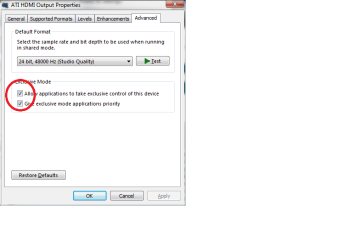
Those channels are outputting a digital format that your HDMI receiver cannot process. If it's a TV it's supposed to show an OSD (onscreen display) error when that input is selected. There is a workaround -- I'm not sure why this works but you can try as it's helped dozens of others with this same issue -- disable exclusive access to the device:
Untitled.png
 

My Computer My Computer

Computer type
Laptop
Computer Manufacturer/Model Number
Apple
OS
El Capitan / Windows 10
CPU
i7-4980HQ
Memory
16GB
Graphics Card(s)
Iris 5200
Back
Top