MCE playback issues

BrianDigital

New member
Local time
6:37 PM
Messages
9
Hey guys,

I am trying to get my new htpc set up (first time using one) I am having no luck with getting MCE to play files from Amazon Video ondemand service and DVD files I converted to avi files( I have learned my lesson since I'm in windows might as well use windows type files) How do I get playback of these files in MCE.

Funny enough windows meia player plays all the files but not in MCE, googling leads me to numerous results and not sure where I have to be heading

Also I do have Sharks codec pack install and ran the recomended settings he had.

This is all on 64-bit
 

My Computer

Computer Manufacturer/Model Number
Self Built
OS
Windows 7
CPU
Q9450
Motherboard
Asus Rampage
Memory
6gigs of G.Skill
Graphics Card(s)
ATI 4870
Sound Card
Creative
Monitor(s) Displays
Acer
Hard Drives
1.5 TB's
ok update got my avi files working now, but anything from amazon doesn't show in mce but can be played in wmp


this is crazy, on my gaming rig I must have installed everything awhile ago and my amazon files can be viewed from there but not on my htpc wtf.
 

My Computer

Computer Manufacturer/Model Number
Self Built
OS
Windows 7
CPU
Q9450
Motherboard
Asus Rampage
Memory
6gigs of G.Skill
Graphics Card(s)
ATI 4870
Sound Card
Creative
Monitor(s) Displays
Acer
Hard Drives
1.5 TB's
It seems to me you may be missing the x64 Components addon.

It installs a similar interface to the 32bit Settings Application
and also has a checkbox at the bottom for suggested settings.
 

My Computer

Computer Manufacturer/Model Number
Selfbuilt
OS
Windows 7 Ultimate 64bit
CPU
i7 2600k
Motherboard
asus P8Z68-V LE
Memory
16GB (4x4) corsair vengeance
Graphics Card(s)
Intel HD3000 iGPU / AMD HD6870 1024MB
Sound Card
bitstreamed to an Onkyo 609
Monitor(s) Displays
Asus VE278 27" LED / Bravia EX7 60" LED
Screen Resolution
native 1080p x2
Hard Drives
4x 2TB int. + 2x 2TB external and a SSD for the boot drive.
PSU
650w Antec
Case
NZXT tempest evo
Cooling
air/stock
Keyboard
Dell
Mouse
logitech m505
Internet Speed
dual: cable/blackberry tether for travel use
Other Info
BD re-writer //
asus notebook G73Jw
I have both done at ran the setting off a post of yours but I am heading back to it now and I'll try using your recommended settings on both
 

My Computer

Computer Manufacturer/Model Number
Self Built
OS
Windows 7
CPU
Q9450
Motherboard
Asus Rampage
Memory
6gigs of G.Skill
Graphics Card(s)
ATI 4870
Sound Card
Creative
Monitor(s) Displays
Acer
Hard Drives
1.5 TB's
no dice, even though I can now play avi files no thumbnail preview when in explorer
 

My Computer

Computer Manufacturer/Model Number
Self Built
OS
Windows 7
CPU
Q9450
Motherboard
Asus Rampage
Memory
6gigs of G.Skill
Graphics Card(s)
ATI 4870
Sound Card
Creative
Monitor(s) Displays
Acer
Hard Drives
1.5 TB's
The suggested settings break AVI thumbnails. Hovering that selection will tell you this.

If you want the thumbnails, (some avi files may fail) go to the SWAP TAB, (in both apps)
and uncheck the box for the DMO codecs.
 

My Computer

Computer Manufacturer/Model Number
Selfbuilt
OS
Windows 7 Ultimate 64bit
CPU
i7 2600k
Motherboard
asus P8Z68-V LE
Memory
16GB (4x4) corsair vengeance
Graphics Card(s)
Intel HD3000 iGPU / AMD HD6870 1024MB
Sound Card
bitstreamed to an Onkyo 609
Monitor(s) Displays
Asus VE278 27" LED / Bravia EX7 60" LED
Screen Resolution
native 1080p x2
Hard Drives
4x 2TB int. + 2x 2TB external and a SSD for the boot drive.
PSU
650w Antec
Case
NZXT tempest evo
Cooling
air/stock
Keyboard
Dell
Mouse
logitech m505
Internet Speed
dual: cable/blackberry tether for travel use
Other Info
BD re-writer //
asus notebook G73Jw
do you have any idea of what is holding up me playing amazon videos they are in a wmv container
 

My Computer

Computer Manufacturer/Model Number
Self Built
OS
Windows 7
CPU
Q9450
Motherboard
Asus Rampage
Memory
6gigs of G.Skill
Graphics Card(s)
ATI 4870
Sound Card
Creative
Monitor(s) Displays
Acer
Hard Drives
1.5 TB's
My software has nothing to do with the WMV format.
That format belongs to Microsoft/WMP12 and there are no codecs redistributables for the format. If the video's are old, you may need to install an antique codec called acelp available in THIS THREAD
 

My Computer

Computer Manufacturer/Model Number
Selfbuilt
OS
Windows 7 Ultimate 64bit
CPU
i7 2600k
Motherboard
asus P8Z68-V LE
Memory
16GB (4x4) corsair vengeance
Graphics Card(s)
Intel HD3000 iGPU / AMD HD6870 1024MB
Sound Card
bitstreamed to an Onkyo 609
Monitor(s) Displays
Asus VE278 27" LED / Bravia EX7 60" LED
Screen Resolution
native 1080p x2
Hard Drives
4x 2TB int. + 2x 2TB external and a SSD for the boot drive.
PSU
650w Antec
Case
NZXT tempest evo
Cooling
air/stock
Keyboard
Dell
Mouse
logitech m505
Internet Speed
dual: cable/blackberry tether for travel use
Other Info
BD re-writer //
asus notebook G73Jw
tried that did not help, this is absolutely ridiculous I just bought the season of amazon and will not play in mce.

I will keep looking around will post back if arrises
 

My Computer

Computer Manufacturer/Model Number
Self Built
OS
Windows 7
CPU
Q9450
Motherboard
Asus Rampage
Memory
6gigs of G.Skill
Graphics Card(s)
ATI 4870
Sound Card
Creative
Monitor(s) Displays
Acer
Hard Drives
1.5 TB's
ok tomm I am going to doa clean install and based off my knowledge windows 7 should know how to play a dam wmv file, so I am going to find out when this breaks I guess
 

My Computer

Computer Manufacturer/Model Number
Self Built
OS
Windows 7
CPU
Q9450
Motherboard
Asus Rampage
Memory
6gigs of G.Skill
Graphics Card(s)
ATI 4870
Sound Card
Creative
Monitor(s) Displays
Acer
Hard Drives
1.5 TB's
ok did a clean install and my amazon files are playable as well all my avi files with no codecs installed WTF
 

My Computer

Computer Manufacturer/Model Number
Self Built
OS
Windows 7
CPU
Q9450
Motherboard
Asus Rampage
Memory
6gigs of G.Skill
Graphics Card(s)
ATI 4870
Sound Card
Creative
Monitor(s) Displays
Acer
Hard Drives
1.5 TB's
ok did a clean install and my amazon files are playable as well all my avi files with no codecs installed WTF

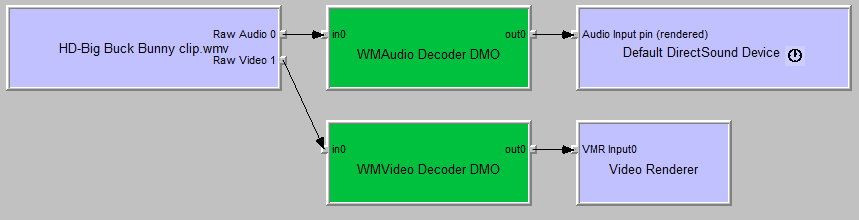
I would have to say the answer is obvious; some software installation (SUPER is the worst I ever came across for being invasive) is breaking the native decoding. There is a software called graphedit (you can get it from the tools page of my website) that will display the decoders in use when decoding a video. Below is a screenshot of the native windows codecs decoding a high Definition wmv video clip I downloaded directly from microsoft.

I know for a fact that my Win7codecs distribution is NOT breaking your system.
I carefully test all aspects of my installation and by default,
my software DOES NOT mess with the native decoding Microsoft is providng.
 

Attachments

  • graph.png
    graph.png
    4.9 KB · Views: 7

My Computer

Computer Manufacturer/Model Number
Selfbuilt
OS
Windows 7 Ultimate 64bit
CPU
i7 2600k
Motherboard
asus P8Z68-V LE
Memory
16GB (4x4) corsair vengeance
Graphics Card(s)
Intel HD3000 iGPU / AMD HD6870 1024MB
Sound Card
bitstreamed to an Onkyo 609
Monitor(s) Displays
Asus VE278 27" LED / Bravia EX7 60" LED
Screen Resolution
native 1080p x2
Hard Drives
4x 2TB int. + 2x 2TB external and a SSD for the boot drive.
PSU
650w Antec
Case
NZXT tempest evo
Cooling
air/stock
Keyboard
Dell
Mouse
logitech m505
Internet Speed
dual: cable/blackberry tether for travel use
Other Info
BD re-writer //
asus notebook G73Jw
If I have any issues with files I will just install your software shark thanks for your help
 

My Computer

Computer Manufacturer/Model Number
Self Built
OS
Windows 7
CPU
Q9450
Motherboard
Asus Rampage
Memory
6gigs of G.Skill
Graphics Card(s)
ATI 4870
Sound Card
Creative
Monitor(s) Displays
Acer
Hard Drives
1.5 TB's
Back
Top