
Meade AutoStar Suite

kljw

New member
Local time
6:17 AM
Messages
3
Hi
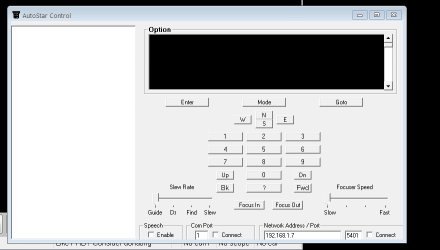
the attached picure shows a control panel for software that i use to control a telescope. the black panel, top and slightly right, should have text showing. the text is balck, and therefore cannot be seen, against a balck panel.
the only way to get the text visible, is to choose windoes classic setting for display colours.
the software is Meade AutoStar Suite.
i have tried changes colours etc, but the problem persists, if anyone can help, i would appreciate this.
 

Attachments
  • AutoStar Cotrol Panel.PNG
    AutoStar Cotrol Panel.PNG
    5.7 KB · Views: 11

My Computer

Computer type
PC/Desktop
Computer Manufacturer/Model Number
home built
OS
win7 64
Welcome to Seven Forums kljw. I see some mention of running the application as administrator (right click exe and choose Run as administrator, this was on XP though where using the default blue theme also corrected this).

You mention changing colors, did you mean through Personalization> Windows color> Advanced?

7. To Change the "Advanced Window Color and Appearance" Settings

http://www.sevenforums.com/tutorials/282-window-color-appearance-change.html

I would play with 3D Objects, Application background, Menu, Message box, and Window. Note original settings before changing, so you can set them back if no help.

If no help, you might try running it in compatibility mode. A Guy
 

My Computer

Computer type
PC/Desktop
OS
Windows 10 Home x64
CPU
INTEL Core i5-750 Quad-Core 3.37GHz
Motherboard
ASUS P7P55D
Memory
HyperX Fury Black Series 8GB (2 x 4GB) 1866Mhz
Graphics Card(s)
EVGA GeForce GTX 750 Superclocked 1GB 128-Bit GDDR5
Monitor(s) Displays
LG 32MA68HY 32" IPS
Screen Resolution
1920 x 1080
Hard Drives
Samsung 840 Evo 120GB, SEAGATE 500GB Barracuda® 7200.12, SATA 3 Gb/s, 7200 RPM, 16MB cache
PSU
ANTEC TruePower New TP-550, 80 PLUS, 550W
Case
ANTEC Three Hundred Illusion
Cooling
COOLER MASTER Hyper 212 Plus, 4 x 120mm 1 x 140mm Noctua's
Internet Speed
85 + Mbps
Antivirus
Avast
Browser
Vivaldi
A GUY
thank you the responce, in short i worked it out. for some reason, you have to alter the colour of the Active Title Bar. nit sure why this changes the background colour, but it simly does, so one problemed solved, another created trying to work out why.

Keith
 

My Computer

Computer type
PC/Desktop
Computer Manufacturer/Model Number
home built
OS
win7 64
Ahhh, good for you. It wouldn't have been obvious that the title bar would be the trick :thumbsup:

A Guy
 

My Computer

Computer type
PC/Desktop
OS
Windows 10 Home x64
CPU
INTEL Core i5-750 Quad-Core 3.37GHz
Motherboard
ASUS P7P55D
Memory
HyperX Fury Black Series 8GB (2 x 4GB) 1866Mhz
Graphics Card(s)
EVGA GeForce GTX 750 Superclocked 1GB 128-Bit GDDR5
Monitor(s) Displays
LG 32MA68HY 32" IPS
Screen Resolution
1920 x 1080
Hard Drives
Samsung 840 Evo 120GB, SEAGATE 500GB Barracuda® 7200.12, SATA 3 Gb/s, 7200 RPM, 16MB cache
PSU
ANTEC TruePower New TP-550, 80 PLUS, 550W
Case
ANTEC Three Hundred Illusion
Cooling
COOLER MASTER Hyper 212 Plus, 4 x 120mm 1 x 140mm Noctua's
Internet Speed
85 + Mbps
Antivirus
Avast
Browser
Vivaldi
i think maybe the next thing is to try and look how the control box is setup in the code, and see if this can be changed. although i have found the solution, it means that some of the text colour is a bit naff
 

My Computer

Computer type
PC/Desktop
Computer Manufacturer/Model Number
home built
OS
win7 64
Back
Top