Media Center Displays Wrong Aspect Ratio Through Xbox 360

shanndogg

New member
Local time
12:07 PM
Messages
7
Hello,

I have an 1920x816 HD WMV file that I am trying to watch from my Xbox via Windows Media Center. However, instead of displaying it in it's correct aspect ratio (2.35:1), it is vertically smaller. I can't tell if it is actually squishing the picture as the difference is about 3/4-1 inch from what it should be displaying- the picture is about 1/2 inch shorter than what it should be on the top and bottom.

I know for a fact that it is incorrect as I thought it looked thinner than usual so I checked it vs the original disc the file was encoded from via my bluray player and switching inputs back and forth between it and the xbox. I also played the file through the My Xbox -> Video Library and it was displayed correctly. So I have confirmed the problem lies within Media Center.

I have tried adjusting the Zoom settings within Media Center, but it still will not display the correct sized picture. Since my PC monitor is 1920 x 1200 and my TV is 1920 x 1080, I switched the display setting in Media center between the two, and it did not make a difference.

Does anyone know how to fix this- or if it can be fixed?

Thanks!
 

My Computer My Computer

At a glance

Windows 7 Home Premium 32bit
OS
Windows 7 Home Premium 32bit
The only thing i can think of that would be causing the problem is if the ratio in the video meta data is off. How does the video look in WMC on your PC? Can you show us? :D
 

My Computer My Computer

At a glance

Windows 7 Ultimate 64-bitAMD Phenom II X6 1090T 3.2GHZG.SKILL RipJaw 3x2GB DDR3-10662x HIS Radeon HD 6850 1 GB
OS
Windows 7 Ultimate 64-bit
CPU
AMD Phenom II X6 1090T 3.2GHZ
Motherboard
MSI 890FXA-GD70
Memory
G.SKILL RipJaw 3x2GB DDR3-1066
Graphics Card(s)
2x HIS Radeon HD 6850 1 GB
Sound Card
VIA 8-channel
Monitor(s) Displays
2x 20 inch Acer LCDs, 1x 32" Sony LCD TV
Screen Resolution
4480x900
Hard Drives
1x Crucial 64GB SSD
3x 1TB HDDs (WD, Seagate, Hitatchi)
1x 500GB Seagate External
PSU
Kingwin 1000W Modular
Case
Coolermaster HAF 932
Cooling
1x 120mm, 3x 200mm, CoolerMaster Hyper 212+
Keyboard
Microsoft Wireless Keyboard 1000
Mouse
Microsoft Wiresless Mouse 5000
Internet Speed
20mbps
Other Info
Samsung BD-ROM/DVD-RW
The video looks fine on the PC, watched it in WMP and WMC vs the original disc file and it all seems good. I put little post it makers on the side of my monitor to make sure it was the same size from each source, and it was.

I also checked the ratio via MediaInfo and properties -> details and it is displaying the right aspect ratio I encoded it to. I would think a photo from my tv would be better to show what I am talking about instead of the PC? I will see if I can grab a shot or two that shows what I am talking about.
 

My Computer My Computer

At a glance

Windows 7 Home Premium 32bit
OS
Windows 7 Home Premium 32bit
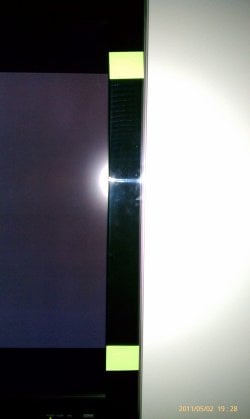
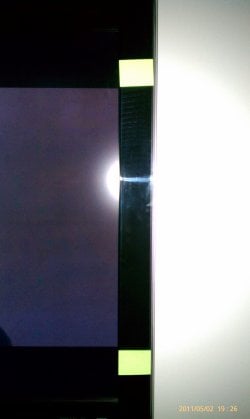
OK, here are two photos of what I am talking about. I placed two green post-its on the side of my TV so you can see the difference. They are actually placed for a 2.35:1 film I was testing, but the attached photos are from a 2.40 source- either way you can easily see the difference.

1920x1080 No Crop - this shows the edges as they are within the green markers as they should be. This also matches the source disc picture size.

1920x800 Cropped - this shows the edges as they are well inside the green markers as it should NOT be. This is the auto cropped 2.40 file that WMC squished down for some reason.

Any way to have WMC correctly display the image?
 

Attachments

  • 1920x1080 No Crop.jpg
    1920x1080 No Crop.jpg
    384.8 KB · Views: 26
  • 1920x800Cropped.jpg
    1920x800Cropped.jpg
    417.4 KB · Views: 18

My Computer My Computer

At a glance

Windows 7 Home Premium 32bit
OS
Windows 7 Home Premium 32bit
It sounds like WMC might not be taking to the fact that it's not 1080 pixels high.

It might not hurt to try a different streaming server. Check out this guide: Gizmodo, the Gadget Guide
 

My Computer My Computer

At a glance

Windows 7 Ultimate 64-bitAMD Phenom II X6 1090T 3.2GHZG.SKILL RipJaw 3x2GB DDR3-10662x HIS Radeon HD 6850 1 GB
OS
Windows 7 Ultimate 64-bit
CPU
AMD Phenom II X6 1090T 3.2GHZ
Motherboard
MSI 890FXA-GD70
Memory
G.SKILL RipJaw 3x2GB DDR3-1066
Graphics Card(s)
2x HIS Radeon HD 6850 1 GB
Sound Card
VIA 8-channel
Monitor(s) Displays
2x 20 inch Acer LCDs, 1x 32" Sony LCD TV
Screen Resolution
4480x900
Hard Drives
1x Crucial 64GB SSD
3x 1TB HDDs (WD, Seagate, Hitatchi)
1x 500GB Seagate External
PSU
Kingwin 1000W Modular
Case
Coolermaster HAF 932
Cooling
1x 120mm, 3x 200mm, CoolerMaster Hyper 212+
Keyboard
Microsoft Wireless Keyboard 1000
Mouse
Microsoft Wiresless Mouse 5000
Internet Speed
20mbps
Other Info
Samsung BD-ROM/DVD-RW
I have found the same problem. WMC cannot display aspect ratios other than 4:3 and 16:9. It can display 2.35:1 for some videos but not all. It can never display 1.85:1 or 3:2. If you must play it in WMC through Xbox 360 (which I prefer to call Xbox Extender), you must convert it to 16:9 with letterbox. (WMC zoom modes are useless.)
 

My Computer My Computer

At a glance

Windows 7 Home Premium 64bit.
OS
Windows 7 Home Premium 64bit.
Back
Top