Media Center Problems

trashdog

New member
Member
Local time
3:11 PM
Messages
67
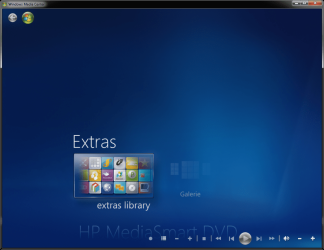
When I start media center I only see Extras and Extras Gallery. I don't see the icons for movies, tuner or other items that were working yesterday. What did media center do to loose my cable tv signal? How do I restore my media center settings?
 

My Computer

Computer Manufacturer/Model Number
Dell
OS
Windows 7
Everything was working yesterday. I installed the internet television through media center and now I have nothing. Help please.
 

My Computer

Computer Manufacturer/Model Number
Dell
OS
Windows 7
This might be a stupid question, but have you tried to scroll up or down with mouse wheel, WMC remote or up/down arrow keys?

Because Extras is the top most menu option it sometimes looks like it is the only menu choice you have, even there is full list of menu items beneath it. You can see the list when scrolling up or down.

Kari
 

Attachments

  • WMC.PNG
    WMC.PNG
    217.1 KB · Views: 11

My Computer

Computer type
Laptop
Computer Manufacturer/Model Number
HP ENVY 17-1150eg
OS
Windows 10 Pro x64 EN-GB
CPU
1.6 GHz Intel Core i7-720QM Processor
Memory
6 GB
Graphics Card(s)
ATI Mobility Radeon HD 5850 Graphics
Sound Card
Beats sound system with integrated subwoofer
Monitor(s) Displays
17" laptop display, 22" LED and 32" Full HD TV through HDMI
Screen Resolution
1600*900 (1), 1920*1080 (2&3)
Hard Drives
Internal: 2 x 500 GB SATA Hard Disk Drive 7200 rpm
External: 2TB for backups, 3TB USB3 network drive for media
Cooling
As Envy runs a bit warm, I have it on a Cooler Master pad
Keyboard
Logitech diNovo Media Desktop Laser (bluetooth)
Mouse
Logitech Performance Mouse MX
Internet Speed
50/10 Mbps VDSL
Antivirus
Windows Defender 4.3.9431.0
Browser
Maxthon 3.5.2., IE11
Doh' Do I feel sheepish...lol

I've not really had that much experience with media center. Thanks for the heads up...lol
 

My Computer

Computer Manufacturer/Model Number
Dell
OS
Windows 7
Don't worry, it happens to all of us. Good to know it was so simple.

Kari
 

My Computer

Computer type
Laptop
Computer Manufacturer/Model Number
HP ENVY 17-1150eg
OS
Windows 10 Pro x64 EN-GB
CPU
1.6 GHz Intel Core i7-720QM Processor
Memory
6 GB
Graphics Card(s)
ATI Mobility Radeon HD 5850 Graphics
Sound Card
Beats sound system with integrated subwoofer
Monitor(s) Displays
17" laptop display, 22" LED and 32" Full HD TV through HDMI
Screen Resolution
1600*900 (1), 1920*1080 (2&3)
Hard Drives
Internal: 2 x 500 GB SATA Hard Disk Drive 7200 rpm
External: 2TB for backups, 3TB USB3 network drive for media
Cooling
As Envy runs a bit warm, I have it on a Cooler Master pad
Keyboard
Logitech diNovo Media Desktop Laser (bluetooth)
Mouse
Logitech Performance Mouse MX
Internet Speed
50/10 Mbps VDSL
Antivirus
Windows Defender 4.3.9431.0
Browser
Maxthon 3.5.2., IE11
Thanks for this advice - I had the same problem - how stupid was that?
 

My Computer

Computer Manufacturer/Model Number
Wired2fire
OS
Windows 7 Ultimate x64
CPU
Core i7 920
Motherboard
Gigabyte EX58 UD3R
Memory
6GB DDR3
Graphics Card(s)
Radeon HD4890
Sound Card
on board
Monitor(s) Displays
Samsung T240HD + Dell 19"Ultrasharp
Screen Resolution
1920 x 1200 + 1280 x 1024
Hard Drives
2 x 1TB
1 x 300GB
PSU
Thermaltake toughpower 600W
Case
Antec 300
Cooling
Thermalright Ultra 120 + Lots of fans
Keyboard
Logitech Internet 350 Keyboard
Mouse
Razer DeathAdder Gaming Mouse
Internet Speed
5ish MB
Back
Top