Media Centre only seems to work for one day, after doing system restor

Florio

New member
Member
Local time
10:40 AM
Messages
77
Location
Italy
Yesterday I posted in the Windows Media Center section but, as I have had no response whatsoever, I thought I'd try asking here; more people seem to browse the General Discussion.

Last week I was having big problems getting my Media Center to play DVD discs; the screen resolution seemed to have changed, even though I had not altered the settings. A message came up saying that it was impossible to play the DVD, and that either the device was in use by another application, or that it might have been necessary to reduce the video resolution etc. I DID get it to work again after doing a system restore, and in fact I watched a couple of DVDs on my PC the day before yesterday. But yesterday morning the problem had returned, even though -- once again -- I had not touched anything. The Media Centre seems as if it is going to play the DVD, then suddenly the screen size changes and the error message comes up again.:cry:

The other day I noticed, quite by chance, that Windows was attempting to update the Media Centre (I could see the Media Centre icon in the Notification Area), but I then saw a message that the update was unsuccessful. I went to Windows Update to see if I could try and do a manual update, but apparently there were no updates to be downloaded.

Does anyone know what the problem might be here, and how I can get updates for the Media Centre? (btw I have tried updating the video driver via Device Manager, but this causes my laptop to crash, and when I reboot it, none of my media players will work.:huh:
 

My Computer My Computer

At a glance

Windows 7 Home Premium 64bit
OS
Windows 7 Home Premium 64bit
Hi Florio, I have not used Media Centre as I use XBMC Media Center. Is this problem affecting only DVD playback?
You can try two things: install the lates codeck pack to play media files (K-Lite Codec Pack 10.90 (Full)); try using different media player to make sure it only affecting Media Center(I like to use XMBC on my HTPC)
 

My Computer My Computer

At a glance

w7 ultimate 64-bit sp1i5 2500K @4.52x4GB G.Skill Ripjaws-X 2,133 CL9GTX 560Ti
Computer type
PC/Desktop
Computer Manufacturer/Model Number
custom build
OS
w7 ultimate 64-bit sp1
CPU
i5 2500K @4.5
Motherboard
MSI P67A-GD65 rev2
Memory
2x4GB G.Skill Ripjaws-X 2,133 CL9
Graphics Card(s)
GTX 560Ti
Sound Card
on board
Monitor(s) Displays
BenQ G2410HD
Screen Resolution
1920x1080
Hard Drives
Samsung 2.5-Inch 250 GB 850 EVO
PSU
BeQuiet 600W
Keyboard
K65
Mouse
Razer Deathadder Ergonomic Gaming Mouse
Internet Speed
35Mbps
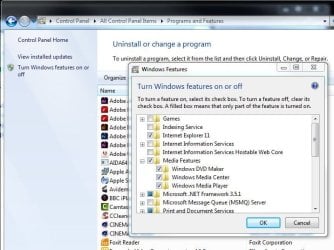
re: WMC updates - AFAIK WMC updates are just TV stuff (EPG etc), not Windows updates in the conventional sense. Sometimes WMC problems can be fixed by disabling WMC (in Control Panel, Programs and Features, Turn Windows features on or off), rebooting, re-enabling. See pic

win_features.JPG

like I said, sometimes . . .
 

My Computer My Computer

At a glance

Windows 7 Pro x64 sp1i7 4770K8GB Corsair Vengeance 1600MHzonboard
Computer type
PC/Desktop
Computer Manufacturer/Model Number
self build
OS
Windows 7 Pro x64 sp1
CPU
i7 4770K
Motherboard
MSI B85M-E45
Memory
8GB Corsair Vengeance 1600MHz
Graphics Card(s)
onboard
Monitor(s) Displays
LG 27MP35
Screen Resolution
1920-1080
Hard Drives
Seagate 2TB
PSU
Cooler Master GX 750
Case
Antec 300
Cooling
Seidon 120V
Internet Speed
60/18
Antivirus
MSE
Browser
Firefox
Thanks for your feedback guys, but since my first post, the situation has changed dramatically!!:what:
I tried to resolve the problem again this afternoon by doing another system restore (I had created a restore point when the Media Center was working properly), but for some reason the restore would not complete (it was unable to extract a file from the restore point), and it didn't complete even when I chose other restore points.

I then followed mike009's advice and downloaded the latest K-Lite Codec pack, and when I was installing it a message came up saying that the Graphics driver was outdated or obsolete, and it gave me details: Vendor ID:1002, Device ID: 68c1. Where should I go to download this?

Anyway, at the moment I cannot use ANY of the five media players on my laptop -- Windows Media Center, Windows Media Player, VLC Player, QuickTime Player and Media Player Classic -- to watch DVDs or .avi files. I can't even watch YouTube now (here it says that the Adobe Flashplayer plugin has crashed).

Any ideas on what I can do? I'm desperate! :cry:
 

My Computer My Computer

At a glance

Windows 7 Home Premium 64bit
OS
Windows 7 Home Premium 64bit
Hey. A few questions, I feel like they might be dumb. So if they are forgive me.

1. Why cant you use VLC or any of the other players?
2. If there is an error message when you try VLC what is it?
-I have never ever had any problems with vlc. I am inclined to believe it's not the players that stoping it.
3. Why did you do a system restore?

A quick note. A quick search on "vendor id:1002, device ID:69c1" brings back and ati radeon graphics card. Find out what card you have and go to the amd site below looking for your graphics card and updating it. Also I would check for windows updates just to be safe. If you are unsure of your graphics cards or specs you could use a cool safe program called cpu z.

Download Drivers
CPU-Z CPUID - System & hardware benchmark, monitoring, reporting
 

My Computer My Computer

At a glance

Windows Seven Home Premium 64bitAMD FX 8120 EIGHT CORE 3332 mHZ,16 GigsAMD radeon hd 7700
Computer type
PC/Desktop
Computer Manufacturer/Model Number
Custum Build
OS
Windows Seven Home Premium 64bit
CPU
AMD FX 8120 EIGHT CORE 3332 mHZ,
Motherboard
MSI 970A-G43
Memory
16 Gigs
Graphics Card(s)
AMD radeon hd 7700
Sound Card
N/A
Monitor(s) Displays
Westinghouse 40led 120hz 1080p HDTV
Screen Resolution
1920x1080
Hard Drives
-1TB SEAGATE 7200RPM
-2TB SEGATE 7200RPM
Case
Cooler Master: Storm Trooper
Cooling
Standerd with Case
Keyboard
Microsoft Wireless Keyboard
Mouse
Microsft Wireless Mouse
Internet Speed
10mbs Download
Antivirus
Windows, Bitdefender
Browser
Mozilla Firefox, IE
Hello greenthingsjump. I'll try and answer your questions. First I should tell you that last night I DID manage to get Windows Media Center playing DVDs, but now the same old problem has come up again, at least as far as the Media Center is concerned!!:confused:
1. As I explained, at a certain point none of my media players would work, and not just as regards playing DVDs; I couldn't even open .avi files. The players would open, and then immediately close. I figured that some important drivers/codecs must have been unintentionally moved or deleted, or were otherwise obsolete.
2. None of the media players, including VCL, gave me error messages when I tried to open them or play a video file. When I was faced with the initial problem, with Windows Media Centre, a message did come up to the effect that my DVD couldn't be played, and that the screen resolution was probably too high.
3. I did a system restore because the other day I thought I had solved the problem, and so created a restore point when everything seemed to be working properly.

I was desperate yesterday when I couldn't do a system restore, so I went onto the AMD website and used their auto detect utility to see if I needed a new graphics driver. I downloaded the one they suggested, and afterwards everything seemed be working perfectly.:D I created another restore point in case I was going to have more problems.

I've just tried inserting another DVD, and the old problem has resurfaced with Windows Media Center. I'd like to be able to fix this without having to resort to another system restore. Can you help me??
 
Last edited:

My Computer My Computer

At a glance

Windows 7 Home Premium 64bit
OS
Windows 7 Home Premium 64bit
I dont have a lot of knowledge on the issue but i'll help if I can. Thinking about it there is a disconnect between the hardware and the software. So because of this I have a few suggestions for you. To explain you have to determine if the dvd players bad, your windows install is bad, or there is a third party software interference.

1. Go to safe-mode, then uninstall all players except one. Try it again in safe mode if possible. The reason for this is to check to see if it there is any third party software interfering.
2. Physically remove the dvd drive and install it on another pc, see if it will play dvds. If it works that means at the very least it is not the dvd player it self.

If 1 fails, then it is possible there is a program preventing you from viewing the movies. If it passes then you should have fixed your problem. As for number 2, it may or may not be related at this point we dont know. If it works on another pc then we know its good and it could be something else.

To be honest, if you have access to a hard line for the internet, your windows cd key, and an original windows disk. I would format the hard drive and reinstall. Obviously save your word docs and any other stuff first. This is not the easiest work around by any stretch, but it cuts straight to it. Elimnates any chances of it being a windows problem. Then it would have to be hardware or third party driver. Once you deterimne its either of those, you could figure it out pretty easily.

*also check to make sure the dvd's are not bad.
 

My Computer My Computer

At a glance

Windows Seven Home Premium 64bitAMD FX 8120 EIGHT CORE 3332 mHZ,16 GigsAMD radeon hd 7700
Computer type
PC/Desktop
Computer Manufacturer/Model Number
Custum Build
OS
Windows Seven Home Premium 64bit
CPU
AMD FX 8120 EIGHT CORE 3332 mHZ,
Motherboard
MSI 970A-G43
Memory
16 Gigs
Graphics Card(s)
AMD radeon hd 7700
Sound Card
N/A
Monitor(s) Displays
Westinghouse 40led 120hz 1080p HDTV
Screen Resolution
1920x1080
Hard Drives
-1TB SEAGATE 7200RPM
-2TB SEGATE 7200RPM
Case
Cooler Master: Storm Trooper
Cooling
Standerd with Case
Keyboard
Microsoft Wireless Keyboard
Mouse
Microsft Wireless Mouse
Internet Speed
10mbs Download
Antivirus
Windows, Bitdefender
Browser
Mozilla Firefox, IE
Thanks greenthingsjump. Hopefully it won't be necessary to do a complete windows reinstall!!

I have now identified the glitch, but have yet to find a solution. The original problem with the Windows Media Center was/is caused by a Windows Update. Strangely enough, the update in question concerns Windows Defender (KB3019215). I did yet another system restore, choosing the point I'd created yesterday when everything was working well; this time it completed without problems, and the Media Center plays DVDs again like it should!!

Latest news: I had to go out for a while an hour or so ago, and now that I've come back I see that Windows Update has again downloaded, but not installed, the Defender package. Is there a way of preventing these particular updates?
 

My Computer My Computer

At a glance

Windows 7 Home Premium 64bit
OS
Windows 7 Home Premium 64bit

My Computer My Computer

At a glance

Windows Seven Home Premium 64bitAMD FX 8120 EIGHT CORE 3332 mHZ,16 GigsAMD radeon hd 7700
Computer type
PC/Desktop
Computer Manufacturer/Model Number
Custum Build
OS
Windows Seven Home Premium 64bit
CPU
AMD FX 8120 EIGHT CORE 3332 mHZ,
Motherboard
MSI 970A-G43
Memory
16 Gigs
Graphics Card(s)
AMD radeon hd 7700
Sound Card
N/A
Monitor(s) Displays
Westinghouse 40led 120hz 1080p HDTV
Screen Resolution
1920x1080
Hard Drives
-1TB SEAGATE 7200RPM
-2TB SEGATE 7200RPM
Case
Cooler Master: Storm Trooper
Cooling
Standerd with Case
Keyboard
Microsoft Wireless Keyboard
Mouse
Microsft Wireless Mouse
Internet Speed
10mbs Download
Antivirus
Windows, Bitdefender
Browser
Mozilla Firefox, IE
Okay. I have now asked to be able to choose whether or not to install downloaded updates, and I have turned off Defender. I'm not really happy about this, but I do have anti-virus and other anti-malware programs.
I've noticed that when I turn off my computer, or restart it, the latest download of Windows Update is going to be installed. Is there a way of preventing this?:huh:
 

My Computer My Computer

At a glance

Windows 7 Home Premium 64bit
OS
Windows 7 Home Premium 64bit
Whats the update number of the update that screwed you over? I will help you research the problem update if you give the the windows update serial number. Normally its starts with "kb" followed by a bunch of numbers.

edit update:
I found the follow link that might help you.

How to troubleshoot definition update issues for Windows Defender
 
Last edited:

My Computer My Computer

At a glance

Windows Seven Home Premium 64bitAMD FX 8120 EIGHT CORE 3332 mHZ,16 GigsAMD radeon hd 7700
Computer type
PC/Desktop
Computer Manufacturer/Model Number
Custum Build
OS
Windows Seven Home Premium 64bit
CPU
AMD FX 8120 EIGHT CORE 3332 mHZ,
Motherboard
MSI 970A-G43
Memory
16 Gigs
Graphics Card(s)
AMD radeon hd 7700
Sound Card
N/A
Monitor(s) Displays
Westinghouse 40led 120hz 1080p HDTV
Screen Resolution
1920x1080
Hard Drives
-1TB SEAGATE 7200RPM
-2TB SEGATE 7200RPM
Case
Cooler Master: Storm Trooper
Cooling
Standerd with Case
Keyboard
Microsoft Wireless Keyboard
Mouse
Microsft Wireless Mouse
Internet Speed
10mbs Download
Antivirus
Windows, Bitdefender
Browser
Mozilla Firefox, IE
I've managed to solve the problem!!:p

Turns out it was all caused by a conflict with my Avira anti-virus (which I'd installed about a month ago and have now removed). I would never have suspected this. Anyway, everything is now running as it should (for the time being, LOL)

Thanks for your help and suggestions.

F.
 

My Computer My Computer

At a glance

Windows 7 Home Premium 64bit
OS
Windows 7 Home Premium 64bit
woot. dont forget to mark solved.
 

My Computer My Computer

At a glance

Windows Seven Home Premium 64bitAMD FX 8120 EIGHT CORE 3332 mHZ,16 GigsAMD radeon hd 7700
Computer type
PC/Desktop
Computer Manufacturer/Model Number
Custum Build
OS
Windows Seven Home Premium 64bit
CPU
AMD FX 8120 EIGHT CORE 3332 mHZ,
Motherboard
MSI 970A-G43
Memory
16 Gigs
Graphics Card(s)
AMD radeon hd 7700
Sound Card
N/A
Monitor(s) Displays
Westinghouse 40led 120hz 1080p HDTV
Screen Resolution
1920x1080
Hard Drives
-1TB SEAGATE 7200RPM
-2TB SEGATE 7200RPM
Case
Cooler Master: Storm Trooper
Cooling
Standerd with Case
Keyboard
Microsoft Wireless Keyboard
Mouse
Microsft Wireless Mouse
Internet Speed
10mbs Download
Antivirus
Windows, Bitdefender
Browser
Mozilla Firefox, IE
Back
Top