
zeiverlepke
New member
good morning,
I have a Belkin router model F5D8636-AVL; a gigabyte motherboard with a Realtek Family RTL 8168/8111 PCI-E gigabit ethernet NIC, and a Belkin stick N300 to connect to the internet. Dual boot computer win 7 (primary) and win XP (secondary)
I tried about everything I can, got latest win 7 driver, uninstalled and reinstalled, checked the system files (which are OK) - Both Belkin as Realtek are said to be working properly. The problem solver indicates "there might be a problem with the driver of the wireless connection 9 adaptor"
I have this same media disconnected problem. Now this PC is a dual boot, internet works on XP, but not on 7 (trying to update a driver something went wrong ). The ipconfig is a bit like everywhere - media disconnected.
this is it:
Realtek RTL8168C(P)/8111C(P) Family PCI-E Gigabit Ethernet NIC (NDIS 6.20)
problem description in troubleshooter
Windows Network Diagnostics Publisher details
Issues found
There might be a problem with the driver for the Wireless Network Connection 9 adapterThere might be a problem with the driver for the Wireless Network Connection 9 adapter
Windows couldn't automatically bind the IP protocol stack to the network adapter. Detected
Set up the wireless network adapter Not run
The wireless network adapter is experiencing problems Not run
Issues found Detection details
6 There might be a problem with the driver for the Wireless Network Connection 9 adapter Detected
Windows couldn't automatically bind the IP protocol stack to the network adapter.
Set up the wireless network adapter Not run
Set up the network adapter to communicate with this network. This ensures that both Internet Protocol Version 4 (TCP/IPv4) and Internet Protocol Version 6 (TCP/IPv6) can be used on the network adapter.
The wireless network adapter is experiencing problems Not run
Windows Help and Support can provide more information about resolving driver or hardware issues.
Detection details
Diagnostics Information (Network Adapter)
Details about network adapter diagnosis:
Network adapter Wireless Network Connection 9 driver information:
Description . . . . . . . . . . : Belkin USB Wireless Adaptor
Manufacturer . . . . . . . . . : Belkin International, Inc.
Provider . . . . . . . . . . . : Belkin International, Inc.
Version . . . . . . . . . . . : 1086.27.708.2010
Inf File Name . . . . . . . . . : C:\Windows\INF\oem12.inf
Inf File Date . . . . . . . . . : Friday, 3 September 2010 5:51:44 AM
Section Name . . . . . . . . . : RTL8192su.ndi
Hardware ID . . . . . . . . . . : usb\vid_050d&pid_845a
Instance Status Flags . . . . . : 0x180600a
Device Manager Status Code . . : 0
IfType . . . . . . . . . . . . : 71
Physical Media Type . . . . . . : 9
Network Diagnostics Log
File Name: 57C1951A-0C38-4A47-9721-A175E806A9E2.Diagnose.0.etl
Other Networking Configuration and Logs
File Name: NetworkConfiguration.cab
Collection information
Computer Name: JOHN-PC
Windows Version: 6.1
Architecture: x86
Time: Tuesday, October 02, 2012 8:52:36 AM
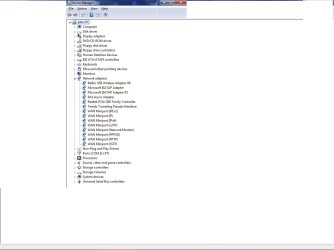
The hardware configuration is shown on the pic.
Now it says something about (see blue text) set up the wireless network adapter.
Silly Q: how?
Help would be greatly appreciated.
Thank you.
I have a Belkin router model F5D8636-AVL; a gigabyte motherboard with a Realtek Family RTL 8168/8111 PCI-E gigabit ethernet NIC, and a Belkin stick N300 to connect to the internet. Dual boot computer win 7 (primary) and win XP (secondary)
I tried about everything I can, got latest win 7 driver, uninstalled and reinstalled, checked the system files (which are OK) - Both Belkin as Realtek are said to be working properly. The problem solver indicates "there might be a problem with the driver of the wireless connection 9 adaptor"
I have this same media disconnected problem. Now this PC is a dual boot, internet works on XP, but not on 7 (trying to update a driver something went wrong
). The ipconfig is a bit like everywhere - media disconnected.this is it:
Realtek RTL8168C(P)/8111C(P) Family PCI-E Gigabit Ethernet NIC (NDIS 6.20)
problem description in troubleshooter
Windows Network Diagnostics Publisher details
Issues found
There might be a problem with the driver for the Wireless Network Connection 9 adapterThere might be a problem with the driver for the Wireless Network Connection 9 adapter
Windows couldn't automatically bind the IP protocol stack to the network adapter. Detected
Set up the wireless network adapter Not run
The wireless network adapter is experiencing problems Not run
Issues found Detection details
6 There might be a problem with the driver for the Wireless Network Connection 9 adapter Detected
Windows couldn't automatically bind the IP protocol stack to the network adapter.
Set up the wireless network adapter Not run
Set up the network adapter to communicate with this network. This ensures that both Internet Protocol Version 4 (TCP/IPv4) and Internet Protocol Version 6 (TCP/IPv6) can be used on the network adapter.
The wireless network adapter is experiencing problems Not run
Windows Help and Support can provide more information about resolving driver or hardware issues.
Detection details
Diagnostics Information (Network Adapter)
Details about network adapter diagnosis:
Network adapter Wireless Network Connection 9 driver information:
Description . . . . . . . . . . : Belkin USB Wireless Adaptor
Manufacturer . . . . . . . . . : Belkin International, Inc.
Provider . . . . . . . . . . . : Belkin International, Inc.
Version . . . . . . . . . . . : 1086.27.708.2010
Inf File Name . . . . . . . . . : C:\Windows\INF\oem12.inf
Inf File Date . . . . . . . . . : Friday, 3 September 2010 5:51:44 AM
Section Name . . . . . . . . . : RTL8192su.ndi
Hardware ID . . . . . . . . . . : usb\vid_050d&pid_845a
Instance Status Flags . . . . . : 0x180600a
Device Manager Status Code . . : 0
IfType . . . . . . . . . . . . : 71
Physical Media Type . . . . . . : 9
Network Diagnostics Log
File Name: 57C1951A-0C38-4A47-9721-A175E806A9E2.Diagnose.0.etl
Other Networking Configuration and Logs
File Name: NetworkConfiguration.cab
Collection information
Computer Name: JOHN-PC
Windows Version: 6.1
Architecture: x86
Time: Tuesday, October 02, 2012 8:52:36 AM
The hardware configuration is shown on the pic.
Now it says something about (see blue text) set up the wireless network adapter.
Silly Q: how?
Help would be greatly appreciated.
Thank you.
Attachments
My Computer
- Computer Manufacturer/Model Number
- gigabyte 3GA-EP45-UD3LR
- OS
- windows 7 home premium 32 bit
- CPU
- LGA775
- Motherboard
- gigabyte ultra durable 3GA-EP45-UD3LR
- Sound Card
- audio realtek
- Monitor(s) Displays
- ASUS
- Hard Drives
- western digital 500 gbx2